Guidance on examining identity documents (accessible)
Updated 21 October 2026

© Crown copyright 2026
This publication is licensed under the terms of the Open Government Licence v3.0 except where otherwise stated. To view this licence, visit nationalarchives.gov.uk/doc/open-government-licence/version/3 or write to the Information Policy Team, The National Archives, Kew, London TW9 4DU, or email: psi@nationalarchives.gov.uk.
Where we have identified any third party copyright information you will need to obtain permission from the copyright holders concerned.
This publication is available at https://www.gov.uk/government/publications/recognising-fraudulent-identity-documents/guidance-on-examining-identity-documents-accessible
National Document Fraud Unit
Introduction
Secure identity documents are presented as proof of identity, nationality, status within the United Kingdom, and for employment or renting accommodation.
Document verification is crucial in ensuring that the documents presented are both genuine and presented by the rightful holder.
The aims of this guide are to:
-
increase awareness of different types of identity documents used for identification purposes
-
outline what identity documents are encountered in the United Kingdom
-
gain knowledge of what to look for when presented with an identity document
-
provide a basic awareness of document abuse
-
introduce a checklist that can be used (Checklist A and Checklist B)
Types of identity document
An identity document is any document which may be used to verify aspects of a person’s personal identity. These can include:
-
passports
-
national identity cards
-
biometric residence permits and cards
-
other residence documents
-
driving licences
-
military identity cards
-
official identity documents (police warrant card etc)
-
an e-Visa (an eVisa is an online record of your immigration status)
Note that this is not an exhaustive of all identity documents – reference should be made to the Right-to-Work and Right-to-Rent further guidance links below.
Types of identity documents and guidance
Various documents are acceptable for employment and renting accommodation in the United Kingdom (UK).
Further guidance on Right-to-Work is available here:
Further guidance on Right-to-Rent is available here:
United Kingdom passports
UK passports are valid for up to 10 years and 9 months. There are currently 5 styles in circulation, issued to British citizens.
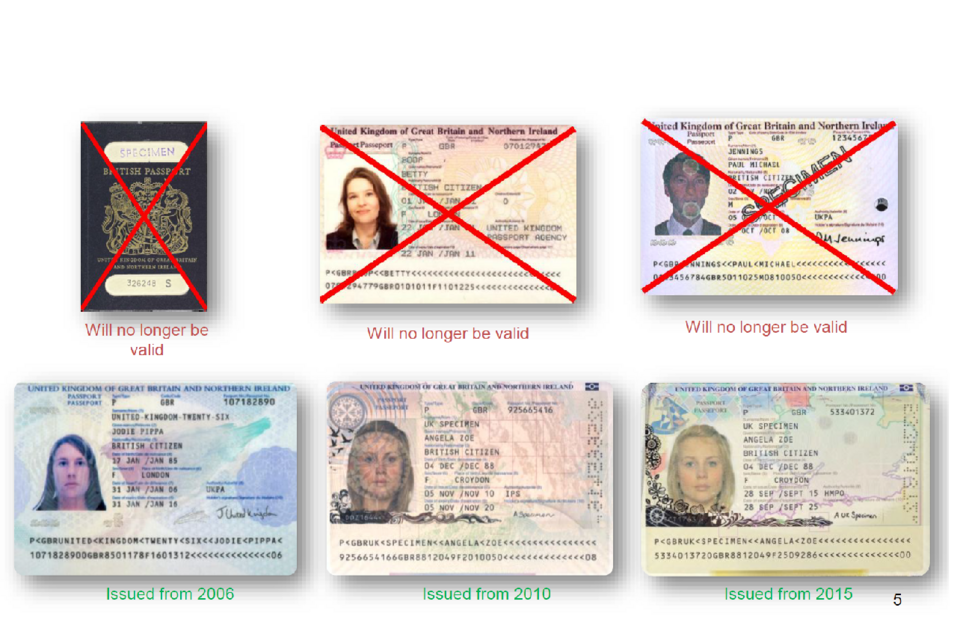
Examples of UK passport designs issued between 2006 and 2015, alongside older passport formats marked as no longer valid.
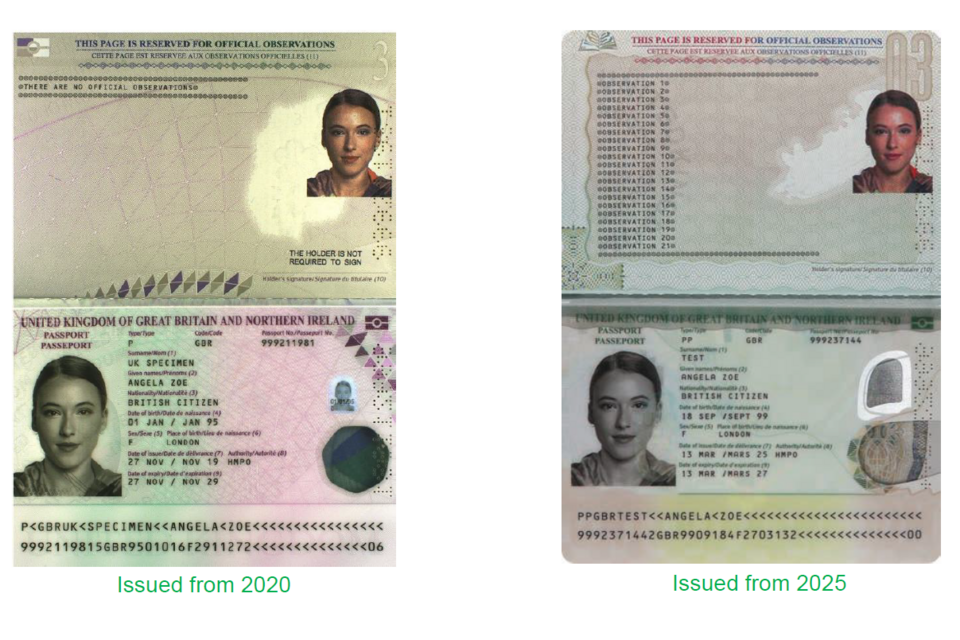
Images of UK passport designs issued from 2020 and 2025, showing the personal details page and observations page for each version.
Application registration cards (ARCs)
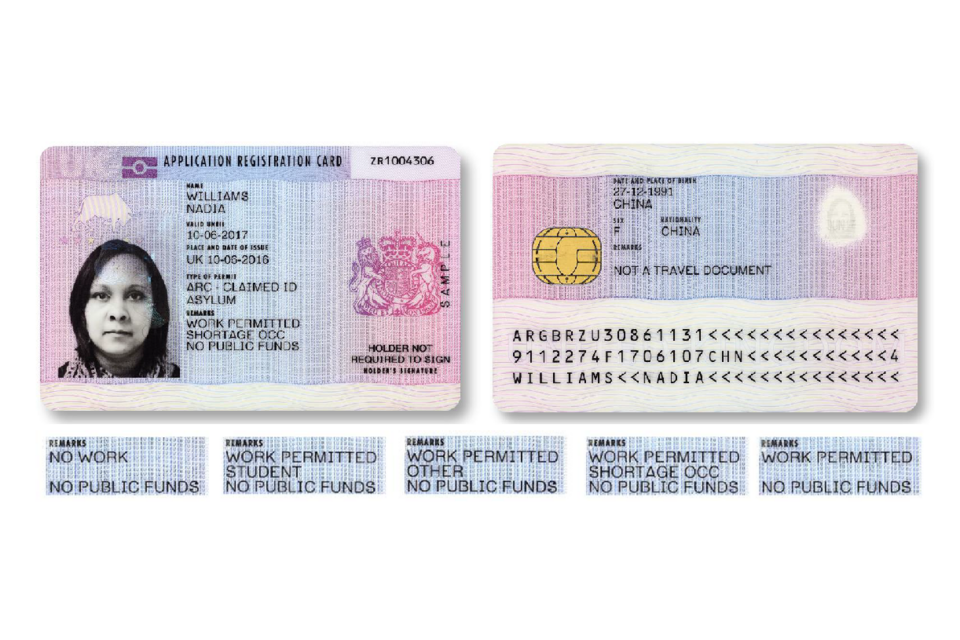
Application Registration Card and examples of wording that permits or restricts employment.
ARCs are issued to foreign nationals who have made an application to stay in the UK and are having their application considered. Once the application is either granted or refused the card should be withdrawn. If the card says ‘forbidden from taking employment’, you are not allowed to work in the UK. If the card says ‘allowed to work’, you’re allowed to work in the UK as normal but your employer must confirm this with the Employers’ Checking service.
Certificate of entitlement to the right of abode
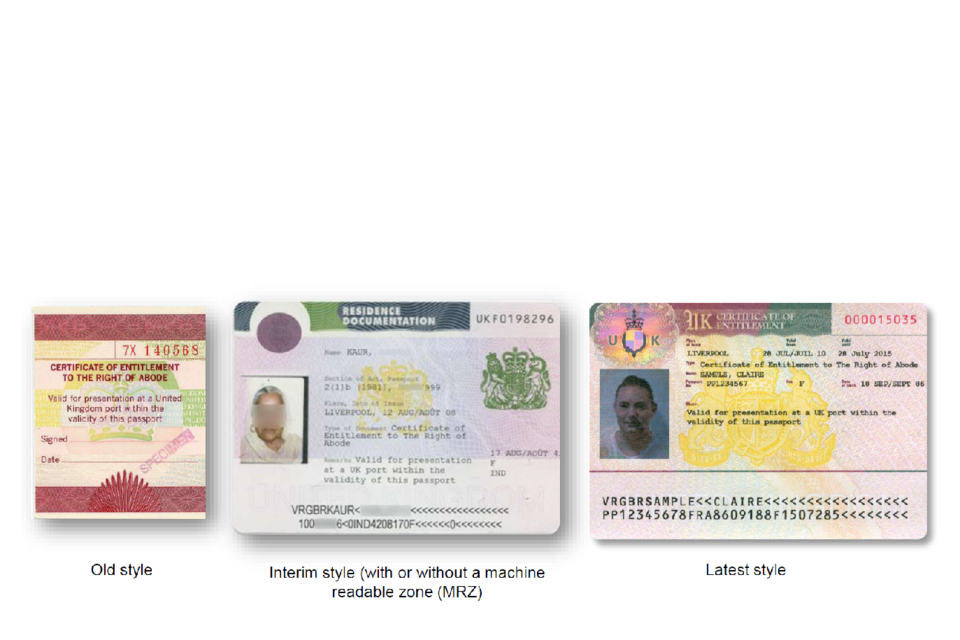
Old vignette, interim residence document and latest Right of Abode vignette.
These vignettes (stickers) are evidence of the holder’s right of abode in the UK. They are affixed inside the holder’s foreign passport. They provide evidence that the holder is entitled to travel to, or live, in the UK.
Indefinite leave to remain (ILR) stamps and vignettes
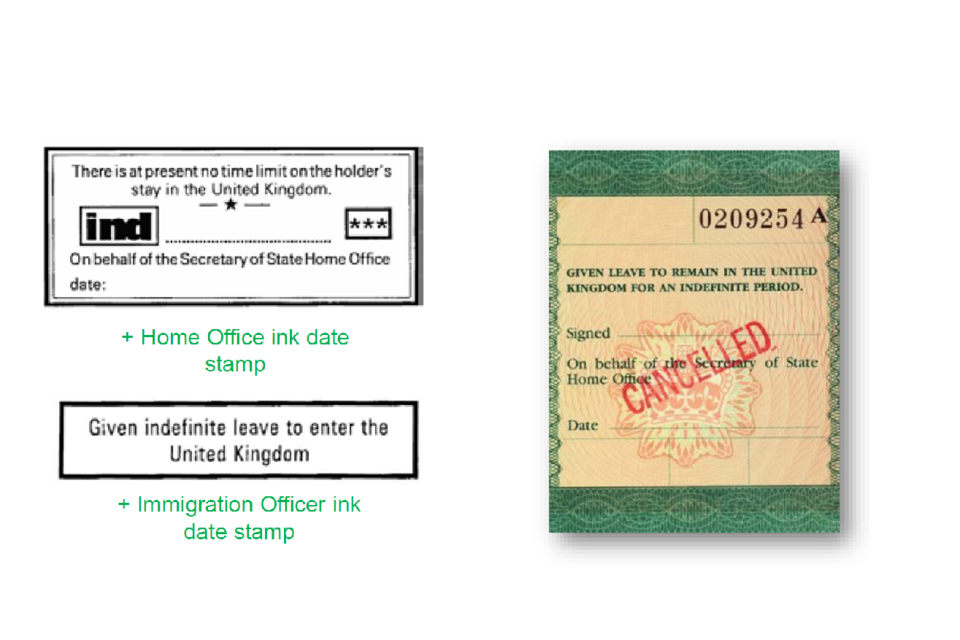
Examples of indefinite leave stamps and a cancelled vignette.
ILR stamps and vignettes allow a non EU/EEA national to remain indefinitely in the UK. They were last issued in August 2006 having been replaced by the residence permit. However, there are many in circulation because they have no expiry date.
E-visas
eVisas have now replaced physical immigration documents.
An eVisa is a digital record of:
- your identity and immigration status - for example the type of visa you have or if you have indefinite leave to remain (settlement) in the UK
- the conditions of your status - for example if you’re allowed to work or study in the UK
- you’ll get an eVisa when you successfully apply for a visa or other type of permission to be in the UK.
Up-to-date information is available at: Online immigration status (eVisa).
You may still see a Category D Entry Clearance (a visa to enter the UK for a period of 6 months or more) in the format of a vignette stuck in the passport. They were typically endorsed with a variety of conditions / restrictions, for example, as a spouse, to work, or to join family. They also granted indefinite leave to enter.
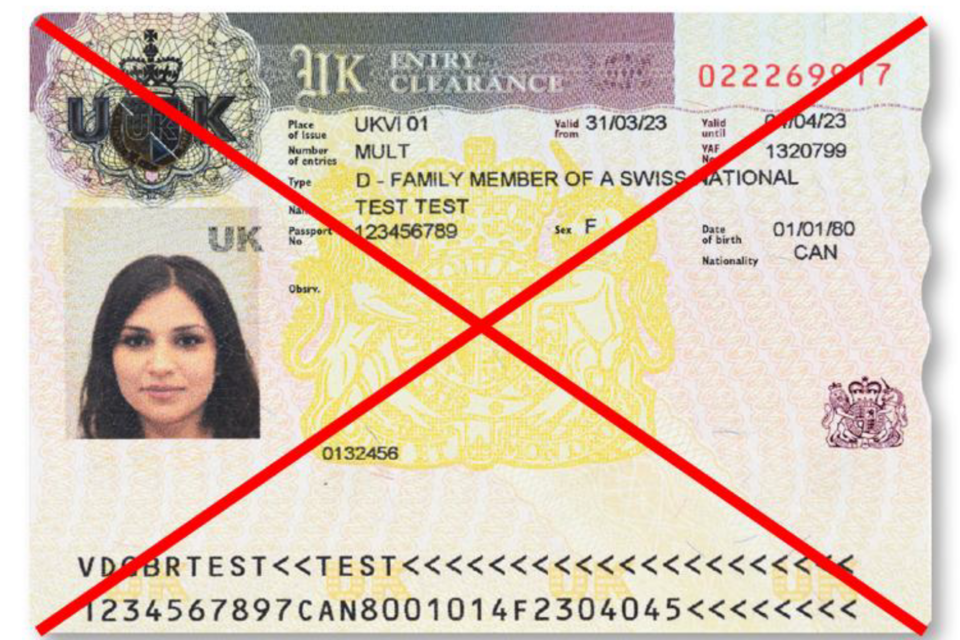
Category D passport vignette crossed out to represent replacement by eVisas.
United Kingdom residence permit (UKRP)
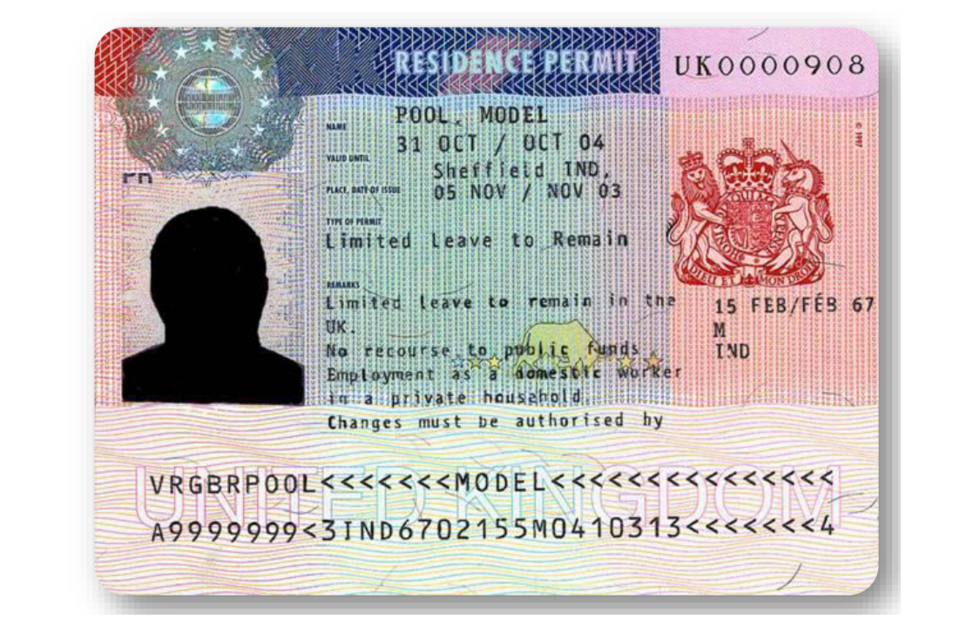
UK residence permit showing a photograph, personal details and machine-readable zone.
This is a residence permit that replaced the green ILR vignettes and ink stamp endorsements that were previously used (see Category D entry clearance). They give permission to reside in the UK for the purpose stated on the vignette, e.g., student or work permit holder.
First issued in 2003, this is placed into a passport or onto an ‘Immigration Status Document’ (ISD - a white piece of A4 paper). They were last issued in 2012 and were replaced by the biometric residence permit.
Biometric residence permit (BRP)
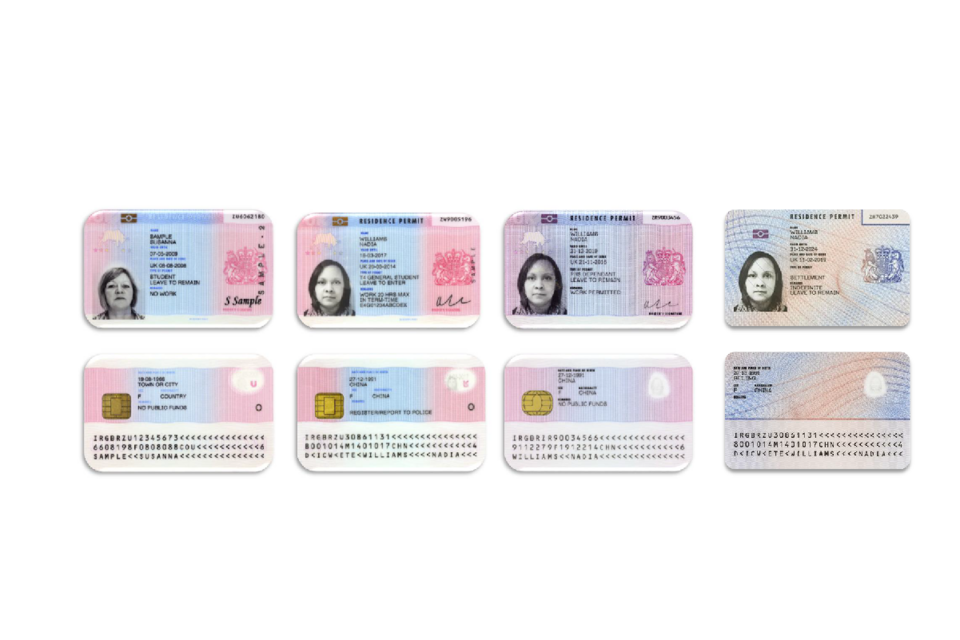
Front and back examples of four styles of Biometric Residence Permit.
Biometric residence permits (BRPs) are cards that were used to prove immigration status. You might have a BRP if you were granted permission to live or work in the UK on or before 31 October 2024.
All BRPs have now expired and have been replaced by eVisas. An eVisa is an online record of your immigration status. If you have an expired BRP and still have permission to stay in the UK, you need to create a UK Visas and Immigration (UKVI) account to get access to your eVisa.
Visit visa
Not allowed to work/maximum 6 month stay
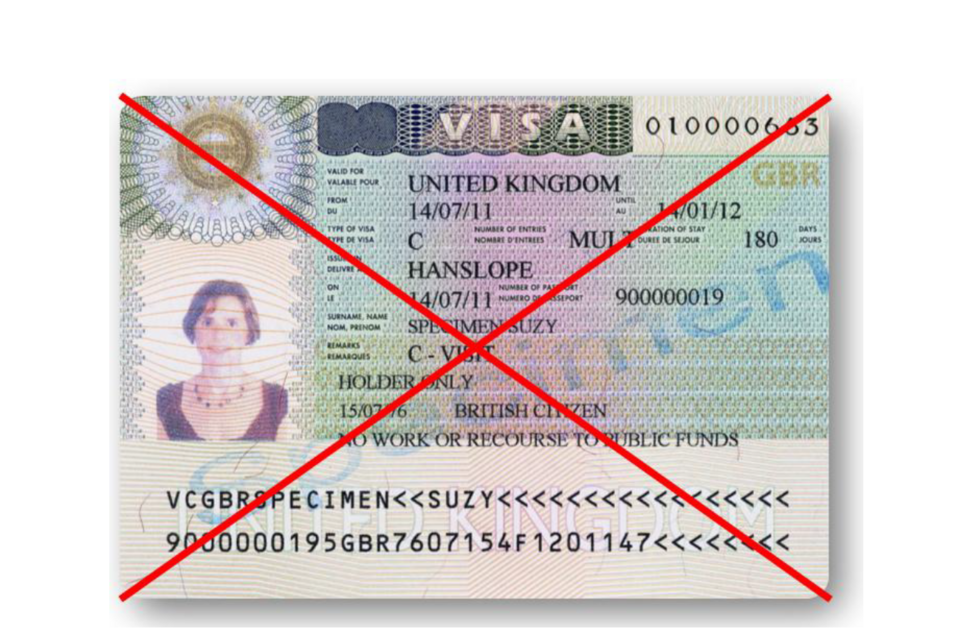
UK visit visa crossed out to indicate that it is no longer issued.
These visas are issued to visitors to the UK – they are valid for a maximum stay of 6 months and holders are not allowed to undertake paid or voluntary work in the UK.
Home Office travel documents
In all cases, the holder’s status (leave to enter or remain) in the UK will be recorded on the observations page.
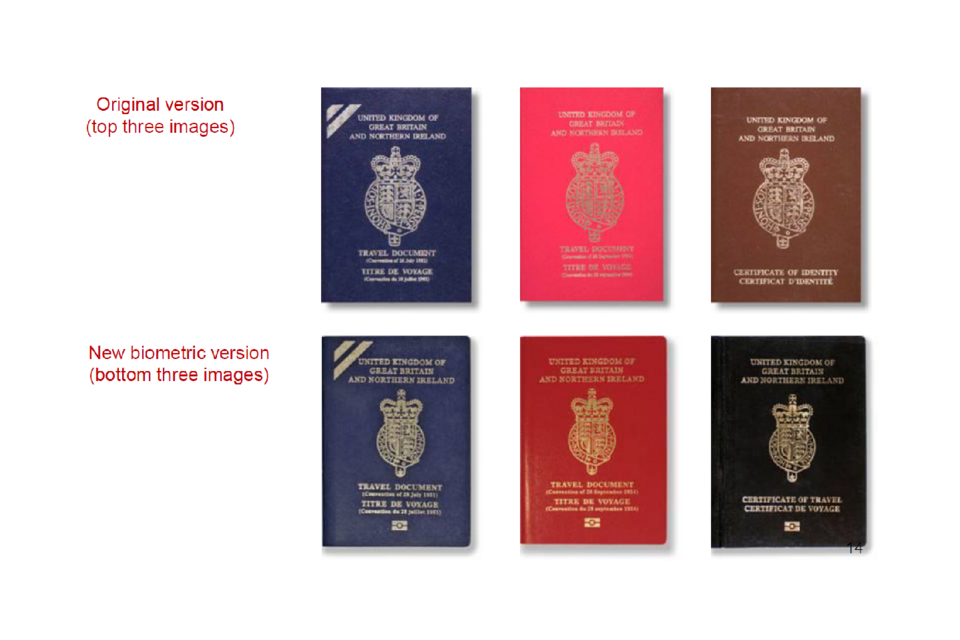
Original and biometric Home Office travel documents in blue, red and black.
Why abuse an identity document?
-
Illegal working
-
Immigration abuse
-
Financial fraud
-
Benefit fraud
Types of document abuse
Impersonation
The person is simply a “look-alike” presenting a genuine document.
Counterfeits
A complete reproduction from scratch to resemble an officially issued document.
Forgeries
A genuine document that has been unlawfully altered in some way, for example:
-
substituting a page
-
substituting a photograph or image
-
altering the personal details
Pseudo/fantasy documents
Documents which may have the physical appearance of a passport or identity card but are not officially recognised. They are not acceptable proof of either nationality or identity.
Impersonation
Initial checks
-
Check the signature – can the person recreate it without sight of the document?
-
Does the person in front of you look the correct age?
-
Does the person have any distinguishing features e.g., moles, scars etc?
Comparing features
-
Compare the shape of the face.
-
Look at the features of the face individually.
-
Look at the position of each in relation to the rest of the face.
-
Ears are unique to each person.
Equipment
The following pieces of equipment are easy to obtain and can enhance your ability to detect fraudulent documents. However, the use of this equipment will only be effective if the user has an understanding of secure documents and their security features.
Magnifiers
Standard handheld magnifying glasses can be useful when examining documents to see if they are counterfeit (e.g., looking at print quality), or if they have been forged (e.g., damage around photographs and images).
Ultraviolet (UV) light sources
These are useful tools for identifying whether documents are made from secure paper or UV safeguards are genuine.
Transmitted light
Shining light through paper (e.g. using light from above, a lamp, or a torch) is a useful way to view features such as watermarks, and also any damage to paper.
Document scanners
These can provide a quick and easy way to establish the authenticity of documents presented for identity verification purposes. See more guidance on document scanners.
Security features
Base fluorescence
Here you can see a range of purported secure documents viewed in normal light.
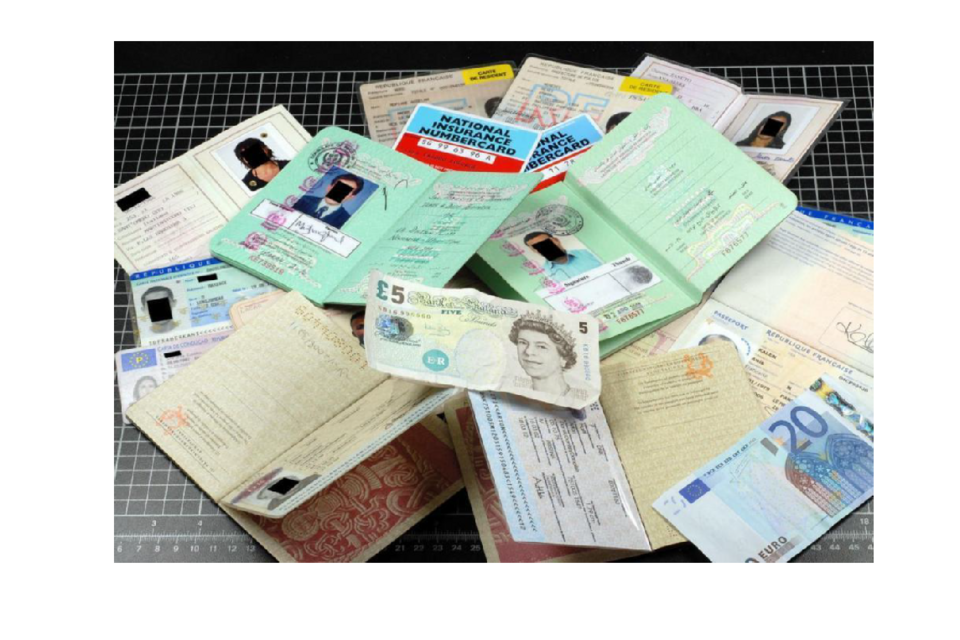
Assorted identity documents and banknotes viewed in normal light.
Base fluorescence (using ultraviolet light)
Using ultraviolet (UV) light you can see counterfeit documents that fluoresce (shine) more brightly than genuine documents which use dull, secure paper/material.
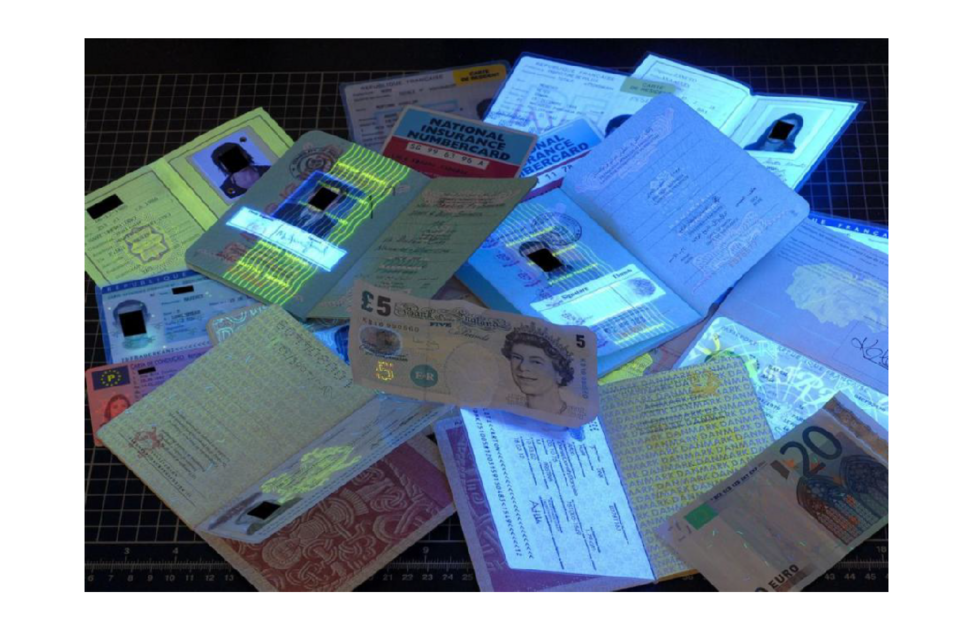
Assorted documents under ultraviolet light, with some fluorescing more brightly than others.
Watermarks
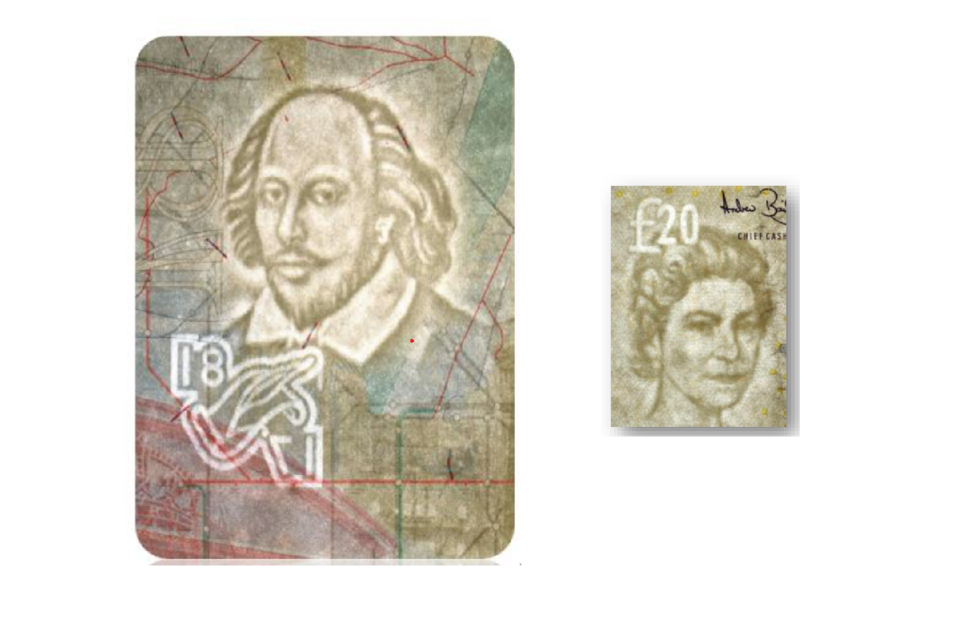
Document and banknote watermarks showing subtle changes in light and dark areas.
A watermark is created during the paper manufacturing process by varying the thickness of the paper. It is best viewed using transmitted light (e.g., holding the paper up to a lamp or by shining a torch light through the paper). A real watermark should usually consist of subtle changes in tone and both lighter and darker areas.
A watermark should never react under UV light.
You will notice that many security features in passports can also be found in banknotes.
Random fibres
Security fibres which appear randomly across the paper. They can be visible to the naked eye or react when exposed to UV light.
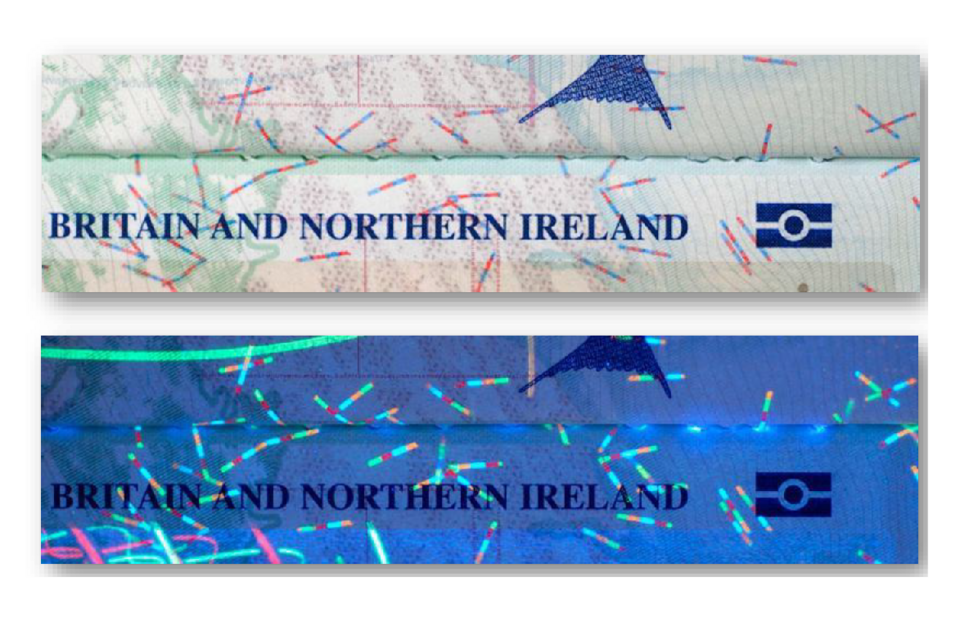
Passport security fibres in normal light and fluorescing under ultraviolet light.
Background print
Background areas on secure documents are printed to a high standard. Using magnification, solid lines and detailed designs should be visible.
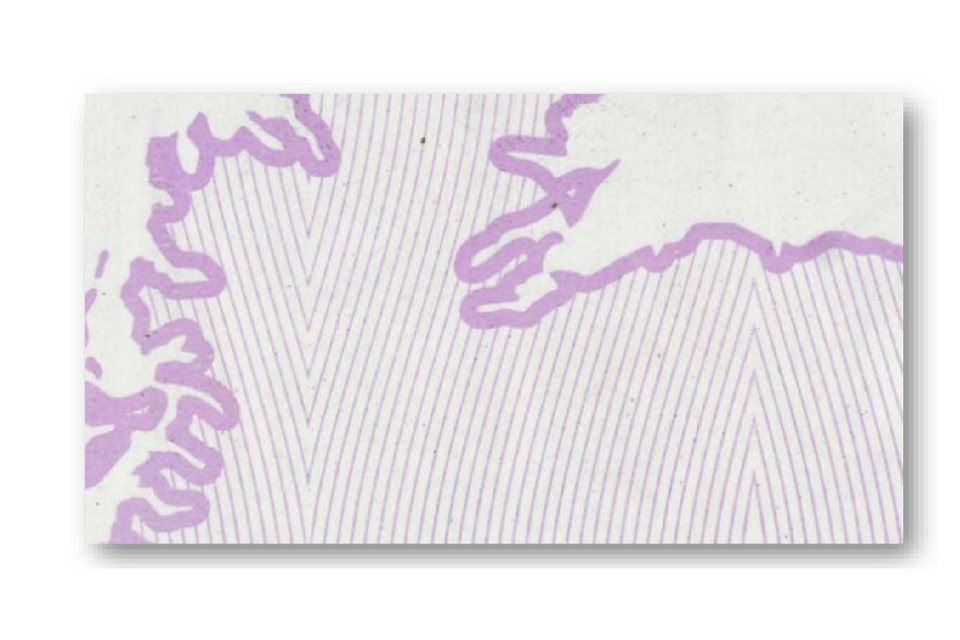
Magnified background print formed from fine, solid lines.
Intaglio ink
A printing process which results in the in having a raised feel which can be felt by running a finger over the paper. Intaglio printing can be found on the inside cover of most (but not all) passports. You can often find a hidden pattern, revealed when the page is viewed at an oblique angle. The images below are of the intaglio printed area in a British passport.
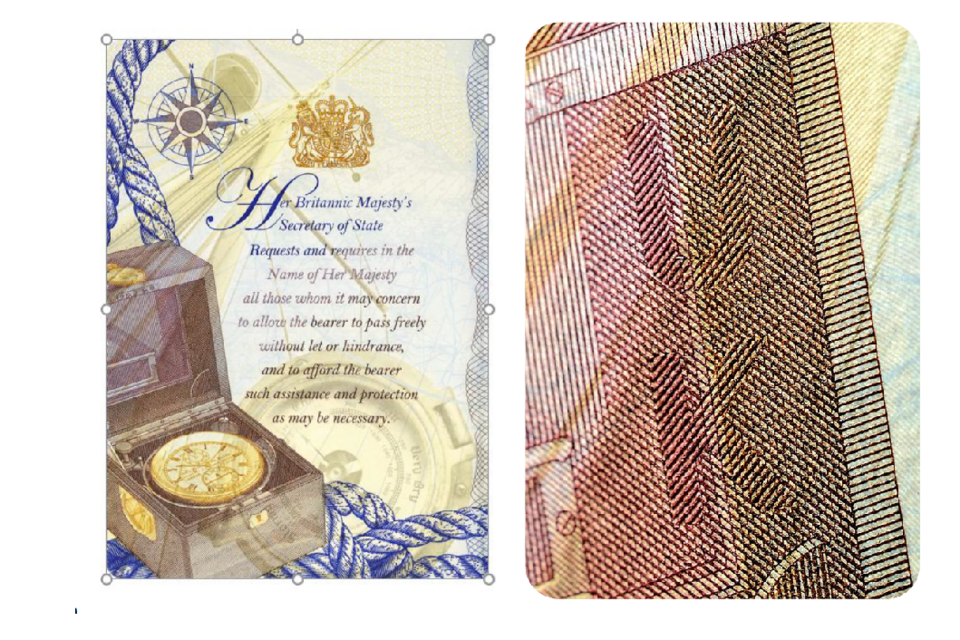
British passport page and enlarged intaglio print viewed at an angle.
Optically variable ink
Many secure documents have designs formed of optically variable ink.
A clear colour change from one colour to another should be seen when the document is tilted.
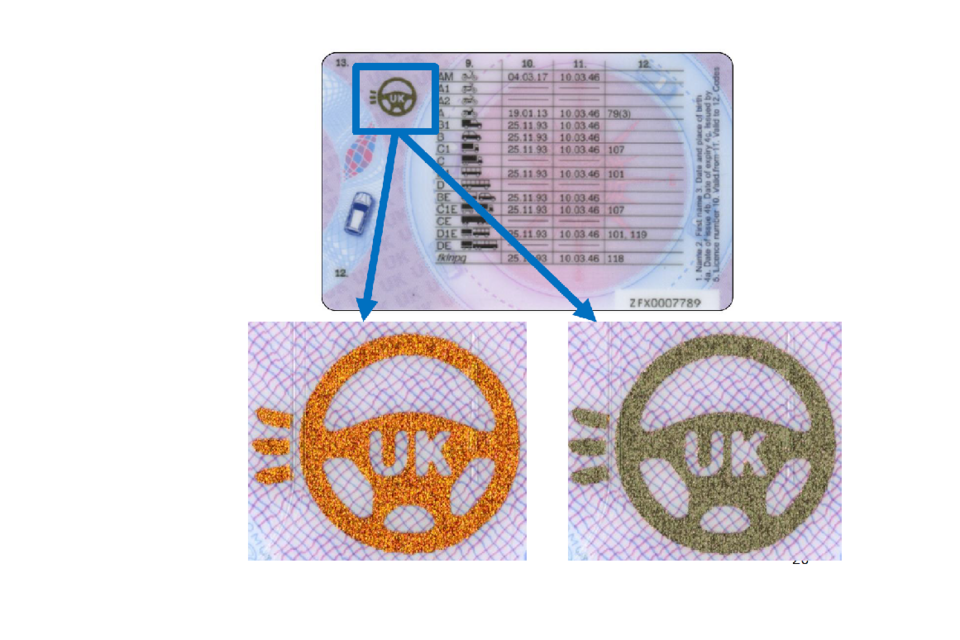
UK driving licence feature changing from orange to green when tilted.
This example is from the UK driving licence.
Machine readable zone - optical character recognition
Most passports and identity cards have a standardised machine readable zone (MRZ). Below is a chart of the only characters that should be seen in these lines. The presence of any characters that do not match this font exactly could indicate that the document may be a counterfeit or a forgery.
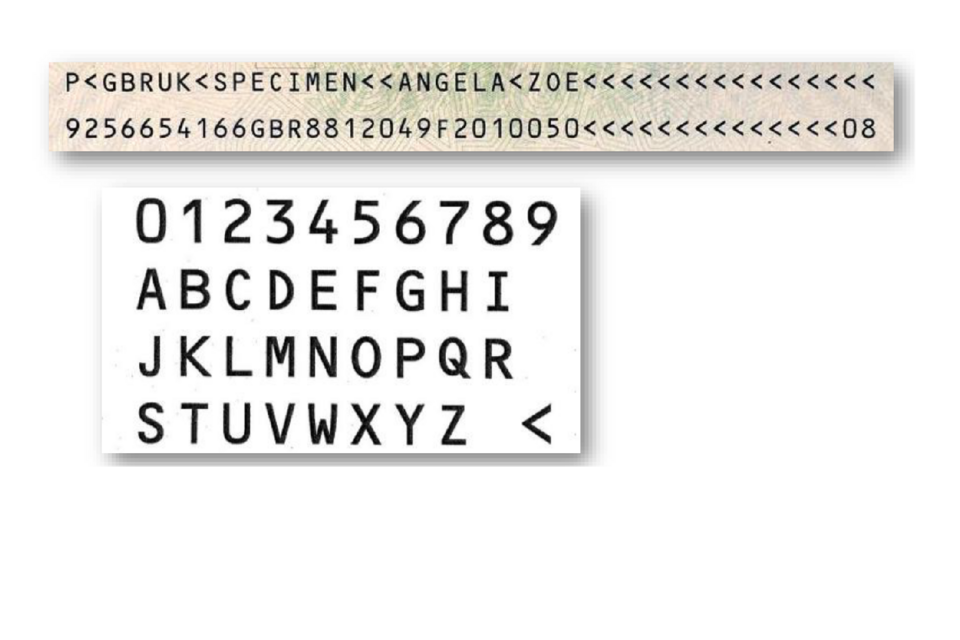
Example machine-readable zone and chart of its permitted characters.
N.B. Some countries have issued genuine passports with a non-compliant font within the MRZ.
Counterfeit documents
A counterfeit is a complete reproduction from scratch to resemble an officially issued document. The counterfeiter will often simulate security features that you would expect to see.
-
What is the overall quality of the document?
-
What is the reaction under UV light – bright or dull?
-
Are there watermarks and other paper features e.g. random fibres?
-
Has it been securely printed?
Quality of manufacture
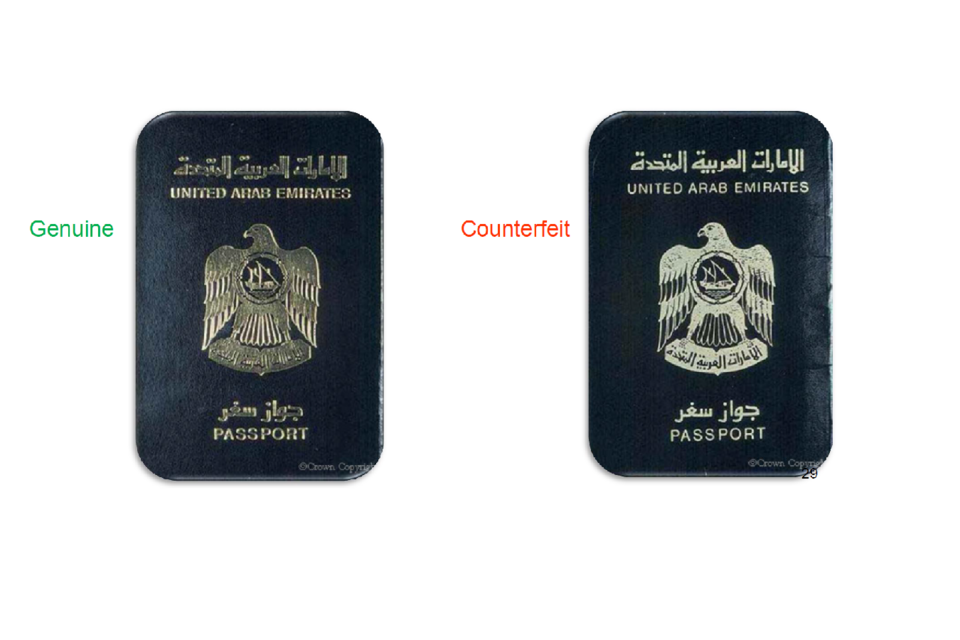
Genuine passport cover beside a lower-quality counterfeit cover.
Look at the quality of the document – it should be manufactured to a high standard. Consider the detail of the embossed design on the front (usually gold foil stamped into the cover) and feel the texture of the cover material. Compare the quality and fine detail of the genuine example (left) with the counterfeit (right).
Base fluorescence
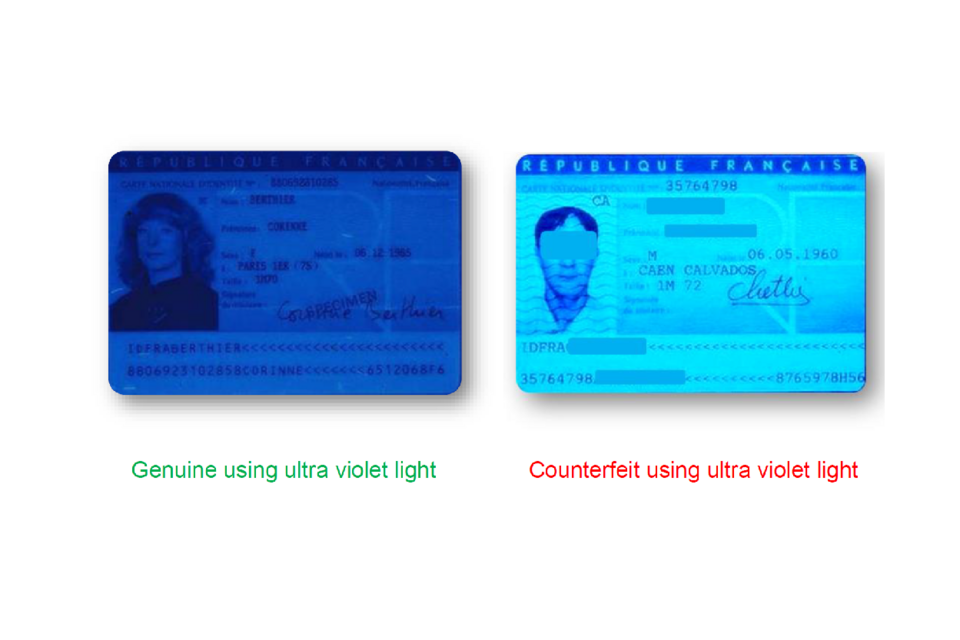
Genuine document reacting dully and counterfeit document fluorescing brightly under ultraviolet light.
Look at the fluorescence (brightness) of the document using ultraviolet light. Note the different reactions – security documents should have a dull reaction.
Watermarks
Nearly all passports contain watermarks (some paper based identity cards also have one). When light is shone through the page the genuine watermark (left) has subtle variations in the light and dark areas (thinner or thicker areas of paper), unlike the counterfeit (right) which has been printed onto the surface.
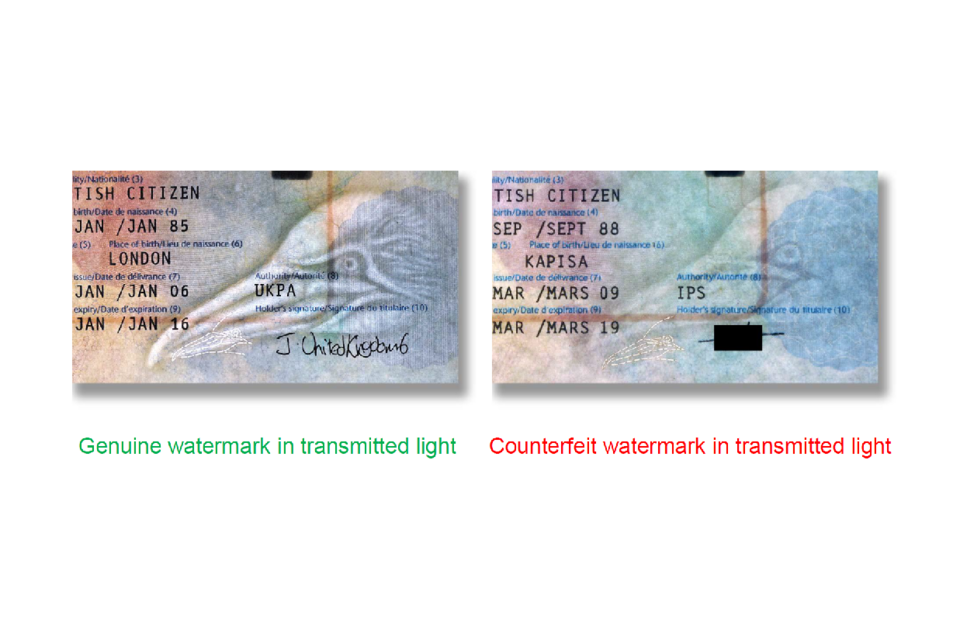
Genuine tonal watermark beside a counterfeit watermark printed on the page surface.
Random security fibres
Security fibres appear randomly across the paper. No repeated pattern should be seen as the process is completely random. Looking at 2 pages from a Greek passport (below) under a UV light source, you can see that the fibres on pages 13 and 15 are in the same place. This is not possible in genuine documents.
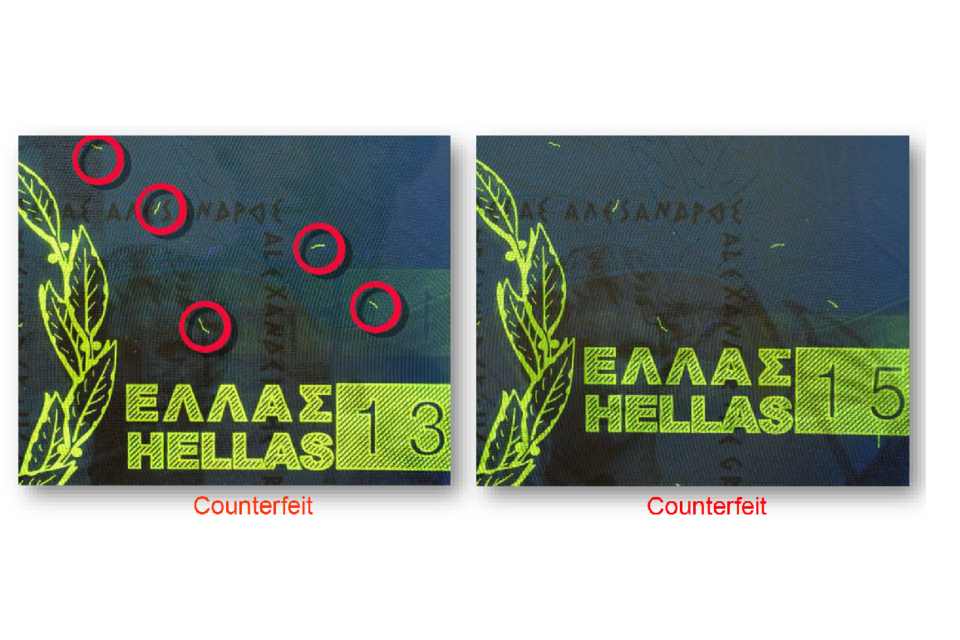
Counterfeit passport pages 13 and 15 with security fibres repeated in identical positions.
Quality of the printing
Look at the quality of the printing - it should be solid lines of high quality.
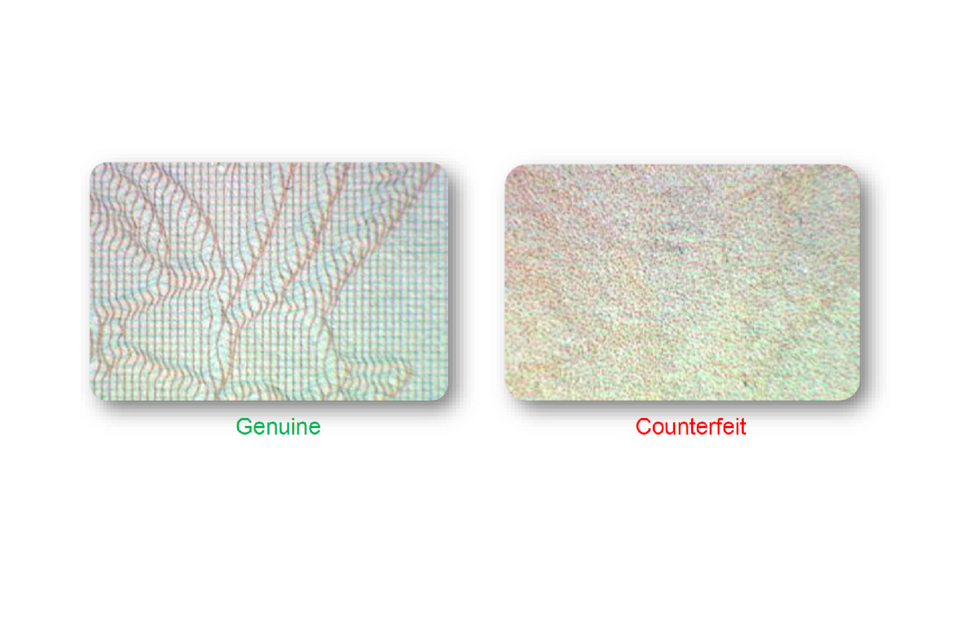
Genuine solid-line background print beside counterfeit print made from coloured dots.
The printed patterns on the pages are deliberately complex, like banknotes, to make copying difficult. The background print in the genuine passport (left) consists of solid fine lines unlike the random dots of the counterfeit (right), a characteristic of readily available home printers. Print quality is often a quick indicator of a counterfeit document. Commercial printing cannot produce the same quality as security printing.
Intaglio (raised) printing
Genuine intaglio printing will have raised print which can be identified by touch. In contrast the counterfeit document on the right does not have raised print.
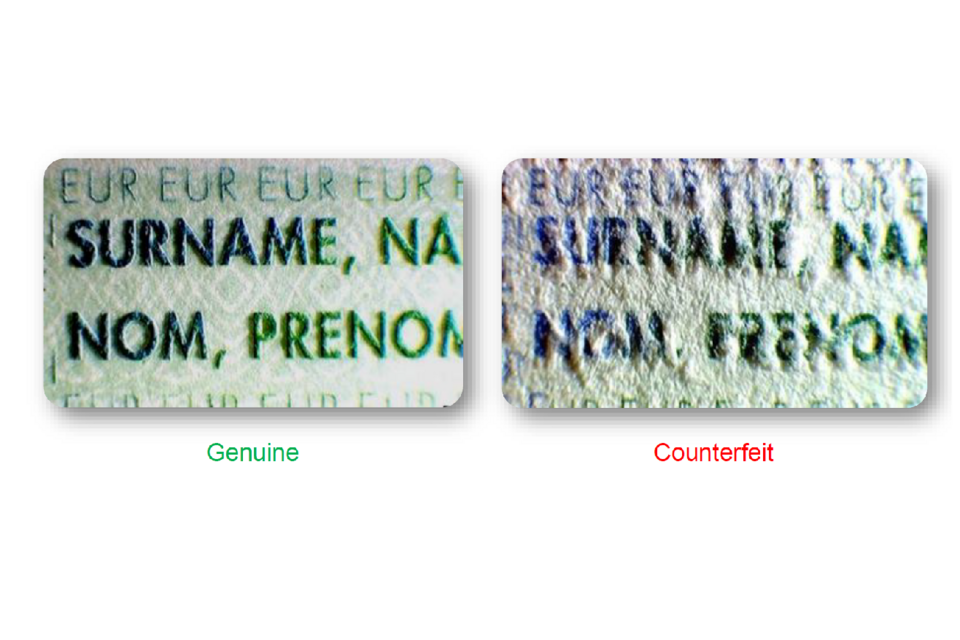
Genuine raised passport lettering beside flat, lower-quality counterfeit printing.
Holographic devices
Many documents have holographic devices which are highly detailed and display different colours and designs when rotated and tilted. The counterfeit document below has a generic hologram with the word GENUINE in it.
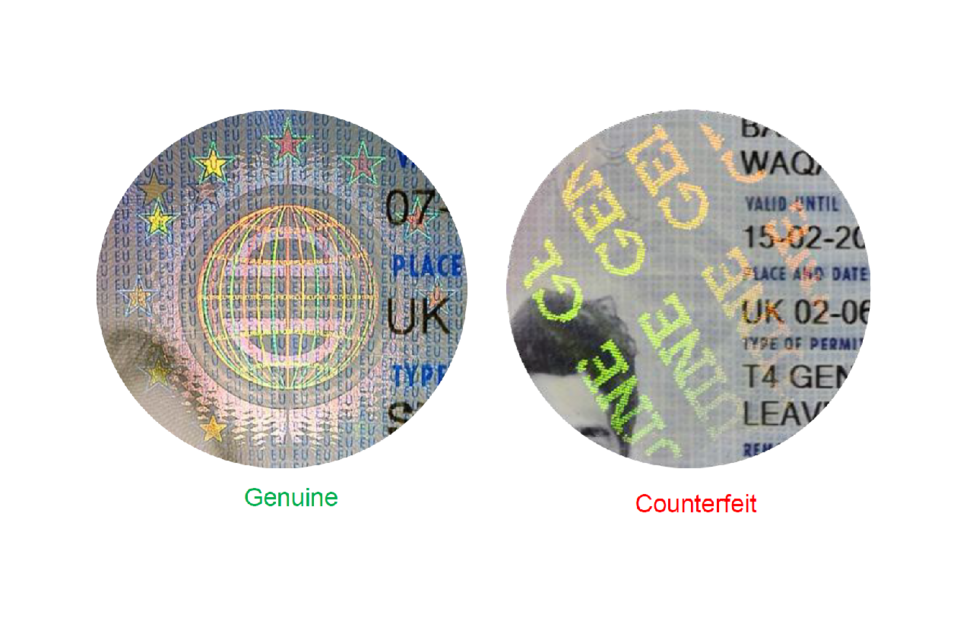
Detailed genuine security hologram beside a generic counterfeit hologram marked “GENUINE”.
Forged documents
Unlawfully altered documents
There are a number of different ways to alter a genuine document:
-
substitution of a page – usually the bio-data page
-
substitution of the photograph or image
-
alteration of personal details
Substituted pages
Passports are made up from sheets of paper which are then stitched together and cut to size. The pages and cover should therefore all be in perfect alignment. To forge a document it may first be taken apart and then re-assembled by hand, making it difficult for all the pages to sit flush as before.
The machine readable zone (MRZ)
Note the incorrect characters in this machine readable zone (MRZ) on a forged Dutch passport (compare with those set out in Machine readable zone - optical character recognition).
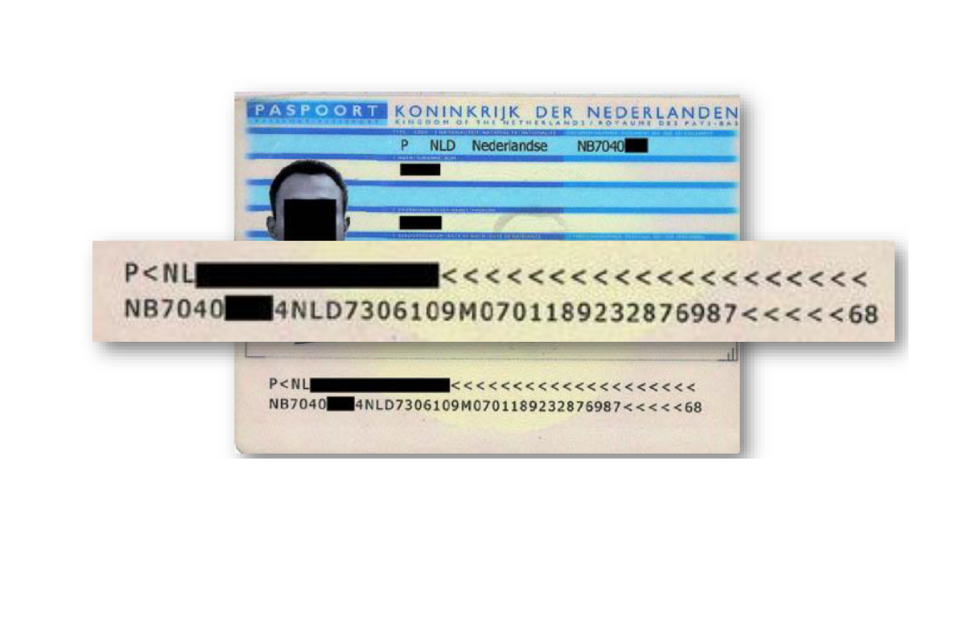
Forged passport with an enlarged machine-readable zone containing incorrect characters.
Substituted photographs and images
Image protection
Most photographs and digital images in passports or ID cards will be protected by an ink stamp, an emboss, or a laminate with visible safeguards.
An ink stamp is produced with wet ink and should not be printed.
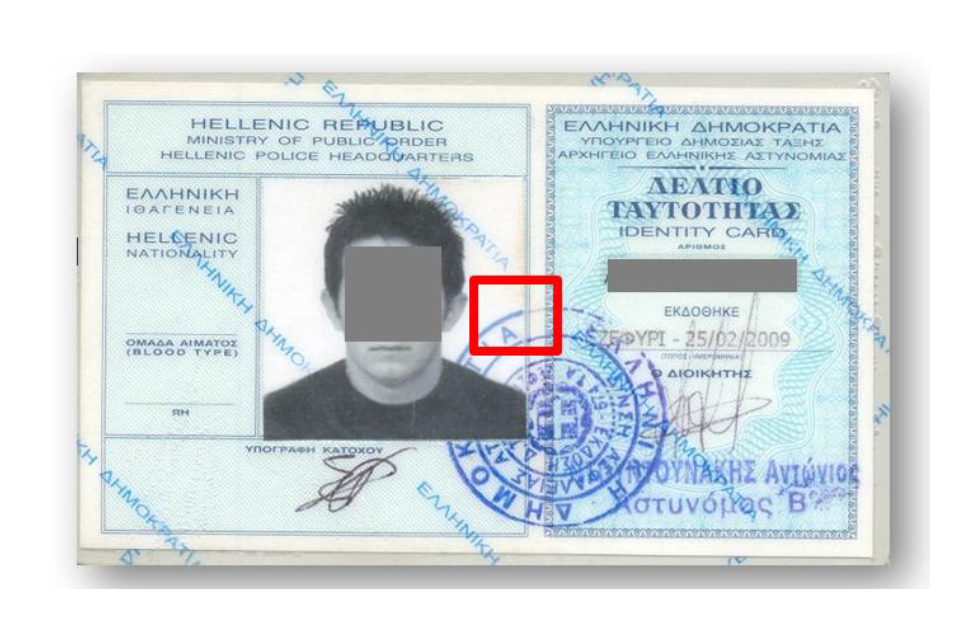
Forged identity card with the photograph’s ink stamp area highlighted.
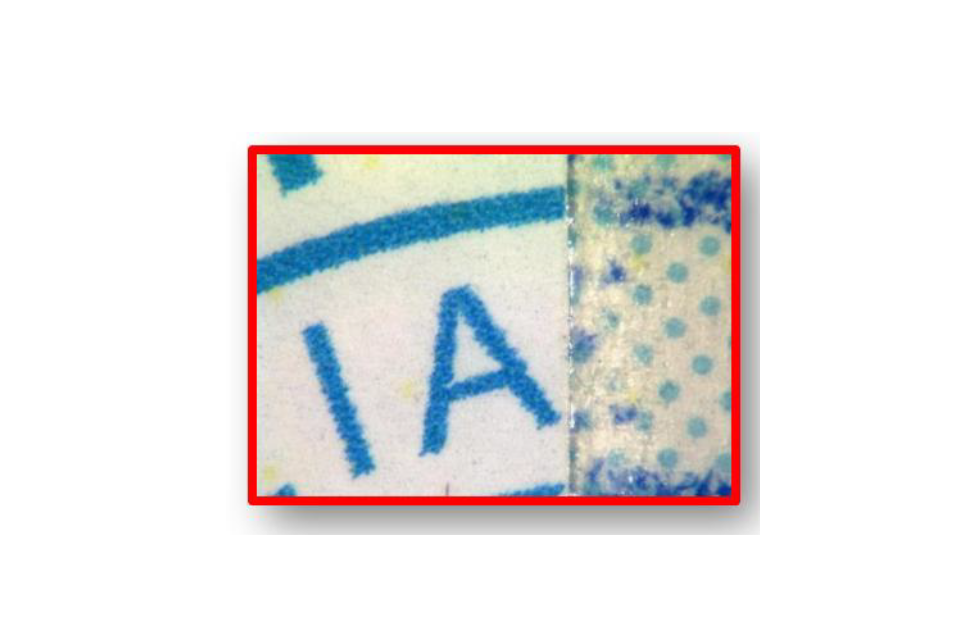
Magnified printed stamp that does not align with the stamp on the card.
Note the printed portion of the stamp on the photograph in the forgery differs from the stamp on the rest of the card.
Printing
Documents have evolved, with most moving away from traditional ‘stuck-in’ photographs. Most paper biodata pages contain images which are digitally printed directly onto the page, as seen in this genuine Portuguese passport. This printed image should not react any differently when viewed under a UV light.
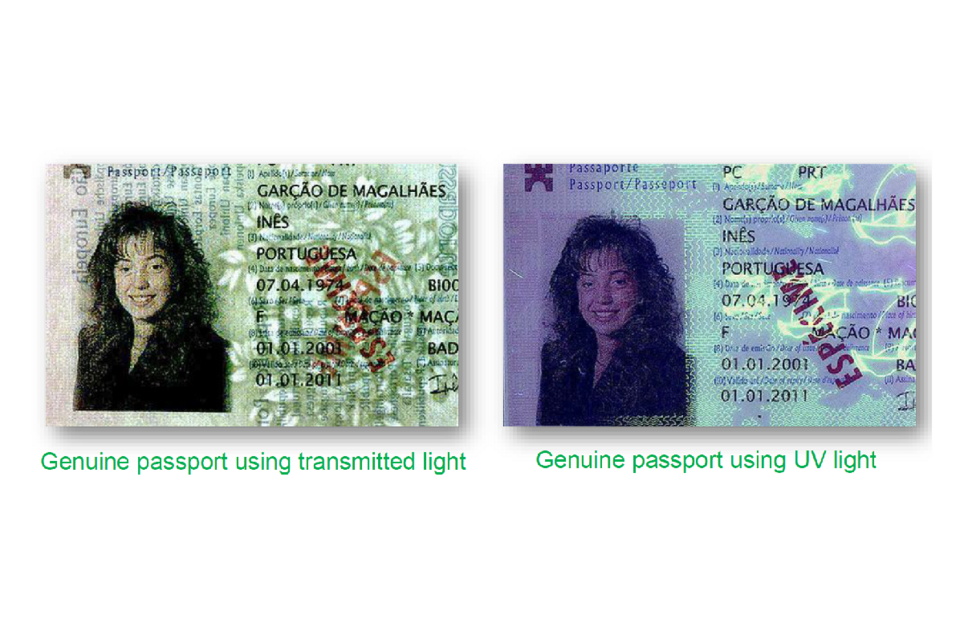
Genuine passport image viewed using transmitted light and ultraviolet light.
Use different light sources
In this forged Portuguese passport the image has been substituted. The new image has been printed onto a piece of paper and placed onto the page under the laminate. Using a transmitted light source (left) you can see the edges of the new piece of paper. Under a UV light source (right), you can see the new piece of paper fluorescing brightly under UV light - ordinary commercial paper has been used.
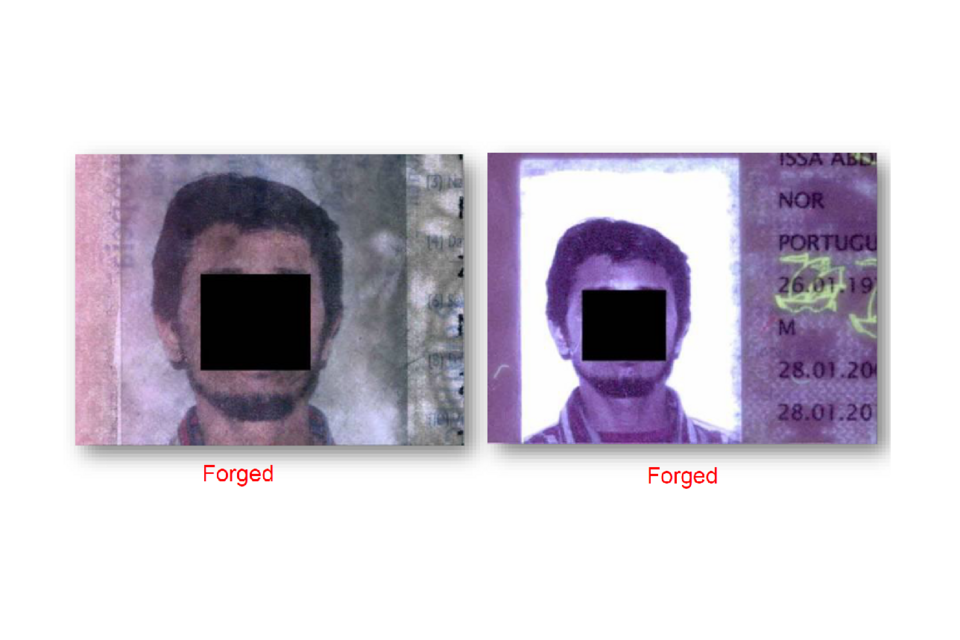
Substituted passport image visible as added paper in transmitted and ultraviolet light.
Laminate overlays
Many forgers simply print a new image (or parts of an image) onto a thin clear laminate and place it on top of the page. In this forged USA passport a new face has been added to the original holder’s image. Examine holographic and UV features as the new image may incorrectly sit above them.
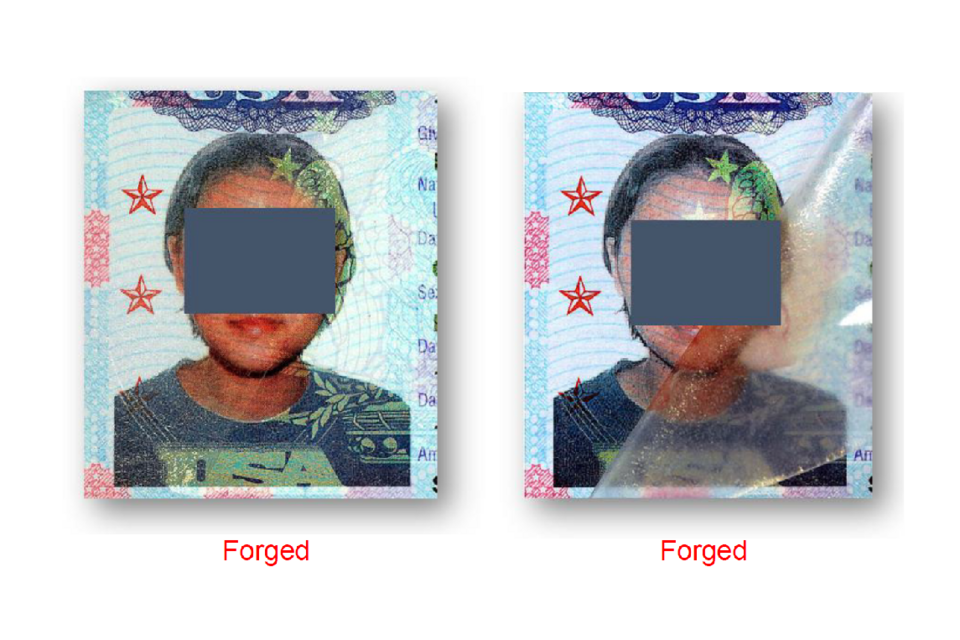
Passport image before and after a replacement face was added on a clear laminate.
Laser engraving
Passports or ID cards made with polycarbonate (a type of plastic) will have a laser engraved image of the holder. This image should display shades of grey/brown (burned carbon). Forgeries usually have printed images which contain jet black or coloured dots. Neither of these should be seen in laser engraved images.
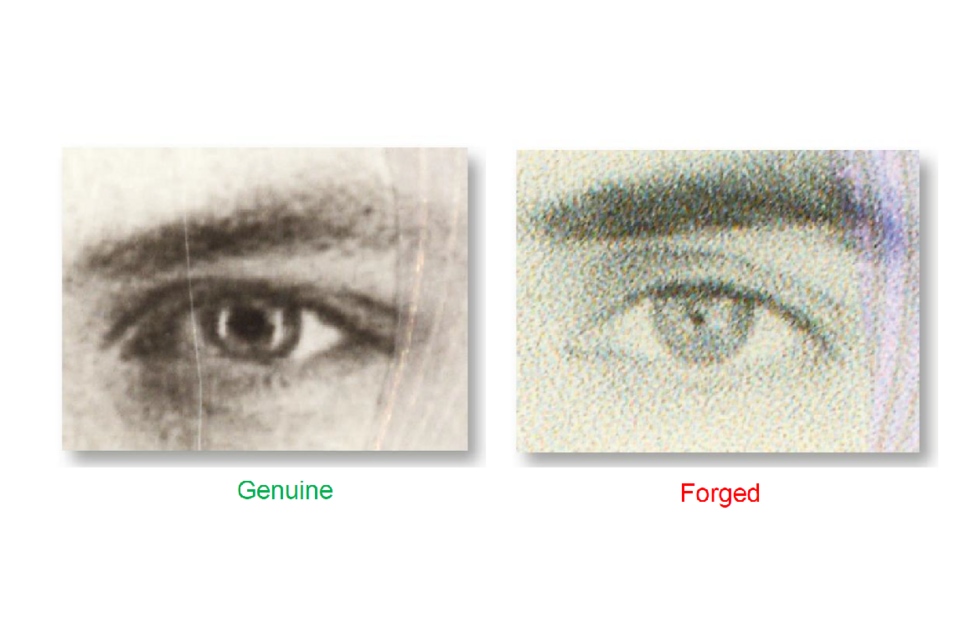
Genuine grey laser-engraved eye beside a forged image made from coloured print dots.
Altered details
A forger will often alter details in conjunction with changing a page or photograph/image. The passport has been forged by changing the date of birth. The forger has abraded the original pen ink and then over-written a new date.
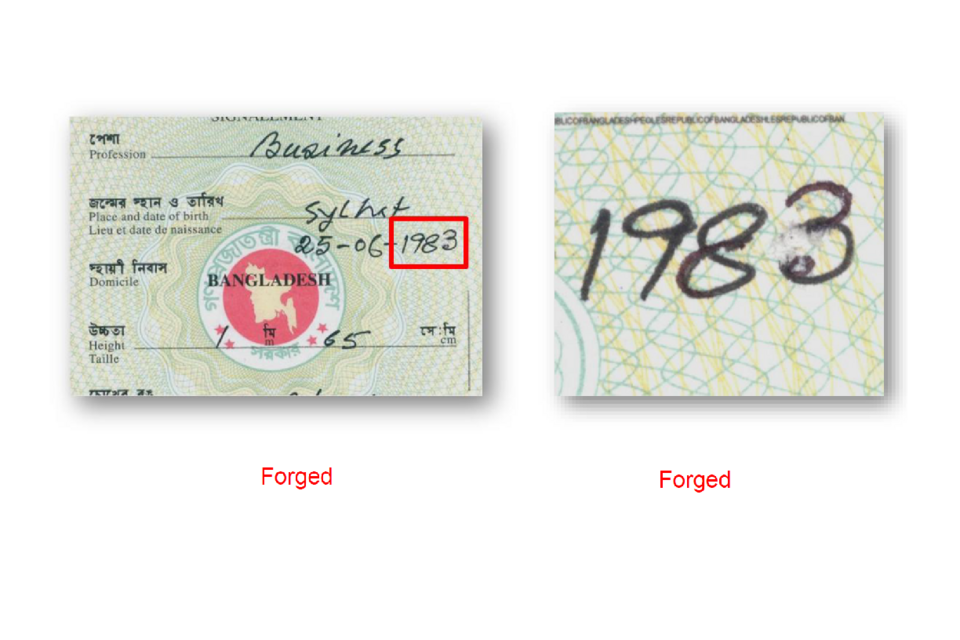
Passport date of birth changed by removing the original ink and writing a new date.
Pseudo/fantasy documents
Pseudo or fantasy documents are ones that have no legal basis; they are normally not based on any legitimate document. They may have the appearance of an official document, are not issued by a legally recognised state authority or institution, or by an organisation recognised under international law, and as such have no legal validity.
Further information
Useful websites
UK government - guidance for employers on UK visa sponsorship
NPSA employment screening guidance
PRADO - information and images of genuine documents, (European and other countries)
EDISON – information and images of genuine documents
Basic document checks: Checklist A
Cause for concern
Does the document allow the person to live and work in the United Kingdom? (Yes/No)
Is the person presenting the document the same as the image/photograph? (Yes/No)
Is the document genuine or counterfeit? (Yes/No)
Check for:
-
General quality/cover - is it manufactured to a high standard? (Yes/No)
-
Watermarks - view the page with a light source, e.g., a torch or lamp (Yes/No)
-
UV reaction - check if the document reacts dully if a UV light is available (Yes/No)
-
Random fibres - are there random fibres on each of the documents pages? (Yes/No)
-
Print quality - is the quality of the print of a high standard (no dots)? (Yes/No)
-
Intaglio ink on inside cover of passports - is there raised ink on the document? (Yes/No)
-
Optically variable ink - move the document under a light source (Yes/No)
-
Machine readable zone (font) - use an online MRZ checker if available (Yes/No)
-
Holographic devices - move the document under a light source (Yes/No)
Basic document checks: Checklist B
Cause for concern
Have any pages been substituted? (Yes/No)
Check for:
-
Construction/page alignment/page numbers/page design (Yes/No)
-
Counterfeit pages (see above) (Yes/No)
-
Has the photograph/image been substituted?
Check for:
-
Damage around the photograph/image (Yes/No)
-
Any safeguards over photograph/image e.g., ink stamp, emboss, laminate (Yes/No)
-
Correct image type (Yes/No)
-
Evidence of a second laminate – move the document under a light source (Yes/No)
Have any details been altered? (Yes/No)
Check for:
-
Damage to paper around details e.g., date of birth (Yes/No)
-
Is the document a fantasy/pseudo document? – Can you find it on the PRADO or EDISON websites? (Yes/No)
Who do I contact?
If you encounter a suspected false document then contact the police or your local immigration enforcement office.
The originator and owner of the material contained in this presentation is the National Document Fraud Unit, United Kingdom Home Office. The material is protected by Crown Copyright and the images and content should not be used without prior reference to this Unit.
Please note that the information in the presentation was correct at the time of its publication.