
How to make a claim (Tree Production Capital Grant)
Updated 23 October 2026
Applies to England

© Crown copyright 2026
This publication is licensed under the terms of the Open Government Licence v3.0 except where otherwise stated. To view this licence, visit nationalarchives.gov.uk/doc/open-government-licence/version/3 or write to the Information Policy Team, The National Archives, Kew, London TW9 4DU, or email: psi@nationalarchives.gov.uk.
Where we have identified any third party copyright information you will need to obtain permission from the copyright holders concerned.
This publication is available at https://www.gov.uk/government/publications/tree-production-capital-grant-how-to-make-a-claim/how-to-make-a-claim-tree-production-capital-grant
If you’re a Tree Production Capital Grant (TPCG) grant holder, use this guide for claiming your approved capital items.
When can you claim
You can claim any time during your funding period, up to once per month. We cannot extend the deadline or offer extensions to your funding agreement.
Submit end of year claims by 11:55pm on:
- Saturday 27 March 2027 (2026 to 2027 financial year)
- Monday 27 March 2028 (2027 to 2028 financial year)
Before you claim
You must have:
- received all items you are claiming for
- completed all work you are claiming for
- paid the total amount (not just deposits) of each cost
Try to claim for multiple items together and include everything purchased to date where possible.
How to make a claim
Step 1: Gather your documents
Collect all invoices, receipts and records of staff time for items or activities you want to claim. Learn more about what evidence you need to provide.
Step 2: Complete your paperwork
Use the claim form and spending tracker on the guidance for TPCG recipients page.
- add all costs to your spending tracker
- complete and sign your claim form
- take photos of items and or activities that exceed £1,000
Read how to complete the spending tracker and claim form.
Step 3: Submit your claim
Email the following documents to TPCG@forestrycommission.gov.uk:
- claim form
- spending tracker (in Excel format)
- all invoices and receipts
- bank statements (for purchases not in pounds sterling)
- photographs (for items and activities over £1,000)
- supplier creation form or supplier amendment form (if needed)
We will email to confirm we’ve received your claim and contact you if we have questions.
Do not invoice the Forestry Commission to request payment for your claim. A claim can only be paid through a claim form and evidence received.
Evidence you need to provide
You must provide valid evidence for every item you claim, regardless of cost.
All invoices, receipts and timesheets must be dated within your funding period and within the financial year that you are claiming.
We may reject all or part of your claim if you cannot provide valid evidence.
Detail all costs in your spending tracker and link these to the relevant item reference in your finance spreadsheet. Find the item reference in Column B of your finance spreadsheet.
You can only claim 50% of each cost.
Invoice and receipt requirements
Your invoices must show:
- invoice date
- grant recipient organisation name (as shown in your agreement)
- supplier’s name and address
- cost and clear description of each item
- date(s) when the work was carried out (if invoice is for a service)
- VAT amounts (where applicable)
- total amount owed
For information on what invoices should include, read Invoicing and taking payment from customers.
What receipts and order confirmations must show:
- payment date
- supplier’s name and address
- cost and clear description of each item
- confirmation of payment
- VAT amounts (where applicable)
Evidence that will not be accepted:
- proforma invoices
- quotes
- purchase orders
- purchases made in cash
- order confirmations with no confirmation of payment
If your claim includes invoices in foreign currency, you must provide evidence of the amount paid in pounds sterling. This can be a bank statement, with confidential details removed.
Name the documents containing your invoices and receipts clearly. For example, ‘001-InvoicingCompany -05July26’.
What to include in your spending tracker
Use the invoices and receipts tab of your spending tracker to detail all your invoices and receipts.
For each cost, provide:
- item reference for the relevant item in your finance spreadsheet
- name of the document containing the invoice or receipt (include page number if multiple invoices in one document)
- a brief description of item purchased (for example, ‘components for irrigation system’)
- total cost
- amount you’re claiming for (to 2 decimal places)
- details of VAT claimed
- invoice date
If an invoice relates to more than one item reference on your finance spreadsheet, list each item separately on your spending tracker.
If an invoice includes items that are not part of your TPCG project, explain in your spending tracker which items you’re claiming for.
VAT information
- if you can recover VAT on a cost: claim the amount excluding VAT
- if you cannot recover VAT on a cost: claim the amount including VAT
- if you can partly recover VAT on a cost: claim the amount including only the irrecoverable VAT and explain the rate applied in ‘additional details’ on your spending tracker
Claiming internal staff time
Use the timesheet tab in your spending tracker to claim for internal staff time.
Timesheets are for internal staff only. Invoices must be submitted for external contractors’ time.
For each person, provide:
- item reference for the relevant item in your finance spreadsheet
- dates when work was carried out
- the team member’s name and job role
- a brief description of work carried out (for example, ‘constructed polytunnel’)
- rate of pay (daily or hourly)
- number of days or hours worked
- total cost
- amount you’re claiming for
If a staff member has carried out activities relating to more than one item reference on your finance spreadsheet, list each activity separately on your spending tracker.
Photographs
You must provide photographs for any item or activity costing more than £1,000 in total.
Photographs must:
- show the item on site without packaging
- be clear, in focus and in colour
- have no other objects blocking the view
- show each part if the item has multiple components (for example, all parts of a transplanting system)
Acceptable photograph examples:
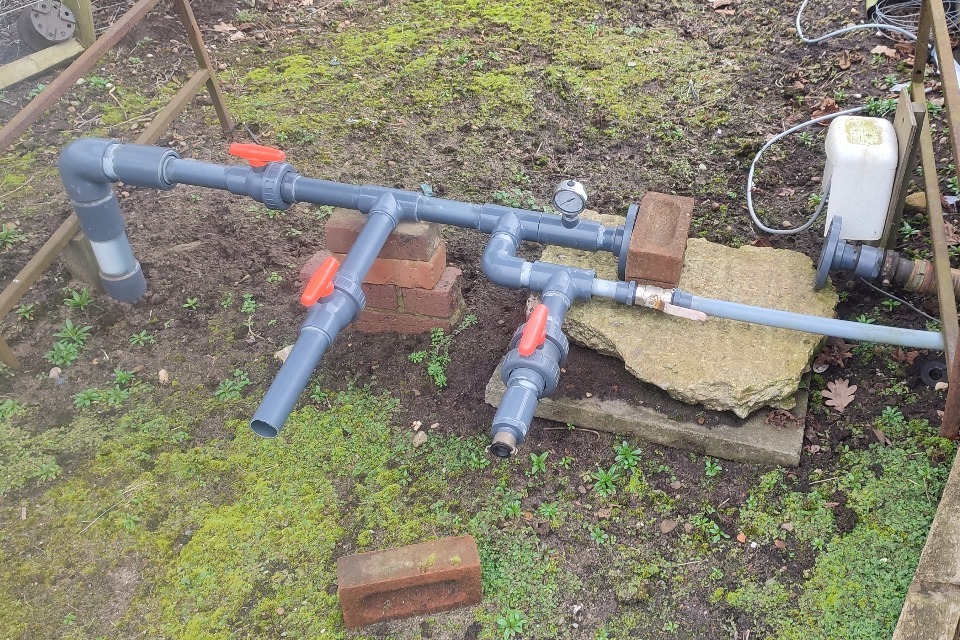
Example 1: irrigation pipes.
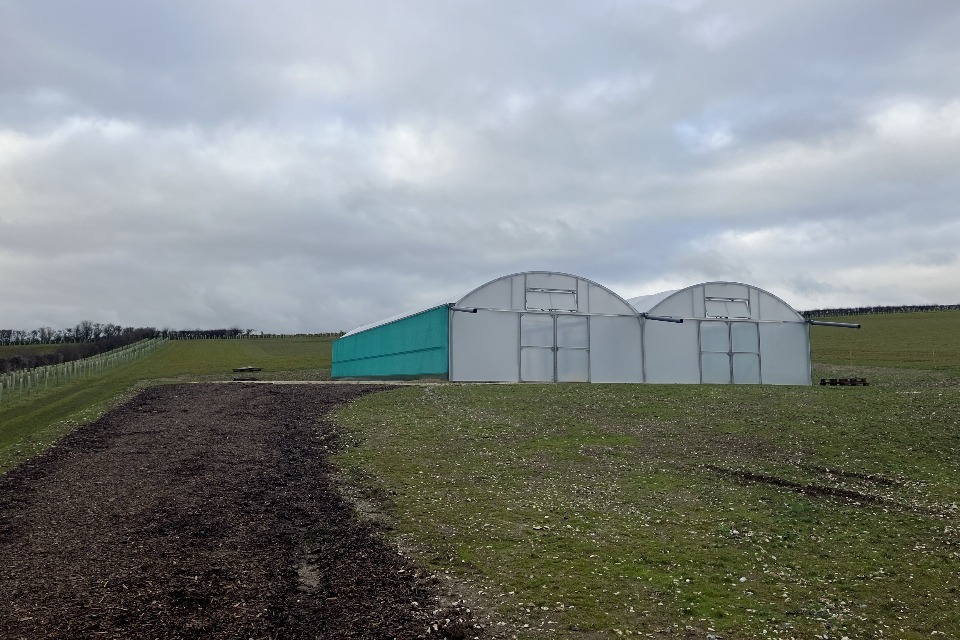
Example 2: double-span polytunnel.
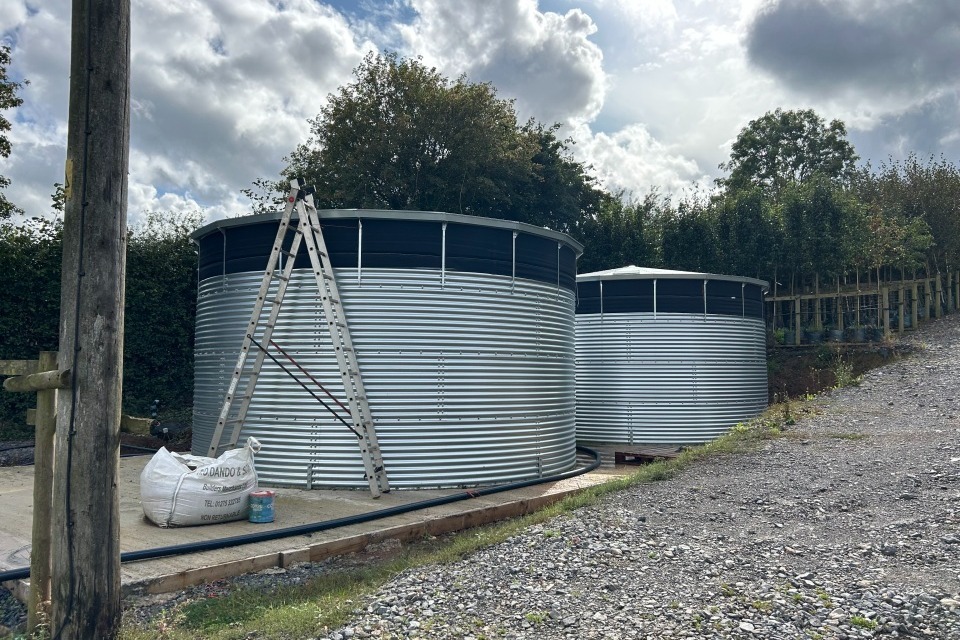
Example 3: water tanks and concrete base.
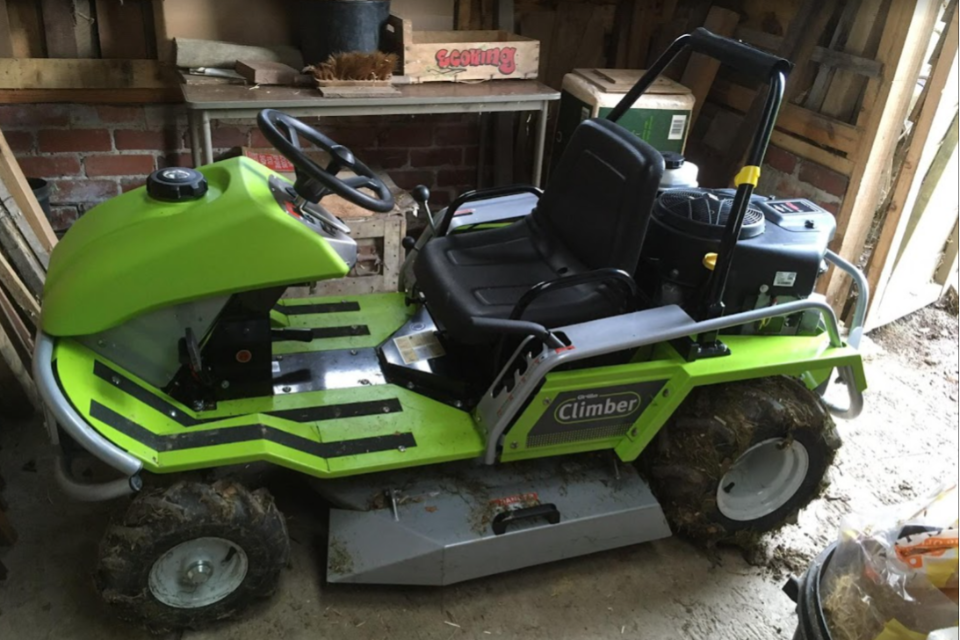
Example 4: ride-on mower.
Completing your claim form
Section 1: Claimant details
The claimant must:
- be the lead applicant or project representative
- sign section 3 of the claim form
Contact us if you would like to add an additional project representative to your project to sign future claims.
The grant recipient organisation must match the:
- grant recipient on your agreement
- business or individual name on your supplier creation form or supplier record
Only the grant recipient organisation can receive claim payments.
Section 2: Claim details
Check that your claim amount does not exceed the maximum grant amount in your agreement.
If you’ve made previous claims, ensure the total of all claims stays within your budget for that financial year.
Only claim up to 50% of each cost.
Section 3: Declaration
Provide either an electronic or handwritten signature. We cannot accept typed names in the signature box or an image of a signature.
Setting up payment details
New suppliers
Complete a ‘supplier creation form’ if this is your first payment from the Forestry Commission. The supplier creation form will be emailed to you after you have signed your grant agreement.
The business or individual name on the form must match the grant recipient name in your agreement. The address you provide on the form must match the registered address for your organisation (check Companies House or the Charity Commission).
Existing suppliers
If your bank details or organisation information has changed since your last Forestry Commission payment, email TPCG@forestrycommission.gov.uk for a supplier amendment form.
Payment to a different organisation
If payment needs to go to a different organisation than named in your agreement, contact the TPCG team.
After your claim
When you’ll receive payment
We aim to make payment within 22 working days of receiving a completed claim.
This may take longer at the end of the financial year. Delays may occur if your claim is incomplete or has errors.
Reporting requirements
Within 3 to 6 months of your final claim, you must complete and return a ‘post-implementation report’. We will provide a post-implementation report template for you.
Obligation period requirements
For 2 years following the date you submit your final claim, you must:
- keep grant-funded items in your ownership
- maintain items in good working order
- use items for their intended purpose (as in your application)
- submit your post-implementation report
We may recover some or all of your grant if you do not comply.
Contact the TPCG team immediately if you cannot meet these obligations.
Record keeping
Keep all paperwork (invoices, receipts, accounting records) for 7 years from the end of your funding period.
Changes to your project
You must inform us as soon as possible if:
- you would like to make significant changes to your project
- you would like to reallocate budget between spend categories
- you no longer plan to proceed with your project
All significant changes need Forestry Commission approval in advance.
If a cost increases slightly:
- it does not need approval in advance
- you can claim 50% of the actual cost if you have the budget available
- payment of the higher value will be at the Forestry Commission’s discretion
Contact us
Contact the TPCG team if you need help with:
- submitting your claim or supporting evidence
- correcting a mistake after you’ve submitted a claim
- making a change to your project
Email us at TPCG@forestrycommission.gov.uk.
All the forms you need are on the Guidance for TPCG recipients page.
Read more about TPCG.