Academies budget forecast: guidance for completing the online form
Updated 25 September 2026
Applies to England

© Crown copyright 2026
This publication is licensed under the terms of the Open Government Licence v3.0 except where otherwise stated. To view this licence, visit nationalarchives.gov.uk/doc/open-government-licence/version/3 or write to the Information Policy Team, The National Archives, Kew, London TW9 4DU, or email: psi@nationalarchives.gov.uk.
Where we have identified any third party copyright information you will need to obtain permission from the copyright holders concerned.
This publication is available at https://www.gov.uk/government/publications/academies-budget-forecast-return-guides-to-using-the-online-form/academies-budget-forecast-guidance-for-completing-the-online-form
Introduction to the online form
This guide explains how to complete and submit the budget forecast return (BFR) to the Department for Education (DfE).
The academies budget forecast return has more information and a link to details of the weekly dial-ins where you can ask us any questions about your BFR.
The deadline for submitting your BFR to DfE has now passed. The form will remain open for a short period for late submissions. If you have not yet submitted your return, submit it as soon as possible.
Submissions can only be made through the online form.
BFR form structure
The BFR form collects data over 3 financial periods, including:
- prior year
- current year
- future years
The table shows the periods where the detailed actuals and forecasts are required.
| Period | Prior year | Prior year | Current year | Current year | Forecast year | Forecast year |
|---|---|---|---|---|---|---|
| Type of entry | Actual | Actual | Actual | Forecast | Forecast | Forecast |
| Months | September 2024 to March 2025 (7 months) | April 2025 to August 2025 (5 months) | September 2025 to March 2026 (7 months) | April 2026 to August 2026 (5 months) | September 2026 to March 2027 (7 months) | April 2027 to August 2027 (5 months) |
| Academic year | 2024 to 2025 | 2024 to 2025 | 2025 to 2026 | 2025 to 2026 | 2026 to 2027 | 2026 to 2027 |
You can read more about the details of what is included in the Three-year forecast section.
If your trust completed the BFR 2025 then the period ‘Sep 24 to Mar 25’ will be pre-populated with the data your trust returned.
The summary level forecasts for the financial years are:
- 2026 to 2027 which will be automatically summarised from the data already entered in the form
- 2027 to 2028
- 2028 to 2029
Who should complete this return?
You should complete this form if your academy trust was active on 1 May 2026.
You will need to complete the BFR on an accruals and prepayments basis. The terms ‘academy trusts’ and ‘academy’ include:
- sponsored academies
- academy converters
- free schools
- university technical colleges
- special schools
- studio schools
New trusts or trusts with academies having joined or left should include:
- data for the period the trust has been open
- academies for the period that they have been part of that trust
You can find out what to do if any academies have transferred in or out of your trust during the academic year.
Roles and responsibilities
As the BFR is collected at trust level, you should ensure you sign in to your trust’s organisation through DfE Sign-in. If you sign in with the academy organisation, you will not be able to access the BFR service.
You should ensure that your trust has a BFR approver assigned.
The action you need to take in the form depends on your role.
If you are an ‘approver’, you can:
- prepare and amend the form
- add an external preparer
- submit the form to DfE
If the form has been completed by an approver, the preparer declaration is not available as it is not applicable.
If you are a ‘preparer’, you can:
- prepare the form
- add an external preparer
- complete the preparer declaration
If you are an ‘external preparer’ and not an employee of the trust, you can:
- prepare the form
- complete the preparer declaration
External preparer
If you have an external preparer who will prepare your BFR form, you must enter their details in the overview section of the online form and mark the page ‘Mark as complete’.
They must have fully registered on the DfE Sign-in platform before you can enter their details in your form. Either the trust preparer or approver can add the details once registered.
In order to be fully registered on the DfE Sign-in platform, the external preparer must be part of the ‘DfE – ADC External’ user group for preparers & auditors. If they are not part of the group, they must submit a request via the customer help portal.
Once a registered external preparer has had their details added to the overview section, they will be able to access the trust’s BFR from the auditor dashboard within their own DfE Sign-in account.
External preparers should not be added to the trust’s DfE Sign-in account.
If you do not have an external preparer to prepare your BFR form, you must mark the page ‘Mark as complete’ with no users added. This will enable the rest of the form to be completed.
Dashboard
The dashboard page shows the overall status of your form. From this page, you can access:
- each section of the form
- the activity history
- guidance
You can also download your reports.
Once you have completed the ‘Overview’ section of the main navigation page you will be able to access the rest of the form.
You need to mark all pages in section 2 as ‘Completed’ to progress through to section 3 and submit your BFR form.
Updates to the BFR form
To improve the BFR form for 2026 and the data we collect, we have made the following changes.
Introduced 2 new finance questions:
- FQ5 – Does your trust use top slicing? This requires a yes or no response
- FQ6 – Does your trust pool and hold centrally the general annual grant (GAG)? Select the approach that most accurately describes your trust:
- Not applicable (single academy trust (SAT))
- general annual grant (GAG) is not pooled
- All of the general annual grant (GAG) is pooled and held in a central fund
- Some of the general annual grant (GAG) is pooled and held in a central fund (partially pooled)
If the last option is selected, you will be required to provide an estimated percentage of the amount of GAG that is pooled in your trust.
Introduced Line 213 – Investment income.
This line should only include investment income from:
- interest from bank accounts
- interest from short-term and long-term deposits
- dividend income on current or fixed investments held
- other investment income, for example rent on investment properties
- income from endowment, where it is expendable
The figures in columns 1 to 3 for 2024/25 have been pre-populated using the figure provided in your prior year Academies Accounts Return (AAR), field INV010: Investment income.
Amended line 220 – Other income.
Line 220 must not include any investment income. All investment income must only be included in the new line 213 – Investment income.
This means that line 220 should now only include any revenue income not covered by the previous categories, such as donations and business sponsorship.
Column 1 of line 220 has been pre-populated from column 4 of your prior year BFR. You will need to update this figure to remove any investment income that is now included in line 213. You can use the pre-populated amount in line 213 for a proxy to determine how much to reduce line 220 by.
Introduced a new section for trusts with revenue reserves up to 20% of their total revenue income for 2025 to 2026.
This year, we are extending questions on reserves management to all trusts with a positive revenue position. If your trust has revenues reserves of up to 20% of the total revenue income, you’ll need to select the most relevant choices for your trust from a list of options.
The financial planning section of the academy trust handbook requires trusts to have clear plans for how they will use their funds for the benefit of pupils. This new section allows trusts to set out how they intend to use their revenue reserves.
This section will ask how you plan to spend your reserves, including the amount the trust is holding as contingency as a percentage of total income. This information should form part of your trusts overall financial management policy and is detailed in the financial planning section of the academy trust handbook.
Improved the BFR Excel workbook.
This year, trusts can use BFR form reports to pre-populate their workbook, helping them prepare their return accurately in Excel.
Once the BFR form is available, trusts can copy and paste their data from the BFR form data download.
Updated the formulas used to calculate lines 410 and 670.
This year, the brought forward balances for revenue and capital balances pre-population methodology has been updated . This data remains pre-populated but now reconcile to your accounts return data using the ‘Analysis of Net Assets between Funds’.
Line 410: Total unrestricted funds (excluding pension) plus total restricted funds (excluding pension) has the following accounts return fields:
- unrestricted fund (AR reference NAFTOT-A)
- restricted fund (AR reference NAFTOT-B)
Less:
- pension scheme liabilities (AR references NAF060-A and NAF060-B)
Line 670: Total restricted fixed asset fund (excluding pension) less fixed assets is made up of the following accounts return fields:
- total restricted fixed asset fund (AR reference NAFTOT-C)
Less:
- fixed assets (AR reference NAF010-C)
- pension scheme liabilities (AR reference NAF060-C)
These lines cannot be edited because they reflect the updated definition of reserves and the trust’s audited financial position at the time they were submitted.
Finance questions
This section of the form is used to clarify if your trust needs to complete later sections of the form.
For questions 1 to 4, the answers will be pre-populated in line with how your previous BFR submission was completed. For example, if you had an outstanding loan in your previous BFR submission:
- the answer to FQ2: loans in your current BFR will be ‘Yes’
- you will not be able to change the answer
- you can update the data and answer the validation in the ‘Other Items’ section of the form
- if you have reduced the value of the loan to £0, you will then be able to change the answer
Questions 5 and 6 require you to give answers before moving on to complete the BFR.
Completing the form as a multi-academy trust (MAT)
MATs preparing aggregated financial statements made up of more than one academy must submit a consolidated return. This aggregates the budgets of each of its academies.
The introduction section of the form has:
- the name of the academy trust
- unique provider identification number (UPIN)
- a checked list of all academies that are in the DfE data set as being part of the trust
MATs will be asked to review the names of the academies included in the form. If any academies have left, you should:
- untick those academies that will not be included for the timescales covered by the form
- select ‘no’ to the question ‘is the above information correct?’
- provide an explanation for why this has happened
If any academies have joined, you should:
- select ‘no’ to the question ‘is the above information correct?’
- provide an explanation including details of the academies
If you notice any errors or omissions in the data provided, contact DfE using the customer help portal.
Re-brokerage of academies
If an academy has left or joined your trust since May 2026 you will need to enter balances in specific lines at the point of completing the BFR. Trusts should enter the balances (where applicable) in the period that corresponds to the date that the academy joined or left the trust. You should enter actuals, current and forecasts. The lines you should complete are:
- line 999: Pupil numbers – adjust upward to account for new pupils joining the trust or downwards to account for pupils leaving the trust
- lines 212 or 215: Revenue surplus on conversion (line 215) or transfer of an existing academy in or out of a trust (line 212) – you should include revenue surplus received or receivable on conversion from local authorities or transfer in or out of a trust
- lines 350 and 351: Revenue deficit on conversion (line 351) or transfer of an existing academy in or out of a trust (line 350) – include revenue deficit payable on conversion from local authorities or on transfer in or out of a trust
- line 410 – if the trust has fully closed, ensure that the balance in 410 is zero from the point of transfer
- line 530: Capital income transferred in or out of the trust as a result of an existing academy joining or leaving the trust – include a transfer of capital income from an existing academy as a positive value, and a transfer out of an existing academy as a negative value
- lines 560 and 571: Capital income (cash) transferred into the trust on conversion (line 560) or capital income transferred into the trust from another body (line 571)
- line 573 – this is the value of capital reserves balances as a positive number, received or receivable upon transfer of any academies joining your trust
- line 639: Capital assets transferred of an existing academy out of the trust – this is the value of capital reserves balances as a negative number, payable upon any academies leaving your trust
- line 572 (only when a school converts from local authority maintained status to become an academy) – this is the value of capital income equal to the amount entered in line 575: Local authority donated assets, the value of the land and buildings (capital assets at net book value) transferred from the local authority when the school converted to academy status
Once you have completed the above lines, complete the remaining BFR lines including actuals and forecasts for the relevant periods after the date of transfer.
If you have any known academies leaving or joining your trust after 1 September 2026, you must work with the other trust to agree the date at which the academy will be reported on each trust’s return. This is to avoid duplication or omission.
You should include any transfers in your BFR, in line with your trust’s confirmed strategic plans.
You can find out what to do if any academies have transferred in or out of your trust during the academic year.
Queries
If you have queries about the BFR, raise an enquiry through the customer help portal.
Downloads and reports
On the dashboard, there are 3 options on the right of the screen to download reports of your form. These are in PDF and Excel formats. The options allow you to download:
- your previous year’s BFR report, which you can use to pre-populate your workbook when preparing this year’s return
- your current BFR report
- your financial management system (FMS) mapping report – this is only for trusts who have automated their FMS data into the accounts return for the same period
The reports can be accessed at any time during the completion of the form.
We recommend that you download a copy your previous year’s BFR before you start completing your form. This will help you to prepare if you do not already know the details of the last BFR form submitted to DfE.
Forecasting assumptions
This guidance does not set out a specific forecasting method for trusts to follow. Instead, it highlights key matters that trusts should consider when preparing forecasts. When developing forecasts, trusts should ensure that trustees are consulted and presented with available options.
Teachers’ and support staff pay awards
Read the guidance on the teachers’ and support staff pay awards for 2026 for more information.
From April 2027, employer contribution rates for the Teachers’ Pension Scheme (TPS) will decrease from 28.6% to 17.6%. Funding for schools and other eligible education settings will be reduced from 1 April 2027 to reflect the decrease in pension costs. Teachers’ pension employer contributions funding adjustment provides further information and a calculator.
Maximising value for pupils
The government’s maximising value for pupils programme supports schools and trusts to ensure every pound delivers the best possible outcomes for children.
Trusts should take a proactive, long-term approach to financial planning across the following 4 areas:
- commercial spending
- better use of financial and physical assets
- effective curriculum and financial planning
- strengthening capability (including digital and commercial skills)
As part of the maximising value for pupils programme, the following support on financial planning and forecasting is available to trusts and schools.
-
School resource management advisers help schools and trusts save money on day-to-day costs. You can contact an adviser by raising a ticket through the customer help portal. They can provide support with:
- financial governance
- financial planning
- forecasting
- procurement
- the Financial Benchmarking and Insights Tool allows trusts to view and compare performance with other trusts of similar characteristics
- School capacity survey: guide for local authorities provides information on demand for SEND school places
- Get help buying for schools and DfE energy for schools support schools, trusts and academies to make savings through staffing solutions, energy costs and procurement
National support is currently available for trusts. More information is available at:
- Maximising value for pupils: guidance for schools and trusts
- Maximising value for pupils: policy paper, which sets out how DfE will support the sector over the coming years
Other factors to consider
When planning your forecast, there are additional factors you may want to consider.
You may want to consider factors that could affect potential income, such as:
- projected pupil numbers and local demographic trends
- academies revenue funding allocations
- changes to pupil premium funding and the proportion of pupils with special educational needs (including any associated funding)
- the balance of funding weighting factors, including the area cost adjustment
- other income assumptions, such as commercial income and investment income
You may also want to consider factors that could affect potential expenditure, such as:
- planned structural or curriculum changes
- estimated staff turnover and changes to staff grade ratios
- Teachers’ Pension Scheme (TPS) contribution rates, including any national changes
- Local Government Pension Scheme (LGPS) contribution rates, which vary by fund
- non-staff cost inflation, whether applied as a flat rate or varying by cost type
- utilities costs, including water, gas and electricity
Future growth strategies
If your trust has a formal strategy for future growth, including acquisition of new academies, this should be reported in your return. The data should be included in your return in line with your strategy for when you have planned for the growth to occur. Provide details to support the assumptions you are forecasting regarding pupil numbers, income and expenditure.
Forecasting Implications of Lease Accounting under FRS 102 (Section 20)
Trusts with leasing arrangements that have adopted or are preparing to adopt FRS 102 lease requirements (including recent amendments) are advised to carefully assess the financial impact on forecasts and budgets. Refer to the academies accounts direction for more information.
A key change is the recognition of leases on the balance sheet, which can significantly affect expenditure, its timing and profiling.
From 1 September 2026, expenditure relating to lease agreements where trusts have applied exemptions to leave leases off the balance sheet should be recorded in BFR line 378 or a relevant ICT expenditure line (BFR lines 336 to 342).
Where a right-of-use (ROU) asset and associated liability is recognised from 1 September 2026, forecast depreciation of ROU assets and interest on the associated liability (both non‑cash expenses) are recognised as expenditure.
Depreciation on ROU asset should be included under BFR line 717 – other owned assets depreciation.
Interest costs should be included under relevant ICT expenditure lines (BFR lines 336 to 421) or BFR line 378 for interest associated with non-ICT leases.
Pupil numbers
You must input the number of pupils in line 999. The number must be actual or estimated number of pupils, not rounded. It must be the total number of:
- pre and post 16 students
- students in your trust as at the October census date in the year of input
If you have had any re-brokerage of academies after the October census, you should adjust your pupil numbers accordingly. You can read the re-brokerage of academies guidance for more information.
For help determining which pupils to include in your totals, see the complete the school census guidance.
In section 2 (prepare BFR form), you should input the pupil numbers first, as this will prevent other validations being unnecessarily triggered on line 102 – General annual grant (GAG) (excluding the student service grant).
Revenue
You should include all DfE revenue grants funding receivable in the period. This should be broken down into the various DfE funding streams, including new funding streams.
For the September 2024 to August 2025 academic year (previous year):
- Column 1: September 2024 to March 2025 actuals will be pre-populated with last academic year’s figures
- Column 3: then you will need to update the total 2024 to 2025 with the year-end total outturn as at 31 August 2025
- Column 2: April 2025 to August 2025 will automatically be calculated (column 3 less column 1) – no manual input is required as this is a calculation in the workbook and the form
For the September 2025 to August 2026 academic year (current academic year):
- Column 4: you should enter the September 2025 to March 2026 actuals
- Column 6: you should input the year-end totals forecast as at 31 August 2026
- Column 5: the April 2026 to August 2026 forecast will automatically be calculated (column 6 less column 4) – no manual input is required as this is a calculation in the workbook and the form
For the September 2026 to August 2027 academic year (future year):
- Column 7: you should enter the September 2026 to March 2027 forecast
- Column 9: you should input the year-end totals forecast as at 31 August 2027
- Column 8: the April 2027 to August 2027 forecast will automatically be calculated (column 9 less column 7) – no manual input is required as this is a calculation in the workbook and the form
DfE income
For line 101 – Rates reclaim, you should:
- include the grossed-up rates reclaim and show the equal expenditure offset in line 378
- enter the total amount for the year you are claiming
Line 102 – General annual grant (GAG) (excluding student service grant) is the gross GAG figure as shown on the trust’s GAG funding statement and the post 16 allocation statement.
From April 2027, employer contribution rates for the Teachers’ pension scheme (TPS) will decrease from 28.6% to 17.6%. Funding for schools and other eligible education settings will be reduced from 1 April 2027 to reflect the decrease in pension costs.
The GAG allocations issued to academies for the 2026 to 2027 academic year do not take account of the reduction in pension contributions. For the 1 April to 31 August 2027 period, a separate adjustment will therefore be made. This adjustment will be shown as a debit line on the remittance statements, and the funding will be deducted from the monthly GAG allocations that are paid out between April and August 2027.
The GAG income you include in the BFR for April 2027 to August 2027 should reflect your remaining GAG allocations after this deduction of funding. A calculator is available to help mainstream academies estimate the deduction to their general annual grant (GAG) allocations from April to August 2027.
Teachers’ pension employer contributions funding adjustment provides the methodology for funding adjustment to account for the fall in teachers’ pension employer contributions from 1 April 2027.
In line 102, do not include:
- any deductions for the Risk Protection Arrangement for schools (RPA)
- loan repayments
- start-up grants
- the 16 to 19 bursary fund
You can find out more about your funding statements.
For line 103 – Student services grant (academy post 16 bursary funding), you should only include the academy 16 to 19 bursary fund.
For line 105 – Start-up grants, you should include both elements of the post opening grant (start-up grants and post opening grants) included in the GAG funding statement.
For line 108 – Pupil premium and service pupil premium, you should not include any looked-after children pupil premium allocations as this is funding provided by local authorities and should be included within line 200.
For line 132 – Pupil number adjustment, you should include any additional funding you have received due to pupil number adjustment (PNA). This applies to academies who receive their funding based on pupil numbers. It is necessary so that academies funded in this way receive grant income which more accurately reflects the actual pupil numbers present during the year.
For line 135 – Other DfE grants, you should include any remaining non-GAG grants receivable. This includes:
- inclusive mainstream fund for special educational needs and disabilities (SEND) 2026 to 2027
- catch up funding for tutoring
- PE and sports grant
- free school meals expansion grant (for 2026 to 2027 only)
- any other grants from DfE not recorded in lines 101 to 138
For line 136 – Universal infant free school meals, you should include any additional funding you receive from universal infant free school meals (UIFSM). This provides funding for all government funded schools to offer free school meals to pupils in reception, year 1 and year 2. Funding relating to the free school meals expansion grant should be included in line 135.
In the 2026 to 2027 academic year, a temporary adjustment to the provisional allocation of the Universal infant free school meals (UIFSM) grant will be made. This will reflect the fact that some infants currently receiving UIFSM will become eligible for the new free school meals (FSM) entitlement and receive funding in respect of the new entitlement instead (which is recorded on line 135 for 2026 to 2027). The UISFM income you forecast on line 136 will need to be adjusted downwards to reflect the fact that infants currently receiving UIFSM will become eligible for the new FSM entitlement and receive funding in respect of the new entitlement instead.
For line 137 – Insurance, you should only contain any insurance top-up grant received from DfE. It should not include the value of insurance claims.
For line 138 – Sponsor capacity grant, you should include any additional funding from the sponsor capacity grant, as per the grant determination. The grant has now been withdrawn. This line will be removed for the BFR 2027.
For line 150 – Other DfE family revenue grants should only be used for grants from the DfE family, including:
- Teaching Regulation Agency (TRA)
- Standards and Testing Agency (STA)
- Office of the Children’s Commissioner
- Student Loans Company (SLC)
- Office for Students (OfS)
- Engineering Construction Industry Training Board (ECITB)
- Construction Industry Training Board (CITB)
Any grant received from ECITB or the Construction Industry Training Board prior to 1 April 2026 should be recorded in line 150. If you receive any grant from these bodies from 1 April 2026 onwards, you must now record this in line 205. These bodies are now executive non-departmental public bodies of the Department for Work and Pensions (DWP).
Other revenue
For line 200 – Local authority revenue income, you should:
- include all revenue income received or receivable from local authorities
- include the core schools budget grant (CSBG) for special schools, special post-16 institutions and alternative provision, if received from the local authority
- exclude revenue surplus transfers from predecessor local authority-maintained schools on conversion
For line 205 – Other government grants, you should include:
- all revenue grants receivable from other government sources (excluding other bodies within the DfE family and local authorities) that are not included in the previous lines
- grants receivable from any government funding (excluding DfE and local authorities) intended to promote access and opportunities for minority ethnic pupils in support of English as an additional language or as part of a wider focus on raising attainment
- grants received from ECITB or the Construction Industry Training Board from 1 April 2026 onwards (any grant received from these bodies prior to 1 April 2026 should be recorded in line 150) – these bodies are now executive non-departmental public bodies of DWP
For line 210 – Non-government grants, you should include all revenue grants received from non-government sources.
For line 211 – Income from trading activities, you should include all revenue received from trading activities such as:
- hall hire
- catering
- rental income
- breakfast and after school clubs (excluding any DfE funded)
- parental contributions
- staff secondments outside of the trust
- insurance claims
For line 213 – Investment income, you should include any investment income received by the trust such as:
- interest income from bank accounts, short-term and long-term deposits
- dividend income on current or fixed investments held
- other investment income, for example rent on investment properties
- income from endowments where it is expendable
The amount entered should have a positive value. The figures for 2024 to 2025 have been populated from field ‘INV010: investment income’ from your trust’s prior year accounts return.
For line 220 – Other income, you should include any other revenue income not covered by the previous categories, for example:
- donations
- business sponsorship
You need to exclude investment income from this line. This should be included in line 213 – Investment income.
Surplus transfers
For line 212 – Revenue surplus transfer of an existing academy in or out of the trust, you should:
- include all revenue surplus received following the transfer of an existing academy, excluding pensions and fixed assets
- enter the figure as a positive where there is a transfer of a surplus into the trust, which will increase your income
- enter the figure as a negative where there is a transfer of a surplus out of the trust, which will decrease your income
For closed trusts: if your trust is transferring out all surplus revenue balances held, show the amount in this line when completing the revenue totals section of the form. Ensure the balance in line 410 – Balance b/f from previous period is zero from the point of transfer. You can read the re-brokerage of academies guidance for more information.
For line 215 – Revenue surplus transfer to academy on conversion, you should:
- include all revenue surplus received or receivable on conversion from local authorities, for example, surpluses received from local authorities on conversion excluding pensions and fixed assets
- enter this as a positive figure
For line 255 – Transfers between revenue and capital is the net transfer between revenue and capital. This should be either:
- the planned transfer from revenue reserves
- revenue income to the capital budget to spend on capital items
This should normally be a negative figure. For any capital grant that is spent as per the grant conditions but the expense has been classified as revenue (for example, maintenance and general repairs), you may need to make a transfer from capital to revenue, creating a positive transfer to revenue from capital. This will require a positive figure in line 255, creating a negative balancing figure in line 585.
For line 298 – Total revenue income is the sum of:
- total DfE revenue income (line 199)
- other revenue
- any revenue transfers in or out of the trust (lines 212 and 215)
- any revenue transfers between revenue and capital income (line 585)
Staff costs (excluding pension movements)
For line 310 – Wages and salaries, you should:
- include the full costs of employment for staff employed directly or indirectly by the trust, including gross pay, bonuses, overtime, allowances, maternity, sick pay and bought in supply costs
- include any redundancy costs for staff costs
- exclude third-party IT support and instead include these in line 342 – ICT costs
For line 311 – Social security costs, you should include the employer’s national insurance and any costs of the apprenticeship levy.
For line 320 – Pension cost: teaching staff, you should:
- include the superannuation contributions relating to teaching staff
- include staff members in the teachers’ pension scheme, including those on the leadership pay scale
- include actual cash pension contributions
For line 325 – Pension cost: non-teaching staff, you should:
- include the superannuation contributions relating to non-teaching staff
- include actual cash pension contributions and any payments to address the deficit on the LGPS fund
You must not include any change in the value of the deficit calculated under FRS102. These lines must only include the amount of cash paid to the pension funds provider – no actuarial gain, loss or capping should be included in your BFR.
Non-staff costs
DfE requires information from academy trusts about spend in key areas of technology. This information will help DfE to develop better programmes and services that support schools and trusts to:
- be more informed buyers of technology
- ensure they are safe and secure
- support system-wide efficiencies
Lines 336 to 342 collect ICT revenue expenditure and lines 621 to 625 collect ICT capital expenditure.
You should not include ICT revenue and capital expenditure within line 378 – Non-staff costs. Instead, include them within the ICT lines depending on whether they are revenue or capital expenditure.
For line 336 – ICT costs: connectivity, you should include:
- main and backup broadband lines
- wireless networks
- network switches
- network cables
- telephony
- Integrated Services Digital Network (ISDN)
- asymmetric digital subscriber line (ADSL) or other dedicated phone lines
- safety and security features, such as cyber security and filtering and monitoring if they are bundled with connectivity services
- any leasing costs associated with connectivity
You should exclude:
- connectivity expenditure where costs are capitalised, such as installation costs or where phones are not leased
- mobile phones, including hardware and contracts – you should include these in line 621 - ICT costs: connectivity, within the capital expenditure section
For line 337 – ICT costs: onsite servers, you should include:
- purchased or leased physical onsite servers present in the school or trust where they are not capitalised
- onsite servers that support cloud-based storage across a trust
You should exclude:
- cloud storage where the school or trust does not have a physical onsite server – you should include these in line 339 – ICT costs: administration software and systems
- energy costs associated with onsite servers – you should include these in line 378 – non-staff costs
- expenditure on onsite servers where costs are capitalised – you should include these in line 622 – ICT Costs: onsite servers, within the capital expenditure section
- any repair and maintenance costs – you should include these in line 342 – ICT costs: IT support
For line 338 – ICT costs: IT learning resources, you should include:
- curriculum software to support teaching and learning, such as apps and lesson planning tools
- subscriptions and licenses associated with educational software and websites
- digital learning platforms
- e-books
You should exclude:
- resources that are used specifically for administration purposes, such as management information systems (MIS), safeguarding systems, and data storage – you should include these in line 339 – ICT costs: administration software and systems
- any laptops, desktops, and tablets, including associated licenses– you should include these in line 340 ICT costs: laptops, desktops, and tablets if they have not been capitalised
- any other hardware that has not been capitalised, such as audio-visual screens, printers and keyboards – these should be included in line 341 – ICT costs: other hardware
Where a resource is used for curriculum and non-curriculum (administration) purposes, and where costs are material, costs or estimates of the split should be coded separately at the time of purchase.
For line 339 – ICT costs: administration software and systems, you should include:
- administration and management software, such as MIS
- safeguarding
- finance
- cashless catering
- building management
- payment portals
- operating systems and device licences, unless they are bundled into the cost of laptops, desktops and tablets
- IT hosting, including cloud and data storage
- cyber security and filtering or monitoring systems if they are not part of any previously stated connectivity services
You should exclude:
- connectivity, such as broadband and telephony – you should include these in line 336 – ICT costs: connectivity
- IT learning resources including:
- hardware
- inhouse or third-party IT support – you should include these in line 338 – ICT costs: IT learning resources
Where a resource is used for curriculum and non-curriculum (administration) purposes, and where costs are material, costs or estimates of the split should be coded separately at the time of purchase.
For line 340 – ICT costs: laptops, desktops and tablets, you should include:
- laptops
- desktops
- tablets purchased or leased by the school that are used for teaching, learning and administration
- peripherals, such as keyboards
- computer mice
- display screens if they are bundled into the cost of the devices
- operating systems and licences if they are bundled into the cost of devices
- device management tools
You should only include costs within this line if they have not been capitalised. If they are capitalised, you should include them in line 624 – ICT costs: laptops, desktops and tablets within the capital expenditure section of the form.
You should exclude:
- bring your own device schemes, where pupils and staff are required to bring their own devices, such as laptops or tablets
- peripherals that are not bundled into the cost of the devices
- any other hardware or expenditure where device costs are capitalised– you should include these in line 341 – ICT costs: other hardware
- IT support unless this is bundled into the purchase or hire of the devices – you should include these in line 342 – ICT costs: IT support
For line 341 – ICT costs: other hardware, you should include:
- hardware, such as printers and consumables
- audio-visual display screens
- projectors
- CCTV
- peripherals, such as keyboards and computer mice where they are not bundled into laptop, desktop and tablet costs
- purchase or hire of any hardware where this has not been capitalised
You should only include costs within this line if they have not been capitalised. If they are capitalised, you should include them in line 625 – ICT costs: other hardware.
You should exclude:
- laptops, desktops and tablets – you should include this in line 340 – ICT costs: laptops, desktops and tablets
- onsite servers – you should include these in line 337 – ICT costs: onsite servers
- software unless it is bundled as part of the cost of the hardware – you should include it in 339 – ICT costs: administration software and systems
For line 342 – ICT costs: IT support, you should include:
- third-party IT support contracts
- maintenance and repair of technology
- IT related consultancy when it is not bundled into any other services
- the estimated costs of IT support if these are bundled into other services
- costs associated with cyber security systems, such as cyber insurance and cyber audits. Do not include the initial cost of the cyber security system itself – this should be reported on line 336: ICT costs connectivity, if bundled into connectivity services, or line 339: ICT costs administration software and systems if not bundled
You should exclude inhouse IT support, such as a network or IT manager. You should include this in staff costs.
For line 330 – Other staff support costs, you should include any indirect staffing costs, such as:
- training and development
- staff travel
- childcare vouchers
- DBS checks
For line 378 – Non-staff costs (cash), you should include any other revenue expenditure not already covered, for example:
- costs of all educational and non-educational supplies and services, including HR or Payroll services from the local authority
- RPA contributions
- building repairs and maintenance costs, including any service level agreements that relate to the upkeep and maintenance of the school estate
- legal and governance costs
- land and buildings valuations
- bank charges
- any residual RAAC related expenditure that has not been capitalised
You should exclude:
- revenue deficits on conversion or transfer
- ICT related costs, as these should be included in lines 336 to 342
- any non-cash costs, such as unwinding of the discount, impairment or depreciation
For line 379 – Building repair and maintenance or building improvements (disclosure only), you should include any expenditure that relates to:
- building repair and maintenance
- building improvements that have not been capitalised
This can include:
- general maintenance
- repairs to the building
You should only include costs that have not been capitalised and added to the trust’s balance sheet as a fixed asset. You do not need to alter line 378, as line 379 is a disclosure only and any repair and maintenance costs within 378 will not be double counted.
If your trust is entirely church owned or has some church academies, you should only include spend on building repairs and maintenance or building improvements that your trust has paid for. You should not include it in line 378 or 379 if your diocese has paid for this work.
Line 379 is a disclosure only line and will not impact the overall total as all of the spend is included line 378.
If you have entered a value in line 379, we will ask if you can tell us the typical percentage of this spend that is funded through capital grants and that you have not capitalised.
You should include any spend that has not been capitalised and has been funded through:
- condition improvement funding (CIF)
- devolved formula capital (DFC)
- school condition allocation (SCA) that your trust has spent but not capitalised
The percentage estimate is a guide based on typical capitalisation.
If you are not sure, you should review last year and calculate how much of the capital funding your trust has received was reported in the revenue section as compared to the capital section.
Deficit on transfer
For line 350 – Revenue deficit transfer of an existing academy in or out of the trust, you should include all revenue deficit payable following the transfer of an existing academy, excluding pensions and fixed assets.
Where there is a transfer of a deficit into the trust, you should enter the figure as a positive, which will increase your expenditure.
Where there is a transfer of a deficit out of the trust, you should enter the figure as a negative, which will decrease your expenditure.
For closed trusts: if your trust is transferring out all revenue balances held, you can show it in this line. When completing the revenue totals section of the form, ensure the balance in line 410 – Balance b/f from the previous period is zero from the point of transfer.
You can read the re-brokerage of academies guidance for more information.
For line 351 – Revenue deficit transfer to an academy on conversion, you should include revenue deficit payable on conversion from local authorities, for example deficits received from local authorities on conversion excluding pensions and fixed assets. You should enter this as a positive figure.
For line 395 – Other non-cash costs, you should only include any non-cash costs that flow into revenue reserves.
You should exclude non-cash costs that feed the pensions reserve or the capital fund. For example, you should exclude where depreciation flows into the capital fund. You should disclose this in the other items section below. If you include impairment charges in revenue reserves then you should provide an explanation following the validation query. You should include other non-cash items, such as:
- provisions (but not pension liabilities)
- unwinding of the discount
Revenue totals
Lines 400, 410 and 430 are not editable.
For line 400 – Net revenue income or (expenditure) for the period, you do not need to input anything because it will automatically calculate using data entered into the preceding sections of the form.
If you forecast your year expenditure to increase by more than 10% compared to the current year without a corresponding increase in income, you should provide an explanation.
For line 410 – We have pre-populated your balance b/f for 1 September 2024 with the figures from your 2023 to 2024 accounts return. The figures for this can be found in your statutory accounts (please refer to the AAD for guidance) and examples are provided in the Scenarios section. The remaining balances are automatically calculated using line 400.
Assuming no structural changes, the amount should agree to the sum of the following in the Analysis of Net Assets Between Funds table in the prior year accounts return:
- unrestricted fund (AR reference NAFTOT-A)
- restricted fund (AR reference NAFTOT-B)
Less:
- pension scheme liabilities (AR references NAF060-A and NAF060-B)
If the value in column 1 is zero, you have to provide an explanation.
For closed trusts: if your trust is transferring out all revenue balances held, the balance in line 410 – Balance b/f from previous period should be zero from the point of transfer.
You can read the re-brokerage of academies guidance for more information.
Line 430 – Balance carried forward to next period is an automatic sum of lines 400 and 410 and is used to calculate your trust’s total revenue reserves.
You should provide an explanation where there are any deficits.
Reserve balances ratio
Revenue reserves are calculated by dividing line 430 – Balance carried forward to next period 31 August 2026 by line 298 – Total revenue income 2025 to 2026. If the value is:
- positive and less than 20%, complete the reserve balance questions section
- 20% or more, complete the reserve balance details section
You must ensure the values in lines 430 and 298 are correct before completing the reserve balance questions or the reserve balance details section. If you change any values in your BFR after completing the reserves section and this changes your reserves position from above 20% to below 20%, or vice versa, you will need to complete that section again. This is because questions are shown depending on your reserve levels.
Reserve balance details
If your trust holds revenue reserves of more than 20%, you will be asked to disclose your plans for the reserves you hold to ensure compliance with the academy trust handbook.
You will be asked:
- the value of actual reserves your trust is holding for contingency – this should be in line with your reserves policy, as approved by trustees, as being appropriate to hold to cover any additional costs or reduction in income that could not reasonably be planned for, and where there is no active plan to use those reserves in the next academic year
- for a narrative to explain the reasons for holding that value of reserves which should be in line with your trust’s reserve policy
The value of actual reserves held for contingency should be separate from other planned spend listed in the options below.
For this section, enter the figure rounded to the nearest thousand, in line with the rest of the BFR. For example, if actual reserves held for contingency is £250,000, enter ‘250’.
Details must relate to plans for reserves you currently hold. If you allocate more funds to plans than you currently hold, you should provide the details of this as narrative.
You must select at least one from the following list of options. You can include plans for reserves across all the options.
Your allocations will add up to the calculated reserves total.
IT and systems
This could include:
- plans to spend reserves on IT upgrades and installations
- purchasing or maintenance of digital equipment
- alarm systems or network costs
Pupil and curriculum provision
This includes plans to spend reserves on ensuring pupils have the skills and knowledge they need to thrive in a changing world through investment in curriculum, such as delivering new qualifications and improving the delivery of existing curriculum. It could also include additional pupil-focused staff support or equipment to provide inclusive support for all abilities.
Do not include reserves planned to support large-scale capital investment required to better support pupil and curriculum provision. Record these plans under one of the 2 specific categories for capital projects.
Do not include plans to hold reserves in view of known demographic change affecting specific schools in the trust. Record these plans under ‘Finance and strategy’.
Staff provision
This will include reserves held to support plans to deliver workforce organisation, development and transformation, including:
- the recruitment, management and development of staff within the trust, for example planned training commitments, inset days and leadership schemes
- improving workplace experience
- provision for pay awards and other enhancements to terms and conditions
- expanding staffing due to increasing the numbers of pupil on roll
Do not record plans to fund staffing costs resulting from expanding or improving pupil and curriculum provision. Record these plans under ‘Pupil and curriculum provision’.
Finance and strategy
This could include:
- the cost to develop school improvement strategies
- investments into central services to improve delivery
- funds to offset planned in-year deficits in future years so you can set a balanced budget
- paying back longer-term liabilities
- the holding of reserves to manage longer-term demographic change, such as falling or rising pupil numbers
New buildings and estates projects
This could include plans to spend reserves on expanding the academy trusts premises, for example:
- building a new classroom or sports hall
- purchasing new properties
Maintenance and improvements to existing buildings and estates projects
This could include plans to spend reserves on the current buildings and estates within the academy trust, for example:
- refurbishments to classrooms
- buying furniture
- replacing windows
- investments into solar panels
Other spend
This should only include any plans that cannot be captured in the other spend categories.
For each of these relevant categories, you need to:
- input as rounded thousands (£000s)
- detail the values of the reserves held (in rounded thousands) for each of the selected reverse plan categories
- provide the planned amount of reserves to be spent in each selected category in the 2026 to 2027 academic year
- provide narrative detail and context of your plans for each category used, including any issues that may disrupt planned spend of held reserves in the 2026 to 2027 academic year
This year the form will automatically calculate how much your trust has allocated to each reserve category, based on the values you entered.
A new validation, QU100, will check these allocations. You will need to allocate the total value of reserves held against each of the categories to proceed.
Reserve balance questions
If your trust is holding reserves between 0% and 20% of your total revenue income, you will need to answer a series of tick-box questions about your trust’s approach to managing reserves.
The current BFR online form contains slightly different wording for some questions and for the definition of the ‘Not Applicable’ response option. The BFR will be updated shortly to align with the wording used in this guidance. Although the questions in the current form are very similar, when completing this section, trusts should follow the questions and definitions set out in this guidance, as these reflect the wording that will appear in the amended BFR form.
You will be asked the value of actual reserves your trust is holding for contingency. This should be in line with your reserves policy, as approved by trustees, as being appropriate to hold to cover any additional costs or reduction in income that could not reasonably be planned for, and where there is no active plan to use those reserves in the next academic year.
You will be asked to select one from the list to best explain the phase your trust is currently within the reserves cycle:
- reserve levels are materially below the agreed level in the trust’s policy for contingency and our priority is to build up to this
- holding the agreed level of reserves in line with the trust’s policy, with no additional strategic priorities requiring an increase or decrease in reserves levels in the future
- trust reviewing strategic priorities and agreeing priorities for the short, medium and longer term, which could see reserves levels need to increase or decrease in the future
- actively increasing the reserves levels to address the trust’s strategic priorities in the future (e.g. premises improvements, digital updates, curriculum investment etc)
- actively using the reserves to deliver the trust’s strategic priorities (e.g. premises improvements, digital updates, curriculum investment etc), which will see reserves levels decrease
To explain your wider planning for the reserves your trust currently has, you will be asked to tell us where you hold reserves at 31 August 2026 that are above your defined contingency level, on what areas will you spend those reserves over the next three financial years.
You need to select up to 3 priority categories per academic year. This question will only require a tick-box choice. The categories are:
Not applicable
Use this option if 100% of reserves allocated to contingency, so no available reserves to spend on other areas. You can also select this option if you have reserves above contingency but do not plan to spend any in this academic year.
Tick this category only if there are no remaining reserves after contingency.
IT and systems
This could include:
- plans to spend reserves on IT upgrades and installations
- purchasing or maintenance of digital equipment
- alarm systems or network costs
Pupil and curriculum provision
This includes plans to spend reserves on ensuring pupils have the skills and knowledge they need to thrive in a changing world through investment in curriculum, such as delivering new qualifications and improving the delivery of existing curriculum. It could also include additional pupil-focused staff support or equipment to provide inclusive support for all abilities.
Do not include reserves planned to support large-scale capital investment required to better support pupil and curriculum provision. Record these under one of the specific categories for capital projects.
Do not include plans to spend reserves in view of known demographic change affecting specific schools in the trust. Record these under ‘Finance and strategy’.
Staff provision
This will include reserves spent to support plans to deliver workforce organisation, development and transformation, including:
- the recruitment, management and development of staff within the trust, for example planned training commitments, inset days and leadership scheme
- improving workplace experience
- provision for pay awards and other enhancements to terms and conditions
- expanding staffing due to increasing the numbers of pupil on roll
Do not record plans to fund staffing costs resulting from expanding or improving pupil and curriculum provision. Record these under ‘Pupil and curriculum provision’.
Finance and strategy
This could include:
- the cost to develop school improvement strategies
- investments into central services to improve delivery
- funds to offset planned in-year deficits in future years so you can set a balanced budget
- paying back longer-term liabilities
- the spending of reserves to manage longer-term demographic change, such as falling or rising pupil numbers
New buildings and estates projects
This could include plans to spend reserves on expanding the academy trusts premises, for example:
- building a new classroom or sports hall
- purchasing new properties
Maintenance and improvements to existing buildings and estates projects
This could include plans to spend reserves on the current buildings and estates within the academy trust, for example:
- refurbishments to classrooms
- buying furniture
- replacing windows
- investments into solar panels
For examples of how trusts with different levels of reserves might answer these questions, see the Scenarios section. You can only select up to three categories of spend. If you plan to spend reserves in more than 3 categories in an academic year, select the three categories of spend where you plan to incur the most spend from reserves in that academic year.
Capital
DfE income – capital
You should include all DfE capital grants funding receivable in the period.
For line 510 – DfE devolved formula capital, you should input the total amount of capital funding grant receivable from DfE.
For line 520 – Capital donation of assets from DfE for the school rebuilding programme (SRP) / previously called the priority school building programme (PSBP) / free schools programme, you should include the value of any asset that has been transferred, or is due to be transferred from DfE to the trust where DfE has procured the capital works centrally under the SRP, PSBP or free schools programme.
This line should equal line 605.
For line 530 – Other DfE income – capital, you should include:
- the amount of any capital grants received from DfE that is not included in lines 510 or 520, for example CIF or SCA funding
- any RAAC funding you have that relates to capital
- transfers of surplus capital income balances from an existing academy into your trust –record the surplus transfer in as a positive
- transfers of deficit capital income balances from an existing academy into your trust – record the deficit transfer in as a negative
For line 540 – Other DfE family capital grants, you should enter the value of any capital grants from DfE family bodies, such as:
- Teaching Regulation Agency (TRA)
- Standards Testing Agency (STA)
- Office of Children’s Commissioner (OCC)
- Student Loans Company (SLC)
- Office for Students (OfS)
- Engineering Construction Industry Training Board (ECITB)
- Construction Industry Training Board (CITB)
Any grants received from ECITB or CITB prior to 1 April 2026 should be recorded in line 540. If you receive any grant from these bodies from 1 April 2026 onwards, you must now record this in line 571. These bodies are now executive non-departmental public bodies of DWP.
Other income – capital
For line 560 – Local authority capital income, you should include any local authority capital funding receivable. This should be for cash payments only.
You should also include unspent grants (cash), including any capital balances on conversion. This is the cash reserves balances on conversion only.
For lines 570 to 575 – Other capital income, you should include all other capital income broken down into these categories.
For line 570 – Non-government capital income you should include:
- voluntary and private capital
- donations for use as capital
- endowment funds or any other non-government capital income
You should specify what each is in the comments section.
For line 571 – Other government grant capital income, you should:
- include any other government capital grants received, which you have not already included
- include transfers in on conversion of capital income from any other government body
- specify which government body the grants are from in the comments section
- include any grants received from ECITB or CITB from 1 April 2026 onwards (any grants received from these bodies prior to 1 April 2026 should be recorded in line 540) – these bodies are now executive non-departmental public bodies of DWP
For line 574 – Endowment releases to fund capital expenditure, you should include where there have been any releases from endowments reserves to fund capital expenditure.
For line 575 – Local authority donated assets, you should include any donated assets from local authorities. This will equal line 606 – Local authority donated assets expense.
Disposals
Lines 581 and 582 include the value of any capital proceeds that are available to re-invest in capital spending.
For line 581 – Land and buildings disposals, include proceeds for land and buildings only.
For line 582 – Other fixed assets disposals, include disposal proceeds for other (non-land and buildings) only.
Capital income totals
Line 585 transfer between revenue and capital (contra line 255) should balance to line 255. Normally there are revenue transfers to capital and this line should be a positive figure. Transfers from capital funding to revenue reserves is usually not allowed. A reverse transfer may be necessary as described in line 255, in which case:
- funds may flow from capital to revenue
- the balance in this line would become negative
In this circumstance, you will need to add an explanation to provide the context of this.
Capital expenditure
Impact of new Charities Statement of Recommended Practice (SORP) in the financial year 2026 to 2027
A new Charities SORP was published on 31 October 2025 to provide sector specific guidance on amendments to FRS 102. These amendments are effective for accounting periods beginning on or after 1 January 2026, and the new SORP takes effect from this date. Academies must not adopt the new SORP earlier. Annex B to the academies accounts direction 2025 to 2026 provides details on when trusts should apply this, as well as further details for trusts to consider.
The BFR forecast for 2026 to 2027 onwards will need to be prepared on the basis of the updated standard and new SORP. The changes to FRS 102, based on the principles of IFRS 16 Leases, remove the distinction between operating leases and finance leases for lessees, with the result that more leases will now require the recognition of a ROU asset and a lease liability on the balance sheet. Unless recognition exemptions are applied, all leases entered into by a trust may be recognised on the balance sheet as ROU assets. ROU assets that are defined as such under the updated accounting standard but were not previously recognised as a finance lease under the previous accounting standard will need to be recognised as capital additions at 1 September 2026.
While capital additions arising from ROU assets are recognised here, forecast depreciation on ROU assets and interest on the associated liability (both non‑cash expenses) are recognised as expenditure and should be recorded on the relevant BFR lines. These are recognised as:
- depreciation under BFR line 717
- interest costs under BFR line 378
Land and buildings additions are shown in lines 601 to 620. This will include the cost of land acquisition and all fees and charges associated, for example:
- new construction – for example fees, cost of conversions and renovations
- extension to the existing premises
For line 601 – Land and buildings additions funded by DfE grants, you should include any expenditure of grants received from DfE for freehold and leasehold land and buildings additions. In here, you should include:
- any RAAC related expenditure that has been capitalised
- any completed major maintenance work that has been capitalised
You should carry forward any unspent grant income into the next financial year, usually in the capital funds balance.
You should carry forward any unspent grant income into the next financial year, usually in the capital funds balance.
For line 605 – Land and buildings donated to the trust by DfE (SRP, PSBP or free schools programme), you should include donations from DfE for the SRP, PSBP and the free schools programme. This line should equal line 520.
For line 615 – Land and buildings additions funded by other capital grants, you should include any expenditure that is funded by other capital grants and not the DfE family, for example:
- The National Lottery Community Fund
- Sport England
- local authorities
- The Football Association
For line 620 – Land and buildings additions funded by reserves, you should include other revenue sources as well as endowment releases.
You should include your ICT additions in lines 621 to 625. This will include the cost of ICT where they have been capitalised for:
- network connection and installation
- onsite servers
- software
- hardware
This needs to be broken down into the following category lines. For line 621 – ICT costs: connectivity, you should include (where capitalised):
- broadband
- wireless networks
- network switches
- network cables
- installation costs
- telephony
- ISDN
- ASDL or other dedicated phone lines where they are not leased
- installation costs
- cost of ROU assets funded through capital grants
You should exclude:
- IT support
- repair
- maintenance costs (see line 342 – ICT costs: IT support, within the revenue expenditure section)
For line 622 – ICT costs: onsite servers, you should include:
- physical onsite servers where costs are capitalised
- the cost of ROU assets funded through capital grants
You should exclude:
- costs previously deemed as operating lease costs – these should be recorded in line 337 – ICT costs: onsite servers
- any repair and maintenance costs associated with onsite servers, cloud storage costs, IT support (see line 342 – ICT costs: IT support)
For line 623 – ICT costs: administration software and systems, you should include (where capitalised):
- administration and management software, such as MIS
- safeguarding
- finance
- cashless catering
- building management and payment portals
- operating systems and device licences (unless bundled into the cost of laptops, desktops and tablets)
- cloud and data storage
- cyber security
- filtering and monitoring if they are not part of any connectivity services
- the cost of ROU assets funded through capital grants
You should exclude:
- connectivity, such as broadband and telephony (see line 621 – ICT costs: connectivity)
- IT learning resources (see line 338 – ICT costs: IT learning resources within the revenue expenditure section)
- IT support
- repair and maintenance costs (see line 342 – ICT costs: IT support, within the revenue expenditure section)
Where a resource is used for curriculum and non-curriculum (administration) purposes, and where costs are material, costs or estimates of the split should be coded separately at the time of purchase.
For line 624 – ICT costs: laptops, desktops and tablets, you should include (where capitalised):
- laptops
- desktops and tablets purchased by the school (used for teaching, learning and administration)
- operating systems and licences (if bundled into the cost of devices)
- device management tools
- the cost of ROU assets funded through capital grants
You should exclude:
- bring your own device schemes where pupils and staff are required to bring their own devices, such as laptops or tablets
- any other hardware (see line 625 – ICT costs: other hardware, within the capital expenditure section)
- IT support
- repair and maintenance costs (see line 342 – ICT costs: IT support, within the revenue expenditure section)
Where a resource is used for curriculum and non-curriculum (administration) purposes, and where costs are material, costs or estimates of the split should be coded separately at the time of purchase.
For line 625 – ICT costs: other hardware, you should include (where capitalised):
- hardware, such as printers and consumables
- audio-visual display screens
- projectors and CCTV
- peripherals, such as keyboards and computer mice (where they are not bundled into laptop, desktop and tablet costs)
- the cost of ROU assets funded through capital grants
You should exclude:
- laptops, desktops and tablets (see line 624 – ICT costs: laptops, desktops and tablets)
- onsite servers (see line 622 – ICT costs: onsite servers)
- IT support, repair and maintenance costs (see line 342 – ICT costs: IT support)
For lines 636, 637 and 638 other fixed assets additions, which will include the cost of other fixed assets acquisition, you should include:
- furniture and equipment
- computer equipment
- motor vehicles,
- assets under construction
- intangible assets
For line 636 – Other fixed assets additions funded by DfE grants, you should include:
- any expenditure of DfE grants received in a previous period – the unspent grant income should be carried forward from a prior year
- any RAAC related expenditure that has been capitalised in this line
- any completed major maintenance work that has been capitalised
For line 637 – Other fixed assets additions funded by other capital grants, you should include any expenditure that is funded by other capital grants, including:
- The National Lottery Community Fund
- Sport England
- local authorities
- The Football Association
You should also include any completed major maintenance work completed that has been capitalised.
For line 638 – Other fixed assets additions funded by reserves, you should include any expenditure that is funded by reserves, including other revenue sources as well as endowment releases.
Line 606 – Local authority donated assets expense should be the contra of line 575 recognising the asset expense following receipt of the donated asset (as income).
Any additions shown in lines 601 to 606 should be new assets created by the existing trust and not assets transferred in from another local authority or academy.
Capital totals
For line 670 – Balance brought forward from previous period, we have pre-populated your balance b/f for 1 September 2024 with the figures from your 2023/24 accounts return.
This line is not editable.
The figures should match the sum of the following in the Analysis of net assets between funds table in the accounts return:
- Total restricted fixed asset fund (AR reference NAFTOT-C)
Less
- Fixed assets (AR reference NAF010-C)
- Pension scheme liabilities (AR reference NAF060-C)
Line 680 – Balance carried forward to next period is automatically calculated and is not editable.
Capital transfers and conversions (disclosure)
You should include any transfer of capital assets and liabilities from local authorities (line 572) or an academy (line 573) into your trust. Use these lines to add in capital assets that have already been established within the incoming academy or local authority, and not new assets created by your current trust. New assets created by your current trust should be included within lines 601 to 606.
For line 572 capital assets transferred to academy on conversion, when a school converts from local authority maintained status to become an academy, your trust will need to record the value of the associated land and buildings as both an expense and a grant to reflect the fund accounting for this donation.
Your BFR must include the value of:
- capital income equal to the amount entered in line 575: Local authority donated assets – this is the value of the land and buildings (capital assets at net book value) transferred from the local authority when the school converted to academy status
- capital expenditure equal to the amount entered in line 606: Local authority donated assets expense
The amounts entered in lines 575 and 606 must offset each other. This ensures that the donation has a neutral effect on your trust’s capital position.
You should also include the amount entered in 575 in the disclosure note for line 572. This disclosure helps trusts check that they have included all necessary conversions, joiners and leavers from their trust.
When an academy joins or leaves your trust, use:
- line 573 for academies joining the trust
- line 639 for academies leaving the trust
For academies joining your trust, you must:
- enter the value of the capital reserves balances transferred to your trust as a positive figure in line 573
- use lines 212 and 350 in the revenue section of the form to record any revenue reserve balance transfers
For academies leaving your trust, you must:
- enter the value of the capital reserves transferred from your trust as a negative figure in line 639
- use lines 212 and 350 in the revenue section of the form to record any transferred revenue reserves
After reflecting the transfer in your return, you need to update your income, expenditure and pupil numbers to reflect the revised number of academies in your trust.
For an existing academy moving between trusts, do not enter any values in lines 575, 606 or 572. These lines are just for schools converting to become academies for the first time.
The re-brokerage of academies guidance has more information.
Other items
You should follow normal asset and liability sign convention where net assets are positive numbers and net liabilities are negative numbers.
Cash
For line 700 – Cash at bank and in hand, you should include:
- balances held in all academy trust bank accounts
- any miscellaneous cash holdings, for example petty cash balances
- cash equivalents, being short-term highly liquid investments with a short maturity, for example short-term money market deposits
August balances should be as per your audited financial statements.
For line 701 – Overdrafts, you should include any bank or other overdrafts still in use at period end date.
Impairment or gains and losses
For line 710 – Gain or loss on disposal of fixed assets, you should:
- deduct the carrying amount of the asset and related selling expenses from the proceeds of the disposal.
- enter losses as positive and gains as negative
For line 712 – Impairments, the impairment charge is the reduction in carrying value of an asset.
Investments
For line 725 – Investments, you should include the total value of your investments as at the specified dates. Increases to the total value could be as a result of the purchase of new fixed income or equity investments.
For line 730 – Investment liquidations, you should include cash or cash equivalents received as a result of investment liquidations. This is a disclosure only line and will not result in double-counting in line 700.
Loans
For line 780 – Opening outstanding loans, you should include any closing loans (including Salix loans) outstanding from the previous financial year. You should also specify in the comments section:
- who the lender is
- the amounts specific to each loan
- whether the loans were transferred on conversion
- the reason for the loan
- the loan duration
For line 785 – Increase or decrease in outstanding loans (including Salix loans), you should include the value of any increase or decrease in outstanding loans. You should also specify in the comments box:
- who the lender is
- the amounts specific to each loan
- whether the loan was transferred on conversion
- the reason for the loan
- the duration of the loan
Provisions
For line 736 – Provisions increase, you should include any new provision:
- which is a known liability
- where the timing and amount of payment are uncertain
- that have been created or increased in the year
For line 737 – Provisions release (enter as a negative value), you should include any reductions to the value of the provisions in the year. This must be a negative value.
For line 738 – Provision utilisation, you should include any payments made out against the provisions in the year. This must be a negative value. This is a cash payment and not a cost.
DfE will use these in year movements to assess movements in provisions in the academy sector. An example of this would be an announcement of a future severance scheme. This should be entered as a positive figure in line 736. In this example, if the terms of the scheme changed and reduced the potential liability, this reduction should be recorded in line 737 as a negative number. If the provision matures and crystallises, you should enter the value of the cash payment in respect to this in line 738 as a negative number. If the scheme is then cancelled in following years, record this in line 737 for the period in which it was cancelled. If your trust has a long-standing provision and there are no in year movements or cash payments, you do not need to record it in the BFR,
Depreciation or amortisation for the period
Forecast depreciation in 2026 to 2027 may increase if additional ROU assets are recognised in the balance sheet at 1 September 2026 following updates to FRS 102. For the purpose of the BFR, include this depreciation in line 717. For more details, Annex B to the academies accounts direction 2025 to 2026 explains about how trusts can prepare for this change.
For line 715 – Buildings depreciation, you should include depreciation charges for DfE buildings only. If the building has been donated by DfE, you should include it in this line. You should exclude depreciation relating to:
- other owned assets
- other donated assets
- other non DfE buildings during the year
For line 716 – Other assets donated depreciation, you should include depreciation charges for non-DfE donated assets.
For line 717 – Other assets owned depreciation, you should include depreciation charges for other owned assets (and leased assets that meet FRS 102 lease requirements), excluding DfE buildings or non-DfE donated assets.
Trust revenue reserves
In the Trust revenue reserve totals section, lines 1000 to 1002 exclude pensions and capital reserves. Trusts will be required to provide:
- an explanation if any of its academies are carrying a negative reserve balance
- the plan of action to bring the deficit fund to surplus
You can collect this information in the comments section of the worksheet and copy it across onto the online form.
If your trust’s reserves are fully pooled and held centrally click ‘Yes’. You will then not be required to input the balance for each academy separately.
If you do not fully pool your reserves, select ‘No’ and the list of your academies will appear for you to input the individual balances per academy in the 800 lines.
For line 1001 – Total trust revenue reserves:
- for SATs this is a calculated field from lines 1000 and 1002 only
- for MATs this is a calculated field from lines 1000, 1002 and 800 lines
For line 1001 to populate, enter your figures into line 1000, 1002 or the 800 lines depending on whether your reserves are held centrally or at academy level.
For trusts that pool reserves, enter your figures into line 1000 – Centrally held revenue reserves, and line 1002 – Adjustments to revenue reserve balances (if applicable).
For trusts that do not pool reserves, and hold balances at academy level and centrally, enter your figures into lines 1000 – Centrally held revenue reserves and line 1002 – Adjustments to revenue reserves (if applicable), and enter the individual academy revenue reserve balances into the 800 lines.
The calculated total in line 1001 should equal line 430, however it may not match due to any changes in the structure of your trust.
For line 1002 Adjustments to reserve balances, you should use this line if you need to adjust the reserve balances. For example, if you have new academies that are not included on the form and you have included financial data for them.
For line 1000 Centrally held reserves (pooled funding), you should input the value of reserves held centrally. When reserves are fully pooled, this will be the trust’s total reserves. This applies to all SATs and should equal line 430.
For non-pooled funding MATs only, if your reserves are not fully pooled, and you hold reserves centrally and at academy level, you should:
- adjust the centrally held reserves in line 1000 to show the value of reserves held centrally
- adjust the reserve balances for each academy within the 800 lines
If you only hold reserve balances centrally, and not at academy level, this should equal line 430. Once lines 1000 or 800 are populated, then line 1001 will populate automatically.
For the 800 lines – Individual academy revenue reserves, the number of academies in the form should match the number of lines of academy revenue reserves. If there is no reserves pooling, MATs should separately report revenue reserves information for each academy included in the form.
You should enter deficits as a negative value.
Trusts must provide an explanation along with the plan of action to bring the deficit fund to surplus, if any of its academies are carrying a negative reserve balance at the close of each academic year.
Three-year forecast
This section of the form is completed at a summary level as compared to the rest of the form. The first column is calculated from information previously input into the form. You should input this for the following years:
- 2027 to 2028
- 2028 to 2029
This is input in the following 4 sections:
- revenue
- capital
- other items
- reserves
Revenue
Line 1990 – DfE grant income maps to line 199. This includes all DfE income.
Line 2500 – Other income maps to line 250 Total other revenue income.
Line 2530 – Surplus or deficit transfer into trust on conversion or transfer maps to lines 212, 215, 350 and 351 showing surplus or deficit movements on conversion or transfer.
Line 2550 – Transfer revenue to capital maps to line 255. Transfers from the current year revenue into capital reserves. This usually reduces income but on occasion there is a transfer from capital to revenue.
For line 2980 – Subtotal income there is no action as it is an auto calculation.
Line 3100 – Staff costs maps to line 310 to 325 and includes all appropriate staff costs.
Line 3300 – Other costs maps to the ICT revenue cost lines 336 to 342, line 330, line 378 and 395. It includes all non-staff costs but excludes non-cash depreciation, pension provision movements.
For line 3900 – Assumed pay awards for teaching staff (% rate), you should enter the percentage (%) rate used to forecast assumed pay awards for teaching staff. This figure should be between 0% and 100%. You should enter these figures as actual figures, for example for 1% enter ‘1’ or for no increase enter ‘0’.
For line 3950 – Assumed pay awards for support staff (% rate), you should enter the percentage (%) rate used to forecast assumed pay awards for support staff. This figure should be between 0% and 100%. You should enter these figures as actual figures, for example for 1% enter ‘1’ or for no increase enter ‘0’.
Capital
Line 5850 – Transfer revenue to capital expenditure maps to line 585. It is contra of 255. This is the current year revenue transferred to capital or is sometimes a reverse transfer.
Line 5500 – Capital income maps to lines 550 and 580. This should be all grant funding and should only include genuine income. You should exclude:
- donated assets
- DfE assets under construction
- transfers
- conversions
Line 6500 – Actual spend on capital expenditure maps to line 650. You only include actual trust spend. You should exclude:
- donated assets
- DfE assets under construction
- transfers
- conversions
Line 5840 – Asset disposals maps to line 584 Total disposal proceeds.
For line 6600 – Capital net there is no action as it is an auto calculation.
Other items
We collect forecasted depreciation to enable us to report the department’s data to comply with HM Treasury control totals.
To calculate your forecasted depreciation, you should:
- take your current years’ depreciation charge for the year and roll this forward for the next year
- add in the depreciation charge for any planned asset acquisitions when the asset is forecast to be capitalised
- reduce the depreciation charge when the asset is due to be disposed
Line 7200 – Depreciation maps to line 720. All depreciation categories are combined. You should provide a brief explanation of the different strands of depreciation, for example:
- buildings
- donated assets
- other
Line 7100 – Any other non-cash costs maps to lines 736, 737, 712 and 710. You should only include this if it is known and planned. Do not include any pension actuarial non-cash costs in the BFR.
You should include:
- provision movements
- impairments
- gain or loss on disposal
- a brief summary of the costs included
Line 7000 – Cash maps to line 700 to 701. You should include bank balances and overdrafts combined.
For line 9000 – Pupil numbers (estimated), you should enter estimated pupil numbers for every year and without rounding.
Reserves
Line 4100 – Revenue Reserve opening balance brought forward 1 September 2026, 2027 and 2028 maps to line 410 Revenue reserves balance brought forward from previous period.
Line 4300 – Revenue Reserve balance carried forward 31 August 2027, 2028 and 2029 maps to line 430. You should explain the circumstances where you have forecast any closing deficits.
Line 8000 – Trust reserves balances at 31 August 2027, 2028 and 2029 maps to 1001, which is the total of all 800 lines and 1000. Only a single line entry is required for the entire trust. You should provide further details where you have forecast a deficit in any one year.
Completing your return
This is the final section of the return that requires input from the preparer and approver of the return.
If this is not the accounting officer, then it will ask for the accounting officer details.
The declaration asks for confirmation that the accounting officer (or delegate) verifies that the information is supported by appropriate working papers and is accurate and complete.
All validations must have been cleared before the BFR can be submitted.
Summary declaration
This page allows for a final check on the total figures calculated based on the information entered in the form.
It will also show those figures as they will be reported to DfE without rounding to the nearest thousand pounds. This is to ensure that all trusts are rounding the figures input into the form.
Tick the ‘Mark as complete’ statement to access the preparer and approver declarations.
Preparer declaration
You must complete the contact details.
This will help us if we need to contact the trust regarding the return.
There is a comments box for any notes that you wish to pass on to DfE.
You should:
- read the declaration box and tick to confirm you are content the return has been completed correctly
- press the ‘Mark as complete’ button
The return will then be made available to the approver. Once the return has been sent to the approver the form will become read-only for all the preparers or the external preparer.
If the approver is completing the return, they will not be able to access this step and should move to the Approver declaration.
Approver declaration
The user with an approver role should complete this page. You should provide contact details.
If you are the accounting officer, select ‘Yes’. If you are not the accounting officer, provide the details of the person who holds this role for the trust.
The approver must now confirm they are content to approve the return and submit to DfE. The approver can make amendments to the form if they need to, or you can reject it back to the preparer for further amendments.
If you want to provide any further comments with your return submission, enter them in the comments section.
Once you are ready to submit press the Submit to DfE button at the bottom right-hand corner. Your return is now submitted and cannot be amended. You will receive an email to the address your DfE Sign-in account is set up with. This email will confirm the time and date of your submission. If you have not received your email after a few hours, you should contact the customer help portal to confirm that your return has been received.
Submission page
This is a confirmation page to show that your return has been submitted and received by DfE.
Once you have submitted your return you will not be able to edit any of the figures.
You are still able to download or print a copy of the form.
This can be done from the link on the right-hand side of the dashboard screen. Should you discover any errors or omissions, contact the customer help portal.
Scenarios
Revenue totals
We have pre-populated your balance brought forward for line 410 column 1 with figures from your 2023/24 AAR.
The following are examples of where these figures can be found.
Example 1: Finding the figures in the previous year’s AAR
The figures in the previous year’s AAR can be found in the analysis of net assets funds by logging into your trust’s accounts return and going to: Academies accounts return index > Balance sheet funds and other disclosures > Other > Analysis of net assets funds.
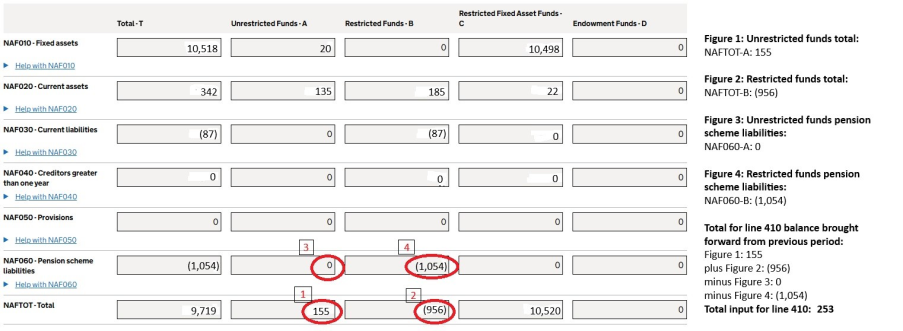
This image shows where the figures have been taken from your trust’s prior year AAR to populate BFR line 410 (revenue totals brought forward from previous period).
The lines taken from the AAR to populate BFR line 410 (revenue total brought forward from the previous period) are:
- NAFTOT-A – Total unrestricted funds
- plus NAFTOT-B – Total restricted funds
- minus NAF060-A – Pension scheme liabilities – unrestricted funds
- minus NAF060-B – Pension scheme liabilities – restricted funds
Example 2: Model set of accounts from the AAD
This is an example using the AAD model accounts (Coketown) for revenue totals.
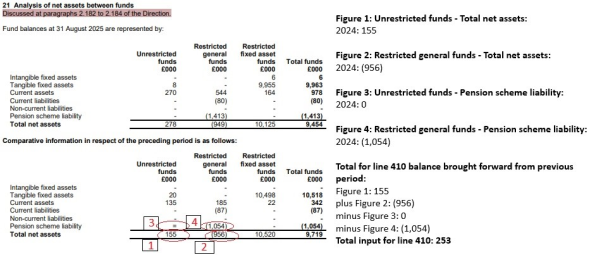
This image shows where the figures can be seen at Note 21 within the academy accounts direction (AAD) model set of accounts, which populate line 410 (revenue totals brought forward from previous period).
The figures that are taken from Note 21 within the AAD model set of accounts to populate line 410 (revenue totals brought forward from previous period) are:
- Unrestricted funds: total net assets minus pension scheme liability
- plus Restricted funds: total net assets
- minus Pension scheme liability
Capital totals
We have pre-populated the opening balance for capital totals brought forward from September 2024 on line 670 with the closing balance from the 2023/24 AAR return.
The following are examples of where these figures can be found.
Example 1: AAR
The figures in the previous year’s AAR can be found in the analysis of net assets funds by logging into your trust’s accounts return and going to: Academies accounts return index > Balance sheet funds and other disclosures > Other > Analysis of net assets funds.
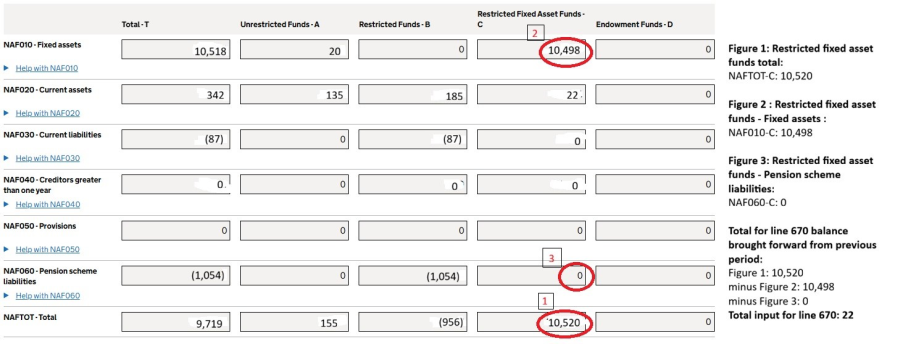
This image shows where the figures have been taken from your trust’s 2023/24 AAR to populate BFR line 670 (capital totals brought forward from previous period).
The lines we have taken from the AAR to populate your BFR line 670 (capital totals brought forward from previous period) are:
- NAFTOT-C – Total restricted fixed asset funds
- minus NAF010-C – Fixed assets – restricted fixed asset funds
- minus NAF060-C – Pension scheme liabilities – restricted fixed asset funds
Example 2: Model set of accounts from the AAD
This is an example using the AAD model accounts (Coketown) for capital totals.
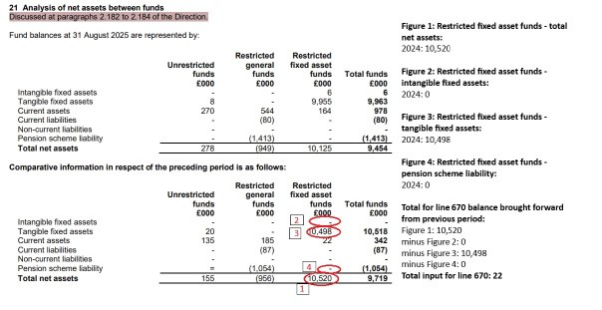
This image shows where the figures can be seen at Note 21 within the academy accounts direction (AAD) model set of accounts, which populate line 670 (capital totals brought forward from previous period).
The figures that are taken from Note 21 within the AAD model set of accounts to populate line 670 (capital totals brought forward from previous period) are:
- Restricted fixed asset funds – total net assets
- minus Restricted fixed asset funds - intangible fixed assets
- minus Restricted fixed asset funds – tangible fixed assets
- minus Restricted fixed asset funds – Pension scheme liability
Reserve balance questions page
Scenario 1
Trust revenue reserve levels are 15% of annual revenue income at 31 August 2026 (£1000k reserves c/f). The trust’s reserves policy aims to hold 10% of annual revenue income as contingency. They are planning an extension to their main site worth £300k, with an aim to complete construction by August 2028.
Question 1: What percentage (%) of income does your trust reserves aim to hold as a contingency?
Response: 10%
Question 2: Where is your trust currently on the reserves planning cycle?
Response: Actively using the reserves to deliver the trust’s strategic priorities (for example, premises improvements, digital updates, curriculum investment) which will see reserves levels decrease
Question 3: Where you hold reserves at 31 August 2026 that are above your defined contingency level, on what areas will you spend those reserves over the next 3 financial years? Choose up to 3 priority areas of spend in each financial year.
Responses:
For 2026 to 2027, choose ‘New buildings and estates projects’ if the extension to the main site begins in the 2026 to 2027 academic year. If there will be no spend in relation to this project in the 2026 to 2027 academic year, select ‘Not applicable’.
For 2027 to 2028, choose ‘New buildings and estates projects’.
For 2028 to 2029, choose ‘Not applicable’.
Scenario 2
Trust – revenue reserve levels are 15% of annual revenue income at 31 August 2026 (£1000k reserves c/f). The trust’s reserves policy aims to hold 10% of income as contingency. They are planning an extension to their main site worth £900k, with an aim to complete the project in January 2029.
Question 1: What percentage (%) of income does your trust reserves aim to hold as a contingency?
Response: 10%
Question 2: Where is your trust currently on the reserves planning cycle?
Response: Actively increasing the reserves levels to address the trust’s strategic priorities (for example, premises improvements, digital updates, curriculum investment)
Question 3: Where you hold reserves at 31 August 2026 that are above your defined contingency level, on which areas will you spend those reserves over the next 3 financial years? Choose up to 3 priority areas of spend in each financial year.
Responses:
For 2026 to 2027, choose ‘New buildings and estates projects’ if the extension to the main site begins in the 2026 to 2027 academic year. If there will be no spend in relation to this project in the 2026 to 2027 academic year, choose ‘Not applicable’.
For 2027 to 2028, choose ‘New buildings and estates projects’ as it is highly likely you will need to spend reserves in the 2027 to 2028 academic year to complete a £900,000 capital project by January 2029.
For 2028 to 1029, choose ‘New buildings and estates projects’.
Scenario 3
Trust – revenue reserve levels are 5% of annual revenue income at 31 August 2026. The trust’s reserves policy aims to hold 5% of annual revenue income as contingency. There are no specific plans to build higher reserve levels for additional specific activities within the trust.
Question 1: What percentage (%) of income does your trust reserves aim to hold as a contingency?
Response: 5%
Question 2: Where is your trust currently on the reserves planning cycle?
Response: Holding the agreed level of reserves in line with the trust’s policy, with no additional strategic priorities requiring an increase or decrease in reserves levels in the future
Question 3: Where you hold reserves at 31 August 2026 that are above your defined contingency level, on which areas will you spend those reserves over the next 3financial years? Choose up to 3 priority areas of spend in each financial year.
Responses:
For each year range 2026 to 2027 to 2028 to 2029 choose ‘Not applicable’ for all time periods.
Scenario 4
Trust – revenue reserve levels are 5% of annual revenue (£500k reserves c/f). The trust’s reserves policy aims to hold 8% of annual revenue income as contingency.
Question 1: What percentage (%) of income does your trust reserves aim to hold as a contingency?
Response: 8%
Question 2: Where is your trust currently on the reserves planning cycle?
Response: Reserve levels are materially below the agreed level in the trust’s policy for contingency and our priority is to build up to this
Question 3: Where you hold reserves at 31 August 2026 that are above your defined contingency level, on what areas will you spend those reserves over the next 3 financial years? Choose up to 3 priority areas of spend in each financial year.
Responses:
For 2026 to 2027, 2027 to 2028 and, 2028 to 2029 choose ‘Not applicable’.
Scenario 5
Trust – revenue reserve levels are 15% of annual revenue (£1,500,000 reserves c/f). The trust’s reserves policy aims to hold 5% of annual revenue income as contingency. The trust plans to use these reserves to support a wide range of priorities, including:
- classroom refurbishment of £100,000
- IT upgrades of £50,000
- annual costs of £80,000 to deliver the GCSE in British Sign Language
- annual costs of £20,000 on a new staff leadership programme
Both the classroom refurbishment and IT upgrade projects will complete by 31 August 2027.
Question 1: What percentage (%) of income does your trust reserves aim to hold as a contingency?
Response: 5%
Question 2: Where is your trust currently on the reserves planning cycle?
Response: Actively using the reserves to deliver the trust’s strategic priorities (such as premises improvements, digital updates, curriculum investment and similar), which will see reserves levels decrease.
Question 3: Where you hold reserves at 31 August 2026 that are above your defined contingency level, on which areas will you spend those reserves over the next 3 financial years? Choose up to 3 priority areas of spend in each financial year.
Responses:
For 2026 to 2027, choose ‘IT and systems’, ‘Maintenance and improvements to existing buildings and estates projects’ and ‘Pupil and curriculum provision’. These reflect the 3 areas in 2026 to 2027 where you will incur the most spend from your trust’s reserves held at 31 August 2026. You cannot record the planned spend on the staff leadership programme as you can only select up to three categories in any one academic year.
For 2027 to 2028 and 2028 to 2029, choose ‘Pupil and curriculum provision’ and ‘Staff provision’. You can now select ‘Staff provision’ to record the planned spend on the staff leadership programme as the classroom refurbishment and IT upgrade projects should have completed by 31 August 2027.
Glossary of terms
Academy trust handbook
Academy trusts must comply with this handbook as a condition of their funding agreement. It provides an overarching framework for implementation of effective financial management and control.
Academy level
To do with an individual academy school(s).
Accounting officer (AO)
The accounting officer is responsible for giving assurance (to Parliament and the public) of high standards of probity in the management of public funds, particularly regularity, propriety and value for money. More details of their responsibilities are given the academy trust handbook, sections 1.28 to 1.38.
Accruals
The recognition of income and expenditure in the accounting period that they have been earned or spent.
Amortisation charges
Depreciation charged on intangible assets.
Approver
The accounting officer or designated representative who submits the return on behalf of a trust and can also prepare the return.
Balance brought forward
Balance brought forward from the previous accounting period.
Balance carried forward
Balance carried forward to the next accounting period.
Capital expenditure (CAPEX)
Payments made to buy or enhance a capital asset.
Companies House
National register of company information within the UK that is available to the public.
Consolidated return
An academy trust level return that covers more than one establishment, such as the BFR.
Contingency
Contingency refers to funds deliberately set aside, typically in line with an organisation’s reserves policy and trustee-approved reserve levels, to manage uncertainty. These funds are ring‑fenced to enable the organisation to respond effectively to unforeseen events or circumstances and to cover unexpected or additional costs, helping to maintain financial stability and operational continuity.
Declaration section
Part of the application or form that requires the user to enter sign off details.
Devolved formula capital
DfE capital grant allocated to individual schools and other eligible institutions to spend on capital projects.
DfE Sign-in
Online portal for accessing the BFR and used for setting up and updating user roles.
Disposal proceeds
Income received when selling assets.
Fixed assets
Assets that are purchased for long term use and are not likely to be converted quickly into cash, such as land, buildings and equipment.
Forecast deficit
A situation when expenditure exceeds income in the near future.
Funding agreement
The funding agreement provides the framework within which your academy or free school will operate.
General annual grant (GAG)
Government funding for the school or trust to operate and will form a large part of academy funding.
Impairments
A permanent reduction on the value of a fixed or intangible asset. It is when an asset’s market value is less than the asset’s book value.
Intangible assets
Assets that cannot physically be seen, for example, software, licenses, goodwill.
Investment income
Income received from investments.
Investment liquidations
Either selling the investment or bringing it to a form that can be easily converted to cash.
Organisation details
Details of the establishment in question, normally things like UPIN and trust type.
Post 16 allocations
Grant allocations for post 16 education.
Predecessor local authority
The local authority an academy was previously maintained by.
Preparer
The person who fills in the return with data then submits to the approver.
Private Finance Initiative (PFI)
Where private firms are contracted to complete and manage public projects.
Provisions
Financial or other arrangements for future eventualities or requirements.
Public Expenditure Statistical Analysis (PESA)
Annual publication of information on government spending.
Pupil premium and service premium
This provides funding to improve educational outcomes for disadvantaged pupils in state-funded schools in England.
The grant also provides support for children and young people of service families, referred to as service pupil premium (SPP). This has been combined into pupil premium payments to make it easier for schools to manage their spending.
Pupil premium plus
Similar to pupil premium but this is aimed at children in the care of the local authority. Money is paid through a virtual school head that works in the local authority.
Reserves
Money held for emergencies or future projects. Some may be ringfenced for capital works, for example, or paying for staff expense contingencies.
Reserves cycle
Trusts hold reserves to support both short‑term priorities and long‑term sustainability. The level of reserves a trust holds will change over time as it moves through different stages of the reserves cycle.
At some stages, a trust may focus on building reserves, for example to save towards future projects, planned investments or to improve financial resilience. At other stages, reserves may be used or reduced when sufficient funds have been built up to deliver specific priorities. After this spending, the trust will usually return to a period of rebuilding reserves.
A trust’s position in the reserves cycle does not indicate its financial health. Well-managed trusts will see their reserve levels rise and fall in line with their needs and strategic plans. Multi‑academy trusts may experience more stable reserve levels overall, as they often manage spending and investment across several schools.
Residual unspent net capital income
Capital income received and not spent on capital expenditure.
Revenue grants
Grants received for revenue expenditure.
Risk protection arrangement (RPA)
An alternative to commercial insurance for academy trusts. Under the RPA, the UK government covers the losses instead of commercial insurance.
Surplus and deficit
Monetary term denoting a value in a plus or negative state. Surplus budget is a situation where income exceeds expenditure, and a deficit budget is a situation when expenditure is more than its revenue.
Tangible assets
Fixed assets that are held by a trust for a long period of time and are easily identifiable that is, land, buildings and equipment, as opposed to software or licenses (see Intangible assets).
Trading activities
Activities undertaken to earn income from the school which are non-educational activities, for example room or hall rental.
Trust level
To do with all academies in the group that is, represented as one entity.
Unwinding of the discount
Term generally used when the future liability is fixed/certain (for example, loans or leases) and you undo (unwind) the process to find out the discount in the said fixed future liability as against its relative present value (for example, interest to its relative present value).
Validation messages
Alert or warning that highlights an error that requires attention.
Privacy notices
DfE uses personal information in academy trust data collections. This includes:
- information you give to us
- information that we may collect about you
- personal data from the online forms you complete – this is part of the information telling us how your trust budgets and spends its money
The aim for this project is to provide an online service for trusts to send their financial data to the department.
This is a requirement from the HM Treasury to account for the spending of public funds.
You can find out more about how we use your data in: