Preparing your practice
Deciding which services to offer and what that might mean for your business and colleagues.
Once you know which of your clients will need to use Making Tax Digital for Income Tax, you can think about the services you will provide to them and consider whether there are changes you need to make in your own practice which will help you to prepare.
HMRC allows taxpayers to appoint both a main agent and one or more supporting agents to help manage their obligations under Making Tax Digital for Income Tax.
As part of preparing for Making Tax Digital for Income Tax, you should consider how multiple agent relationships may apply within your practice or across collaborative business models.
Agents whose client authorisations are transferred from legacy HMRC systems will automatically be assigned as main agents. For new clients added through the agent services account, agents will be prompted during sign-up to specify whether they are acting as a main or supporting agent.
Main agents
Main agents have full access to Making Tax Digital for Income Tax services and can see and do almost everything that their client can do online, including finalising tax returns and viewing tax calculations.
Supporting agents
Supporting agents have limited access and will only able to do certain things for their clients, such as preparing quarterly updates. They cannot submit tax returns or view all income sources and can only interact with HMRC on a client’s behalf for their sole trader and property businesses.
Once you know which of your clients will need to use Making Tax Digital for Income Tax, you can plan how your practice can best support them.
This includes deciding which services to offer and how responsibilities will be shared between:
- agent
- client
- any supporting bookkeepers
You should talk to your clients about what they want you to do their behalf. Options might include:
- digital record keeping
- preparing and sending your client’s quarterly updates and submitting the tax return
- checking your client’s quarterly updates before submission, and then handling the tax return for them
- allowing your clients or their bookkeeper to manage quarterly submissions independently, while you are responsible for the tax return only
Letters of engagement
Professional bodies under the Professional Conduct in Relation to Taxation (PCRT) have issued guidance specifically about Making Tax Digital for Income Tax. They encourage agents to consider the use of ‘letters of engagement’ which clearly define roles and responsibilities.
Example letters can be downloaded from the websites of participating professional bodies.
These examples and diagrams show how roles and responsibilities might be shared between an agent and their client.
The examples are not exhaustive and do not cover all possible scenarios. It is up to you and your client to agree on exactly which services you will offer them.
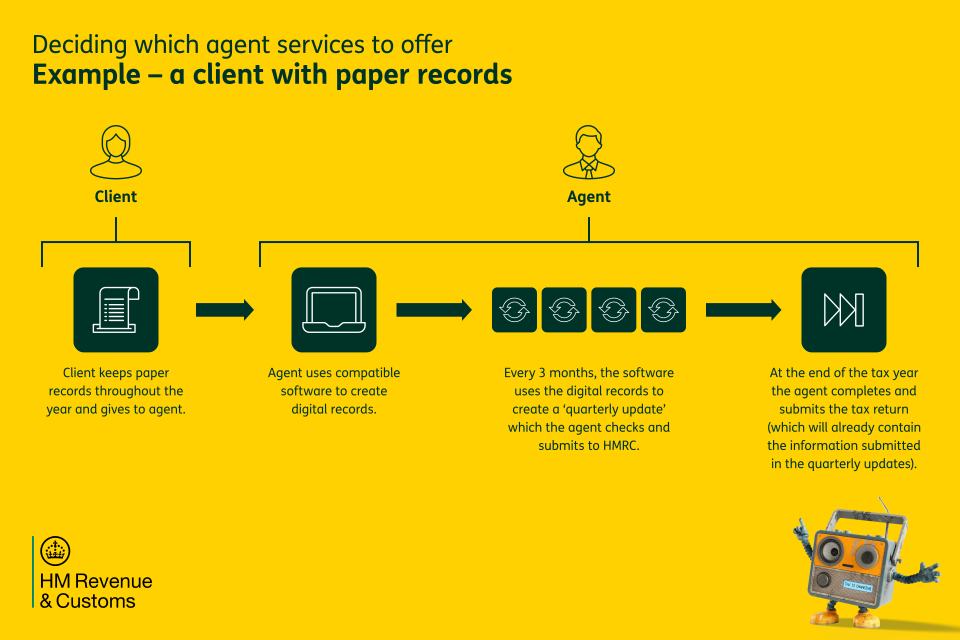
Example — a client with paper records
If your client keeps paper records, you might agree with them that you will:
- use your client’s paper records to create their digital records
- every 3 months, check and send a quarterly update using compatible software
- complete and submit their tax return at the end of the tax year, making any adjustments as required
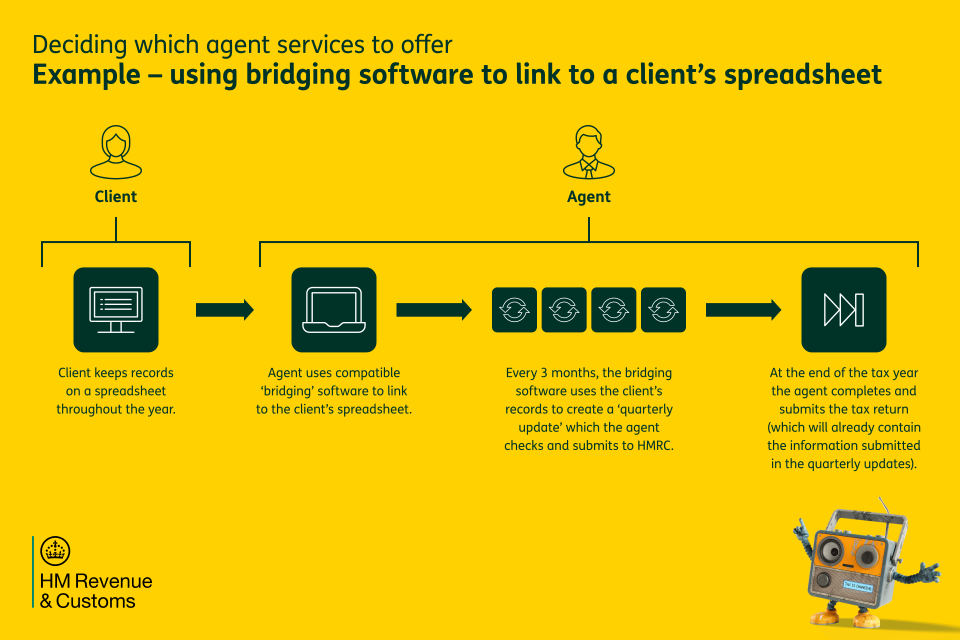
Example — using bridging software to link to a client’s spreadsheet
If your client keeps records on a computer spreadsheet, you might agree with them that you will:
- use compatible ‘bridging’ software to link to their records
- every 3 months, create, check and send a quarterly update
- complete and submit the tax return at the end of the tax year, making any adjustments as required
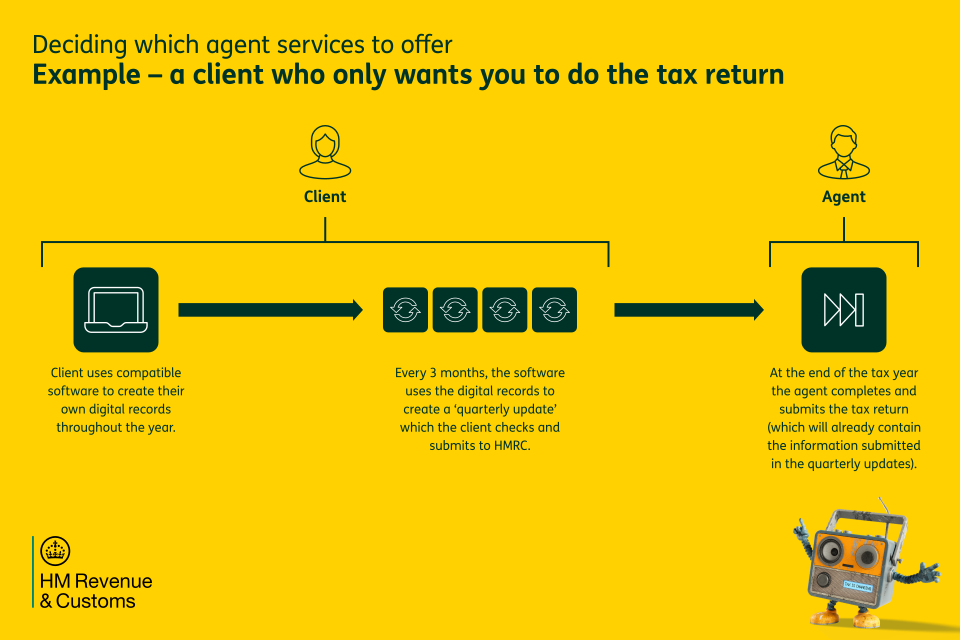
Example — a client who only wants you to do the tax return
Your client might want to use compatible software to create their own digital records and send their own quarterly update every 3 months.
If so, you might agree with them that:
- they will share their records with you
- you will complete and submit their tax return at the end of the tax year, making any adjustments as required
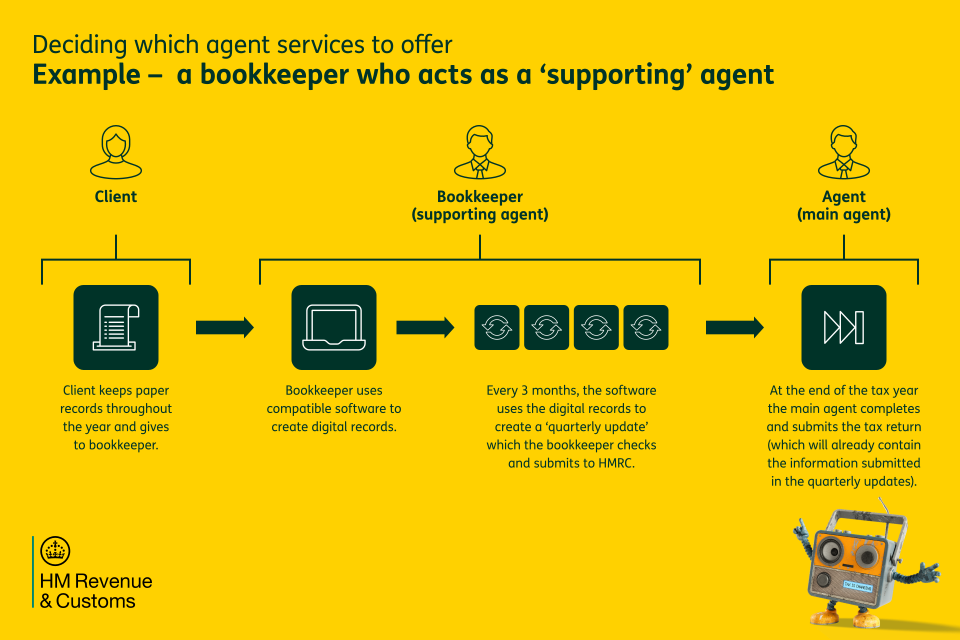
Example — a bookkeeper who acts as a ‘supporting’ agent
If your client keeps paper records and sends them to a bookkeeper, you need to decide who will carry out which tasks on behalf of the client.
For example, you might agree that:
- the bookkeeper (the supporting agent) will use compatible software to create the client’s digital records and send their quarterly update every 3 months
- as the main agent, you will complete and submit the tax return, making any end of year adjustments as required
As well as agreeing with your client how you will work with them, you should also consider what might need to change within your practice to help you prepare.
This could include:
- staff training needs
- guidance and communications
- pricing and marketing
Appointing one or two Making Tax Digital ‘champions’ within your practice can help manage internal queries and provide support to both staff and clients.
You must have an agent services account for Making Tax Digital for Income Tax. This secure HMRC account is essential for accessing digital tax services.
It is likely that you will already have an agent services account if you deal with client VAT returns, Trust Registration or 60 Day Capital Gains Tax returns. If you do already have an account, you will use the same account for Making Tax Digital for Income Tax.
The agent services account is separate from the agent online services account and is designed to support agents in managing client authorisations and software connections under Making Tax Digital for Income Tax.
There should only be one agents services account per firm regardless of how many legacy agent accounts the firm has.
Find more information about HMRC services for tax agents.
Creating an agent services account (if you don’t already have one)
To create an agent services account, you must be registered with HMRC as a tax agent and have a Government Gateway user ID and password.
How do I set up an agent services account for Making Tax Digital for Income Tax clients?
Once the account is set up, you will be able to:
- manage client authorisations for Making Tax Digital for Income Tax services
- authorise compatible software
- set staff permissions and access levels
- view and change client details, obligations and tax estimates
- access multiple HMRC tax services from one account
Apply for an agent services account if you’re not based in the UK
Adding client authorisations to your agent services account
Your agent services account will need to hold authorisation from your client giving you permission to act for them (for example to sign them up and connect software to HMRC).
How to add client authorisations to your agent services account
If you already have an agent services account for VAT, you may have already added Self Assessment client authorisations to your account.
You do not need to request new authorisation from your client — you can add any existing authorisations held in your Online Services for Agents account to your agent services account. You will still have access to your Online Services for Agents account, the legacy accounts and all the information held there.
To add client authorisations, you will be asked to provide a Government Gateway ID linked to the Agent Code which holds the client authorisations you want to add.
Many agents will already be using software that is compatible with Making Tax Digital for Income Tax but it’s important to check.
You can use HMRC’s guidance to find the right software for Making Tax Digital for Income Tax, which includes a software finder tool.
If you do not already have compatible software, you should begin selecting and implementing solutions that align with your practice model and client needs.
When you choose compatible software, consider whether a single product or a combination of tools will work best for you. Where multiple products are used, it is essential that digital records are transferred using compliant digital links, not manual methods.
For clients with the simplest circumstances, a spreadsheet together with bridging software may be a solution. However, data must be digitally linked throughout the process and never cut and pasted or copied and pasted. This makes sure that submissions meet HMRC’s technical requirements.
When making software decisions you should also consider:
- the types and volume of mandated income sources across your client base
- licensing and cost implications
- integration with existing practice systems
- compatibility between client and agent software
- the level of support your clients may need, including training or guidance
Read more about how to choose the right software for Making Tax Digital for Income Tax.
As part of preparing for Making Tax Digital for Income Tax, you need to make sure that all the software you use for submissions is properly authorised.
-
Select the option to connect to HMRC in the compatible software.
-
Enter your firm’s agent services account user ID and password.
-
Pass the identity check by entering personal information and details from identity documents.
-
Give permission for your firm’s software to connect with HMRC.
Personal information from you or an employee at the firm is required for fraud prevention. You can find out how we store and process personal information in the Government Gateway Privacy Notice and HMRC Privacy Notice.
You’ll need to repeat these steps every 18 months. Your software should remind you when it’s time to reconnect.