Net capacity assessment: guidance
Updated 28 October 2026
Applies to England

© Crown copyright 2026
This publication is licensed under the terms of the Open Government Licence v3.0 except where otherwise stated. To view this licence, visit nationalarchives.gov.uk/doc/open-government-licence/version/3 or write to the Information Policy Team, The National Archives, Kew, London TW9 4DU, or email: psi@nationalarchives.gov.uk.
Where we have identified any third party copyright information you will need to obtain permission from the copyright holders concerned.
This publication is available at https://www.gov.uk/government/publications/net-capacity-assessment-tool/net-capacity-assessment-guidance
Overview
The capacity of a school is the number of pupil places the school can accommodate.
This guidance describes the ‘net capacity assessment (NCA) method’ of assessing the capacity of all mainstream and special schools in England.
It should be used as a measure of the capacity of all maintained schools in England.
Local authorities in England are responsible for informing the Department for Education (DfE) of the net capacity of all maintained schools and any future changes through the annual school capacity (SCAP) survey.
Schools to which net capacity applies
The NCA method applies to the following schools in England:
- community
- voluntary aided
- voluntary controlled
- foundation
- academies
It does not apply to:
- nursery schools
- alternative provision, including pupil referral units
- further education colleges
Responsibilities
The Secretary of State for Education requires all local authorities under Section 29(3) of the Education Act 1996 to inform DfE annually, via the SCAP survey, of:
- the capacity of each mainstream and special school in its area
- any planned changes to a mainstream school’s capacity in the coming 3 years
This includes academies. The local authority may not centrally hold capacity data for all its academies and may have to collect this data from responsible bodies. Practices will differ across local authorities. It may involve responsible bodies:
- having to inform the local authority of any new capacity figures
- responding to the local authority when it asks for the data.
The SCAP survey should always reflect the most up-to-date capacity of an academy, regardless of whether the funding agreement is yet to be updated.
Steps 1 to 3 of the Room details may be measured and assessed by independent assessors, as they are based only on the physical attributes of the spaces available.
Local authorities are responsible for assessing the net capacity of all schools maintained by them, based on these measurements. Responsible bodies for other schools, including academies, should use the NCA assessment method to ensure a consistent approach with maintained schools when supporting their requirement to keep their capacity figure in their funding agreement accurate and up to date.
The relevant responsible body should identify the establishment details and, at step 4 of the Room details, identify:
- the rooms that are teaching rooms, which are the basis of the net capacity calculation. In primary schools, teaching rooms that are also the main registration bases for a class are categorised as ‘classbases’
- any non-school facilities excluded from the capacity assessment because they are not normally available for the school, including but not limited to:
- a faith space
- a parent or community room
- adult learning facilities
- some specially resourced facilities
- any spaces in residential use
- any early years provision used solely for local-authority-designated nursery and childcare places for children aged 0 to 4
- any spaces used solely for local-authority-designated specially resourced places for pupils with specific special educational needs that are outside of the mainstream school admissions and roll, such as a designated unit
Terminology
Net area
Net area is the total area of all usable spaces, both teaching and non-teaching. It includes everything except:
- corridors
- toilets and showers
- boiler and plant rooms
- school kitchens
- the area occupied by internal walls
This parallels the standard measurement used in non educational sectors, except that it excludes ‘shared circulation’ and school kitchens.
A full definition is given in Net area.
Non-net spaces can also be captured on the net capacity tools. This provides a full record of all spaces within the school. Further information is given in the Measuring ‘non-net’ area section.
Classbase
A classbase is a classroom or area designated as the registration base for one class.
In primary schools, the net capacity is generally based on the size and number of classbases, unless it exceeds the limits referenced in How the net capacity method works – general.
Teaching spaces
Teaching spaces comprise all rooms available for teaching or learning, including:
- all timetabled spaces
- halls
- libraries (if used for timetabled teaching)
- study areas (but not including dining areas or social areas)
In secondary schools, the net capacity is based on the size and number of teaching spaces, and on a ‘utilisation factor’ linked to the age range of the school, unless it exceeds the limits referenced in How the net capacity method works – general.
Utilisation factor
The utilisation factor is a decimal fraction equivalent to the average proportion of time that any workplace is in use to allow for the ‘frequency of use’ of teaching spaces being timetabled and the ‘occupancy’ of the space to allow for varying group sizes.
The purpose and background of net capacity
The purpose of net capacity
The NCA method provides a single, robust and consistent method of assessing the capacity of schools. It results in a measure of capacity called the ‘net capacity’, which means it includes all the spaces within the net area of school buildings. The final output of the assessment is a single net capacity figure as well as a range to allow flexibility for inclusion policies and admission arrangements where needed.
The net capacity figures can be used for a number of purposes:
- by comparison with the number on roll and future pupil forecasts, it can indicate the number of places that are surplus or additional places that are needed in a school or across the local area when combined with capacity data from other schools
- in mainstream schools, if it is divided by the number of year groups, it can indicate the approximate admission number (called the indicated admission number) that can generally be accommodated
- in special schools, it can indicate an appropriate number of planned places
It can also inform decisions about how capital resources are best deployed. In addition, it provides schools and responsible bodies with consistent and objective data for use in admission appeals, supporting estate management and curriculum planning. The admission number or planned places indicated by the net capacity of a school may need to be refined taking into account class size limits and need.
Background
The net capacity method was introduced in 2002 for mainstream schools to replace a variety of methods previously used to assess the capacity of schools, based on different indicators. This version of net capacity is a development of that method, based on the physical capacity of the school buildings, and has been expanded to include special schools.
The NCA method provides a realistic and fair assessment of physical capacity. Its key features are that:
- all usable spaces are measured, both teaching and non-teaching, to present a fair assessment of the actual space available and ensure there is sufficient space available for ancillary accommodation, such as staffrooms and storage
- the assessment is based only on the physical attributes of the available space, and the net capacity range itself is not affected by variable factors such as the number of sixth-form students on roll or pupils with an education, health and care (ECH) plan
- the assessment does not need to be updated unless:
- there is any change in the physical attributes of the usable space
- there are significant changes in the use of the spaces
- changes are made to admission numbers or age ranges
- for mainstream schools, the net capacity divided by the number of years will produce an ‘indicated admission number’ that is related to a reasonable or consistent year size – only the indicated admission numbers in mainstream schools will be affected by changes in sixth-form stay-on rates, not the net capacity
- realistic long-term allowances for pupils with special educational needs or disabilities (SEND) within mainstream schools can be accounted for
- for special schools, the wide capacity range allows for diverse types of need to be accounted for
The net capacity of most schools should match a capacity based on their preferred admissions number in mainstream schools or their planned number of places in special schools.
Capacity based on planned admission number is the published admission number multiplied by the number of year groups, with an allowance for average sixth-form size, if applicable.
The net capacity method uses a standard area per pupil to calculate how many pupils can be accommodated within each space. The minimum area for a primary classbase for 30 pupils is 50 square metres, but this must be supported by at least a further 12 square metres of ancillary area, not including the hall. Part of this further area could be in non-teaching spaces such as stores, but it will predominantly be for teaching, either within the overall area of the classroom or in shared teaching areas. The early years foundation stage framework requires 69 metres for reception.
The minimum area for a secondary classroom assumed for 30 pupils is also 50 square metres. Like other types of space, this is in line with the recommendations for area guidelines. In both sectors, further allowances are made for increasing the overall area per pupil to allow for those with SEND.
Further guidance on the recommended teaching area of schools is in:
- Building bulletin 103: area guidelines for mainstream schools
- Building bulletin 104: area guidelines for SEND and alternative provision
How net capacity is assessed
For all types of schools, the net capacity is based on the number, size and type of teaching spaces and the age range of the school. This is checked against the total usable space available, which must be measured, and ensures that there is neither too much nor too little space available to support the core teaching activities.
For mainstream schools, the method also allows some flexibility via the resulting net capacity range to suit the inclusion of pupils with SEND and admission arrangements.
For special schools, the net capacity is calculated in the same way as mainstream schools described in the Purpose of net capacity section, but with an additional assumption that allows significantly more space per pupil. There is also flexibility via the net capacity range to account for type of need.
The net capacity of a school should be assessed by the measurement of all available space and calculation using the relevant assessment form.
Although the method of assessing net capacity is broadly similar, different assessment forms are used for mainstream and special schools.
There are 3 parts to a net capacity assessment:
How the net capacity method works
General
All usable spaces must be included in the net capacity measurement. Every space in the ‘net area’ of the school buildings must therefore be listed and measured, including separate stores, garages and temporary buildings. This is to ensure there is enough support space available in the school for staff, storage and other ancillary accommodation.
The net capacity is given in terms of number of places, based on the number of workplaces in classbases and teaching spaces, if this is within reasonable limits. Because all spaces in the net area are measured, these limits are based on the proportion of classbase or teaching workplaces compared to all the usable space available, as set out in the Workplaces section.
One limit ensures there is enough space available for the support areas that the school needs, and adjusts the capacity figure accordingly if there is not.
The other limit checks that a reasonable proportion of the total space that could be used for teaching (classbases or teaching spaces) are designated as such, and adjusts the capacity figure accordingly if it is not.
All spaces in the net area of a school must be measured, but only to set these limits. Unless it exceeds these limits, the net capacity of any school is based only on the size and number of spaces designated as a classbase or a teaching space.
In special schools, the net capacity is based on mainstream workspace calculations, and the mainstream utilisation factor linked to the age range of the school, where relevant, unless it exceeds the limits. However, the utilisation factor is multiplied by a further 35% to allow for the smaller group sizes in special schools.
Flexibility to allow for SEN inclusion and admission arrangements
The net capacity method calculates a maximum and minimum potential capacity in any school, based on the methods described in How the net capacity method works - general. The net capacity is then equal to the capacity based on the planned admission number (PAN) in mainstream schools, or the planned number of places in special schools, if it is within the minimum-to-maximum range.
If the PAN is below the minimum, the net capacity defaults to the minimum potential capacity. If the PAN is above the maximum, the net capacity defaults to the maximum potential capacity.
In mainstream schools, the minimum potential capacity is 90% of the maximum. This range offers the flexibility for inclusion, allowing extra space for pupils with SEND. The net capacity of a mainstream school can therefore be based on a long-term policy of inclusion of all pupils (with and without EHC plans).
The range allows the net capacity based on classbases and teaching spaces to be reduced by up to 10% in both primary and secondary mainstream schools. A school may set a capacity towards the low end of the range to allow extra space for adult assistants or for wheelchair users, where the responsible body recognise that the long-term inclusion policy of the school requires this additional allowance. This would be in addition to the allowances for specially resourced facilities for pupils outside of the main school admissions and roll. The Additionally resourced facilities for SEN section includes further information.
The methodology also provides flexibility to take into account admission arrangements in mainstream schools. The net capacity can be within the range and match the proposed admission number, even if it is a little below the capacity based on spaces. This allows some flexibility to suit a reasonable admission arrangement and organisation of the school (including infant class size limits, as necessary). For instance, a 5 to 11 primary school with 11 classbases suitable for 30 pupils each would have a capacity of 330, based on classbases, but the PAN of 45 (one and a half ‘forms of entry’) would reduce the capacity to 315 to avoid more than 3 classes of 30 in every 2 year groups.
In special schools, the minimum potential capacity is 75% of the maximum to allow for the wide range of group sizes needed: from around 4 for pupils with the most complex needs to about 12 for those with moderate learning difficulties.
One permanent measure
Net capacity does not need to be calculated every year.
It will only need to be updated if physical changes are made to the usable space, such as:
- space being removed (via demolition or becoming non-school use) or more space being added (via expansion or conversion)
- several small spaces being converted into one larger one
- changes being made that affect the type of space in classbases or teaching spaces
The NCA should also be updated if major changes are made to the admission details such as the PAN, age range or sixth-form numbers. This includes if the school needs to admit an additional bulge class, as set out in the Establishment details section.
Indicated admission number
The indicated admission number is a guide to setting an appropriate admission number and is calculated by dividing the net capacity by the ‘number of year groups’ to be accommodated at the school. This is usually a simple whole number, but it can also incorporate fractions to allow for the proportion of pupils in the sixth form, or where there is more than one year of admission.
In secondary schools with sixth forms, the number of year groups is adjusted to include the stay-on rate of all post-16 students remaining at the school. If the school also admits sixth-form students from elsewhere, this can be noted in the tool as a second year of admission. If the number of additional sixth-form students admitted from elsewhere is less formal and fluctuates considerably, these students can be added into the full-time equivalent pupils staying on in sixth form instead, and the calculations will still work appropriately. Similarly, the year 12 admission number could include pupils staying on from year 11, as well as students from elsewhere, and the calculations will still work appropriately.
In schools where there is more than one normal year of admission, the number of year groups will also be adjusted. The number of additional pupils it intends to admit from outside the school for each additional normal year of admission should be noted.
For instance, where an all-through school has a primary phase admitting 30 pupils in reception, and increased to 90 pupils in year 7, the number of further pupils to be admitted in the second normal year of admission (60) should be noted. Where a school admits a ‘bulge’ class, it should be added as an additional year of admission but only for one year in ‘Number of years’.
Workplaces
The net capacity method measures the area available in units known as ‘workplaces’.
Workplaces are used as the unit of measurement to ensure that the spaces in schools are weighted fairly. This is because different activities require different types of space, which in turn require very different floor areas to accommodate the same number of pupils. For instance, a classroom of 50 square metres and a gymnasium of 260 square metres will both accommodate a class of 30.
Each space in the net area is allocated a notional number of workplaces. This is based on different formulae for each type of space. These formulae are broadly based on area guidelines for the size of such spaces. However, the number of workplaces is not an indication of the minimum or maximum number of pupils that any room can or should hold, particularly in special schools, where the typical group size would be around a third of that in mainstream spaces of the same size. Nor is it an indication that the room should be used for teaching or working. It is the room type and use that determines this.
Room type
The room type of each space is based on the physical attributes of the space rather than its use.
Changes to the use of a space (for instance, from classroom to staffroom) are enough for its room type to change. There are 6 types of space:
- general, some of which may be open plan – most spaces fall under this type
- fitted
- light practical, including science and ‘other spaces’
- heavy practical, including ‘clean’, such as food rooms and workshops
- large
- storage
See the annex for a list of the rooms and areas that would normally be included in each type of space, and their general physical attributes.
Room use
Room use is based on how the school uses the space for the majority of the time. This does not have to match the room type, but the room uses that are most suitable for the room type are the first to appear in the drop-down list in the tool.
How workplaces affect school capacity
A further element of the NCA method is that, in mainstream schools:
- spaces with between 15 and 30 workplaces or, in larger spaces, the highest multiple of 30 (for example 60 or 90), are known as ‘basic workplaces’
- spaces with fewer than 15 workplaces, or the remaining workplaces in spaces with more than 30, are known as ‘resource workplaces’
In special schools, where teaching spaces can be smaller and group sizes are lower (equivalent to approximately a third of the workplaces):
- spaces with between 10 and 30 workplaces or, in larger spaces, the highest multiple of 30 are known as ‘basic workplaces’
- spaces with fewer than 10 workplaces, or the remaining workplaces in spaces with more than 30, are known as ‘resource workplaces’
This means that small rooms (27 square metres or less in mainstream ‘general’ spaces and 19.5 square metres or less in special school ‘general’ spaces) and extra space in larger rooms (over 50 square metres in ‘general’ spaces) do not count towards the capacity of any school. Such space should still be measured, however, to ensure that there is enough support space. They may also be used as learning resource areas or small group rooms.
The allocation of basic workplaces to a space indicates that it is a potential classbase or teaching space. This is based purely on the size and type of the space. It is not a reflection of the current use of the space, nor is it expected that all basic workplaces should be used for teaching.
Maximum workplaces limit
Limit 1
If more than 75% of all workplaces available are designated as basic workplaces in classbases or teaching spaces, a lower figure (based on the 75%) will be set as the maximum capacity.
In primary schools, this is further reduced if the number of basic workplaces in classbases is low compared to those in teaching spaces, to account for the lower utilisation of teaching spaces.
This limit ensures that there is enough space available for the support areas that the school needs. For example, if 2 schools have the same amount of classbases and teaching space but only one has sufficient non-teaching space, the second school’s net capacity result will be lower to reflect that it needs a certain level of non-teaching space to operate effectively.
Limit 2
If 75% of the total number of basic workplaces available, after having discounted a ‘basic workplace allowance’, is higher than maximum workplaces under limit 1, then the maximum capacity will be set at this higher figure.
This limit checks that a reasonable proportion of spaces that could be used for teaching (classbases or teaching spaces) are actually designated as such. For example, if a school has a significant amount of non-teaching space that could potentially be used as teaching space, it is not treated differently to a similar school that is using the space for teaching (within reason, hence the limits set in the calculation).
Basic workplace allowance
The basic workplace allowance, additional to the 25% of basic workplaces allowed for non-teaching space as set out in the Maximum workplaces limit section, allows parity across a range of school sizes.
This means that all schools have a minimum allowance to have large, non-teaching spaces such as halls, regardless of the size of the school.
The allowance is 75 basic workplaces per site, and increases to 125 for very small sites in relation to the building size to allow for additional large spaces within the building due to lack of outdoor space (see the Split sites and small sites section).
For instance, small schools with few classbases are allocated a reasonable number of basic workplaces for a hall, staffroom and other supporting spaces, such as a dining area. Large schools, however, may already have a sufficient proportion of space to allow for 2 halls or staffrooms and various other larger supporting spaces.
Schools without halls
Some schools have no hall because physical activities can take place in other, non-maintained accommodation, such as a village hall.
If the non-maintained facilities are available to the school for less than 80% of the normal school week, they need not be measured or included in the capacity of the school.
If a school has no hall but has a large classroom that can be used as such, even if it is not well suited for the purpose, that classroom can be given a use of assembly hall in step 4 of the Room details, even though it may be marked as a ‘general’ room type in step 1.
Split sites and small sites
Schools on split sites are those where there are buildings accommodating registration classes on 2 or more sites where pupils would have to use a public highway to travel between sites.
The basic workplace allowance of 75 or 45 basic workplaces is allocated for each site that the school occupies, to allow for the extra space requirements of split sites.
A further allowance of 50 basic workplaces in mainstream, or 25 in special schools, is given to schools where the total site area is smaller than an area approximately suitable to allow for sufficient outdoor physical education facilities. This allows schools on small sites (such as in inner-city areas) to have more space than a school with a larger site, such as an additional hall. This will help to make up for their inadequate outdoor ‘playing field’ area.
Figure 1: primary school plan (showing net area)
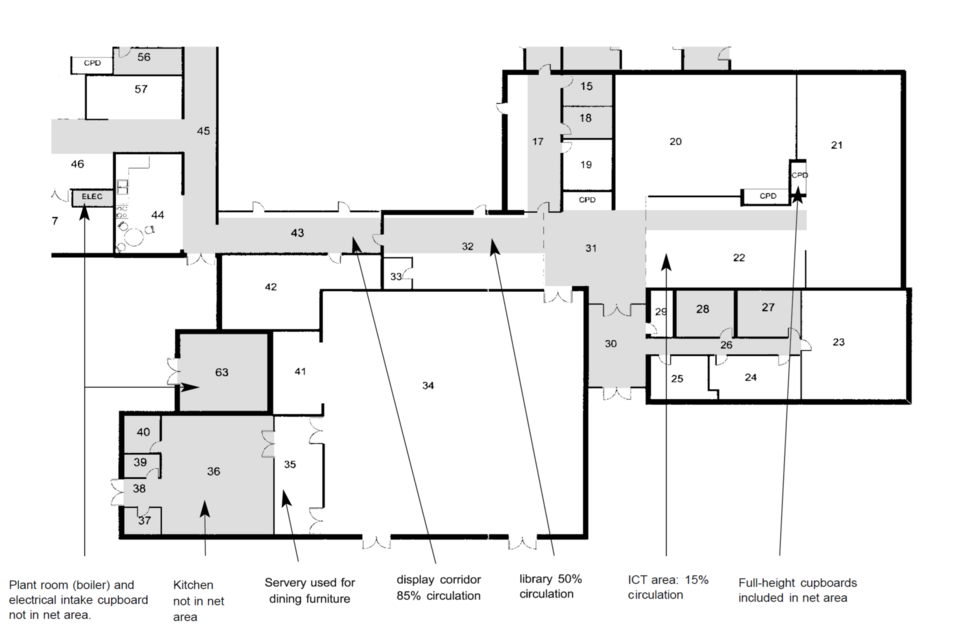
Figure 1 is a schematic floor plan of a primary school. It distinguishes between spaces that are included, partially included and excluded when calculating the net area of a primary school building. The net area includes classrooms and other teaching accommodation, halls, offices, stores and full-height cupboards. Non-net spaces excluded from the net area include the kitchen, toilets, plant room and electrical intake cupboard. The figure highlights examples where only part of an area is counted as net, such as a display corridor (85% non-net circulation), a library (50% non-net circulation), and an ICT area (15% non-net circulation). Arrows identify these examples within the plan.
What must be measured
The net capacity of a school is based on the net area of all buildings that are available to that school. These comprise:
- all buildings, on any site used by the school, that are owned or maintained by the local authority, responsible body or trustees and are intended to be secure and weathertight
- ‘non-maintained’ accommodation used by the school as described in the next section
All spaces in the net area should be measured. This should be done by listing the spaces and their area in the Room details sheet of the NCA forms. Certain spaces will be measured but excluded from the net capacity of the school. These are described in the Measured but excluded areas section.
Non-maintained accommodation
Non-maintained accommodation means any buildings that are used by a school but not maintained by the local authority, responsible body or trustees as part of the school premises.
The net area of any non-maintained accommodation should also be measured and included if it is available for the school to use during at least 80% of any normal school week. This would normally be under a ‘joint use agreement’ or similar. The accommodation would normally be on a site that is adjacent to the school or is easily accessible from the school.
Net area
Net area includes all spaces in all buildings that are available to the school, except the following, which are considered ‘non-net’ or ‘unusable’. These spaces can still be measured and included but will automatically be excluded from the calculations:
- residential (including caretaker’s houses) or farm buildings in use as such or intended to be used as such – for instance, if it’s a temporarily empty residence awaiting a new tenant
- buildings condemned by a suitably qualified surveyor or engineer as structurally unsafe
- accommodation under the control of service or external bodies and maintained by them (such as telephone or electricity services, the Police or NHS)
- open-sided covered areas (such as external balconies, covered ways, external fire escapes and canopies) and any other area not intended to be secure and provide reasonable weather resistance (reasonable resistance to penetration by rain, snow and wind and to moisture rising from the ground, including outdoor swimming pools)
- areas with headroom of less than 1.5 metres, unless beneath an open mezzanine level
- additional area provided by open mezzanine levels in spaces of 3 metres or less in height
- toilets, washrooms and showers, and any associated lobbies (including changing areas where these adjoin showers)
- plant rooms, including lift rooms, boiler rooms, tank rooms and fuel stores, and any space occupied by permanent air conditioning, heating or cooling apparatus and ducting that renders the space substantially unusable
- internal walls, including structural walls, non-structural partition walls, columns, piers, chimney breasts, other projections and vertical ducts
- school kitchens used for preparing school meals for pupils, including the kitchen, related stores, office and washroom facilities for catering staff, and server areas (where these are not available for furniture storage or other uses at other times). In some cases, the level of specialist equipment provided, or environmental health requirements, mean that a servery cannot be used for any other purpose than preparing, finishing or reheating and serving food. However, where this is not the case, the servery can provide a useful storage area (for instance, for dining furniture) when not being used for serving food. Where such areas can be used as storage, therefore, they should be included in the net area
- circulation areas, including any corridor, landing or balcony 2.5 metres or under in width for essential access, stairwells, entrance lobbies, lift wells, any protected corridor (deemed to be for the purpose of escape in case of fire) and shared circulation in mixed-use areas that have a circulation route running through them
Shared circulation
Shared circulation is the part of an entrance hall, atrium, wide corridor or open-plan area used for the purpose of essential access. It can be determined by either:
- measuring, from a scale plan, the notional circulation routes between openings across the shared space, using appropriate widths (normally 1.5 metres)
- estimating the circulation area as one of the following 3 proportions of the floor area of the space of which it is a part:
- 85% – for instance in corridors between 2.5 metres and 3.5 metres wide
- 50% – for instance, in shared resource areas or reception spaces with circulation through them
- 15% – for instance, in halls or shared teaching areas with a single circulation route through them
In cases of dispute, shared circulation should be measured from a scale plan.
Essential access
Essential access is the primary or only circulation route for regular access by pupils to a room or discrete area from a corridor or other spaces. It does not apply to:
- secondary routes to spaces accessible from other circulation areas
- routes through other spaces leading to offices, storerooms or similar that do not require regular access by pupils
- circulation between desks or workstations within rooms
Measuring ‘non-net’ area
All spaces in a school should be listed in the Room details.
The area of any spaces that are not in the net area (such as toilets, corridors or plant rooms) should be noted in the ‘non-net’ column in the Room details.
These spaces will not be allocated workplaces. Although it does not affect the net capacity calculation, it is useful to list spaces that are not currently in the net area, such as the school kitchen or residential facilities, for future reference or benchmarking.
Open-plan areas
Some open or semi open-plan primary schools have small classbases that were designed to be used with part of an adjacent shared teaching area.
Where such spaces exist and can be used together for teaching a class, their floor areas can be combined for the NCA. In this situation, a marked-up scale plan should be used to show the notional boundaries of the space or spaces. If the classbases and shared area are so designed that they cannot reasonably be used together to teach a class, they should be measured and included as separate spaces.
Similarly, open-plan areas in secondary schools that are designed for more than 2 groups should be notionally delineated to identify the area of each teaching space.
Figure 2: open-plan area in a primary school, from example 1 in part 5
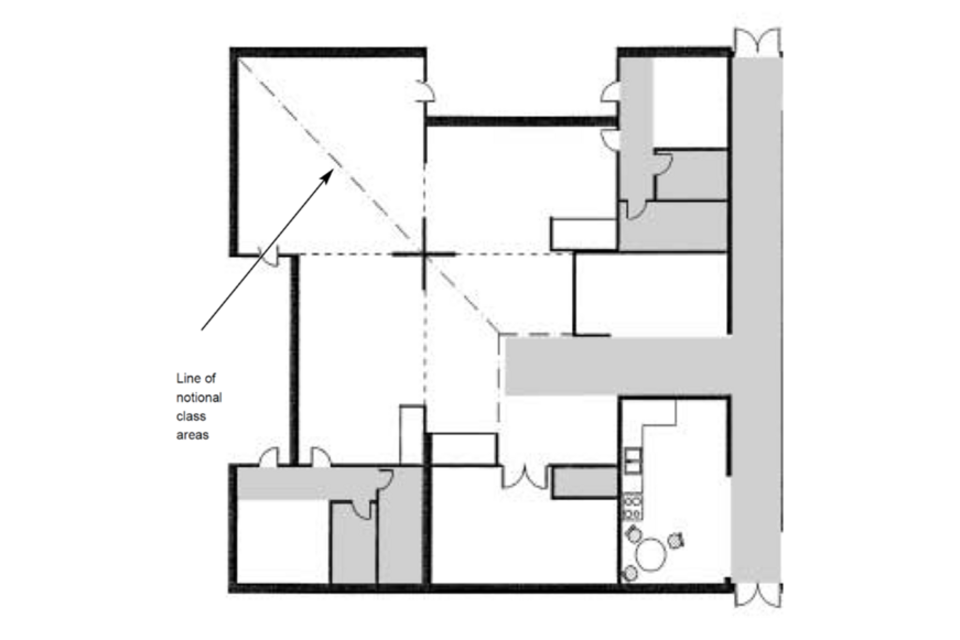
Figure 2 shows an open-plan area within a primary school. Dashed lines indicate the notional boundaries of within shared teaching space. These boundaries are used for measurement purposes and do not represent physical walls. The figure demonstrates how open-plan teaching accommodation can be divided into identifiable areas to be counted together with a classbase when recording measurements.
Accuracy of area measurements
Internal area should be measured to the face of internal walls or sliding or folding doors.
Any fixed storage, such as benching, should be included in the area of the space, unless it is full-height (from floor to ceiling) and effectively forms another space.
The measurement of any space larger than 7 square metres should be rounded up or down to the nearest one square metre. Half a square metre should be rounded up. Small spaces of less than 7 square metres (or storage rooms of less than 10 square metres) do not need to be measured as accurately because they will have just one resource workplace, whatever the exact area.
Measured but excluded areas
Some schools have small rooms that are not available to the school during the school day because they are used, for example, as community offices or stores, or by school nurses or counselling services. These can normally be noted as such and included in the Room details, but will not count towards the net capacity, as they are too small to have basic workplaces and will be designated as non-school.
Some larger areas should also be measured but will be excluded from the capacity assessment by being designated as non-school provision and support provision.
Non-school and support provision
Non-school and support provision should be measured but can be excluded from the capacity if one of the following categories applies:
- nursery (marked as early years status in step 4 of the Room details)
- specially resourced facilities for SEN (marked as ‘SEND resourced’ status)
- facilities that are not normally available to the school during the school day (marked as ‘non-school’ status)
The first 2 categories would only be for rooms that are provided for local authority (regulated) places, and the third category only applies to rooms that are not normally available to the school during the school day.
Early years provision
Nursery provision will include settings run by a local authority, private provider, a school or a trust, but must be accommodating places officially recorded by the local authority.
Therefore, if a nursery for children of any age up to 4 years is on the school site, all the spaces used solely for this should be identified as ‘early years’ in the Room details, and the nursery will be excluded from the capacity of the school.
Similarly, whatever the age range of the school, the calculation of the indicated admission number will automatically start at reception.
Where the age range of the school includes nursery places, this should be identified in the establishment details worksheet. This includes schools where early years provision on the school site includes mixed nursery and reception classes.
Measurements of workplaces in early years facilities on school sites may be useful for future planning for the provision of such facilities. As such, if this type of accommodation is on the school site but is in a building that is not owned or maintained by the local authority or school, it could still be measured. It will not count towards the net capacity of the school (as long as it is identified as early years in the Room details).
Additionally resourced facilities for SEN
Specially resourced facilities are those in mainstream schools where the local authority provides specialist funding, in addition to EHC plan funding, to cover the premises-related costs of maintaining accommodation for a specified number of pupil places, over and above the school’s mainstream admissions and roll, for pupils with a specific need. For SEND, these facilities include:
- integrated specially resourced provision, for separate places over and above the mainstream admissions, with specific needs, typically comprising:
- small group rooms, a SEND resource space, or a medical treatment or therapy room
- associated staff spaces, such as for peripatetic specialist staff
- storage for specialist equipment or appliances
- additional toilet or hygiene rooms within the non-net area
- a designated unit for separate places over and above the mainstream admissions for pupils with specific needs, typically comprising:
- classbases for the additional pupils, in groups of 6 to 10
- small-group rooms for other associated spaces
- accommodation for local-authority-designated support services, including peripatetic and support staff or assessment centres
‘Non-school’ facilities
Facilities that are not normally available to the school during the school day can be marked as ‘non-school’ status in step 4 in the Room details. These include:
- adult learning facilities
- some specially resourced facilities
- any spaces in residential use
Spaces with this status will not be included as part of the net capacity calculation.
They may also include non-school facilities funded from other sources and not available to the school during the normal school day, such as community library facilities or youth centres, as well as a central office for use by a relevant multi-academy trust (MAT) and community facilities not available to or usable by the school, such as bars.
In some schools, a room for parents, families or the local community may be large enough to have basic workplaces and may affect the capacity calculation. This space may be felt to play a significant role in encouraging parents and others in the local community to participate in the life of the school. One parent or community room in any primary school may therefore be marked as ‘non-school’ at step 4 in the Room details and excluded if it is:
- used regularly during the normal school day by parents or members of the local community
- not available to the school during the school day – for instance, because of the size or type of furniture
One chapel, or other place of worship, on any school site may also be excluded by being marked as ‘non-school’ at step 4 of the Room details if:
- the school has a relevant religious ethos or governance
- it is in use as such
- it is not available to the school except for that purpose
Related ancillary spaces will usually be too small to have basic workplaces, so will rarely affect the capacity calculation. They should still be measured and noted as such and included in the Room details.
Spaces unusable as basic workplaces
Basic workplaces should only be allocated to spaces that could potentially be used as classbases or teaching spaces, although this may not reflect their current use (halls or staffrooms, for instance).
The net capacity method ensures that small rooms and extra space in large rooms are only allocated resource workplaces, so do not count towards the capacity of a school. This is done automatically in the calculation tool.
Some spaces are large enough to be allocated basic workplaces, but their physical attributes mean that they should not be considered a potential teaching space. These spaces should still be measured and allocated as workplaces, as they can provide useful support space (lofts or basements used for storage, for instance). However, they should be marked as ‘unusable as basic workplaces’ at step 1 of the Room details and allocated only resource workplaces. They cannot then count towards the net capacity. The calculation tool will not allocate basic workplaces to spaces marked as unusable as basic workplaces.
The following spaces are typically not suitable as potential teaching spaces and should be marked as ‘unusable as basic workplaces’ on the basis of their physical attributes:
- spaces with no, or very little, daylight (this applies to daylight where required by the room type – for example, not for drama studios – and can include borrowed light from atria or light wells), or ventilation or heating, such as basements or loft space used only for storage, or enclosed servery areas also used for storage (in cases of dispute, reference should be made to the advice on standards for school premises and the relevant Approved Document of the Building Regulations
- spaces with no, or very little, heating or insulation, such as garages or storage containers
- spaces with inadequate access or means of fire escape
- spaces or areas that are narrow – less than 3.5 metres wide (not including any shared circulation area)
- spaces with a low ceiling height, where the height of the majority of the room is below 2.1 metres
- dedicated cloakrooms and changing rooms (without showers – changing rooms with showers adjacent should not be included in the net area of the school) that have fixed changing benches and perhaps fixed ‘island’ units
- usable area in spaces that are around 85% circulation, such as wide corridors, foyers or main entrance halls
- indoor swimming pools
- outbuildings (not suitable for normal indoor use), such as greenhouses or sheds
- spaces with other reasons identified by a professional surveyor or similar that make it unsuitable for teaching or learning
Large non-teaching spaces
Some spaces, such as dining areas and staffrooms, will be over 27 square metres, or 19.5 square metres in special schools, and therefore be allocated basic workplaces, but will not have any of the physical attributes to be marked as unusable as basic workplaces.
Although they may theoretically be potential classbases or teaching spaces, they will not count towards the capacity because they will not be marked with a classbase or teaching status in step 4. Instead, the basic workplaces they are allocated will be part of the allowance for larger non-teaching spaces and halls discussed in the Workplaces section.
Using the NCA forms
The net capacity of a school should be assessed using the relevant assessment form. The spreadsheet tools for mainstream and special schools are available at Net capacity assessment tool.
This section of the guidance summarises the process involved for using the NCA forms and highlights what to do in unusual situations.
Different assessment tools are used for mainstream schools (including primary, middle and secondary schools) and special schools. They both follow the same arrangement.
Establishment details
You must populate the Establishment details tab, as it contains all the general information on the school and covers the following areas:
- establishment information
- age range
- buildings information
- admission details
- sixth-form stay-on rate
- nursery admission details
- SEN admissions
Each cell has a pop-up definition of the cell.
Additionally, the ‘Definitions’ tab contains the definitions of different fields.
There are multiple validation messages that will automatically populate when certain conditions are not met. This acts as a prompt to check that the information populated is correct and relevant.
Follow these steps to populate the Establishment details tab:
-
Establishment identification: enter all establishment details and select ‘Establishment type’ from the drop-down list. All fields are mandatory and necessary to identify the school, as is selecting the date in which the tool is populated, to ensure that the sixth-form stay-on dates are updated correctly.
-
Establishment age range: from the drop-down list, select the minimum and maximum age range based on your school. All these fields are mandatory and necessary to calculate net capacity.
-
Buildings information: enter the number of sites. In most cases, it will be one, but it can be more. Enter the ‘Total site area’. This is important for the basic workplace allowance calculation.
-
Main admission details: enter all admission information on year groups and the number of students, as needed.
-
Sixth-form stay-on rate: enter all relevant sixth-form admissions details, if applicable, or otherwise leave blank or add a zero. If the assessment form is being completed before details of pupil numbers are known (for instance, in a new school or one that does not currently have a sixth form), enter proposed or projected pupil numbers as a second (or third) admission number.
-
Nursery admission details: enter all relevant nursery admissions details, if applicable, or otherwise leave blank or add a zero.
-
SEN admissions: enter all relevant SEN admissions details if applicable, or otherwise leave blank or add a zero.
-
Comments: provide further information on the details given in steps 4 to 7. This may be used for tracking purposes and to understand schools with special cases.
Convert primary data
This step is only applicable under 2 conditions, which are if:
- the school is a primary school
- you have old data from the original 2001 tool
The Convert primary data tab allows the conversion of the original room data into something usable in the next step of the NCA.
This step allows the use of old data and therefore saves time, while also allowing any additions or changes to the data, if needed.
Follow these steps to populate the Convert primary data tab:
Step 1: previous format
Copy data from step 1 to step 4 in the original NCA and paste the data as values into all the columns labelled under ‘Previous forma’ (columns B to U). Pasting as values can be done by highlighting the data and then pressing the following keys: Ctrl + C (to copy) and then Ctrl + Alt + V to paste as values.
Step 2: converted format
Columns X to AR will be auto-populated such that the old data is translated into the new format ready for using in the next step of the process. Columns AE and AR assume the room type and status based on the title or name of the room in the school. This can be reviewed and changed in the next step once pasted into the Room details tab.
Step 3: paste data to Room details tab
Now that the data has been converted into a new format, you can paste the data into the Room details tab by pasting all the columns and data as values.
All columns will match and do not need to be aligned (copy and paste as values from columns X to AS). Now the data can be changed and new rooms or buildings added, if needed, based on any changes to the school since the last survey.
Room details
The Room details tab is the part of the process where information is input on every room in the school.
The Definitions tab contains descriptions that can assist when trying to understand room uses and room types as well as other definitions.
The Room details tab has a limit of 2,000 rooms. The columns highlighted in grey contain calculations and cannot be manually populated.
The following 4 steps relate to starting a new assessment from the blank tool or adding new rooms to the end of an existing report.
Step 1
-
In the column named ‘Block Reference / External’ (column B), select a building block reference from the drop-down list. If the area you want to input exists outside a building, select ‘OUT’. This block reference field is used to match with construction and design company block-naming conventions. It is not mandatory for the NCA calculations.
-
In the column named ‘Block name’ (column C), input the actual name of the school building block as referred to by the school or establishment, which may be useful for tracking purposes.
-
In the column named ‘Floor’ (column D), select a floor number or name from the drop-down list.
-
In the column named ‘Room’ (column E), input the room number using a logical room reference. This does not have to be the same reference number that is on the plans. This can only be a whole number.
-
Following the input of this data, the column named ‘Surveyor room reference’ (column F) automatically creates a reference for the room by the amalgamation of the floor and room number, and is highlighted in grey, so no input is required.
-
In the column named ‘Establishment room reference’ (column G), input the actual room refence as referred to by the school or establishment, usually those in the plans. This reference can contain numbers and text, and can refer to more than one number if necessary. This may also be useful for tracking purposes.
-
In the column named ‘Establishment room name’ (column H), input the actual room name as referred to by the school or establishment. This may also be useful for tracking purposes.
-
In the column named ‘Room type’ (column I), select the room type from the drop-down list. This list depends on the school or establishment type selected in the ‘Establishment details’ tab. Refer to the Definitions tab for the definitions of different room types. Room type is used in the calculations to determine the workplaces. The type of each space should be chosen based on its physical attributes, as described in the Workplaces section.
-
For all room types apart from ‘non-net’, in the column named ‘Net area’ (column J), enter the area of the room in this field. This field is mandatory for net capacity calculations.
-
For all ‘non net’ rooms, in the column named ‘Non-net area’ (column K), enter the area of the room in this field. An amount of non-net area can also be added for net area to reflect things like circulation space (see the Net area section).
-
The column named ‘Net area validations’ (column L) is an automated field that will provide validation feedback based on the net area values input received. Pay attention to the validations provided and double-check that the correct areas are placed in the correct area types. This field is highlighted in grey, so no input is required. A validation does not automatically indicate an error. It shows that the values are outside of normal ranges but may still be correct. It is used to prompt a further check by the user.
-
In the column named ‘Unusable as basic workplaces’ (column M), select from the drop-down list the reasons why the room is potentially unusable. Further information is available on the ‘Definitions’ tab as to why a room may be deemed unusable. If the option ‘Other’ is selected, it is important to provide further detail in the ‘Notes’ column (column R). (See the Spaces unusable as basic workplaces section).
Step 2
-
In the column named ‘Height of room’ (column N), enter the height of the room in this field. This field is not mandatory, but it is useful for very high or low ceilings.
-
In the column named ‘No. of sinks’ (number of sinks) (column O), input the number of sinks available in that room. This field is not mandatory, but it is useful when considering the likes of potential room use changes in the future.
-
In the column named ‘Accessibility’ (column P), select from the drop-down list (options: ‘Yes’ or ‘No’) whether the room is wheelchair accessible. This field is not mandatory, but it is useful for future planning.
-
In the column named ‘Daylight provision’ (column Q), input any daylight provisions. This is particularly important if ‘Daylight provision’ was selected as an unusable reason earlier. This field is not mandatory.
-
In the column named ‘Notes’ (column R), input any helpful notes as well as reasons when selecting ‘Other’ as highlighted in step 1.12.
Step 3
Workplaces are the unit of measurement used in the capacity calculation, as described in the Workplaces section.
-
In the column named ‘Basic workplaces (calculated)’ (column S), the number of basic workplaces is calculated based on the area provided. This field is highlighted in grey, so no input is required.
-
In the column named ‘Resource workplaces (calculated)’ (column T), the number of resource workplaces are calculated based on the area provided. This field is highlighted in grey, so no input is required.
Step 4
-
In the column named ‘Room use’ (column U), select the room use from the drop-down list. This list depends on the school or establishment type selected in the Establishment details tab and the room type that is selected in column I.
-
In the column named ‘Status’ (column V), select the room status from the drop-down list. The definitions of each room status are available in the Definitions tab. Select blank option for rooms that do not require a status. The How the net capacity works section describes the statuses in more detail. Spaces that are none of the above, including staffrooms, storerooms and other ancillary teaching areas, should not be marked, and this column should be left blank.
-
The column named ‘Type of space validation’ (column W) is an automated field that will provide validation feedback based on the room type values received. This field is highlighted in grey, so no input is required.
Steps 1 to 3 may be conducted by independent building surveyors or data collectors. Responsible bodies and schools are responsible for designating room use and room status at step 4. These will usually match current use. Rooms not given a status in the Room details may be used by the school for any purpose without the capacity calculation being affected.
Calculations and key information
All net capacity details or calculations are provided in the Calculations tab.
The Key information tab provides a short summary. No input is required in either tab. All information in these tabs is based on the data provided in the Establishment details and Room details tabs.
A definition of each calculation is provided in a box on the right-hand side of the figures in the Calculations tab.
Unusual situations
If a school is on a split site, where there are buildings accommodating registration classes on 2 or more sites where pupils would have to use a public highway to travel between sites, the number of sites should be entered in the Establishment details.
The total site area must be entered in the Establishment details to determine if the school is on a small site (where the total site area is smaller than an area equivalent to the minimum team-game playing-field area required by the Education (School Premises) Regulations 1999.
In schools with more than one normal year of admission, the number of years that those pupils admitted are expected to be in the school should be entered in the Establishment details. The number of additional pupils it is intended to admit from outside the school for each additional normal year of admission should also be entered in the Establishment details.
If the school has a separate agreed admission number for post-16 pupils, it should be entered as an additional normal year of admission in the Establishment details. For the purposes of calculating admission numbers, it is assumed that such pupils are expected to be at the school for 2 years (even if a few stay on for 3 years). If it is not intended to admit into the sixth form from outside the school, as in most cases, these boxes will not apply.
Some schools share their accommodation with other sixth forms. For the purposes of indicating admission numbers, the full-time equivalent number of sixth-form pupils should be used for both those staying on and any further admissions[footnote 1].
If a change in age range is envisaged, the net capacity of the school can often be re-assessed without re-measuring. The Establishment details and step 4 of the Room details will need to be altered, but steps 1 to 3 may remain unless the school is moving from primary to secondary status.
Annex: definitions of types of spaces
This annex defines the types of space that should be designated at step 2 of the Room details. It lists typical spaces that are covered by the type of space, except ‘general’, and describes their physical attributes. Any space not described in this annex should be designated as ‘general’.
General
This includes general enclosed spaces:
- with daylight
- that are reasonably ventilated and heated (unless unusable as basic workplaces)
- that have electrical and IT servicing
- with one or no sinks
- with one or no walls with fitted furniture, such as benching
- that have minimal fixed equipment
Open plan and semi open plan
This includes general open-plan or semi open-plan spaces (open to main circulation route or other spaces) with:
- electrical and IT servicing
- one or no sinks
- one or no walls with fitted furniture, such as benching
- minimal fixed equipment
Fitted
This includes any spaces:
- that are reasonably ventilated and heated (unless unusable as basic workplaces)
- with electrical and IT servicing
- with no sinks and 2 or more walls with fitted furniture, such as benching, including:
- ICT-rich rooms
- music rooms with fixed benching for keyboards
- secondary-school libraries or learning resource centres with fixed shelving
Light practical (science)
This includes any spaces:
- with daylight
- that are reasonably ventilated and heated (unless unusable as basic workplaces)
- that have electrical, IT and wet servicing
- with one or more sinks and 2 or more walls with fitted furniture suitable for science, such as benching with gas taps – for example, science studio, demonstration laboratories or prep rooms
Light practical (other)
This includes any spaces:
- with daylight
- that are reasonably ventilated and heated (unless unusable as basic workplaces)
- that have electrical, IT and wet servicing
- with one or more sinks and 2 or more walls with fitted furniture, such as benching – for example:
- art rooms
- graphics or textiles rooms
- hair and beauty salons
- primary practical spaces
Heavy practical (workshops)
This includes any spaces:
- with daylight
- that are reasonably ventilated and heated (unless unusable as basic workplaces)
- that have electrical and wet servicing
- with one or more sinks and fixed equipment, often with extract facilities, in a workshop environment, including:
- design technology
- engineering and construction workshops
- prep rooms for workshops
- computer-aided design and computer-aided manufacturing
- heat treatment areas
Heavy practical (clean)
This includes any spaces:
- with daylight
- that are reasonably ventilated and heated (unless unusable as basic workplaces)
- that have electrical and wet servicing
- with one or more sinks and fixed equipment, or 2 or more walls of fitted furniture and equipment, in a clean, hygienic environment, including:
- food room
- catering training rooms
- clinical or massage spaces with beds
- fitness or exercise rooms
Large and performance
Enclosed spaces with large volume (over-3.5-metre ceilings), which are reasonably ventilated and heated, have electrical servicing and may have fittings to suit physical education or performance, including:
- sports halls
- gymnasia
- swimming pools
- halls (including any stage area)
- dining halls (not smaller social areas)
- drama, dance or media studios
- atria
- malls
Storage (fitted)
This includes enclosed spaces with minimal daylight and servicing, usually with fitted shelving or racking. It is not occupied and is suitable for storage of teaching resources, work in progress, furniture, and sports or other equipment. It does not include preparation spaces (for example, in science and design technology).
Non-net
This includes enclosed spaces with minimal daylight and servicing, usually with fitted shelving or racking. It is not occupied and is suitable for storage of teaching resources, work in progress, furniture, and sports or other equipment. This does not include preparation spaces (for example, in science and design technology).
Workplace formulae
The number of workplaces for each type of space must be at least one.
It can be calculated using the following formulae, rounded up to the nearest whole number:
- general spaces up to 90 square metres: area divided by 1.5 minus 4
- general spaces above 90 square metres: area divided by 2.5 plus 20
- fitted spaces up to 120 square metres: area divided by 2 minus 4
- fitted spaces above 120 square metres: area divided by 3 plus 20
- light practical spaces: area divided by 2.5 minus 4
- heavy practical spaces: area divided by 3.5 minus 5
- large and performance spaces less than 75 square metres: area divided by 2.5 minus 4
- large and performance spaces of 75 square metres or more: area divided by 12.5 plus 20
-
Any change to sixth-form details will only alter the net capacity within the flexibility allowed by the capacity calculation. An average stay-on rate is calculated, so sixth-form details should only be changed if there is a significant long-term increase or decrease in the size of the sixth form. ↩