2026 key stage 2 tests: monitoring visits guidance
Updated 8 May 2026

© Crown copyright 2026
This publication is licensed under the terms of the Open Government Licence v3.0 except where otherwise stated. To view this licence, visit nationalarchives.gov.uk/doc/open-government-licence/version/3 or write to the Information Policy Team, The National Archives, Kew, London TW9 4DU, or email: psi@nationalarchives.gov.uk.
Where we have identified any third party copyright information you will need to obtain permission from the copyright holders concerned.
This publication is available at https://www.gov.uk/government/publications/key-stage-2-tests-monitoring-visits-guidance-and-form/key-stage-2-tests-monitoring-visits-guidance
We will update this guidance in March 2027 for the academic year 2026 to 2027.
Introduction
This guidance is for local authorities undertaking monitoring visits for the key stage 2 (KS2) national curriculum tests. It also contains instructions for completing the 2026 KS2 monitoring visit form.
Local authorities have a statutory responsibility to monitor the administration of KS2 national curriculum tests for 10% of maintained schools that are administering the test and 10% of academies and participating independent schools that have selected them for monitoring. The legal basis for this activity is set out in The Education (National Curriculum) (Key Stage 2 Assessment Arrangements) (England) Order 2003 (as amended). For more information on schools assigned to a local authority, refer to the KS2 assessment and reporting arrangements (ARA).
Monitoring visits help ensure that schools maintain the integrity, security and confidentiality of test materials and that they administer KS2 national curriculum tests correctly and consistently.
Monitoring visits are not required for the multiplication tables check (MTC).
Changes for the academic year 2025 to 2026
Extended application window for additional time
The Standards and Testing Agency (STA) has extended the application window for additional time, to support schools and pupils preparing for the KS2 tests. An application for additional time must be submitted and approved before the pupil sits the test. You can find more information about this in the KS2 access arrangements guidance.
New functionality on the National Curriculum Assessments Portal
School reports for monitoring visits
Local authorities will need to use the National Curriculum Assessments Portal (NCA Portal) to access and download reports on:
- collation data by school (this replaces STA’s delivery note generator previously provided by email) – from Monday 27 April until Friday 22 May
- access arrangements, special consideration and timetable variation applications by school – from Monday 16 March until Friday 22 May
For more information on these reports, refer to Preparing for a visit.
Confirming monitoring visits
Local authority monitoring managers and deputy monitoring managers can now use the ‘Confirm monitoring visits’ form on the NCA Portal to indicate schools that will receive a KS2 monitoring visit this academic year. This activity is optional. The deadline for indicating schools that will receive a monitoring visit is Friday 15 May. After all monitoring visits are complete, the form should then be updated and submitted by Friday 5 June.
For more information, refer to Preparing for a visit and After the monitoring visit.
Online attendance registers
Schools will now complete the KS2 test attendance registers on the NCA Portal – there will be no more paper-based versions. Schools will also submit any notifications of aid within the attendance registers. You can find more information about KS2 test attendance registers in the KS2 returning test scripts guidance and notifications of aid in the KS2 access arrangements guidance.
Self-reporting maladministration
Schools and local authorities can now also self-report allegations of maladministration on the NCA Portal. For more information, refer to Reporting allegations of maladministration.
Managing test materials
STA has simplified the KS2 script return stationery and packaging process. For more information, please refer to the KS2 returning test scripts guidance.
Schools can order adaptable modified large print (MLP) versions of the KS2 test papers from the NCA Portal, available once the school has ordered MLP hard copies. Only orders of hard copies will be included in the school’s collation data, so local authorities should confirm if schools also ordered adaptable versions and how they were kept secure until Friday 22 May.
Preparing for a visit
To carry out a monitoring visit correctly, you should ensure you have read and understood this guidance.
You should also be familiar with the following 2026 guidance:
- KS2 ARA
- KS2 test administration guidance (TAG)
- KS2 modified test administration guidance (MTAG)
- Varying the KS2 test timetable
- KS2 access arrangements
- Returning KS2 test scripts
Completing the monitoring form on the NCA Portal
Monitoring managers and deputy monitoring managers can use the ‘Confirm monitoring visits’ form in the ‘Activities’ section of the NCA Portal to:
- indicate the schools that will receive a monitoring visit for this academic year
- indicate the date and reason for the visit
- receive notification where STA identified schools to include in the samples for monitoring, and confirm receipt of this notification
- submit the outcome of each visit – this does not replace submitting the monitoring visit form
The deadline for indicating schools that will receive a monitoring visit is Friday 15 May.
Accessing collation data and access arrangements
On the NCA Portal, local authorities will be able to access:
- collation data that shows the quantity of KS2 test materials the school should have received
- approved access arrangement applications, including those for additional time, early opening and compensatory marks for spelling
- approved special consideration applications
- approved timetable variation applications
When selecting schools for a monitoring visit, you should look for schools that:
- have not had a recent visit
- are making more applications for access arrangements than expected
During a monitoring visit, you may ask the school for evidence to support the use of access arrangements. Examples of the evidence you may request include:
- notes recorded in teaching plans or workbooks
- adapted lesson plans
- individual pupil support plans
- a pupil’s classwork
If you have concerns about evidence to support access arrangements, you should speak to your monitoring visits manager and record this on the monitoring visit form.
Downloading reports
You must keep all reports secure throughout the test window and destroy them appropriately when they are no longer required.
Collation data
Collation data replaces STA’s delivery note generator, previously provided by email, and is available from Monday 27 April until Friday 22 May.
To view and download a school’s KS2 collation data, follow these steps:
- Sign in to the NCA Portal.
- Select the ‘Activities’ tab at the top of the page.
- Select ‘Summary reports’
- Select ‘Collation data’.
- Enter a school DfE number or school name in the search box and select the relevant school from the list.
- Download and print reports, if required.
Access arrangements, special consideration and timetable variations
Reports on a school’s approved access arrangement, special consideration and timetable variation applications are available from Monday 16 March until Friday 22 May.
To view and download these reports, follow these steps:
- Sign in to the NCA Portal.
- Select the ‘Test administration’ tab at the top of the page.
- Select the required menu option, such as ‘View access arrangements’, ‘View special consideration’ or ‘View timetable variation’.
- Enter a school DfE number or school name in the search box and select the relevant school from the list.
- Download and print reports, if required.
Carrying out a visit
Depending on when your visit takes place, you will need to observe certain aspects of test administration to ensure the school is following the published guidance correctly.
When carrying out a monitoring visit, you should take with you:
- this guidance
- the KS2 collation data from the NCA Portal, which shows the quantity of KS2 test materials the school should have received
- reports from the NCA Portal showing whether the school has approval to open test packs early, use timetable variations, or give any pupils additional time
- copies of the 2026 KS2 monitoring visit form
- photo identification to present on arrival at the school – this can be a passport, driving licence or official work pass
Complete the monitoring visit form as directed. At the end of the visit, you will need to meet with the headteacher, or delegated member of staff, to discuss your findings.
Visits before the test period
These monitoring visits take place during the week beginning Tuesday 5 May.
Schools should have received their initial KS2 test materials consignment, including any modified tests they ordered and the stationery pack, in the week commencing Monday 27 April. Schools will receive additional test materials from Tuesday 5 May if they have updated their pupil registration data or placed new orders for modified tests.
Schools should follow the 2026 KS2 TAG for further information about storing test materials securely.
During your visits, you should:
- check that schools have received the correct number and type of test packs in their initial KS2 consignment, and that they are unopened, undamaged, and stored securely
- confirm how downloads of the tests are kept secure, if applicable
- review other elements of the planned administration, such as the rooms where the tests will take place
Receipt and storage of key stage 2 test packs
Use the KS2 collation data to confirm details of the number of test packs delivered to the school.
Schools receive a printed delivery note in their test materials consignment. They should have:
- used it to check they received all the materials listed
- annotated it to confirm the quantity and type of materials were correct
Ask the headteacher, or delegated member of staff, to show you their delivery note and where the test packs are stored. Check that:
- the number and types of test packs match the delivery note
- all test packs are sealed and stored securely
Damaged test packs
Schools should check their test materials on receipt and report damaged items to the national curriculum assessments helpline immediately on 0300 303 3013.
Check whether the school received any damaged test packs and reported them. Advise the school to contact the national curriculum assessments helpline immediately if it has not reported damaged test packs yet. You should record this on the monitoring visit form.
Early opening of key stage 2 test materials
Schools must have STA’s approval to open any test packs more than one hour before test administration on the scheduled test day. They must apply for early opening on the NCA Portal and will receive confirmation explaining the earliest allowable opening date.
STA will only allow schools to open standard test materials more than one school day before the scheduled test date, or modified materials more than 2 school days before the scheduled test date, in exceptional circumstances.
Check the report from the NCA Portal, showing whether STA has approved the early opening of test packs. Keep in mind that schools may have received approval for early opening in the time since the report was generated – if so, the school should be able to provide evidence of this.
During your visit, you should:
- ask any school that has opened a test pack before the scheduled test day to show you confirmation of STA’s early opening approval
- check that opened packs are stored securely
If you find test packs have been opened early without STA’s approval, you must record this on the monitoring visit form and discuss it with the headteacher, or delegated member of staff, at the end of your visit.
Visits during test week
These visits take place between Monday 11 May and Thursday 14 May. The timetable for the KS2 tests is:
- Monday 11 May: English grammar, punctuation and spelling Papers 1 and 2
- Tuesday 12 May: English reading
- Wednesday 13 May: Mathematics Papers 1 and 2
- Thursday 14 May: Mathematics Paper 3
You should arrive at the school at the beginning of the school day, before the start of the tests, so that you can observe the complete test administration process, including:
- opening of the test packs
- administration of the tests
- packing of the test scripts (the test papers containing the pupils’ answers)
- storing of the test scripts securely
Depending on when your visit takes place, you will need to indicate relevant information for previous or upcoming test days on the monitoring visit form. For example, if you visit on Tuesday 12 May, you should indicate if the tests completed on Monday 11 May have been packed and stored securely. You should also confirm that test materials for the remainder of the test period are stored securely.
Opening the test packs
Check that:
- the school opens test papers just before administration of the test, unless it has STA approval for early opening
- the correct KS2 test is being administered, according to the scheduled timetable or an approved timetable variation
Administering the tests
If the school administers a test in more than one room, you should try to monitor the test administration in each room. Record which assessment rooms you visited on the KS2 monitoring visit form.
You should agree with the headteacher or test administrator at the start of your visit whether they should explain your presence to the observed pupils before the test begins. Take care to ensure your monitoring activity does not disturb pupils as they take the tests.
Check that:
- wall displays or items that could help pupils have been removed or covered up, including items that could help in the spelling test
- seating arrangements allow all pupils to work quietly and independently
- the school administers the papers in the correct test order
- pupils are not using equipment listed as ‘not allowed’ in the printed test administration instructions (provided with the test materials) and the KS2 TAG or KS2 MTAG
- the school adheres to the time allowed for each test
- test administrators, or other members of staff (such as readers, scribes or prompters), do not give inappropriate assistance to pupils
- access arrangements used by pupils have been approved, or notification was given, as applicable
- appropriate arrangements to complete the test separately are made for pupils supported by a scribe or reader, if they are likely to disturb or aid other pupils
- access arrangements are administered in accordance with the KS2 access arrangements guidance
- the school has evidence to show that access arrangements are used in accordance with normal classroom practice
Packing and storing test scripts
You should observe school staff packing and storing the whole cohort’s test scripts. The headteacher, or delegated member of staff, should carry out this activity using the guidance for returning test scripts.
Schools should pack:
- all standard, enlarged print or MLP tests scripts, any scripts printed, photocopied or modified in school, or those with attachments, in the clear inner bags
- braille scripts in the supplied padded envelopes – schools will be provided with a braille envelope for each test ordered
If a school is administering a test in multiple sittings on the scheduled day, it should:
- pack the scripts from the first sitting in the clear inner bags, but leave them unsealed
- place the clear inner bags and any braille envelopes into a white script return bag, apply one Parcelforce address label which corresponds with the test scripts’ subject, and leave the bag unsealed – larger schools may need to use multiple white script return bags
- store the bags securely between sittings
- add the scripts from further sittings to the clear inner bags
- seal the clear inner bags once all sittings are complete on the scheduled day
If the school has an approved timetable variation to administer a test on another day:
- all clear inner bags must be sealed
- the white script return bag must be left unsealed, so that papers from the timetable variation sittings can be added to it
- further test scripts can be put into another inner clear bag if the school has one – alternatively, they can be added loosely into the white script return bag
- unsealed white script return bags must be stored securely until all timetable variation sittings for that subject are complete
Dispatching test scripts
Only STA’s approved courier, Parcelforce Worldwide, must collect and return test scripts. Schools must not give test scripts to any other courier service.
Parcelforce Worldwide will attempt to collect the white script return bags between 9am and 4pm on the following dates:
| Group A – if the school’s DfE number ends with an even digit | Group B – if the school’s DfE number ends with an odd digit |
|---|---|
| Monday 11 May | Tuesday 12 May |
| Wednesday 13 May | Thursday 14 May |
| Friday 15 May | Friday 15 May, if necessary |
If the school has sent test scripts for marking, you should:
- ask to see the school’s dispatch log – the Parcelforce driver should have signed this and the school should have attached labels with the tracking numbers matching its packages
- check that there are no test scripts for marking still on site and packages for the subject have been collected (where the school has fully completed administration for the subject and is not expecting a timetable variation for the subject)
- where there are still test scripts on site and the school has no more scheduled Parcelforce collections, advise the school to ask for further collections by calling the national curriculum assessments helpline on 0300 303 3013 – the school can request additional script dispatch stationery, such as labels and white script return bags, by completing the ‘Order additional stationery’ form on the NCA Portal from Monday 27 April
Visits after the test period
These visits take place immediately after test week, from Monday 18 May to Friday 22 May.
You should use these visits to ensure that the school has securely stored any KS2 test scripts awaiting collection. Unused test papers must also be kept secure until Friday 22 May.
If the school is still administering KS2 tests because it has an approved timetable variation, you should also carry out the checks outlined for test week.
Storing and dispatching test scripts
All test materials remain confidential until Friday 22 May and must be stored securely. Depending on the school’s circumstances, in the secure storage area you should expect to see either:
- sealed white script return bags and any unused test materials, securely stored in a locked cupboard
- a dispatch log, to show the school has sent test scripts for marking
You should only find unsealed white script return bags if the school is still administering a test using an approved timetable variation. In this case, check that they are securely stored in a locked cupboard, and the rest of the cohort’s KS2 test scripts are sealed in clear inner bags. The white script return bags should be sealed as soon as possible once the final test using an approved timetable variation is administered.
Test script packages, including timetable variations administered during test week, should have been collected on the school’s next scheduled collection, up to Friday 15 May. Otherwise, STA will send Parcelforce to the school on the day after the final approved timetable variation for each paper, up to Friday 22 May.
Schools can call the national curriculum assessments helpline on 0300 303 3013 to confirm these arrangements.
Completing the monitoring visit form
You must complete the 2026 KS2 monitoring visit form for each school you visit. You must complete sections A and B in full, and the appropriate boxes in section C.
Form section A: Key stage 2 test-specific information
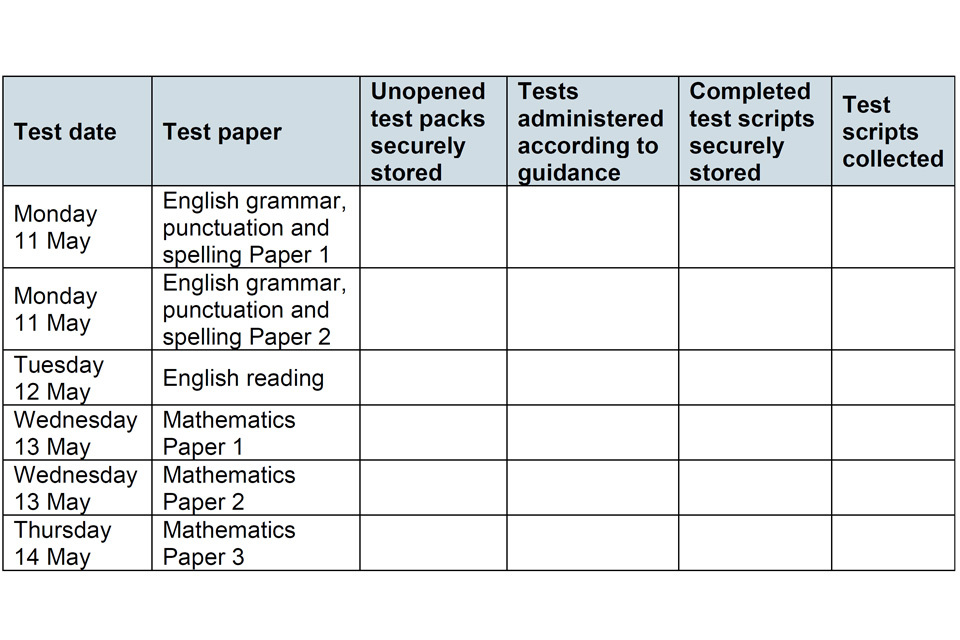
Refer to Carrying out a visit for information on:
- visits before the test period
- visits during test week
- visits after the test period
Depending on when your visit takes place, you will need to indicate relevant information for previous or upcoming test days on the monitoring visit form. For example, if you visit on Tuesday 12 May, you should indicate if the tests completed on Monday 11 May have been packed and stored securely. You should also confirm that test materials for the remainder of the test period are stored securely.
Use ‘✓’ to indicate that you have observed the correct processes.
Use ‘X’ where you have concerns and briefly explain what you have observed in section C. Concerns may include:
- inappropriate support during a test
- a pupil cheating
- incorrectly sealed or stored test scripts
- test packs that appear to have been tampered with
- test packs that have been opened before the date in the statutory test timetable, without STA approval for early opening, or that have been opened more than one hour before the test is administered
Use ‘N/A’ to indicate you have not observed the process.
Form section B: General administration
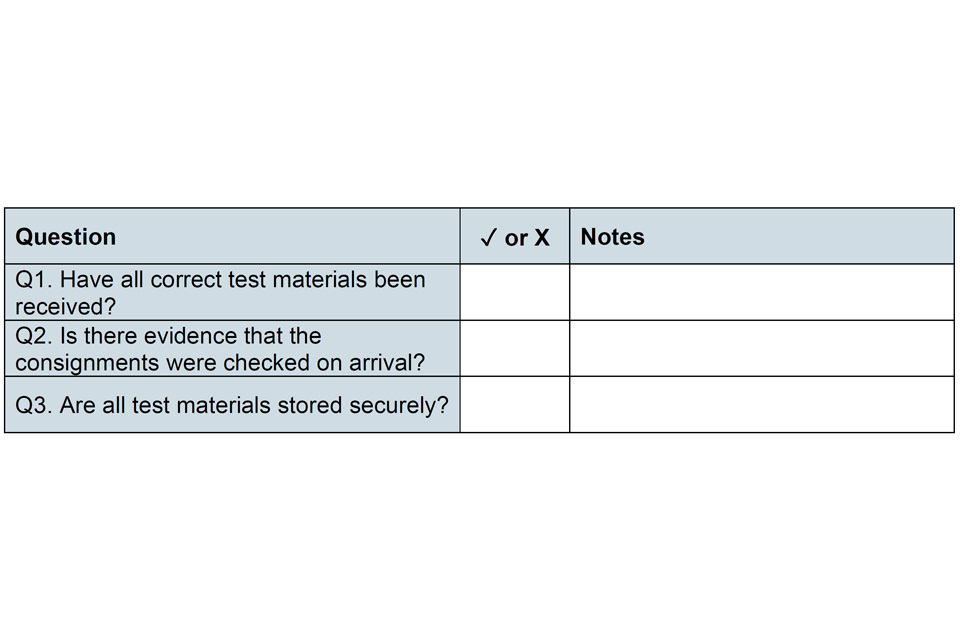
Refer to Carrying out a visit for information on:
- checking test packs
- reporting damaged test packs
- early opening of test materials
- storing test materials securely
Use ‘✓’ to indicate that you have observed the correct general administration.
Use ‘X’ where you have concerns and briefly explain what you have observed in the notes column.
Form section C: Notes
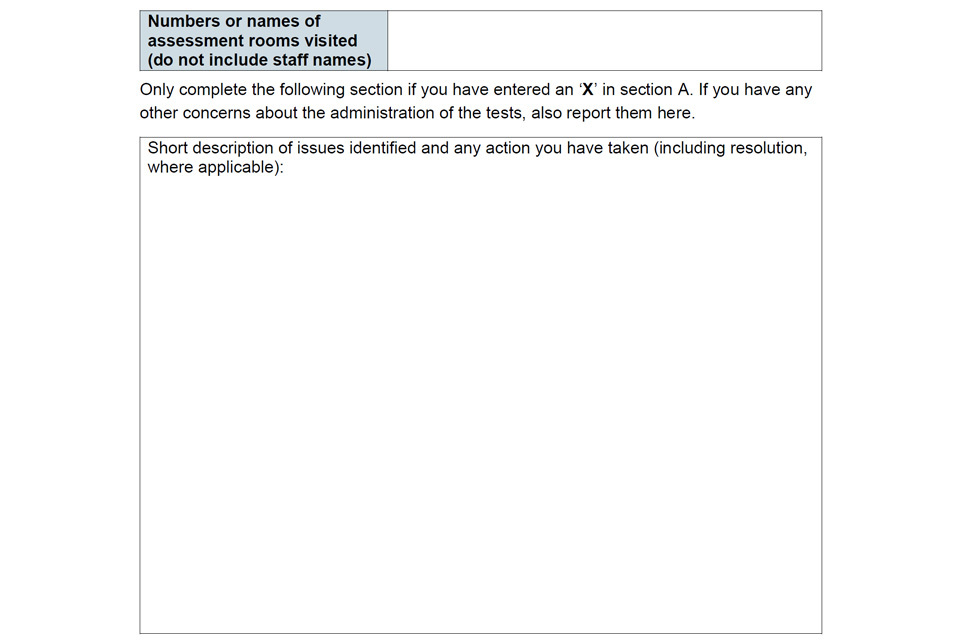
Record which assessment rooms you have observed during your visit. Specify the rooms’ names or numbers, but do not include staff names.
In the next box, record concerns only. Briefly explain your concerns if you have entered an ‘X’ in section A. Any other issues arising during the visit may also be recorded here.
If you are aware of a sensitive matter relating to potential maladministration, which you determine should remain confidential from the school, discuss your concerns with the monitoring visits manager immediately. You can also report the matter directly to sta.maladministration@education.gov.uk.
If you have concerns about the integrity of a test, contact the national curriculum assessments helpline on 0300 303 3013 for further advice. Discuss the issues with your monitoring visits manager as soon as possible.
If you identify any irregularities during your visit that require an urgent response, discuss this with your monitoring visits manager so they can immediately email the completed form to sta.maladministration@education.gov.uk.
Meeting with the headteacher
Before you leave the school, you should meet with the headteacher, or delegated member of staff, to discuss your findings from the visit. If you have placed an ‘X’ in any box on the monitoring visit form, you should advise whether the school should make changes to its test administration procedures for any remaining tests. Record your recommendations on the KS2 monitoring visit form. If you did not find anything that concerned you, make this clear in your verbal feedback, but do not record good practice on the monitoring visit form.
You and the headteacher, or delegated member of staff, should sign and date the monitoring visit form. This confirms that the visit took place, you have given any feedback about the administration of the KS2 tests to the school, and they agree to what you have noted.
You should leave a copy of the monitoring visit form, and any delivery notes you have annotated, with the headteacher or delegated member of staff. You must not add any additional detail or make changes to the monitoring visit form after this point.
After the monitoring visit: submitting the monitoring visit form
You should keep monitoring visit forms secure throughout the check window and destroy them appropriately when they are no longer required.
Send the completed KS2 monitoring visit form to your local authority’s monitoring visits manager immediately after the visit and discuss any findings. The deadline for sending completed KS2 monitoring visit forms to your manager is Tuesday 26 May.
The monitoring visits manager should then email a scanned, unencrypted copy of the KS2 monitoring visit form to sta.maladministration@education.gov.uk using the following subject line:
KS2MVF-geographical area-local authority number (three digits)-number of schools
Example: KS2MVF-Coventry-123-8
If you identified any irregularities during your visit that require an urgent response from STA, discuss your concerns with the monitoring visits manager immediately. In this case, the monitoring visits manager should send the monitoring visit form to sta.maladministration@education.gov.uk using the following subject line instead:
Urgent-KS2MVF-geographical area-school DfE number
Example: Urgent-KS2MVF-Coventry-1234567
The final deadline for local authority monitoring visits managers to send KS2 monitoring visit forms to STA is Friday 5 June.
Completing the monitoring form on the NCA Portal
Once all monitoring visits are complete, monitoring managers and deputy monitoring managers can update the ‘Confirm monitoring visits’ form in the ‘Activities’ section of the NCA Portal.
If you are taking part in this optional activity, you should confirm the final list of schools you have visited, add the outcome of each visit and submit the form by Friday 5 June.
You must still email your monitoring visit forms to sta.maladministration@education.gov.uk, as outlined above.
Reporting allegations of maladministration
Local authorities can report allegations of maladministration by:
- completing section C of the monitoring visit form
- emailing sta.maladministration@education.gov.uk
- contacting the national curriculum assessments helpline on 0300 303 3013 or at assessments@education.gov.uk
- completing the ‘Maladministration allegations’ form in the ‘Incidents’ section of the NCA Portal
When reporting allegations of maladministration, where possible, include:
- details of affected test papers and relevant questions
- where applicable, initials of affected pupils
- details about the allegation and relevant circumstances
- the year of the assessment, if not current
- if relevant, details of other schools that are affected
Help and support
If you have questions about carrying out monitoring visits, you should speak to your monitoring visits manager.
If they are unable to help, you can contact:
- the national curriculum assessments helpline on 0300 303 3013 or at assessments@education.gov.uk
- STA’s maladministration team at sta.maladministration@education.gov.uk