2026 key stage 2 teacher assessment: technical specification
Updated 12 February 2026

© Crown copyright 2026
This publication is licensed under the terms of the Open Government Licence v3.0 except where otherwise stated. To view this licence, visit nationalarchives.gov.uk/doc/open-government-licence/version/3 or write to the Information Policy Team, The National Archives, Kew, London TW9 4DU, or email: psi@nationalarchives.gov.uk.
Where we have identified any third party copyright information you will need to obtain permission from the copyright holders concerned.
This publication is available at https://www.gov.uk/government/publications/key-stage-2-teacher-assessment-data-collection-technical-specification/2026-key-stage-2-teacher-assessment-technical-specification
This guidance provides the specification for the 2026 key stage 2 (KS2) teacher assessment data collection which is returned to the Standards and Testing Agency (STA).
STA produces this guidance to help schools, local authorities and school management information system (MIS) suppliers to prepare and return all the required data to STA.
This technical specification is for:
- suppliers developing software for use in MIS
- local authorities collecting and submitting 2026 KS2 assessments data
- schools submitting 2026 KS2 assessments data
It enables schools and local authorities, including software suppliers working on their behalf, to prepare and submit data on KS2 assessments carried out in 2026. It contains:
- what pupil data is required for each pupil
- how to structure the data in XML
- how to check the data against the validation rules
This specification must be read in conjunction with the current version of the common basic data set (CBDS). It defines common data items that schools use in MIS software and that we use in our data collections.
1. Introduction
This guidance provides the specification for the return of KS2 teacher assessment, pre-key stage and engagement model data to STA. Returns are made using the National Curriculum Assessments Portal (NCA Portal) and are in XML format.
1.1 Statutory requirements
The return of data to the STA and its subsequent publication is underpinned by the following legislation:
- Section 29 of the Education Act 1996
- The Education (School Performance Information) (England) Regulations 2007
- Regulations 5 and 8 of the School Information (England) Regulations 2008
1.2 Data sharing
The UK General Data Protection Regulation (UK GDPR) and the Data Protection Act 2018 (DPA 2018) provide certain safeguards regarding the use of personal data by organisations, including:
- the department
- local authorities
- schools
The UK GDPR and DPA 2018 detail the rights of those (known as) data subjects about whom data is held, such as:
- pupils
- parents
- teachers
This includes (amongst other information that we are obliged to provide):
- the right to know the types of data being held
- why it is being held
- to whom it may be communicated
For data protection legislation purposes, the terms ‘process’, ‘processed’ or ‘processing’ apply to any activity involving personal data, such as:
- collecting
- storing
- sharing
- destroying
Please note that this list is not exhaustive.
The department provides suggested wording for privacy notices that schools and local authorities may wish to use. However, where the suggested wording is used, the school or local authority must review and amend the wording to reflect local business needs and circumstances.
This is especially important as data will be processed that is not solely for use within data collection exercises.
1.3 Structure
This technical specification contains a narrative, sample XML messages and validation. Schools, local authorities and suppliers should read this specification in conjunction with the current version of the CBDS.
1.4 Scope
This data collection exercise covers all schools in England that are required to, or have chosen to, provide data on KS2 assessments carried out in 2026. It also covers local authorities that might be submitting data on behalf of schools. This includes independent schools, academies and free schools outside of their geographical area, where the local authority has been selected to carry out moderation activities.
Figure 1 outlines the overall scope of the collection:
Figure 1: High-level data collection process
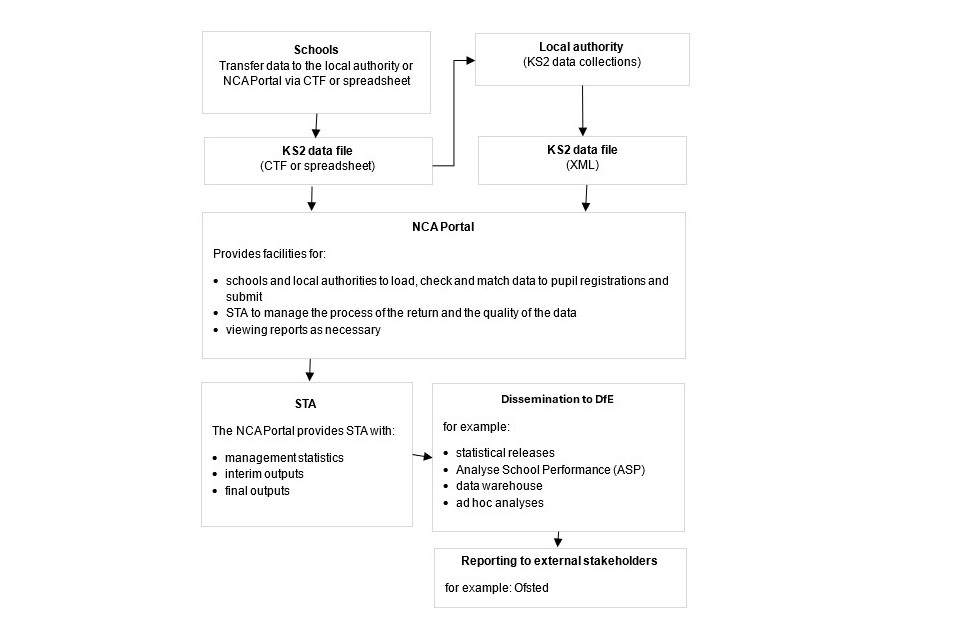
Figure 1 shows the high-level data collection process:
1.Schools transfer the KS2 data file to the local authority or NCA Portal via CTF (common transfer file) or spreadsheet.
2.Where local authorities submit data on behalf of schools, they collect the KS2 data and transfer the KS2 data file (XML) to the NCA Portal.
3.The NCA Portal provides facilities for:
- schools and local authorities to load, check and match data to pupil registrations and submit
- STA to manage the process of the return and the quality of the data
- viewing reports as necessary
4.The NCA Portal provides STA with:
- management statistics
- interim outputs
5.Dissemination to DfE – for example:
- statistical releases
- Analyse School Performance (ASP)
- data warehouse
- ad hoc analyses
6.Reporting to external stakeholders – for example: Ofsted
1.5 Changes for 2026
For the 2026 KS2 data collection technical specification, we made changes to:
- dates, to reflect the current academic year
- reflect the common transfer file (CTF) 25 specification
From September 2025, Pearson Education Limited (Pearson) has been providing the Test Operations Service, supporting national curriculum assessments on behalf of STA. You can find more information about this in the new Test Operations Service provider information for schools and local authorities.
1.6 Important dates
Schools, or local authorities submitting data on their behalf, must submit data on the NCA Portal between Monday 18 May and Friday 26 June 2026.
2. Collection and submission of assessment data
2.1 Outline of data content
Each data return from a local authority will include:
- a header
- one or more school modules (only one school per return, as shown in Figure 2 below)
Each school module will contain a pupil module with a number of pupil records. Each pupil record will include:
- identifiers
- a series of assessment records
Figure 2: Outline structure of data
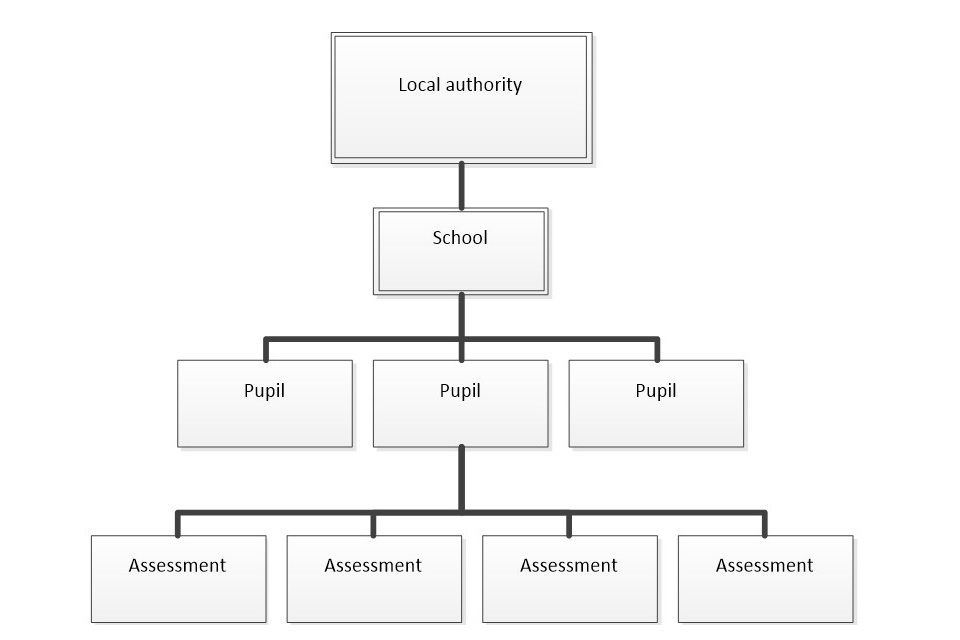
Figure 2 shows the outline structure of data in the form of a hierarchy, whereby:
- the local authority sits above the school
- the school has multiple pupils
- each pupil has one or more assessments linked to them
2.2 What schools must assess
Teachers will complete the end of KS2 assessments following the process set out in the 2026 KS2 assessment and reporting arrangements (ARA).
Schools will report the outcomes of those assessments either to STA or via their local authority, if the local authority agreed to submit the data on behalf of the school. Schools must submit a valid outcome for:
- English writing and science teacher assessment for all children
- English reading and mathematics for any child who is working below the standard of the national curriculum
The table below outlines which codes that should be to use when submitting data:
| Key stage 2 subject | Pupils working at the standard of the national curriculum | Pupils working below the standard of the national curriculum and engaged in subject-specific study | Pupils working below the standard of the national curriculum and not engaged in subject-specific study | Pupils not assessed this academic year |
|---|---|---|---|---|
| English reading | Not applicable | PK1, PK2, PK3, PK4, PK5, PK6 | EM | A |
| Mathematics | Not applicable | PK1, PK2, PK3, PK4, PK5, PK6 | EM | A |
| English witing | GDS, EXS, WTS | PK1, PK2, PK3, PK4, PK5, PK6 | EM | A, L, F, P |
| Science | EXS, HNM | HNM | HNM | A, L, F, P |
The table below includes a description of each code:
| Code | Description |
|---|---|
| GDS | Working at greater depth |
| EXS | Working at the expected standard |
| WTS | Working towards the expected standard |
| HNM | Has not met the expected standard |
| PK6 | Pre-key stage standard 6 |
| PK5 | Pre-key stage standard 5 |
| PK4 | Pre-key stage standard 4 |
| PK3 | Pre-key stage standard 3 |
| PK2 | Pre-key stage standard 2 |
| PK1 | Pre-key stage standard 1 |
| EM | Working below the level of the national curriculum and not yet engaged in subject-specific study |
| A | Absent for long periods, recently arrived, or not enough information to provide a teacher assessment judgement |
| L | Pupil has left the school |
| F | Pupil will reach the end of the programme of study and complete the key stage in a future year |
| P | Pupil completed the key stage in a previous year and a teacher assessment judgement has already been submitted |
For more information on teacher assessment judgements and data submission requirements, please refer to the KS2 teacher assessment guidance.
2.3 Submitting results
Schools should submit their results as follows:
-
Enter individual pupils’ KS2 teacher assessment results (including pre-key stage and engagement model data, if applicable) into the school’s MIS.
-
Use the MIS to creates an XML export file (partial CTF) and upload this to the NCA Portal or share it securely with their chosen local authority, if arrangements have been made with them to submit data on the school’s behalf.
Local authorities submitting data on behalf of schools should complete the following steps:
- Collect the results from schools, as outlined above.
- Load the schools’ results (in all formats) into the local authority’s central database or processing system.
- Create school XML export files, using local authority software, for uploading to the NCA Portal.
STA will only accept submissions in XML format. If this is not available, a KS2 Excel template is available on the NCA Portal to enable schools and local authorities to submit their data.
2.4 Entry of results into school management information systems
Schools must enter into the MIS:
- English writing and science teacher assessment outcomes for each pupil
- English reading and mathematics results for any pupils working below the standard of the national curriculum
Pre-key stage standards
The pre-key stage standards are for pupils who are working below the standard of the national curriculum assessments but are engaged in subject-specific study. This means they will be working below the lowest standard in the relevant framework for teacher assessment. The pre-key stage standards are used to make statutory judgements in English reading, English writing and mathematics for pupils who have not completed the relevant KS2 programme of study but reached the end of year 6, when an outcome must be reported for school accountability.
Pre-key stage standards have not been defined for science. Any pupils who have not met the expected standard in science should be marked as ‘HNM’.
Engagement model
Schools must use the engagement model to assess pupils working below the standard of the national curriculum assessments and not engaged in subject-specific study at KS2.
For more information on when pre-key stage standards and the engagement model should be used, refer to the KS2 ARA.
2.5 Management information system data entry checks
The school’s MIS software should check that a valid judgement has been entered for each subject, where appropriate. Any invalid or missing entries should be reported to the school when the data is entered or when the CTF is created. For more information, refer to the data validation rules.
2.6 Naming convention for CTF files
XML files should be created using the following naming convention:
xxxnnnn_KS2_NAALLLL_yyy.XML
‘xxx’ represents the local authority number and ‘nnnn’ is the school number (establishment number). ‘yyy’ is an incremented version number, starting at 001.
2.7 Loading results into the local authority’s central management system
Where a local authority is collecting and submitting data on behalf of schools, the local authority’s management system should allow the import of the CTF into its central database. It should also allow the local authority to validate the CTF in accordance with the data validation rules, where applicable. Any missing or invalid teacher assessment, pre-key stage and engagement model data should be reported to the local authority in its system. The software should also flag if any unique pupil numbers (UPNs) are missing or invalid, or if any dates of birth are missing, incomplete or outside the expected age range.
In addition, the software should allow the local authority to load into its central database a file created from the KS2 teacher assessment template, available in the NCA Portal.
The export filename should be:
KS2_yyyxxxx_###.xlsx
‘yyy’ is the local authority number and ‘xxxx’ is the school establishment number – for independent schools, this number will always start with a 6. ‘###’ is the version number of the file.
Where any pupil’s identifying or contextual data is already present in the local authority’s central database, there should be a prompt to ask if the existing data should be overwritten by the CTF or xlsx import.
Where a CTF contains any pupil data from previous assessments – for example, earlier years’ KS2 results – there should be a prompt to ask if the existing assessment data should be overwritten.
The local authority should also have facilities to:
- remove and add pupils
- amend a pupil’s identifying data or result outcomes, and revalidate the new data in accordance with the data validation rules
- reimport a corrected CTF with an option for the operator to either replace all existing data or add as new data, to be validated in accordance with data validation rules
2.8 Creation of XML export files for submission to STA
The software should create separate XML files containing individual pupil data for each school, as specified in the example file structure for XML returns. These files should be created for uploading to the NCA Portal.
The XML files should be validated in accordance with the data validation rules. Any data failing the validation checks should be reported using the error codes and messages specified.
In addition to the local authority and school number, the file will contain the following data items for each pupil:
| Identifier | CBDS module | Data item name |
|---|---|---|
| N00001 | Pupil identifiers | Unique pupil umber (UPN) |
| N00003 | Pupil identifiers | Surname |
| N00004 | Pupil identifiers | Forename |
| N00006 | Pupil identifiers | Date of birth |
| N00783 | Pupil identifiers | Sex |
Each pupil will have a number of stage assessments containing each KS2 teacher assessment, pre-key stage or engagement model result as recorded.
Task or test results must not be included in the XML file.
Please note that an approved supplier ID will not be issued. The NCA Portal will use the supplier ID tag value specified by suppliers for this purpose.
2.9 Exporting the XML
When exporting the XML, the:
- local authority should be provided with options to include all or selected schools’ individual pupil results, even if these contain errors or have previously been exported – the software should inform the operator if a school is in error or has previously been exported
- school should be provided with options to include all or selected individual pupil results, even if these contain errors or have previously been exported - the software should inform the operator if a pupil is in error
Whichever option is chosen, all results for each pupil within the school must be exported.
Where a CTF contains any pupils’ previous assessment data – for example, earlier years’ KS2 results – there should be a prompt to ask if the existing assessment data should be overwritten.
2.10 Additional local authority software requirements
The software should allow the local authority to:
- produce a list of schools to check that all expected school returns have been processed
- produce a report for each school, or for all schools, to show the number of boys, girls and total number of pupils included in each school’s CTF submission
- transmit results in batches without the need to resubmit results already transmitted
2.11 Reports for schools and parents
The software should produce pupil results and school results reports for the academic year 2025 to 2026.
2.12 Return of data to schools
The NCA Portal will produce a file in XML format, which the school can import back into their MIS. The data is also available in CSV format.
Imported data may differ from the existing data if changes have been made in the NCA Portal by:
- the school
- the local authority
- an administrator
Imported data may also differ if the local authority resubmitted data following moderation.
In some cases, data may be annulled following moderation. This process was introduced in 2018 and is denoted by the Q code as specified in the in the Assessment component files 2026: A Comp. This code will only be used in files exported from the ‘Key stage 2 test results and outcomes’ section of the NCA Portal. The software should accept the importing of the Q code, but validation should prevent the Q code from being selected when creating teacher assessment data submission files. There should be no restriction on including the Q code in other files, such as the CTF for onward transmission of a pupil’s data to a new school.
3. Data return formats
The local authority or school should provide a submission file in an XML file structure, as described in the example file structure for XML returns. Where an optional item is not included, the associated tag should be omitted. Where a mandatory item is omitted, an error will be generated.
For more technical information on CTFs, please refer to the CTF 25 specification.
3.1 Special notes for XML returns
The standard XML entity references should be used for the following special characters:
| Character | Entity reference |
|---|---|
| Ampersand (&) | & |
| Left angle bracket (<) | < |
| Right angle bracket (>) | > |
| Single quote or apostrophe (‘) | ' |
| Double quotes (“) | " |
For special characters such as ‘é’ use a character reference such as ‘é’. This produces a generic XML file, which you can view in a suitable browser. You can find details of all ‘Characters’ within the XML standard documentation Extensible Markup Language.
4. Data validation rules
This section specifies validation rules that STA applies to the data, using the NCA Portal. The rules should also be applied, and any issues resolved, as far as possible by:
- schools before exporting the file and passing it to the local authority or uploading it onto the NCA Portal
- local authorities before uploading the data onto the NCA Portal
Data items included in the specification but not appearing in the validation rules should be supplied where available. The rules below show the errors that the system will present to the school or local authority on submission of their data if they fail the validation checks.
Any file that is exported with errors, and uploaded to the NCA Portal without being corrected first, may fail to upload or require a new file to be created and uploaded to correct it.
The following validation checks will be carried out – when a validation check fails, an error message will be displayed in the NCA Portal:
4.1 Header validation
| Sequence number | Error or query | Validation check | Error message |
|---|---|---|---|
| 001 | Error | <DocumentName> must be present with a value of “Common Transfer File” | Document name missing or invalid – the file must be recreated |
| 002 | Error | <SupplierID> must be present | Supplier ID is missing |
4.2 Establishment-level validation
| Sequence number | Error or query | Validation check | Error message |
|---|---|---|---|
| 003 | Error | <LEA> must be provided and must be a valid value | Local authority number missing or invalid |
| 004 | Error | <Estab> must be present with a valid value | Establishment number is missing or invalid |
4.3 Pupil-level validation
| Sequence number | Error or query | Validation check | Error message |
|---|---|---|---|
| 1001 | Error | <DOB> must be present | Date of birth is required |
| 1002 | Error | <DOB> format must be DD/MM/YYYY | Date of birth format must be DD/MM/YYYY |
| 1003 | Error | <DOB> should be between 01/09/2013 and 31/08/2016 for KS2 | Pupil’s date of birth is outside expected date range |
| 1004 | Error | <Sex> must be present and a valid value | Sex code is invalid |
| 1005 | Error | All schools except independent schools <UPN> must be present | UPN is required |
| 1006 | Error | If <UPN> is present, it must contain the correct check letter. To calculate the check letter: 1. Multiply the individual digits by their weights as follows: • digit 2 by weight 2 • digit 3 by weight 3 • digit 4 by weight 4 • digit 5 by weight 5 • digit 6 by weight 6 • digit 7 by weight 7 • digit 8 by weight 8 • digit 9 by weight 9 • digit 10 by weight 10 • digit 11 by weight 11 • digit 12 by weight 12 • digit 13 by weight 13 2. Sum the individual results, divide the total by 23, and take the remainder. 3. Calculate the check letter from the result as follows: 0 = A; 1 = B; 2 = C; 3 = D; 4 = E; 5 = F; 6 = G; 7 = H; 8 = J; 9 = K; 10 = L; 11 = M; 12 = N; 13 = P; 14 = Q; 15 = R; 16 = T; 17 = U; 18 = V; 19 = W; 20 = X; 21 = Y; 22 = Z. For calculating the check letter (see above), any alphabetical character at digit 13 is accorded the same numerical value as listed in step 3 above – for example: A = 0, B = 1, C = 2 and so on. |
UPN invalid (wrong check letter at character 1) |
| 1007 | Error | Each pupil <UPN> must be unique across all pupils in the school | More than one pupil record with the same UPN |
| 1008 | Error | If <UPN> is present, characters 2 to 4 of <UPN> must be valid post-April-1999 local authority code or or a recognised ‘pseudo local authority’ code (001 to 005, 201 to 213, 301 to 320, 330 to 336, 340 to 344, 350 to 359, 370 to 373, 380 to 384, 390 to 394, 420, 660 to 681, 701 to 708, 800 to 803, 805 to 808, 810 to 813, 815, 816, 820 to 823, 825, 826, 830, 831, 835 to 841, 845, 846, 850 to 852, 855 to 857, 860, 861, 865 to 896, 908, 909, 916, 919, 921, 925, 926, 928, 929, 931, 933, 935 to 938, or 940 to 943) | UPN invalid (characters 2 to 4 not a recognised local authority code) |
| 1009 | Error | If <UPN> is present, characters 5 to 12 of <UPN> must be numeric | UPN invalid (characters 5 to 12 not all numeric) |
| 1010 | Error | If <UPN> is present, character 13 of <UPN> must be numeric or A to Z, omitting I, O and S | UPN invalid (character 13 not a recognised value) |
| 1011 | Error | <Surname> must be present | Surname is required |
| 1012 | Error | <Forename> must be present | Forename is required |
| 1013 | Error | Where <Subject> = ENG and <Component> = WRI and <ResultQualifier> = NC, there should be a stage assessment <Result> | The writing result is missing – it must be one of GDS, EXS, WTS, PK6, PK5, PK4, PK3, PK2, PK1, EM, A, L, F or P |
| 1014 | Error | Where <Subject> = SCI and <Component> = SCI and <ResultQualifier> = NC, there should be a stage assessment <Result> | The science result is missing – it must be one of EXS, HNM, A, L, F or P |
| 1015 | Error | If <Subject> concatenated with <Component> and <ResultQualifier> equals ‘ENGREANC’, then <Result> must be EM, PK1, PK2, PK3, PK4, PK5, PK6, or A | The reading result is invalid – it must be one of PK6, PK5, PK4, PK3, PK2, PK1, EM, A |
| 1016 | Error | If <Subject> concatenated with <Component> and <ResultQualifier> equals ‘ENGWRINC’, then <Result> must be EM, PK1, PK2, PK3, PK4, PK5, PK6, WTS, EXS, GDS, A, L, F, or P | The writing result is invalid – it must be one of GDS, EXS, WTS, PK6, PK5, PK4, PK3, PK2, PK1, EM, A, L, F or P |
| 1017 | Error | If <Subject> concatenated with <Component> and <ResultQualifier> equals ‘MATMATNC’, then <Result> must be EM, PK1, PK2, PK3, PK4, PK5, PK6, or A | The mathematics result is invalid – it must be one of PK6, PK5, PK4, PK3, PK2, PK1, EM or A |
| 1018 | Error | If <Subject> concatenated with <Component> and <ResultQualifier> equals ‘SCISCINC’, then <Result> must be HNM, EXS, A, L, F or P | The science result is invalid – it must be one of EXS, HNM, A, L, F or P |
| 1036 | Error | Where ‘Test status’* for reading = B, then there must be a stage assessment where <Subject> = ENG and <Component> = REA and <ResultQualifier> equals NC and <Result> is one of PK6, PK5, PK4, PK3, PK2, PK1, EM or A | Our records indicate that this pupil is working below the standard and a result is expected – it must be one of PK6, PK5, PK4, PK3, PK2, PK1, EM or A |
| 1037 | Error | Where ‘Test status’* for mathematics = B, then there must be a stage assessment where <Subject> = MAT and <Component> = MAT and <ResultQualifier> equals NC and <Result> is one of PK6, PK5, PK4, PK3, PK2, PK1, EM or A | Our records indicate that this pupil is working below the standard and a result is expected – it must be one of PK6, PK5, PK4, PK3, PK2, PK1, EM or A |
*‘Test status’ is an internal field used to flag the test status of a pupil. In the case of sequence number 1036 and 1037, these errors can only be presented to the user once the data is uploaded to the NCA Portal.
5. Resubmission guidance
A resubmission will overwrite the data contained in the previous submission, but will not remove existing data that is not included in the resubmission.
6. Valid values
Valid item values must be in the list or range specified in the CBDS, subject to the exceptions and restrictions below:
6.1 Local authority codes
Local authority codes for this collection only cover local authorities in England.
Coverage also excludes the following local authority codes:
- 001, 003, 167
- codes starting with 6 and 7, except 702 (Service Children’s Education, which is valid)
- XXX, MMM and NA
6.2 Assessment parameters
The following combinations of subject, component, assessment method and result type are required, as appropriate.
For KS2 teacher assessment:
- KS2-2026-ENG-WRI-TA-NC
- KS2-2026-SCI-SCI-TA-NC
For pre-key stage standards and the engagement model at the end of KS2:
- KS2-2026-ENG-REA-TA-NC
- KS2-2026-ENG-WRI-TA-NC
- KS2-2026-MAT-MAT-TA-NC