Guidance notes for the acquisition and testing of ultrasound scanners for use in the NHS Breast Screening Programme (NHSBSP)
Updated 9 April 2026
Applies to England

© Crown copyright 2026
This publication is licensed under the terms of the Open Government Licence v3.0 except where otherwise stated. To view this licence, visit nationalarchives.gov.uk/doc/open-government-licence/version/3 or write to the Information Policy Team, The National Archives, Kew, London TW9 4DU, or email: psi@nationalarchives.gov.uk.
Where we have identified any third party copyright information you will need to obtain permission from the copyright holders concerned.
This publication is available at https://www.gov.uk/government/publications/breast-screening-ultrasound-scanners-standards/guidance-notes-for-the-acquisition-and-testing-of-ultrasound-scanners-for-use-in-the-nhs-breast-screening-programme-nhsbsp
1. INTRODUCTION
This guidance outlines:
-
the clinical and technical specifications required for ultrasound equipment used within the NHS breast screening programme (NHSBSP)
- the evidence-based methods for testing ultrasound scanners
- the framework for the quality assurance process, including the recommended test regimes and standards
- how quality assurance tests should be performed
- the process for recording and reviewing equipment with poor clinical performance
Key updates to the Guidance notes for the acquisition and testing of ultrasound scanners for use in the NHS breast screening programme includes:
- specification for the frequency range of probes
- changes to the in-air reverberation pattern test
- spatial resolution limits
- changes to the calliper accuracy tolerance
-
advice on:
o the procurement of pre-owned ultrasound equipment
o the speed of sound settings
o advanced imaging technologies
2. CLINICAL AND TECHNICAL REQUIREMENTS FOR BREAST SCREENING ULTRASOUND EQUIPMENT
2.1 Clinical requirements
The definitive diagnosis of a malignant breast lesion currently rests on histopathology derived from image-guided needle biopsy.
However, ultrasound scanning can provide vital diagnostic information on breast tissue pathology and aid in the identification of potential cancerous tissue. Two-dimensional B-mode imaging is used to provide most clinical information, but other modalities such as colour or power Doppler, elastography, microcalcification detection and 3D imaging are proving to be useful adjuncts to the final diagnosis.
Ultrasound equipment used within the NHSBSP must be able to:
-
distinguish between solid and cystic lesions
-
demonstrate low contrast lesions and disruption in tissue planes - registering the shape and margin of a lesion, its degree of echogenicity and the presence or otherwise of calcification
-
detect breast cancers as small as 2 mm, expediting image guided biopsy and pre-operative diagnosis
-
visualise a fine needle to guide minimally invasive procedures and to detect markers clearly
-
image in a mode that will show acoustic shadowing behind solid lesions, as this is a diagnostic feature
-
allow imaging and biopsy of abnormal axillary nodes
-
measure using callipers with accuracy tolerance of +/-5% for a linear or circumference measurement and +/-10% for an area measurement. This will maintain an acceptable clinical standard without triggering unnecessary intervention
-
optimise the image by adjusting the speed of sound
There are additional imaging features which breast screening services may wish to consider:
- shear wave elastography
- microcalcification detection
2.2 Equipment specification, procurement and life cycle
2.2.1 Overview
Ultrasound scanners used within the NHSBSP must:
- be optimised for breast applications (QSI Ref XR-401); high-quality, high-resolution B-mode imaging is essential
- be able to operate with tissue harmonic imaging functionality and image using colour and power Doppler
- have image optimisation features such as adjustable speed of sound
- have one or more linear array probes that can differentiate cysts from solid lesions, visualise lesion edge and fill characteristics, and image biopsy and fine needles accurately
- include a read and write zoom function and be able to zoom and measure on frozen or cine loop images. The measurement package must provide multiple linear distance measures, areas and circumferences
- have a display that provides high quality wide angle viewing and is flexible and easy to position
- be ergonomic in design, enabling adjustment of height and orientation of the control panel and minimising work related musculoskeletal disorders (WRMSD, QSI Ref US-801) and strain
- have accessible on-board digital test patterns installed for the optimisation and assessment of display performance
- be Digital Imaging and Communications in Medicine (DICOM) enabled (including print, store and worklist). It should include on-board image management and a storage facility (via USB port). The ability to DICOM query and retrieve is optional. Remote online support from manufacturers might be considered
- all scanners and probes used must conform to appropriate regulations and standards for safety and performance
If clinical requirements specify advanced features, such as those listed in section 2.1, appropriate equipment specification for these features should be described.
2.2.2 Detailed requirements
Probe
There should be one or more broadband or ultra-broadband linear array probes that operate across a range of frequencies that extends up to at least 15 MHz. The footprint of each linear probe should be in the range 38–60 mm, except for any additional hockey stick probes.
During the process of procuring an ultrasound scanner, it is advisable to trial multi-row (sometimes referred to as 1.5D or matrix linear array) probes that the manufacturer has available. These probes can offer significantly improved slice thickness resolution. However, they are generally more costly. Medical physics services may be able to provide quantitative data on improvements in image quality throughout the field of view between the linear and 1.5D linear array options.
Field of View
A rectangular image with a depth range of at least 30 to 60 mm should be provided. Alternative additional display options, such as trapezoidal imaging or extended field of view (panoramic) imaging, should be available. Users need to be aware that the image quality is likely to be poorer for trapezoidal images than for rectangular images. Users should be cautious with calliper measurements within an extended field of view as distance measurements may not be accurate.
Callipers
Callipers are required that provide linear measurements accurate to within +5% and this requires a precision of 0.1 mm when measuring a 2 mm cyst, for example. Facilities to measure or estimate circumference (±5% accuracy), area (±10% accuracy) and volumes (no specified tolerance as systems vary widely) are also needed.
Focusing and frame rates
The scanner should include technology that allows focusing to be applied simultaneously across a wide range of depths within a single ultrasound image. On scanners with traditional focusing technology, this takes the form of multiple user-adjustable focal zones, usually displayed down the side of the image at discrete locations using caret-style markers.
On scanners with synthetic focusing technology, the focusing is applied automatically across the whole depth range, and there is no adjustable focus control. In either case, the frame rate must be displayed and the options available should permit an optimal balance between spatial and temporal resolution (e.g. by increasing or decreasing the line density).
Image review
The scanner should have the ability to review cine loops and to capture individual frames within the loop.
Clinical breast presets
Clinical breast presets must be available to allow control settings to be programmed, stored and recalled. These presets should be optimised for breast anatomy rather than individual user preferences (QSI XR-503). It should not be possible to change a preset casually or inadvertently.
Safety
The scanner must comply with the standards outlined in the latest version of the International Electrotechnical Commission (IEC) 60601-2-37 and show the Mechanical Index (MI) and the Thermal Index (TI) when appropriate. Scanners should be set up in such a way that allows operators to employ the as low as reasonably achievable (ALARA) principle as recommended by the British Medical Ultrasound Society (BMUS/AXREM).
Ergonomics
Scanner operation and specification must be designed so as to minimise the risk of work-related musculoskeletal disorders as described in the Society for Radiographers guidance.
Extended features and functionality
Elastography
Ultrasound elastography can be used to assess the stiffness of soft tissue. Soft tissue stiffness can be related to tissue pathology and this in turn can provide diagnostic information. There are several methods that manufacturers of diagnostic ultrasound equipment use to assess tissue stiffness, and very comprehensive reviews of these techniques are available in the literature. Shear wave elastography can provide quantitative information on tissue stiffness. NICE have evaluated ultrasound shear wave elastography systems. From a clinical perspective it is important to understand that, at present, quantitative data or images of tissue stiffness provided by one manufacturer may be different to those provided by another manufacturer for the same tissue. In addition, operators should be aware that elastography techniques can suffer from artefacts that may be related to anatomy, tissue type and scanner settings. Clinical departments should seek advice from applications specialists and medical physics services on the suitability of the elastography features.
Speed of sound adjustment
Breast tissue is composed predominantly of fibrous, glandular and adipose tissue. The proportion of fatty tissue increases with age and from the age of 50 years there is a significant increase in the ratio of adipose tissue to fibroglandular tissue. Adipose tissue is less stiff than fibroglandular tissue and as such it has a lower elastic modulus which correlates with a lower speed of sound in tissue. Studies have shown that the speed of sound in breast tissue changes from approximately 1520 m/s in women aged 20 years to approximately 1460 m/s in women aged 50 years and above (Katz-Hanani et al, 2014).
Ultrasound scanners have traditionally used a speed of sound of 1540 m/s when forming an ultrasound image, irrespective of the anatomy being imaged. If the anatomy contains a significant proportion of adipose tissue this can lead to poor focusing and mis-registration in the image. Some manufacturers allow the operator to adjust the speed of sound while others allow a related parameter to be adjusted using an arbitrary scale. For breast imaging this can markedly improve both the spatial and contrast resolution of ultrasound images. Operators should seek the advice of applications specialists and medical physics services when setting up their breast imaging presets.
Clinical applications support
Full clinical applications support from the supplier is essential during the acceptance and commissioning of the scanner. Preference should be given to suppliers who place minimal reliance on local cascade training and offer continuous support with the initial clinical cases after scanner purchase. Clinical applications support is strongly recommended throughout the lifetime of the equipment, both in response to any reported difficulties and for scheduled reviews.
Manufacturers’ engineering support
Adequate, timely and well-informed engineering support for the scanner is essential. Preference should be given to support arrangements that include remote diagnostics, downtime guarantees (or penalties), and a readiness to respond to issues highlighted during local quality assurance procedures.
It is strongly recommended that any replacement probes are brand new and made by the original equipment manufacturer (OEM). Alternatively, if repaired, pre-owned or loan probes are used then their provenance should be known, as described in national guidance.
Updates and upgrade pathways
Preference should be given to suppliers who offer clear and guaranteed pathways for updates and upgrades. Updates should normally be viewed as a form of maintenance and be provided free of charge. Upgrades will add functionality to the system and so will usually need to be purchased.
Technical and operating manuals
Scanners must be provided with comprehensive documentation covering their operation and technical support.
2.2.3 Scanner selection and purchase
Services are advised to evaluate the options carefully before purchase. Full evaluation helps to secure the most suitable equipment specification, optimal choice from the range available, acceptability to all intended users, and value for money. The specifications set out in this guidance should be considered carefully, for whilst the basic scanner requirements may be modest the options can be extensive.
Clinical assessment is best achieved by visiting a service where the scanner (or a near equivalent) is already in use. This is especially valuable if it includes permission to scan under supervision rather than bringing in a scanner for a local trial. The advantage of the first is that the scanner will be fully commissioned and used by trained colleagues who can supply an unbiased and independent opinion.
Wherever possible, medical physics assessment should be carried out on the scanner and probes under evaluation. These checks should confirm that the equipment meets the basic physics specification.
If advanced clinical features, such as those described in Section 2.1, are being used, then medical physics services should assess the scanners’ performance in these advanced modes.
2.2.4 Regulations and standards
When purchasing a scanner, clinical services and medical physics services should make sure that the equipment complies with the following standards:
- all systems (including any peripheral/auxiliary equipment supplied) must be CE marked and must comply with current international standards for medical equipment, including IEC 60601-1-1 (leakage currents), IEC 60601-1-2 (electromagnetic interference), IEC 60601-1-6 (ergonomic design)
-
acoustic output
-
displays should meet the international standards for medical equipment including:
o American Association of Physicists in Medicine (AAPM)
o IEC 62563-2:2021. Medical electrical equipment – Medical image display systems – Part 2: Acceptance and constancy tests for medical image displays
o MHRA (managing medical devices) - How to manage medical devices used in health and social care services.
-
the equipment should comply with the Society of Radiographers prevention of work-related musculoskeletal disorders in sonography
-
image quality
o the system should meet the recommendations outlined in the Quality Standard for Imaging, RCR, 2024
o Standards for the provision of an ultrasound service, RCR/SCoR, 2014
3. RECOMMENDED FRAMEWORK FOR THE ACCEPTANCE, COMMISSIONING, ROUTINE TESTING AND QUALITY CONTROL OF BREAST SCREENING ULTRASOUND SCANNERS
This Section provides a framework for assuring and managing scanner quality, acceptance, commissioning and routine testing (QSI Ref XR-302 & XR-303). It aims to make sure that the equipment delivered is to the right specification, that it works correctly, that it is set up optimally, and that performance quality is maintained. It also includes advice on equipment lifecycle, decommissioning and replacement. The regime for quality assurance and the standards for scanner performance is detailed in Section 3, whilst guidance on how to carry out user QA and medical physics testing appears in Section 4.
This Section offers a broad assessment of performance based on both technical and clinical considerations. Whilst clinical assessment may be subjective and operator-dependent, medical physics tests offer quantitative and qualitative assessment.
The tests described in Section 4 of this guidance can be analysed using computational methods using and standard image analysis techniques. Measurements of the low contrast penetration depth, the contrast resolution of targets, the detectability of cysts, the resolution (vertical, horizontal and slice thickness) of high contrast targets and the assessment of in-air reverberation patterns, using computational methods, have all been documented in the literature.
This guidance does not prescribe any method of analysis, whether commercial or in-house. In-house computational methods used should be thoroughly validated using quality management systems. Commercial quantitative computer-based analysis packages are also available.
3.1 Management of quality assurance
If adequate quality assurance is to be achieved and maintained, the staff involved must have the right skills, training, duties, contacts and communications channels, and must be supported by an effective management structure (QSI XR-302 & XR-303).
A nominated supervisor (often the lead radiographer in the clinical service) should ensure that up to date information on ultrasound equipment and any identified faults are held and maintained on the National Co-ordinating Centre for the Physics of Mammography (NCCPM) database. They should also appoint a nominated QA person to carry out and/or manage user QA tasks.
The nominated supervisor must notify the medical physics service of:
- any software or hardware changes to the scanning system
- any changes to the scanning environment (particularly lighting); checks can then be carried out to make sure that these changes have not adversely affected image quality
- any changes to key personnel (including the nominated QA person); when changes occur, personnel contacts data (Appendix1) and QA responsibilities data (Appendix2) should be updated in the log file.
If there is a change in the staff who conduct user QA tests, medical physics should be contacted to provide user QA training and to facilitate inter-operator checks to ensure sure continuity of methods and results.
3.1.1 Scanner Acceptance
Scanner acceptance is the responsibility of the nominated supervisor. Acceptance should be completed on a new scanner, if a probe is replaced or added, or if the scanner has had a software upgrade that might affect imaging performance.
Clinical applications support staff from the supplier or manufacturer must attend and liaise with users to make sure that presets match the breast imaging requirements of the screening service. Default acoustic output settings should be based on national British Medical Ultrasound Society guidelines (BMUS / AXREM statement on acoustic output) and only increased if image quality is compromised. Clinical applications staff should be asked to save a backup copy of all relevant presets. Continuing applications support must be available, particularly if scanners are upgraded or new users are introduced. Although acceptance should be arranged and overseen by local staff, the outcomes should be shared with the medical physics service and entered in the log file.
The nominated supervisor should liaise with the Trust local IT department to ensure the scanner is connected to the Trust PACS and that guidelines for security of patient data are followed (NHS Digital Cyber security & Data Protection Act 2018) .
3.1.2 User tests and local responsibilities
User QA testing is a quality assurance procedure designed to monitor equipment against agreed standards and ensure continuous optimal performance. User tests should be undertaken by staff working in the local breast screening department. Ideally those undertaking user QA tests should be able to operate an ultrasound scanner for clinical use. However, where resources make this impracticable, the staff who undertake user testing must be trained appropriately. User tests are performed at multi-daily, daily, weekly and monthly intervals:
- multi-daily tests include cleaning, disinfection and appropriate stowing of probes and cables between patients
- daily tests are carried on ‘clinical days’ (days when the scanner is used) and include simple tests of probe performance
- weekly tests involve inspecting for damage to the equipment and general equipment maintenance
- monthly checks include measurements of probe sensitivity and system noise
A detailed description of the tests is provided in Section 4. A log file should be created locally for each scanner and kept up to date with all relevant information and reports. It is recommended that the nominated supervisor manages the maintenance of the equipment and periodic review of clinical problem reporting (see Section 5).
User test results and images should be shared with the medical physics service at an agreed routine interval (e.g. monthly) and prompt action should be taken if problems arise. If the user notes any potential changes or issues at any time, the nominated supervisor should escalate detail of this to the medical physics service.
Medical physics will generate a report after each routine visit which describes the performance of the scanner and associated probes and highlights any issues. Recommendations will be made indicating their priority and a suggested timescale for any remedial actions required. Once the report has been received by the service, the service should contact medical physics to inform them when the remedial actions are taking place and to request further support if required. Where there are recommendations, it is the responsibility of the nominated QA person (or other(s) indicated on the responsibility form, (Appendix 2)) to add these to the NCCPM database.
3.1.3 Medical physics tests and responsibilities
Medical physics testing should be performed only by suitably experienced and qualified staff. After the scanner has been accepted by the nominated supervisor, the medical physics service should commission the scanner and probes to ensure that the equipment meets the performance requirements outlined in this guidance. Baseline measurements (three sets of data) form part of the commissioning process.
When establishing baselines a factory breast preset, and a quality assurance (QA) preset should be used. The factory breast preset should provide a stable point of reference to monitor changes in imaging performance when advanced imaging features are being used. The quality assurance preset should provide information on changes in imaging performance without the use of advanced imaging features. It is recommended that the medical physics service liaise with the clinical applications specialist to ensure an appropriate QA preset is available for all probes at commissioning and subsequent user and medical physics QA testing. A record should be kept of the presets used for baseline measurements.
Scanner and probe commissioning should include:
- confirmation of electrical safety testing
- room lighting assessment
- visual inspection of the scanner and probes
- display monitor assessment and optimisation
- in-air sensitivity and noise measurements
- scanner control functionality
- calliper accuracy
- tissue mimicking test object (TMTO) measurements of high contrast spatial resolution, low contrast penetration depth, anechoic and contrast target assessment
- checking that appropriate factory breast and QA presets are available for all probe models
- baseline measurements for user and medical physics QA
The test object should be a TMTO with targets suitable for high frequency probes.
Extended testing may also be undertaken, either as a routine test or in response to reported problems or local clinical requirements. Tests may include:
- those using TMTO phantoms with spherical anechoic voids
- evaluations of advanced clinical features (e.g. elastography) if these are being used locally
The medical physics service should carry out routine six-monthly testing of the scanner and probes to ensure they are performing within the baseline tolerances. The medical physics service should also investigate any problems reported and liaise with the nominated supervisor to assess the nature of the issue and undertake any reactive testing that may be required.
A report should be generated which describes the performance of the scanner and associated probes and highlights any issues. Recommendations should be made indicating their priority and a suggested timescale for remedial actions. Once the report has been received by the service, the service should contact medical physics to inform them when the remedial actions are taking place and to request further support if required. Where there are recommendations, it is the responsibility of the nominated supervisor (or other(s) indicated on the responsibility form, Appendix 2) to add these to the NCCPM database.
The medical physics service should flag up any issues, after analysing the user test results, with the nominated supervisor on a monthly basis.
Training for local staff who perform user QA tests should be arranged with the medical physics service. All reports, whether routine or reactive, should be sent to the nominated supervisor. Any faults should be logged on the NCCPM database by the nominated supervisor.
3.1.4 System faults or suspected deterioration
In the event of a fault or a suspected deterioration in performance, prompt action is essential. The nominated supervisor should be informed immediately of any problems highlighted by either the local operators or the medical physics service. The nominated supervisor and the medical physics service should agree a plan of action. This may involve repair or replacement of the faulty equipment (in accordance with national guidance) or a change in procedures or training. It should be made clear on the report form in Appendix 4 what action is being taken to resolve the problem and by whom. If necessary, the problem should be escalated to the director of breast screening services. Where issues prove difficult to resolve the regional QA representative should be involved.
4. RECOMMENDED TESTS FOR THE ACCEPTANCE, COMMISSIONING AND ROUTINE ASSESSMENT OF BREAST SCREENING ULTRASOUND SCANNERS
This chapter is divided into three main sections:
4.1 describes the tasks and tests that should be performed by the local breast screening service (the user).
4.2 describes the tasks and tests that should be performed by the medical physics service when commissioning a scanner or a probe.
4.3 describes the tests that the medical physics service performs at 6 monthly intervals.
In all the Sections descriptions are given along with guidelines on the standards expected and what remedial actions should be taken if the standards are not met. Some of the tests require images to be saved, so that they can be sent to the medical physics service as part of routine quality assurance testing or because feedback due to a suspected fault is required. For these cases it is best to save images under a dummy ‘QA patient’ so that they can be sent via PACS transfer from the local clinical service to the medical physics service. Note that a “QA patient” may need to be agreed with the PACS manager to ensure that these unreported studies are not deleted.
4.1 The user
4.1.1 Acceptance of the ultrasound scanner system
The nominated supervisor should ensure that the details of the scanner system match those stated in the specification:
i) make, model and serial number of the ultrasound scanner
make, model and serial number of the ultrasound probe(s)
ii) make and model of the primary display unit (the monitor) where relevant
The nominated supervisor should ensure that:
iii) the scanner and probes have passed an electrical safety test
iv) the scanner has at least one factory breast preset per probe
v) the applications specialist works with the clinical users to set up optimised breast presets
vi) the application specialist sets up the scanner to display the Thermal Index in Soft Tissue (TIs) and the Thermal Index in Bone (TIb) for all presets. If only one thermal index can be displayed, then the Thermal Index in Bone should be displayed
vii) the applications specialist provides training to the clinical users
viii) the applications specialist has connected the scanner to the local PACS and tested both the worklist and study transfer connectivity.
ix) the applications specialist has backed up breast specific presets.
x) a log file (electronic or manual) is created which documents that the above activities have been completed. Furthermore, the log file should contain:
- a) documents relating to the purchase of the scanner (order, delivery note listing items, etc)
- b) manufacturer/supplier installation report and any subsequent service or maintenance reports
- c) documents relating to medical physics commissioning testing and any subsequent medical physics routine or reactive reports
- d) forms for multi-daily, daily, weekly and monthly user tests
- e) clinical problem report form (Appendix 3)
- f) technical problem report form (Appendix 4)
- g) key personnel contact details and their responsibilities (Appendix 1 & Appendix 2)
The medical physics service will assist the nominated supervisor in creating the log file.
Standard:
Ensure the above requirements are met and verified in the log file.
Remedial action if standard not met:
Report and discuss with clinical users. Ask supplier’s clinical applications support to rectify any outstanding issues.
4.1.2 Multi-daily user tests
- To be carried out by clinical or clinical support staff in the scanning department.
- To be carried out multiple times during a clinical list, usually after each scan.
- Completion of multi-daily tests to be recorded at the end of each clinical list.
- No equipment required.
i) Clean ultrasound gel and body fluids from scanner console, probes and cables after every patient use.
ii) Probes should be cleaned gently with a manufacturer-recommended cleaning product or wipe. Avoid use of alcohol-based products or wipes, as these can damage the probe. Incorrect use of cleaning agents can result in the casing becoming brittle (making it prone to stress fractures) and the lens material undergoing surface texture and colour changes (Figure 1).
iii) After every biopsy procedure the probe should be cleaned, disinfected and visually inspected for damage.
iv) Ensure that probes are stored securely when not in use.
Probes should be stored in their holder, usually on the side of the ultrasound scanner, when they not in use. Ensure probe cables are properly stowed and not at risk of being run over (Figure 2) by the scanner or patient bed. Additional probes that are not connected to the scanner should be carefully stored and protected from damage (e.g. on a holder on the wall or within original case).
Standard:
The above requirements are met and recorded in the multi-daily user QA records.
Remedial action if standard not met:
i) Scanner and probe cleanliness
Minor issues:
If the scanner console or probe has gel remaining from a previous patient, clean the area with recommended products, record in the multi-daily user QA records and monitor via local QA.
Major issues:
If the scanner console or probe has blood or other bodily fluid from a previous patient, this constitutes a major infection control issue. Clean thoroughly using manufacturer recommended products, record in the multi-daily user QA records and inform the nominated supervisor.
ii) Post-biopsy probe inspection
Minor issues: If there are new shallow scratches on the probe (lens or casing), record in the multi-daily user QA records and monitor via local QA.
Major issues: If damage (for example pit marks, deep scratches or holes on the probe lens) is observed and the integrity of the probe is compromised such that gel or any fluid may enter, this should be treated as an infection control and/or electrical safety issue. The nominated supervisor should be informed, and medical physics should be contacted for further advice.
If any probe elements are visible, the probe should be taken out of service immediately and the nominated supervisor and medical physics should be informed.
Record all major damage in the multi-daily user QA records, and the National Co-ordinating Centre for the Physics of Mammography (NCCPM) database.
iii) Probe Storage
Minor issues: If the probe cables are tangled or twisted, untangle or untwist them, record in the multi-daily user QA records and monitor via local QA.
Major issues: If the probes are not appropriately stowed or the cables are tangled or trailing on the floor, this constitutes a potential for probe or cable damage, an infection control issue and a trip hazard. Store probes and cables correctly, record in the multi-daily user QA records and inform the nominated supervisor.
4.1.3 Daily user tests
- To be carried out and/or managed by a nominated QA person in the scanning department on days when the scanner is in clinical use, there is no expectation that this is completed on days where the scanner is not in use.
- To be carried out prior to the first clinical list of the day and with the scanner switched off.
- No equipment required.
i) Clean dust from the monitor using a manufacturer-approved screen cleaner. Stains can be removed by using a moist (not wet) soft cloth. Avoid paper towels as these can scratch the screen. Avoid ammonia-based products as these can damage flat screen monitors.
ii) Ensure the scanner is switched off. Visually inspect all probes for signs of wear and damage (Figure 1). Attention needs to be paid to the edge of the lens where it is bonded to the plastic casing, where small gaps can be observed.
iii) Abrasive wear may show itself as either a change in colour or texture of the lens and is most common at the edges of the probe. Lens face non-uniformities (Figure 1) can often be detected by running a clean fingertip gently along the probe face, when changes in texture and raised regions can be felt. Sometimes complete wearing of the lens reveals the probes elements and will pose an electrical safety risk (Figure 3).
Standard:
The above requirements are met and recorded in the daily user QA records.
Remedial action if standard not met:
Minor Damage:
For monitors minor damage includes removable marks on the screen. For probes minor damage includes changes in colour to the probe lens, a slightly abrasive feel to the lens surface and minor wearing of the probe lens at its edges. These changes should be recorded within the daily QA record and the technical problem report form, and the nominated supervisor informed.
Major Damage:
This includes pit marks or deep scratches on the scanning surface or missing sealant between the lens and the probe casing and can cause electrical safety or infection control hazards. In such cases the probe should be taken out of service and medical physics should be informed. All damage should be recorded within the daily user QA record, the technical problem report form and the National Co-ordinating Centre for the Physics of Mammography (NCCPM) database.
iv) Inspection of in-air reverberation pattern.
- a) Switch on scanner & select a probe.
- b) Ensure that the probe is clean and dry.
- c) Follow the procedure given by the medical physics service.
- d) Set up a QA patient and choose the quality assurance preset specified in the procedure.
- e) Ensure that all scanner settings listed in the procedure agree with those displayed on the scanner.
A reverberation pattern should be seen consisting of a series of bright and dark bands parallel to the probe face (Figure 4a, Figure 4b). Inspect the reverberation pattern and if possible, compare it to the pattern recorded by the medical physics service during their commissioning tests. If any dark or bright vertical bands are seen (especially if they originate at the top of the image), this may be an indication of a fault such as element dropout (Figure 4c), delamination (Figure 5), a damaged cable or a damaged probe connector.
If this is observed freeze the image so that the probe is not active. Disconnect the probe from the scanner, inspect the connector for dust and bent pins (if appropriate, Figure 11), and reconnect the probe into the port (Figure 6). Choose the same QA preset and again inspect the in-air reverberation pattern. If the dark or bright vertical bands do not disappear after re-seating, a further check can be made by connecting the probe to a different port on the scanner (see Element dropout test below). However, it is important to ensure that the new port used is dust free.
If neither of these tests resolves the problem, it is likely that the probe has a fault.
Another common feature illustrated by in-air reverberation patterns is lens wear. Figure 7 shows how the reverberation pattern tapers off at either end of the probe and sometimes leaves a dark region without any reverberation.
Element dropout test.
This test should be performed if dropout is suspected in 4.1.3(iv) above.
- a) Follow the protocol given by the medical physics service.
- b) Using the same preset as in 4.1.3(iv), run the smooth edge of a paperclip along the probe (for hard lenses a smear of water may be needed to improve coupling). The paperclip will produce strong echoes localised at the point of contact (Figure 8). Any loss of echoes (as shown in Figure 8) indicates element dropout, which is likely to be clinically significant.
- c) Any abnormal findings should be reported to the nominated supervisor.
Standard:
The in-air reverberation pattern is uniform and symmetric with no bright or dark vertical bands.
Remedial action if standard not met:
If dark vertical bands are seen, which do not disappear after disconnecting/reconnecting the probe to the port, this should be recorded in the daily user QA records and reported to the nominated supervisor, who will also inform the medical physics service and request further investigation.
Bright vertical bands should be recorded in the daily user QA records and reported to the nominated supervisor, who will also inform the medical physics service and request further investigation.
4.1.4 Weekly user tests
- To be carried out by nominated QA person in the scanning department.
- All tests to be carried out with the scanner switched off.
- No equipment required.
i) Inspect the main body and console of the scanner for damage (Figure 9). Inspect switches, knobs and other controls for damage, such as wear or abrasion. Non-sealed knobs should be inspected for ingress of scanning gel or fluid. Also check the movement and locking mechanism of any moving parts, e.g. video monitor, console, brakes and keyboard.
ii) Inspect the probe cables, mains cable, plugs and other cables to any attached peripherals for damage. With probe cables check the strain relief at both ends. Running the cable carefully through your hand, gently pinching the cable between the thumb, first and second finger will reveal any cuts, abrasions, twisting or deformation or stress internal to the cable. It can also be useful to examine the outer sleeves, looking for a change in shade or colour (Figure 10). Disconnect the probes (never do this with the probe operating) and check the connectors for physical damage and signs of stress (e.g. twisted or misaligned pins, abrasion or corrosion for surface connections (top and bottom images, Figure 11).
iii) Check the air filters (often located towards the bottom of the scanner body) for dust and fluff, which could cause the scanner to overheat (middle image, Figure 11).
Standard:
No visible damage to scanner (including knobs, controls, cables) or probes (including probe casing, lens, strain relief, cable).
The air filters are clear of dust.
Remedial action if standard not met:
Minor Damage:
For switches, sliders, trackballs and knobs attached to the scanner console, there may be some deterioration in the freedom of movement, but nevertheless the desired functionality is achieved.
For mains cables, this includes discoloration, mild twists and minor deformation.
For partially blocked air filters, clean according to manufacturer’s recommendations.
Minor damage and faults should be entered in the weekly user QA record, and the nominated supervisor informed.
Major Damage:
If switches, sliders, trackballs and knobs are unresponsive, the nominated supervisor should contact the maintenance contract provider.
Scanners with torn mains cables should be removed from clinical service until the cables are replaced.
Probes with torn cables, severe twists or other cable deformations should be taken out of service and medical physics should be informed.
Major damage should be recorded within the weekly user QA record, the technical problem report form, and the National Co-ordinating Centre for the Physics of Mammography (NCCPM) database. The nominated supervisor and medical physics team should be informed.
4.1.5 Monthly user tests
- To be carried out by the nominated QA person in the scanning department.
-
All tests to be carried out with the scanner switched on.
- No equipment required.
i) Inspection of in-air reverberation pattern
- a) Ensure that the probe is clean and dry.
- b) Follow the procedure given by the medical physics service.
- c) Set up a QA patient and choose the quality assurance preset specified in the procedure.
- d) Ensure that all scanner settings listed in the procedure agree with those displayed on the scanner.
A reverberation pattern should be seen consisting of a series of bright and dark bands parallel to the probe face. Inspect the reverberation pattern and if possible, compare it to the pattern recorded by the medical physics service during their commissioning tests. As described in Section 4.1.3(iv) any dark or bright vertical bands in the reverberation pattern may indicate element dropout (Figure 4c) or lens delamination (Figure 5) respectively. Follow the procedure given in Section 4.1.3.iv) and reseat the probe to help confirm the occurrence of dropout or delamination. Another common feature illustrated by in-air reverberation patterns is lens wear. Figure 7 shows how the reverberation pattern tapers off at either end of the probe and sometimes leaves a dark region without any reverberation.
Element dropout test.
This test should be performed if dropout is suspected in 4.1.5(iv) above.
- a) Follow the procedure given by the medical physics service.
- b) Using the same preset as in 4.1.5, run the smooth edge of a paperclip along the probe (for hard lenses a smear of water may be needed to improve coupling). The paperclip will produce strong echoes localised at the point of contact (Figure 8).
- c) Any loss of echoes (Figure 8) indicates element dropout, which is likely to be clinically significant. Any abnormal findings should be reported to the nominated supervisor.
Standard:
The in-air reverberation pattern is uniform and symmetric with no bright or dark vertical bands.
Remedial action if standard not met:
If dark vertical bands are seen, which do not disappear after disconnecting and reconnecting the probe to the port, this should be recorded in the monthly QA records and reported to the nominated supervisor, who will also inform the medical physics service and request further investigation.
Bright vertical bands should be recorded in the monthly user QA records and reported to the nominated supervisor, who will also inform the medical physics service and request further investigation.
ii) B-mode electronic noise test
- a) Follow the procedure given by the medical physics service (top image Figure 12).
- b) Reduce the overall B-mode gain to the point where noise has just disappeared from the lower part of the image, including the left and right edges (bottom image, Figure 12).
- c) This is the B-mode noise threshold value. Record this in the monthly user QA records and compare to the commissioning value.
iii) Colour Doppler electronic noise test
-
a) Turn the B-mode gain to zero. Select colour Doppler and increase the colour box size to cover the field of view .
-
b) Adjust the colour Doppler gain so that colour noise appears in the box (top image, Figure 13). Then reduce the colour gain until the colour noise just disappears and cannot be seen anywhere in the box (middle image, Figure 13).
-
c) This value is the colour Doppler noise threshold value. Record this in the monthly user QA records and compare to the commissioning value. The bottom image in Figure 13 also shows a situation where the colour Doppler noise persists in a local region of the colour box. In this case the colour Doppler gain should be reduced until the local colour Doppler noise also disappears.
B-mode and colour Doppler noise tests:
Standard:
The values measured lie within the range of values set by medical physics at commissioning.
Remedial action if standard not met:
The values measured lie outside the range of values set by medical physics at commissioning. Report to the nominated supervisor, who will inform the medical physics service and request further investigation.
iv) Electrical safety testing
Check the date that electrical safety testing is next due (there should be a sticker on the scanner body, or an entry in the service record).
Standard
This is not overdue.
Remedial action if standard not met:
If due within the next month, or overdue, inform the nominated supervisor who should arrange for testing.
4.2 The medical physics service (commissioning)
The medical physics service should commission the ultrasound scanner and all probes, including loan and replacement probes. Commissioning the scanner or an individual probe involves establishing a quality assurance preset so that the ultrasound system can be evaluated under identical conditions at regular intervals by both the user and the medical physics service. Measurements taken with a TMTO can be done using water or gel as a coupling medium. In either case care should be taken to avoid pressing hard on the surface of the TMTO, as this can cause significant distortion of the features within the TMTO.
As part of commissioning, three measurements should be taken for each test to provide a baseline average value. It is advisable to set up a QA patient as a study and save the images so that they may be analysed with image processing techniques and form a baseline record for future review. These baseline images should also be made available to the nominated supervisor so that they can be used for comparison with subsequent user QA. After commissioning, the medical physics service should conduct six monthly quality assurance checks on the scanner and probes. The service should provide reactive quality assurance testing for probes if there is a suspected fault and agree a timetable for a regular review of user quality assurance checks with the local clinical service. If only a probe is being commissioned, then tests related to the scanner, monitor and environment do not need to be conducted.
4.2.1 Commissioning the ultrasound scanner system
- To be carried out by suitably qualified medical physics staff.
- To be carried out on scanners and/or probes which are either new, loaned, repaired or pre-owned.
- A lux meter and a TMTO. An open-topped test object (OTTO) can be used as an alternative for calliper accuracy measurements.
i) scanner inspection
ii) probe inspection
iii) room lighting
iv) monitor set-up
v) preset set-up (Quality Assurance preset)
vi) in-air reverberation inspection
vii) B-mode electronic noise threshold measurements
viii) colour Doppler electronic noise threshold measurements
ix) TMTO uniformity check
x) calliper accuracy measurements
xi) anechoic target detection measurements
xii) low contrast target detection measurements
xiii) low contrast penetration depth measurements
xiv) high contrast spatial resolution measurements
i) Scanner inspection
-
a) The scanner must be switched off and unplugged from the mains socket, for inspection (note: if the scanner is on, shut it down and wait for the shutdown process to end before turning off at the mains socket).
-
b) Inspect the scanner and its cables for visible damage or infection control issues. For example, visible damage could include mains cable wear and tear, and cracks or broken buttons on the control panel (see Figure 2, Figure 9, Figure 10 & Figure 11).
-
c) Check air filters and vents on the scanner for dust or other debris; clean and clear if necessary.
-
d) Turn on the scanner to allow further tests to be completed.
Standard:
No damage to any parts, for example, mains cables, video cables, air filters or vents. No infection control issues.
Remedial Action if standard not met:
New scanner
Any damage or manufacturing defects are unacceptable. The nominated supervisor should raise any issues with the manufacturer.
Pre-owned scanners
Minor damage:
For switches, sliders, trackballs and knobs attached to the scanner console, there may be some deterioration in the freedom of movement, but nevertheless the desired functionality is achieved.
For mains cables, this includes discoloration, mild twists and minor deformation.
Blocked, dusty or dirty air filters, should be cleaned according to manufacturer’s recommendations.
Minor damage and faults should be noted, and the nominated supervisor informed.
Major damage:
This can apply to new and pre-owned scanners. If switches, sliders, trackballs and knobs are unresponsive, the nominated supervisor should be informed.
Scanners with torn mains cables should not be accepted for clinical service until the cables are replaced.
ii) Probe inspection
-
a) At commissioning, ensure that the probes delivered agree with the purchase order. Items found damaged or defective should not be accepted for clinical use.
-
b) Clean the probe if dirty or contaminated, ensuring that appropriate PPE is worn. Only use cleaning agents and wipes recommended by the manufacturer. Report any contamination issues to the nominated supervisor.
-
c) Check each probe and its cable and connector for damage. Look particularly for cracks or chips in the probe housing and tears in the cable (for example where it may have been caught under a wheel). The scanning face should be examined by gently running a finger along the surface to detect any regions of unevenness, which might indicate a tear or gouge or a region where the lens has become detached. Use a magnifying glass to look for subtle damage or defect to the probe lens and housing (see Figure 1, Figure 2 and Figure 3).
Standard:
Full compliance with the purchasing specification and no evidence of physical damage to the probe, cable or connector
Remedial Action if standard not met:
New probes
Any damage or manufacturing defects are unacceptable. The nominated supervisor should raise any issues with the manufacturer.
Pre-owned
Minor damage:
Minor damage and faults should be noted, such as discolouration or shallow scratches, and the nominated supervisor informed.
Major damage:
This includes pit marks or deep scratches on the scanning surface or missing sealant between the lens and the probe casing and can cause electrical safety or infection control hazards. The nominated supervisor should be informed and the probe not accepted for clinical service.
iii) Room lighting
-
a) Ensure that the room lighting conditions are adjustable so that the ambient light level, during clinical scanning, meets the specifications for clinical reporting https://www.aapm.org/pubs/reports/RPT_270.pdf.
-
b) The ambient light level at the scanner monitor should be no greater than 25 lux. A suitably calibrated lux meter should be used for the assessment. It is important to ensure that the monitor does not have any bright light falling on it, for example from a desk lamp.
-
c) If a second monitor is in the room, ensure that the lighting conditions for this monitor are also within the same specifications.
Standard:
The ambient light level in the room is adjustable and no greater than 25 lux for clinical viewing. The monitor(s) does not have any bright hot spots.
Remedial Action if standard not met:
Discuss the situation with the nominated supervisor to find the most appropriate method to achieve the desired room lighting conditions.
iv) Monitor set-up Dim the room lighting as described above, then perform the set-up procedure below.
-
a) Selecting one of the available probes and using a factory breast preset, acquire an image of a TMTO showing the extremes of available grey scales, e.g. filament targets at peak white and low-level noise beyond the low contrast penetration depth (Figure14)
-
b) Optimise brightness and contrast to achieve a dark grey background with low-level echoes visible and unsaturated peak whites. The speed of sound setting on the factory breast preset should be adjusted to match the speed of sound in the TMTO.
-
c) Ensure that the background display on the monitor is very dark grey, but not black, by adjusting the brightness control.
-
d) Ensure that the full range of grey levels is discernible and that the peak white is not saturated by viewing the grey bar. Adjust the contrast control if necessary. Some monitors may not have a contrast control; in this case the brightness control alone should be used to achieve optimised grey levels from background to peak whites.
-
e) Record the final control settings and use these as a baseline.
Standard:
Evidence that the monitor settings are optimised, and the full range of grey levels is represented. Performance is consistent and viewing is not compromised by poor ambient light conditions.
Remedial Action if standard not met:
Ask equipment supplier to rectify before equipment enters clinical use.
v) Preset set-up (Quality Assurance preset)
For each probe, a Quality Assurance (QA) preset should be programmed into the preset library of the scanner. This preset reflects scanner settings that use minimal image processing functions. It’s advisable for the local medical physics team to liaise with the application specialist in setting up the QA preset as adjustments to some parameters require password protected access.
Ensure the probe selected is clean and dry. Ensure the TGC’s are set to their mid-level values.
-
a) For the QA preset, initially choose the factory breast preset. Then remove advanced features such as harmonic imaging, spatial compounding, frequency compounding and speckle reduction processing. If focusing is available on the scanner, then choose one focus and move this to as close to the top of the image as possible.
-
b) Adjust the depth scale such that the full extent of the probe’s scanning surface is displayed at the top of the ultrasound image. Adjust the overall gain setting so that the reverberation pattern extends down the image plane without causing the bands at the top of the image to be saturated (i.e. appear white), or the bands at the bottom of the pattern to be obscured by noise.
-
c) Save this as the QA preset. Record all scanner setting values for the QA preset as a baseline for subsequent routine QA.
vi) In-air reverberation inspection
-
a) Ensure the probe is clean and dry.
-
b) Set up a QA patient study and choose the QA preset.
-
c) Ensure that all scanner setting values listed in the preset agree with those displayed on the scanner. The scanner TGC’s should all be set to mid-range values.
-
d) Visually inspect the in-air reverberation pattern on the scanner display monitor.
The in-air reverberation should consist of a series of bright and dark horizontal bands that run parallel to the probe face ((Figure 4a, Figure 4b). With some model of probes, the bands appear to merge, and this may be normal. If the bright bands are not parallel towards the left and right edges of the image, it may indicate lens wear (Figure 7). This is unlikely to occur for a new probe but may occur with a loan or repaired probe that has had a lens replacement.
If any dark or bright vertical bands are seen (especially if they originate at the top of the image), this may be an indication of a fault such as element dropout (Figure 4c), delamination (Figure 5), a damaged cable or a damaged probe connector. Freeze the image so that the probe is not active. Disconnect the probe from the scanner, inspect the connector for dust and bent pins (if appropriate, Figure 11, and reconnect the probe into the port (Figure 6). Choose the same QA preset and again inspect the in-air reverberation pattern. If the dark or bright vertical bands do not disappear after re-seating, a further check can be made by connecting the probe to a different port on the scanner. However, it is important to ensure that the new port used is dust free.
If neither of these tests resolves the problem, it is likely that the probe has a fault. Confirmation of element dropout can be obtained by performing the tests described below.
Element dropout test (reactive test).
- a) Using the QA preset, run the smooth edge of a paperclip along the probe (for hard lenses a smear of water may be needed to improve coupling). The paperclip will produce strong echoes localised at the point of contact (Figure 8).
- b) Any loss of echoes indicates element dropout, which is likely to be clinically significant.
TMTO imaging (reactive test).
If element dropout or delamination is suspected, the TMTO should be imaged with the QA and factory breast presets to determine the extent of the dropout or delamination and its effect on clinical image quality (Figure 15).
-
a) Move the probe along the TMTO (either a thin layer of gel or water can be used to provide good coupling) and inspect the speckle pattern of the TMTO while scanning in real-time.
-
b) If dark vertical bands or regions are seen in the TMTO image, which move along in correlation with probe movement then this suggests element dropout.
-
c) Confirm whether the vertical banding is visible in both the factory breast preset and the QA preset.
-
d) Save the images and record details of the position and extent of the dropout (callipers measurements may be helpful), e.g. “a single narrow band of dropout is visible in the right-hand third of the image, which extends down to a depth of 1 cm with the QA preset selected. The dropout is barely visible in the top few mm of the image with the factory breast preset selected.”
Standard:
The in-air reverberation pattern is uniform and symmetric with no bright or dark vertical bands.
Remedial Action (including TMTO image tests):
Minor Fault:
If dark vertical bands or regions are seen, which do not disappear after disconnecting and reconnecting the probe to the port and are not visible in images of the TMTO using the QA and factory breast presets this should be reported to the nominated supervisor.
In the event of an increase in the number or extent of dark or bright vertical bands or regions within the warranty period, the probe should be replaced by the manufacturer.
Major Fault:
If either dark or bright vertical bands or regions are seen in TMTO tests, then the nominated supervisor should be advised to ask the manufacturer for a replacement probe.
vii) B-mode electronic noise threshold measurements
- a) Select the QA preset.
- b) Increase the B-mode gain to ensure that noise can be seen in the lower part of the image.
- c) If noise is not seen, then either the depth sale can be increased or the TGC controls can be moved to their maximum position in order to visualise the noise.
- d) Once noise is observed, reduce the overall gain to the point where noise has just disappeared from the lower part of the image (Figure 12).
- e) Record the B-mode gain value displayed on the scanner. This is the B-mode noise threshold value.
viii) Colour Doppler electronic noise threshold measurements
- a) Select the QA preset.
- b) Reduce the B-mode gain to the minimum value.
- c) Select colour Doppler and increase the colour box size to cover the whole image display (top image,(Figure 13), ensuring the box is not in a steered geometry.
- d) Record all the colour Doppler settings so that subsequent 6 monthly tests use the same parameter values.
- e) Adjust the colour gain so that colour noise appears in the box (top image, (Figure 13). Then reduce the colour gain until the colour noise just disappears and cannot be seen anywhere in the box (Figure 13).
- f) The colour gain value is the colour noise threshold value.
It is worth noting that the colour Doppler noise measurement can also be useful in revealing element dropout or cable damage (reactive test). The bottom image in (Figure 13) shows a localised region of colour noise. In this example the increased colour noise is persistent and due to element dropout in that region of the probe. With cable damage the colour noise tends to appear as a burst as the cable is flexed.
Standard:
There are no local regions of B-mode noise or colour Doppler noise that persist while noise in most of the image disappears. The tolerance for both tests should be set to +/- 2 increments from the threshold value.
Remedial Action:
Minor fault:
If local areas of either B-mode or colour Doppler noise are visible with the gain settings at threshold values, the nominated supervisor should be advised to contact the manufacturer for further investigations.
Major Fault:
If local areas or bands of colour Doppler noise indicate either element dropout or cable issues, the probe should be rejected, and the nominated supervisor should be advised to obtain a replacement probe under warranty.
ix) TMTO uniformity check
- a) Image a TMTO using both the factory breast preset and the QA preset. The speed of sound setting, for these two presets may need to be adjusted to match the speed of sound characteristics of the TMTO used.
- b) Move the probe along the phantom (either a thin layer of gel or water can be used to provide good coupling) and inspect the speckle pattern of the TMTO while scanning in real-time.
- c) If stationary dark vertical bands are seen in the TMTO image, then this suggests element dropout (Figure 15). Confirm whether the vertical banding is visible in both the factory breast preset and the QA preset. If horizontal banding (a horizontal zone, or zones, of increased or decreased brightness) is seen, then investigate whether they can be removed or decreased by adjustment of the Time Gain Compensation controls.
- d) Take images of the TMTO so that baseline TMTO uniformity can be compared with measurements made during the lifetime of the probe.
Standard:
The TMTO image shows a uniform mid-grey level throughout the image. No vertical banding is seen. Any horizontal banding can be corrected for by adjusting the TGC.
Remedial Action:
If vertical non-uniformities and / or horizontal non-uniformities are seen in the TMTO image which cannot be corrected for by adjustment of the TGCs or other user selectable settings, the nominated supervisor should be informed and advised to contact the manufacturer for further investigations.
x) Calliper accuracy
Perform these measurements on every probe available for breast imaging.
For these measurements it is acceptable to use either a TMTO or an OTTO. In either case ensure that the speed of sound setting used by the scanner, matches that of the test object used.
Linear calliper accuracy measurements should be made in both the vertical and horizontal directions and should cover distances ranging from 10mm to 30 mm.
-
a) Use the factory breast preset and ensure that the focus is set appropriately for each measurement.
-
b) For horizontal measurements (top image, Figure 16) the focus should be placed adjacent to or just below the horizontal targets.
-
c) For vertical measurements, place the focus at the midpoint between the vertical targets. The TGC (time gain compensation sliders) should be set to mid-level and the overall gain adjusted such that the target brightness is not saturated, but speckle can be seen around the targets.
-
d) For vertical measurements the calliper cursor should be placed at the leading edge of each target, whereas for horizontal measurements the cursor should be placed at the centre of each target. If smaller linear measurements (of the order of one to two millimetres) are made, then the scanner’s ‘read’ zoom function should be used (bottom image, Figure 16).
-
e) Save all the images and record the measurements as baseline values.
-
f) Having established that the accuracy of the linear callipers is acceptable, image a circular target in the test object (if appropriate target available). Use the scanner’s ellipse tool to measure the area and circumference of the circular target (top image, Figure 16). Repeat the measurement using the ‘read’ zoom function (bottom image, Figure 16).
Standard:
All linear measurements should be within 5% of the expected value quoted in the TMTO and/or OTTO data sheet.
All area measurements should be within 10% of the expected value quoted in the TMTO and/or OTTO data sheet.
Remedial Action:
If the measurements are out of tolerance, ensure that the TMTO and/or OTTO is still within specification (e.g. are measurements made on other scanners within tolerance) and that its temperature is within the manufacturer’s recommended tolerance. Inform the nominated supervisor and advise they contact the manufacturer for further investigations.
xi) Anechoic target detection measurements
Perform this test using the factory breast preset and the QA preset.
Ensure the speed of sound setting for the scanner matches that of the TMTO.
- a) Using the default frequency, the focus should be placed adjacent to or just below the anechoic target, keeping the TGC sliders in the mid position and the overall gain adjusted to provide a mid-level greyscale speckle brightness. Adjustment of the image depth and/or frequency may be required to fully visualise the targets over the low contrast penetration range of the probe.
- b) Ensure that a 2mm target (or smaller) is clearly visible at as many depths as possible down to the low contrast penetration of the probe. To maximise the visibility of these targets it can be beneficial to tilt the probe slightly, to eliminate any specular reflections originating from the top and bottom edges of the targets.
- c) Record this depth, focus and frequency for subsequent QA tests (Figure 17).
- d) Repeat the test three times, freezing and storing the images each time.
The evaluation of the images can be done manually or through image analysis software.
If a manual scoring assessment is used, then important factors to assess are:
• the shape of the anechoic target
• the sharpness of its border
• how anechoic the internal part of the target appears
The assessor should apply their own judgement. A suggested scoring criterion is:
0 if the target cannot be seen
1 if it can be seen but does not pass any of the three parameters described above
2 if the target passes one of the above parameters
3 if the target passes two of the above parameters
4 if the target passes all the above parameters
For manual assessment scores of 0-2, confirm that the TMTO is within specification then investigate if scanning parameters (e.g. output power, harmonic frequencies, dynamic range) can be adjusted to achieve a score of 3 or above.
Standard:
The anechoic targets are circular, have a well-defined border and have minimal noise in their interior (manual assessment score of 3 or above)
Automated analysis methods can be used to provide a quantitative baseline value for a parameter related to anechoic target visibility. Changes in the value of the parameter, from baseline, during the lifetime of a probe can be used to assess probe performance. Two standard deviations from the baseline mean value will provide the 95% confidence levels to determine if the probe’s performance is out of tolerance.
Remedial Action:
If the TMTO is within specification and the scanning parameters have been optimised but the manual assessment scores remain between 0-2 then the nominated supervisor should be informed and advised to contact the manufacturer for further investigation. The probe should fail its commissioning test if the situation is not resolved. If historic quantitative data exists, for the scanner and probe combination, then this may also be used to assess whether the anechoic target assessment is within tolerance.
xii) Low contrast target detection measurements
Perform this test using the factory breast preset and the QA preset.
Ensure the speed of sound setting for the scanner matches that of the TMTO.
- a) Identify contrast targets within the TMTO, ensuring that at least one set of targets is located no more than 40 mm from the surface of the TMTO. Ideally targets at two depths should be available so that both high and low frequency probes can be tested (or the full range of frequencies for ultrabroadband probes).
- b) Using the default frequency, the focus should be placed adjacent to or just below the contrast targets, keeping the TGC sliders in the mid position and the overall gain adjusted to provide mid-level greyscale speckle brightness. Adjustment of the image depth and/or frequency may be required to fully visualise the targets over the low contrast penetration range of the probe (Figure 18).
- c) Record this depth, focus and frequency for subsequent QA tests.
- d) Repeat this test three times, freezing and storing an image each time.
The evaluation of the images can be done manually or through image analysis software.
If a manual scoring assessment is made then important factors to assess are:
• the shape of the contrast target
• the sharpness of its border
• how uniform the speckle brightness within it appears.
The assessor should apply their own judgement. A suggested scoring criterion is:
0 if the target cannot be seen
1 if it can be seen but does not pass any of the three parameters described above
2 if the target passes one of the above parameters
3 if the target passes two of the above parameters
4 if the target passes all the above parameters
For manual assessment scores of 0-2, confirm that the TMTO is within specification then investigate if scanning parameters (e.g. output power, harmonic frequencies, dynamic range) can be adjusted to achieve a score of 3 or above.
Standard:
The contrast targets are circular, have a well-defined border and have a uniform brightness speckle pattern within their border (manual assessment score of 3 and above).
Automated analysis methods can be used to provide a quantitative baseline value for a parameter related to contrast target visibility. Changes in the value of the parameter, from baseline, during the lifetime of a probe can be used to assess probe performance. Two standard deviations from the baseline mean value will provide the 95% confidence levels to determine if the probe’s performance is out of tolerance.
Remedial Action:
If the TMTO is within specification and the scanning parameters have been adjusted but the manual assessment scores remain between 0-2 then the nominated supervisor should be informed and advised to contact the manufacturer for further investigation. The probe should fail its commissioning test if the situation is not resolved.
If historic quantitative data exists, for the scanner and probe combination, then this may also be used to assess whether the contrast target assessment is within tolerance.
xiii) Low contrast penetration depth (LCP) measurements
Perform this test using the factory breast preset and the QA preset. If there are two linear array transducers attached to the scanner, then:
-
for the lower-frequency transducer, determine the highest frequency setting that gives a penetration value of at least 60 mm (or 84 mm etc.) and measure that penetration value
-
for the higher-frequency transducer, determine the highest frequency setting that gives a penetration value of at least 40 mm (or 56 mm etc.) and measure that penetration value
If there’s just one linear array transducer attached to the scanner then:
- perform the above two steps at the appropriate lower and higher frequencies
Ensure the speed of sound setting for the scanner matches that of the TMTO.
- (a) Identify a region of the TMTO that has uniform background speckle from the top to the bottom of the TMTO.
- (b) The low contrast penetration depth is assessed by observing the depth at which the speckle merges into the electronic noise (Figure 19). Speckle produces a stationary echo pattern, whereas noise produces a rapidly changing random pattern.
- (c) Place the focus at the boundary between speckle and noise. Keep the TGC sliders in the mid position and change the overall gain so that border between speckle and noise is clearly visible.
- (d) Freeze and save the image.
- (e) Use the callipers to measure the vertical distance from the top of the probe to the boundary between speckle and noise. This is the low contrast penetration depth.
- (f) The measurement should be repeated three times for each preset and frequency setting combination.
- (g) For automated analysis methods more images may be required, and the associated protocol should be followed. Adjust scanning parameters (e.g. output power, harmonic frequencies, dynamic range) if the LCP measured is less than the factory breast preset depth. Record these control settings as a baseline for subsequent routine QA using automated analysis methods.
Standard
The values of LCP stated here are for a TMTO with an attenuation1 of 0.7 dB/cm/MHz.
The low frequency and ultrabroadband probes should be able to image down to a depth of 6 cm in the TMTO. The high frequency probe should be able to image down to 4 cm in the TMTO.
If a phantom with a different attenuation coefficient is used, then an appropriate correction factor2 should be applied to the above LCP distances. For example, if a TMTO with an attenuation of 0.5 dB/cm/MHz is used then the LCP values should be multiplied by 1.4 (i.e. 0.7 / 0.5) and the equivalent LCP will be 8.4 cm and 5.6 cm respectively. Note also that some phantoms may have a non-linear frequency dependence of attenuation and this should be taken into account when determining the correction factor. For example, if the phantom has an attenuation of 0.5 dB/cm/MHz1.08 then the LCP values should be multiplied by 1.4*f(-0.08).
Remedial Action:
If the LCP is less than 6 cm for low frequency or ultrabroadband probes or less than 4 cm for the high frequency probe, then the nominated supervisor should be informed and advised to contact the manufacturer.
The probe should fail commissioning if the issue cannot be resolved.
Notes:
1 The attenuation of breast tissue is both age and tissue composition dependent. Peer reviewed literature reports that the attenuation can vary from 0.3 dB/cm/MHz to 1.6 dB/cm/MHz. For post-menopausal women, however, an average of 0.74 dB/cm/MHz has been reported (https://pubmed.ncbi.nlm.nih.gov/35976833/).
2 In practice, any corrections will be approximate, mainly due to the limited information provided by phantom manufacturers on the attenuation, absorption and backscatter properties of their tissue-mimicking materials and limited information on the frequency content of the ultrasound pulses used to generate b-mode images.
xiv) High contrast spatial resolution measurements
Perform this test using the QA preset. If there are two linear array transducers attached to the scanner, then:
- for the lower frequency transducer, use the frequency chosen in the LCP measurement and select a depth of 65 or 70 mm and measure the spatial resolution down to 60 mm
- for the higher frequency transducer, use the frequency chosen in the LCP measurement and select a depth of 45 or 50 mm and measure the spatial resolution down to 40 mm
If there’s just one linear array transducer attached to the scanner then:
- perform the above two steps at the appropriate lower and higher frequencies
Ensure the speed of sound setting for the scanner matches that of the TMTO.
- a) Identify a region of the TMTO which has a series of filaments running vertically down the TMTO.
- b) Using the QA preset, and the depths and frequencies described above, image the set of filaments.
- c) Ensure that the maximum number of foci are used over the appropriate image depth. The TGC should be set to mid-level and the overall gain adjusted to ensure the filaments do not appear saturated but there is a mid-grey level speckle pattern around the filaments.
- d) Using the read zoom function and the callipers, measure the horizontal and vertical sizes of the image of each filament (top image Figure 20).
- e) Turn the probe by 45 degrees (a slice thickness tool is recommended for this measurement) and measure the width of the filaments to obtain a measure of the beam slice thickness (bottom image, Figure 20).
- f) For the horizontal (lateral and slice thickness resolution) measurement the callipers should be placed where the filament edge merges into the background speckle. For the vertical resolution measurement, the callipers should be placed at the top of each filament edge.
- g) Each measurement should be repeated three times, and each image saved. Automated methods can also be used to measure the resolution in the three planes.
Standard:
The measured high contrast spatial resolution values for low frequency probes should be:
Vertical
less than or equal to 1.2 mm at all depths
Horizontal
less than or equal to 1.6 mm at one depth and less than or equal to 4.8 mm at all depths
Slice thickness
less than or equal to 3.2 mm at one depth and less than or equal to 9.6 mm at all depths
The measured high contrast spatial resolution values for high frequency probes should be:
Vertical
less than or equal to 0.6 mm at all depths
Horizontal
less than or equal to 0.8 mm at one depth and less than or equal to 2.4 mm at all depths
Slice thickness
less than or equal to 1.6 mm at one depth and less than or equal to 4.8 mm at all depths
Remedial Action:
If any high contrast spatial resolution measurement values (vertical, horizontal, slice thickness) are out of tolerance (as specified above) inform the nominated supervisor and advise contacting the manufacturer for further investigation. If the specification cannot be achieved the probe should fail commissioning.
4.3 The medical physics service (6 monthly testing)
The medical physics service should perform these tests on the ultrasound scanner and all probes used for breast imaging. Measurements using the TMTO should be performed once and compared with commissioning results.
- To be carried out by suitably qualified medical physics staff
- A lux meter and a TMTO are required
The following tests should be performed:
i) scanner inspection
ii) probe inspection
iii) room lighting
iv) monitor set-up
v) in-air reverberation inspection
vi) B-mode electronic noise threshold measurements
vii) colour Doppler electronic noise threshold measurements
viii) TMTO uniformity check
ix) anechoic target assessment measurements
x) low contrast target assessment measurements
xi) low contrast penetration depth measurements
xii) high contrast spatial resolution measurements
xiii) review of user QA
i) Scanner inspection
- a) The scanner must be switched off at the mains for inspection (note: if the scanner is on, shut it down and wait for the shutdown process to end before turning off at the mains socket).
- b) Inspect the scanner and its cables for visible damage or infection control hazard. For example, visible damage could include mains cable wear and tear, and cracks or broken buttons on the control panel (Figure 2, Figure 9, Figure 10 and Figure 11).
- c) Check air filters and vents on the scanner for signs of blockage; clean and clear if necessary.
- d) Turn on the scanner to allow further tests to be completed.
Standard:
No observable damage to mains or video cables, air filters and vents, sharp edges. No infection control issues. No damage to any other parts.
Remedial Action if standard not met:
Minor damage:
For switches, sliders, trackballs and knobs attached to the scanner console, there may be some deterioration in the freedom of movement, but nevertheless the desired functionality is achieved.
For mains cables, this includes discoloration, mild twists and minor deformation. For partially blocked filters, clean according to manufacturer’s recommendations.
Minor damage and faults should be noted, and the nominated supervisor informed.
Major damage:
If switches, sliders, trackballs and knobs are unresponsive, the nominated supervisor should be informed.
Scanners with torn mains cables should not be accepted for clinical service until the cables are replaced.
ii) Probe inspection
- a) At commissioning, ensure that the probes comply with the purchase order. Items found damaged or defective should not be accepted for clinical use.
- b) Clean the probe if dirty or contaminated ensuring that appropriate PPE is worn. Use the cleaning agents and wipes recommended by the manufacturer. Report any contamination issues to the nominated supervisor.
- c) Check each probe and its cable and connector for signs of damage. Look particularly for cracks or chips in the probe housing and tears in the cable (for example where it may have been caught under a wheel). The scanning face should be examined by gently running a finger along the surface to detect small regions of unevenness; these might indicate a tear or gouge or a region where the lens has become detached. Use a magnifying glass to look for subtle damage or defect to the probe lens and housing (Figure 1, Figure 2 and Figure 3).
Standard:
No evidence of physical damage to the probe, cable or connector
Remedial Action if standard not met:
Minor damage:
Discoloration or shallow scratches on the probe. Minor damage and faults should be noted, and the nominated supervisor informed.
Major damage:
If damage is observed and the integrity of the probe is compromised such that gel or fluid may enter, it should be treated as potential major damage. If there are pit marks, deep scratches and holes on the probe surface the nominated supervisor should be informed and the probe should not be accepted for clinical service.
If the probe elements are visible, this constitutes major damage. In such cases the probe should not be accepted for clinical service. The nominated supervisor should be informed.
iii) Room lighting
- a) Ensure that the room lighting conditions are adjustable so that the ambient light level, during clinical scanning, meets the specifications for clinical reporting.
- b) The ambient light level at the scanner monitor should be no greater than 25 lux. A suitably calibrated lux meter should be used for the assessment. It is important to ensure that the monitor does not have any bright light falling on it, for example from a desk lamp.
- c) If a second monitor is in the room, ensure that the lighting conditions for this monitor are also within the same specifications.
Standard:
The ambient light level in the room is adjustable and below 25 lux for clinical viewing. The monitor(s) does not have any bright hot spots.
Remedial Action if standard not met:
Discuss the situation with the nominated supervisor to find the most appropriate method to achieve the desired room lighting conditions.
iv) Monitor setup
- a) Dim the room lighting as described above.
- b) Check that the monitor is set to the values recorded at commissioning. Selecting one of the available probes and using the factory breast preset, acquire an image of a TMTO (ensure the scanner speed of sound is set to the TMTO speed of sound). The image should show that the filament targets at peak white and low-level noise beyond the low contrast penetration depth (Figure 14).
- c) Ensure that the background on the monitor is very dark grey, but not black. (The monitor border is often black and can be used as a reference if visible).
- d) Ensure that all the grey levels are discernible and that the peak white is not saturated. Use the grey bar on the monitor to check this, if displayed, or a frozen clinical image.
- e) Record the monitor settings.
Standard:
The recorded monitor settings are still appropriate for clinical viewing.
Remedial Action if standard not met:
If the filaments, electronic noise or monitor background do not look as expected, perform the steps described in commissioning to determine whether suitable monitor conditions can be achieved. Inform the nominated supervisor of any changes in the monitor performance and ask them to contact the manufacturer. If suitable viewing conditions cannot be achieved the scanner should fail this six-monthly test.
v) In-air reverberation inspection
-
a) Ensure the probe is clean and dry.
-
b) Set up a QA patient study and choose the QA preset.
-
c) Ensure that all scanner setting values listed in the preset (from commissioning) agree with those displayed on the scanner. The scanner TGC’s should all be set to mid-range values.
-
d) Visually inspect the in-air reverberation pattern on the scanner display monitor. The in-air reverberation pattern should consist of a series of bright and dark horizontal bands that run parallel to the probe face (Figure 4a, Figure 4b). With some model of probes, the bands can tend to merge, and this may be normal.
-
e) Compare the image to that recorded at commissioning. If the bright bands are not parallel towards the left and right edges of the image, it may indicate lens wear (Figure 7). If any dark or bright vertical bands or regions are seen (especially if they originate at the top of the image), this may be an indication of element dropout (Figure 4c), delamination (Figure 5), a damaged cable or damage to the probe connector.
-
f) Freeze the image so that the probe is not active.
-
g) Disconnect the probe from the scanner, inspect the connector for dust and bent pins (if appropriate, Figure 11), and reconnect the probe into the port (Figure 6).
-
h) Choose the same QA preset and again inspect the in-air reverberation pattern. If the dark or bright vertical bands do not disappear after re-seating, a further check can be made by connecting the probe to a different port on the scanner. However, it is important to ensure that the new port used is dust free.
If neither of these tests resolves the problem, it is likely that the probe has a fault. Confirmation of element dropout can be obtained by performing the tests described below.
Element dropout test (reactive test).
- a) Using the QA preset, run the smooth edge of a paperclip along the probe (for hard lenses a smear of water may be needed to improve coupling).
- b) The paperclip will produce strong echoes localised at the point of contact (Figure 8). Any loss of echoes indicates element dropout, which is likely to be clinically significant.
TMTO imaging (reactive test).
If element dropout or delamination is suspected, the TMTO should be imaged with the QA and factory breast presets to determine the extent of the dropout or delamination and effect on clinical image quality (Figure 15).
-
a) Move the probe along the phantom (either a thin layer of gel or water can be used to provide good coupling) and inspect the speckle pattern of the TMTO while scanning in real-time.
-
b) If dark vertical bands or regions are seen in the TMTO image, which move along in correlation with probe movement then this suggests element dropout.
-
c) Confirm whether the vertical banding is visible in both the factory breast preset and the QA preset.
-
d) Save the images and record details of the position and extent of the dropout (callipers measurements may be helpful), e.g. “a single narrow band of dropout is visible in the right-hand third of the image, which extends down to a depth of 1 cm with the QA preset selected. The dropout is barely visible in the top few mm of the image with the factory breast preset selected.”
Standard:
The in-air reverberation pattern is uniform and symmetric with no bright or dark vertical bands. The pattern is the same as that saved at commissioning.
Remedial Action (including TMTO image tests):
Minor fault:
If dark vertical bands or regions are seen, which do not disappear after disconnecting and reconnecting the probe to the port and are not visible in images of the TMTO using the QA preset this should be reported to the nominated supervisor.
In the event of an increase in the number or extent of dark or bright vertical bands or regions within the warranty period, the probe should be replaced by the manufacturer.
Major fault:
If either dark or bright vertical bands or regions are seen in TMTO test, then the nominated supervisor should order a replacement probe.
vi) B-mode electronic noise threshold measurements
- a) Select the QA preset and set the depth scale to that used at commissioning.
- b) Increase the B-mode gain to ensure that noise can be seen in the lower part of the image.
- c) Once noise is observed, reduce the overall gain to the point where noise has just disappeared from the lower part of the image (Figure 12).
- d) Record the B-mode gain value displayed on the scanner. This is the B-mode noise threshold value.
vii) Colour Doppler electronic noise threshold measurements
- a) Select the QA preset.
- b) Reduce the B-mode gain to the minimum value.
- c) Select colour Doppler and increase the colour box size to cover the whole image display (Figure 13), ensuring the box is not in a steered geometry.
- d) Adjust the colour gain so that colour noise appears in the box. Then reduce the colour gain until the colour noise just disappears and cannot be seen anywhere in the box. The colour gain value is the colour noise threshold value.
It is worth noting that the colour Doppler noise measurement can also be useful in revealing element dropout or cable damage (reactive test). The image on the right in Figure 13 shows a localised region of colour noise. In this example the increased colour noise is persistent and due to element dropout in that region of the probe. With cable damage the colour noise tends to appear as a burst as the cable is flexed.
Standard:
There are no local regions of B-mode noise or colour Doppler noise that persist while noise in most of the image disappears. The threshold values are the same as those recorded at commissioning, within tolerance limits.
Remedial Action:
If the threshold levels fall outside the tolerance levels established at commissioning the nominated supervisor should be informed. Further TMTO tests should be performed to investigate the clinical relevance of the issue. Local areas of B-mode noise and colour noise should be investigated for element dropout and cable issues. In either case the nominated supervisor should request a replacement probe.
viii) TMTO uniformity check.
- a) Image a TMTO using the QA preset. The speed of sound setting, may need to be adjusted to match the speed of sound characteristics of the TMTO used.
- b) Move the probe along the phantom (either a thin layer of gel or water can be used to provide good coupling) and inspect the speckle pattern of the TMTO while scanning in real-time.
- c) If stationary dark vertical bands (Figure 15)are seen in the TMTO image, then this suggests element dropout. Confirm whether the vertical banding is visible in both the factory breast preset and the QA preset. If horizontal banding (a horizontal zone, or zones, of increased or decreased brightness) is seen, then investigate whether they can be removed or decreased by adjustment of the Time Gain Compensation controls.
- d) Compare images with those taken at commissioning.
Standard:
The TMTO image shows a uniform mid-grey level throughout the image and is the same as the commissioning image. No vertical banding is seen. Any horizontal banding can be corrected for by adjusting the TGC.
Remedial Action if standard not met:
If the TMTO image is different to the commissioning image, then re-test using the factory breast preset. If vertical banding, due to element dropout, is seen, continue with further quality assurance tests to determine whether the probe should be replaced. If horizontal banding is seen, request that an engineer investigates the issue. Inform the nominated supervisor.
ix) Anechoic target detection measurements
- a) Perform this test using the factory breast preset for each probe.
- b) Ensure that all the scanner parameters match those used at commissioning. These will include the frequency, the focus position, and TGC placement and the overall gain setting.
- c) Ensure that a 2mm target (or smaller) is imaged at both the upper and lower bounds of the low contrast penetration depth of the probe (Figure 17).
- d) Save the images used in the measurement.
Standard:
The manual scoring results should be the same as those measured at commissioning. The automated scoring results should be within +/-2 standard deviations of those measured at commissioning.
Remedial Action if standard not met:
If the measurement is out of tolerance (e.g. a manual assessment score below 3), then perform the test using the QA preset and compare with commissioning results. Investigate whether scanning parameters (e.g. output power, harmonic frequencies, dynamic range) can be adjusted so that the tolerance criteria are met. Inform the nominated supervisor and if required discuss the results with the manufacturer. The probe should fail its six-monthly test if the situation is not resolved.
x) Low contrast target detection measurements
- a) Perform this test using the factory breast preset for each probe.
- b) Ensure that all the scanner parameters match those used at commissioning.
- c) Identify contrast targets within the TMTO, ensuring that at least one set of targets is located within 40 mm from the surface of the TMTO. Ideally targets at two depths should be available so that both high and low frequency probes can be tested (or the full range of frequencies for ultrabroadband probes).
- d) The focus should be placed adjacent to or just below the contrast targets, keeping the TGC sliders in the mid position and the overall gain adjusted to provide mid-level greyscale speckle brightness (Figure 18).
- e) Save the images used in the measurement.
Standard:
The manual scoring results should be the same as those measured at commissioning. The automated scoring results should be within +/-2 standard deviations of those measured at commissioning.
Remedial Action if standard not met:
If the measurement is out of tolerance (e.g. a manual assessment score below 3), then perform the test using the QA preset and compare with commissioning results. Investigate whether scanning parameters (e.g. output power, harmonic frequencies, dynamic range) can be adjusted so that the criteria are met. Inform the nominated supervisor and if required discuss the results with the manufacturer. The probe should fail its six-monthly test if the situation is not resolved.
xi) Low contrast penetration depth (LCP) measurements
- a) Perform this test using the factory breast preset. If there are two linear array transducers attached to the scanner then perform the test on both transducers at the frequencies used during commissioning. If there is just one linear array transducer then perform the test at both the frequencies used at commissioning.
- b) Ensure that all the scanner parameters match those used at commissioning.
- c) The low contrast penetration depth is assessed by observing the depth at which the speckle and electronic noise merge. Speckle produces a visually stationary echo pattern, whereas noise produces a rapidly changing echo pattern (Figure 19).
- d) Use the callipers to measure the distance from the top of the probe to the speckle / noise border. This is the low contrast penetration depth. For automated analysis methods more images may be required, and the associated protocol should be followed.
Standard:
The LCP value should be either within +/- 2 standard deviations or +/- 5mm (whichever is larger) of the mean value measured at commissioning.
Remedial Action if standard not met:
If the measurement is out of tolerance, then firstly confirm that the TMTO is within specification. Perform the test using the QA preset and compare with commissioning results. Investigate whether scanning parameters (e.g. output power, harmonic frequencies, dynamic range) can be adjusted so that the tolerance criteria are met. Inform the nominated supervisor and if required discuss the results with the manufacturer. The probe should fail its six-monthly test if the situation is not resolved.
xii) High contrast spatial resolution measurements
- a) Perform this test using the QA preset. If there are two linear array transducers attached to the scanner then perform the test on both transducers at the frequencies used during commissioning. If there is just one linear array transducer then perform the test at both the frequencies used at commissioning.
- b) Ensure that all the scanner parameters match those used at commissioning.
- c) Identify the region of the TMTO which was used for the commissioning measurement.
- d) For all probes, take measurements only at the best and worst resolution filaments as determined by the commissioning results.
- e) Ensure that the maximum number of foci are used over the image depth.
- f) The TGC should be set to mid-level and the overall gain adjusted to ensure the filaments do not appear saturated but there is a mid-grey level speckle pattern around the filaments (Figure 20).
- g) Using the READ zoom function, and the callipers, measure the horizontal and vertical size of each filament.
- h) Turn the probe by 45 degrees (a slice thickness tool is recommended for this measurement) and measure the width of the filaments to obtain a measure of the beam slice thickness (Figure 20).
- i) For the horizontal (horizontal and slice thickness resolution) measurement the callipers should be placed where the filament edge merges into the background speckle. For the vertical resolution measurement, the callipers should be placed at the top of each filament edge.
- j) Save images for future comparison. Automated methods can also be used to measure the resolution in the three planes.
Standard:
The vertical, horizontal and slice thickness resolution measurements should be within the specifications stated at commissioning.
Remedial Action if standard not met:
If the resolutions are out of tolerance, then initially adjust frequency and advanced processing (e.g. harmonic imaging) to determine whether the resolution values fall within the tolerance levels. Discuss with the nominated supervisor and the manufacturer. If the specification cannot be achieved the probe should fail the 6 monthly testing.
xiii) Review of user QA
The monthly user test images and results should be sent to the medical physics service on a monthly basis. Every 6 months this should be reviewed between the medical physics service and the nominated QA person ideally at the assessment, along with any other ad-hoc reports of issues to ensure that issues have been escalated between assessments and that remedial actions are being implemented. It is also a mechanism for ensuring that monthly reviews are taking place.
5. MANAGEMENT OF CLINICAL AND TECHNICAL PROBLEMS
This Section offers guidance on logging and making use of information on clinical and technical problems. See also Section on equipment replacement.
All equipment faults should be logged on the equipment database held by the National Co-ordinating Centre for the Physics of Mammography (NCCPM) database, by the Lead Radiographer or Nominated Supervisor. Collection of this information on the central database will assist the NHSBSP in identifying any trends in equipment faults. This will help to alert other clinical users of any potential problems and will help in resolving any issues with manufacturers.
5.1 Clinical problems
The approach recommended here is designed to make reporting clinical problems more straightforward, systematic, and amenable to audit. It uses a proforma to characterise and rank clinical problems, facilitating the periodic review of clinical performance. This, in turn, may be used as evidence of the continued acceptability of the scanner or as grounds for remedial action, intervention or planned replacement.
Although they inevitably involve some subjective judgement on the part of the operator, imaging problems logged in clinical cases may be a useful indicator of performance. Where most ultrasound procedures undertaken (locally or more widely) deliver all or most of their intended benefits, such logs may reveal a pattern of localised problems that warrants investigation.
The proforma recommended for logging clinical problems appears in Appendix 3. A completed example of Section 2 of this form is shown below. Services are advised to keep (both blank and completed) copies with the log file and close to the scanner for ease of use.
5.1.1 Completed example: Ultrasound scanner: clinical problem reporting form
Scenario: a moderate problem was encountered when trying to image a large cyst before aspiration. It was not clear whether the cyst contained particulate matter or whether the image was simply noisy. The level of acoustic enhancement behind the cyst was unexpectedly low and the needle could not be demonstrated clearly. The scan path was long through a large breast.
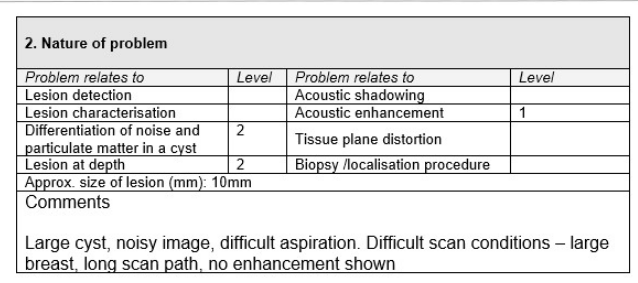
The comment might help to identify this as an unusual problem or prompt improvements in the set up for deep path scanning.
5.2 Technical problems
A log of technical problems may provide valuable information on the management of the scanner, especially in relation to rare or intermittent problems, and should serve as a resource for all staff. A simple form for logging technical problems appears at Appendix 4. Technical faults should also be logged on the National Co-ordinating Centre for the Physics of Mammography (NCCPM) database, by the nominated supervisor.
5.3 Periodic review of problems
The log file should normally be reviewed as part of monthly user QA and shortly before a 6 monthly medical physics test. This will underline the volume and severity of problems recorded and identify any trends, most critically in relation to problems ranked 3 or higher in the clinical log. The review should be carried out by the nominated supervisor. The medical physics assessor should read this summary as part of the 6 monthly testing procedure and investigate issues where necessary. Every effort should be made to identify correlations between clinical or technical problems and the outcomes of the medical physics tests, as this will help to make these outcomes more meaningful and robust.
6. EQUIPMENT REPLACEMENT
The main purpose of monitoring a scanner is to identify unacceptable performance and provide evidence-based grounds for replacement. The approach recommended here is to agree a set of criteria against which acceptability can be judged. All relevant staff, such as clinical users, medical physics and engineering support, should contribute to this process The criteria should include:
-
a) Clinical problems – review of the number and severity of reported clinical problems (especially trends and evidence of deterioration); where possible these reports should be linked to the requirements set out in Section 2.1
-
Technical faults – review of the number and severity of technical faults; downtime; impact on patient care (including treatment delay); the existence of faults that cannot be rectified
-
b) Substandard or deteriorating performance (inferred from physical measurements) – persistent or irreparable failures against standards; failures against baselines that indicate deterioration
-
c) Correlation – parallels between clinical or technical problems (reported in the log file) and poor performance (demonstrated during physical testing) that reinforce concerns about the scanner
-
d) Ageing – a 5-year review of the scanner and its performance should be carried out.. This is not as an unequivocal deadline for replacement but as a prompt to consider planned replacement at each subsequent 6 monthly review
-
e) Obsolescence – evidence that the original, or any other, supplier is unable to support the system adequately (absence of updates or upgrades, design features no longer consistent with best practice, unavailability of spare parts)
-
f) Restricted or inadequate functionality – evidence of limited or inappropriate functionality when compared with current technology; significant concerns about ability to deliver best practice, either in the department (relative to other scanners) or in comparison with NHSBSP services elsewhere.
Testing a scanner against a full range of relevant factors produces a full and robust assessment of its continued suitability. When considering these factors, it should be borne in mind that progress in clinical expectations and standards may justify the replacement of a scanner even where there is no evidence of significant deterioration in performance. It is therefore essential that the extent of these changing expectations and standards is fully reflected in regular updating of the clinical requirements set out in Section 2.1.
If equipment is to be replaced with loaned, pre-owned or repaired equipment, then national guidance, for the purchase of this equipment (especially probes) should be followed.
7. APPENDIX
Appendix 1 Personnel contacts
This (or a similar) table should be completed for each scanner, listing all those involved in its quality assurance. It should be kept in the scanner log file and be made available to all relevant colleagues.
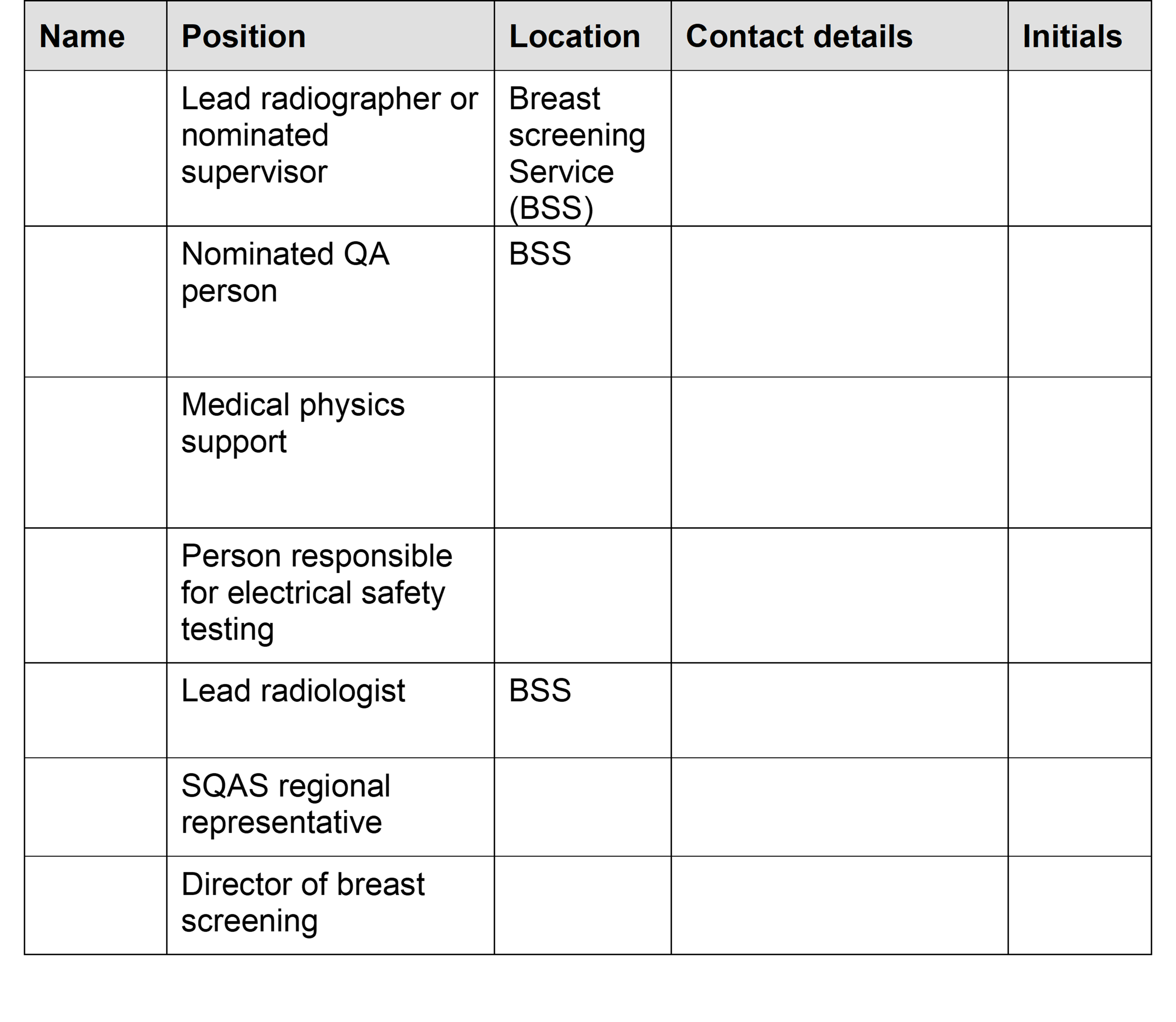
APPENDIX 2 QA responsibilities
This table is designed to indicate the responsibilities of people involved in breast screening Quality Assurance for a particular scanner. On the top row, insert the initials of key personnel as listed in Appendix 1. In the columns alongside each duty, at least one person should be indicated as taking responsibility for the task. A second person may be indicated where appropriate to cover in case of absence.
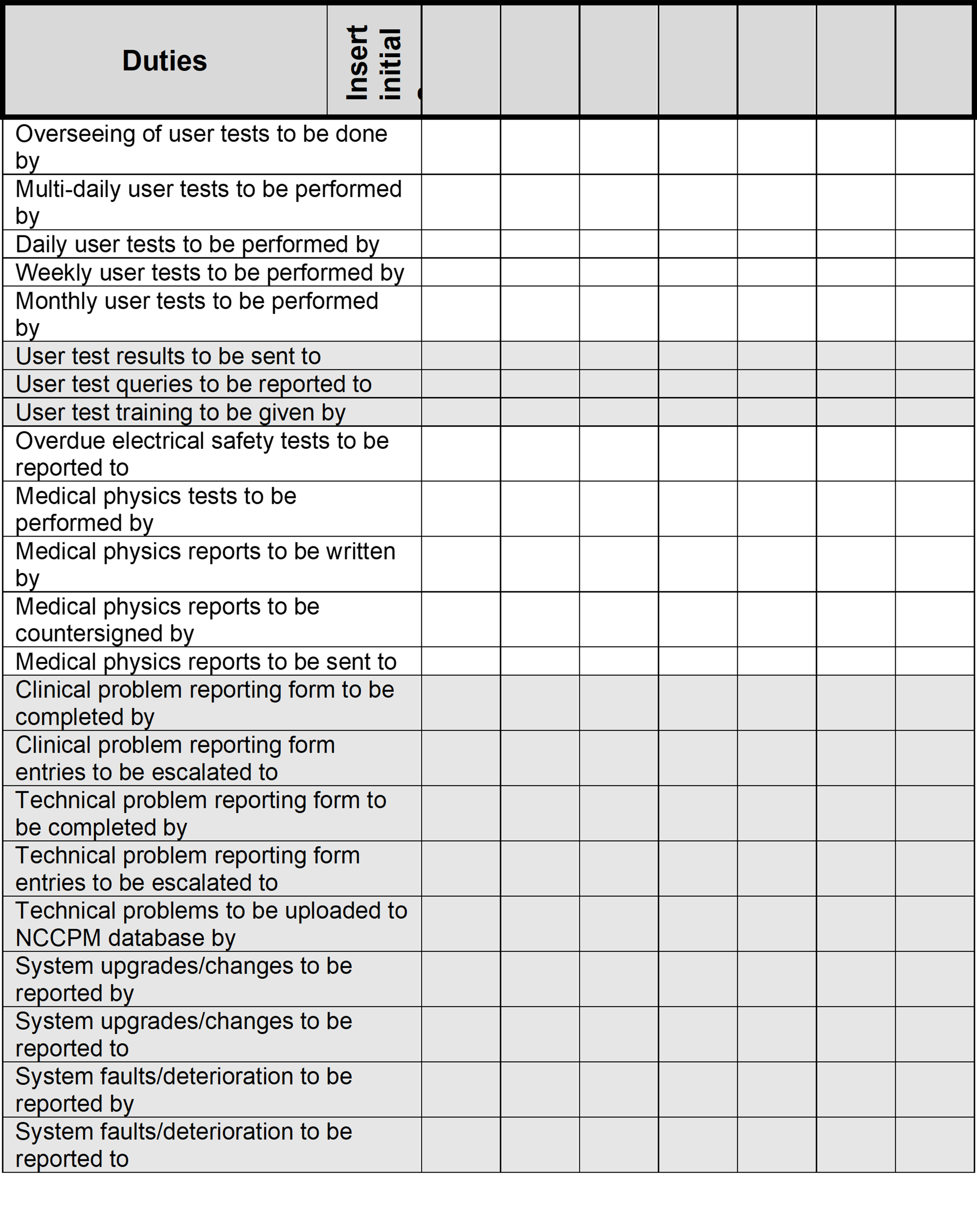
APPENDIX 3 Ultrasound scanner: Clinical problem report form
1. General
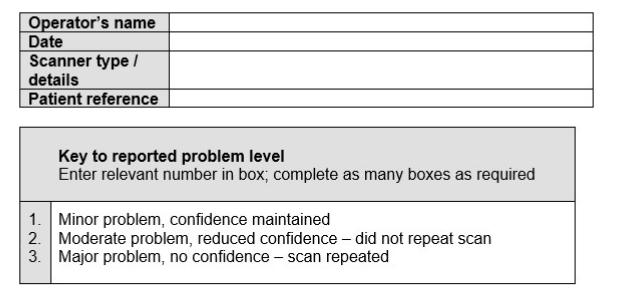
2. Nature of problem
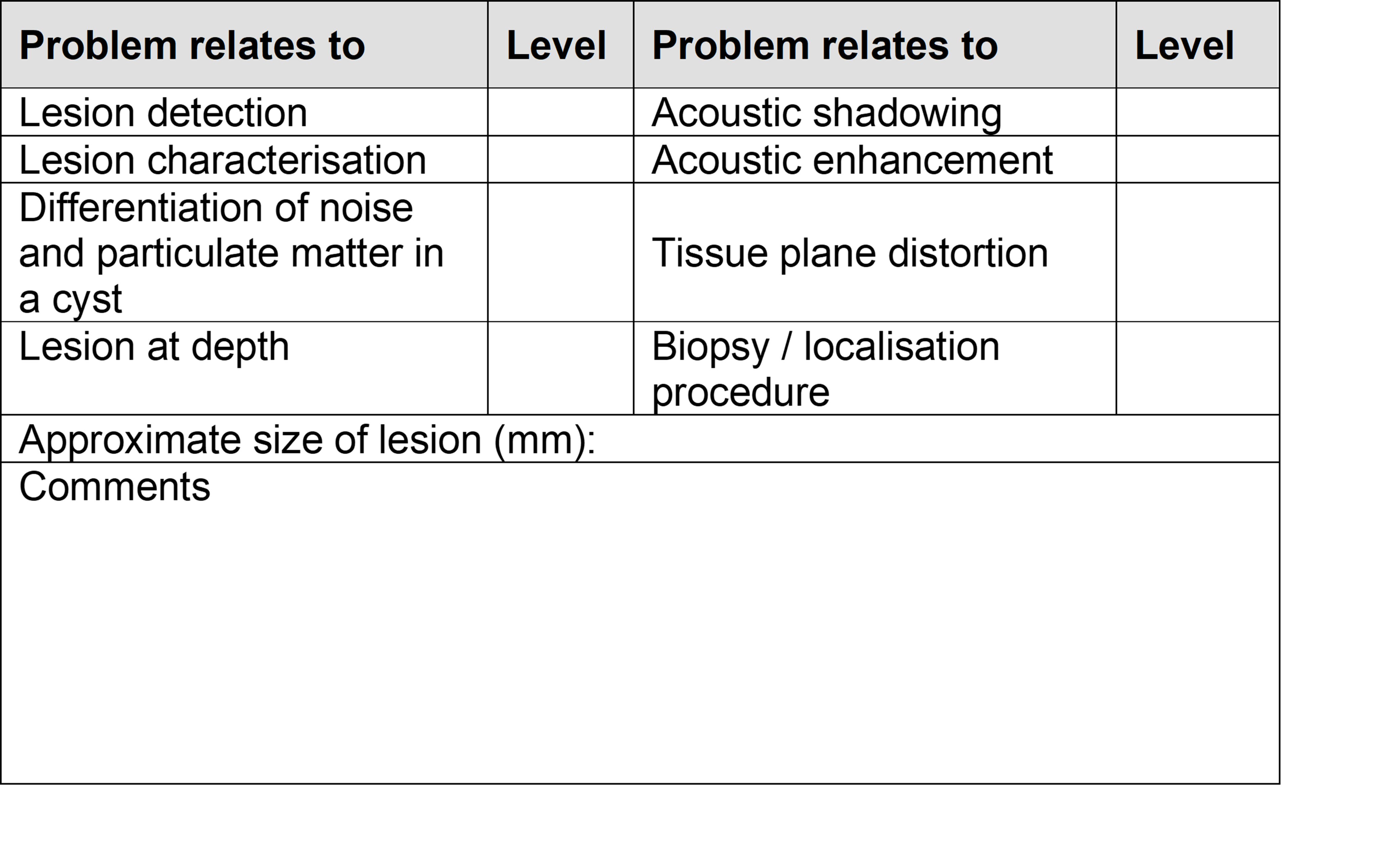
3. If a second scan is performed, please complete the following
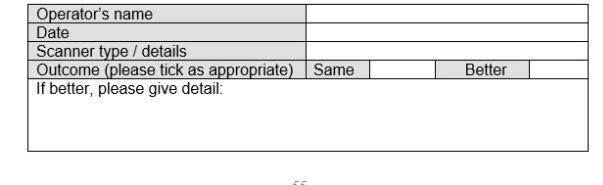
APPENDIX 4 Ultrasound scanner: Technical problem report form
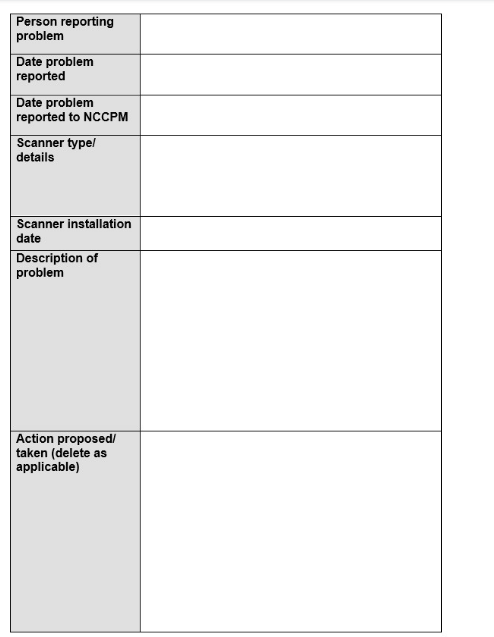
8. FIGURES
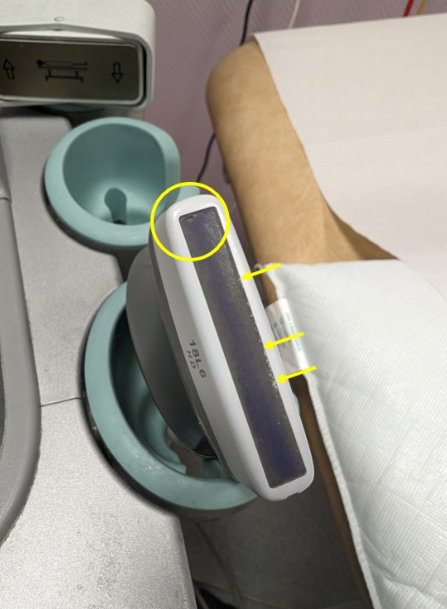
Figure 1. An example of damage to a probe surface
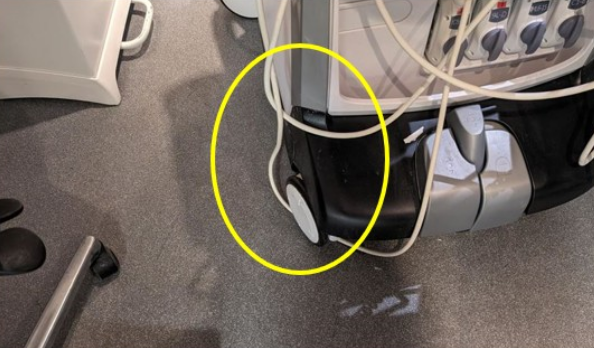
Figure 2. An example of poor cable management
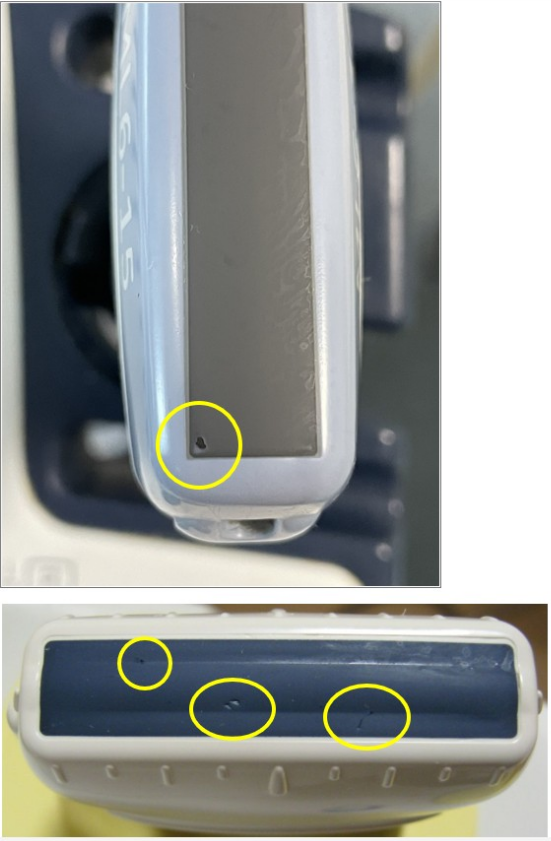
Figure 3. Examples of damage to the probe surface – surface pitting, scarring, small holes and exposed probe elements.
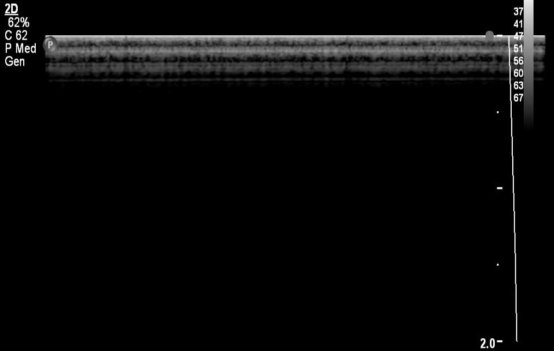
Figure 4a. An example of a normal reverberation pattern
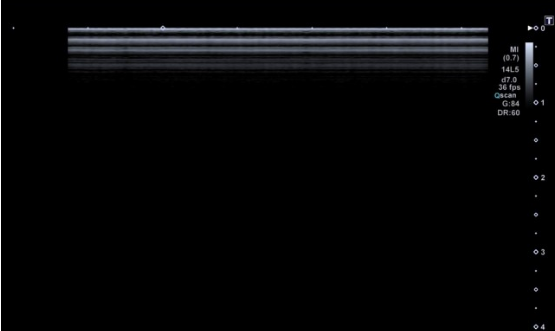
Figure 4b. Another example of a normal reverberation pattern.
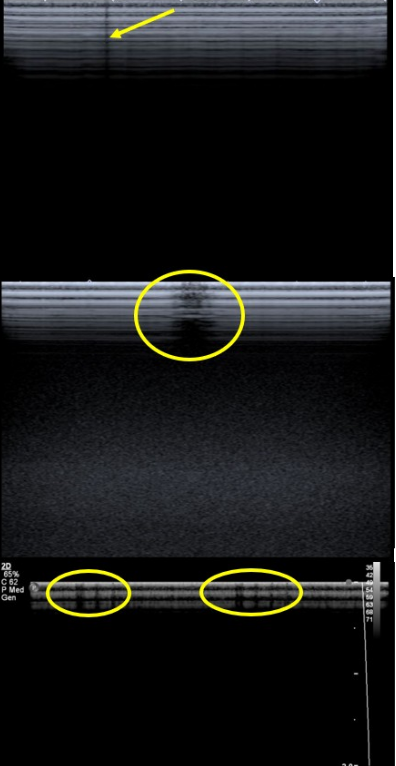
Figure 4c. Examples of reverberation patterns with crystal drop-out
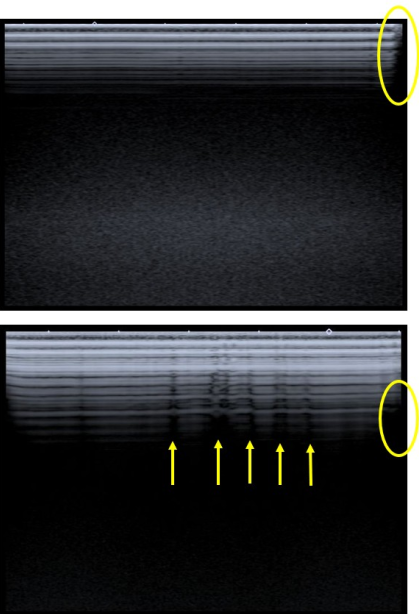
Figure 5. The top image shows delamination on the right-hand side whereas the bottom image shows multiple small regions of delamination.
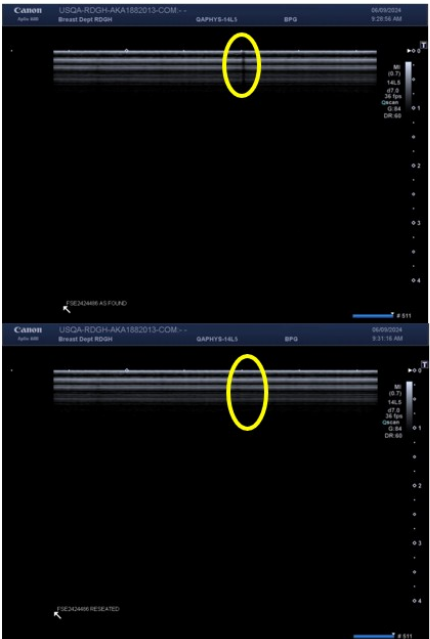
Figure 6. The top image shows apparent element dropout. However, reseating the probe in the port causes the dropout to disappear, as shown in the bottom image.
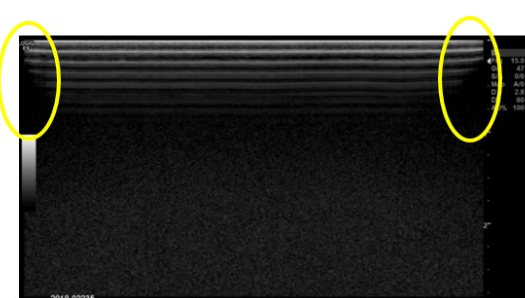
Figure 7. An in-air reverberation image showing lens wear at either end of the probe.
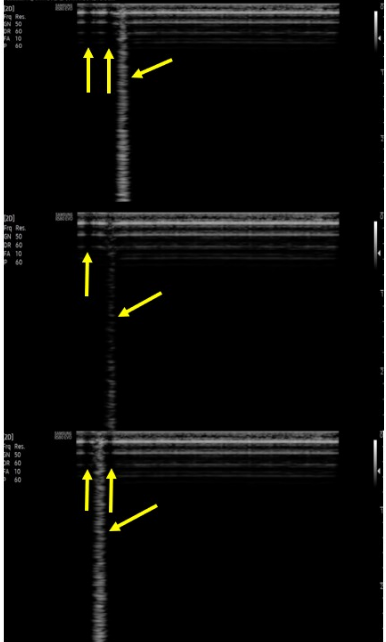
Figure 8. Use of a paperclip to demonstrate element dropout in an in-air reverberation image. The left and right images show a bright narrow vertical ‘comet trail’ reflection from the paperclip. The middle image has a faint narrow vertical reflection and here the paperclip is positioned over a dark vertical region of the in-air reverberation pattern.
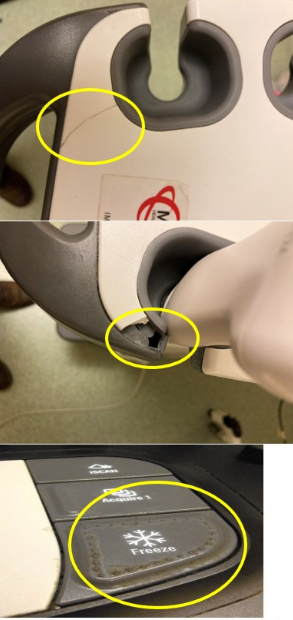
Figure 9. Examples of cracks, breakages and ingress of scanning gel and fluid in the main console. This can potentially be an infection control risk and can also lead to the probe not been secured safely in its holder.
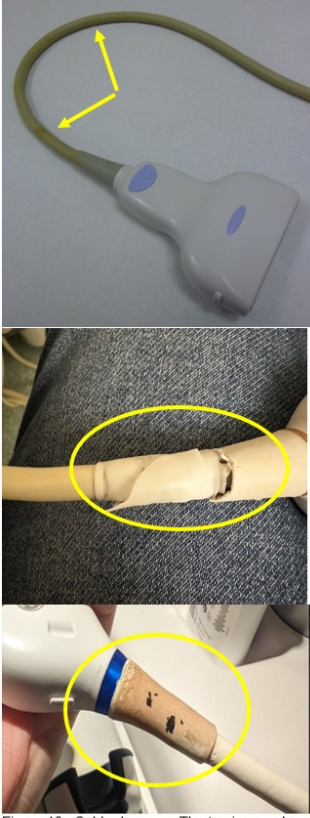
Figure 10. Cable damage. The top image shows discolouration of the probe cable. The middle and bottom images reveal cuts and abrasions near the strain relief. Both can potentially be infection and electrical hazards.
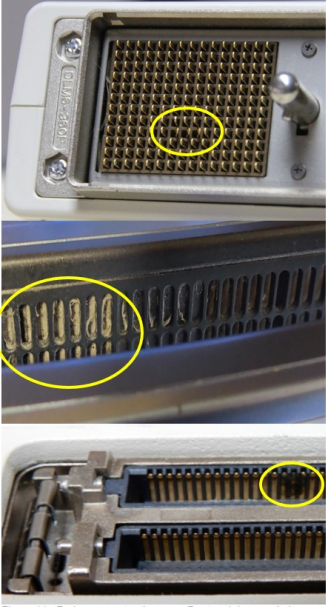
Figure 11. Probe connector damage. Bent and damaged pins can be seen in the top and bottom images. Dust in the port can be seen in the middle image.
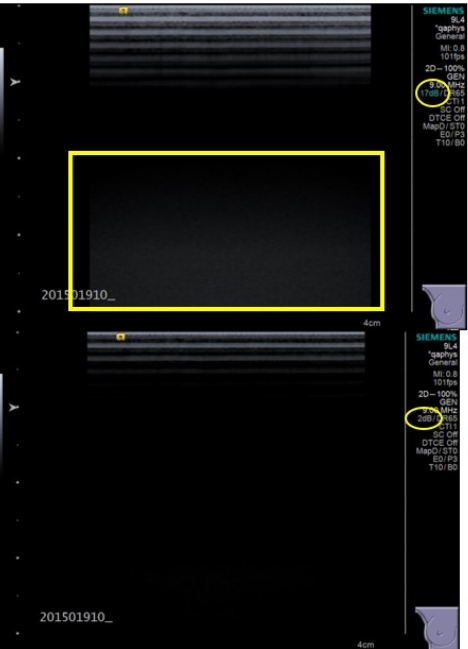
Figure 12. Measurement of B-mode noise. The top image shows noise in the distal part of the image. By reducing the overall gain, this noise will eventually disappear, and this is a measure of the B-mode noise threshold in the image. In this case the bottom image displays the gain as 2dB when the noise disappears.
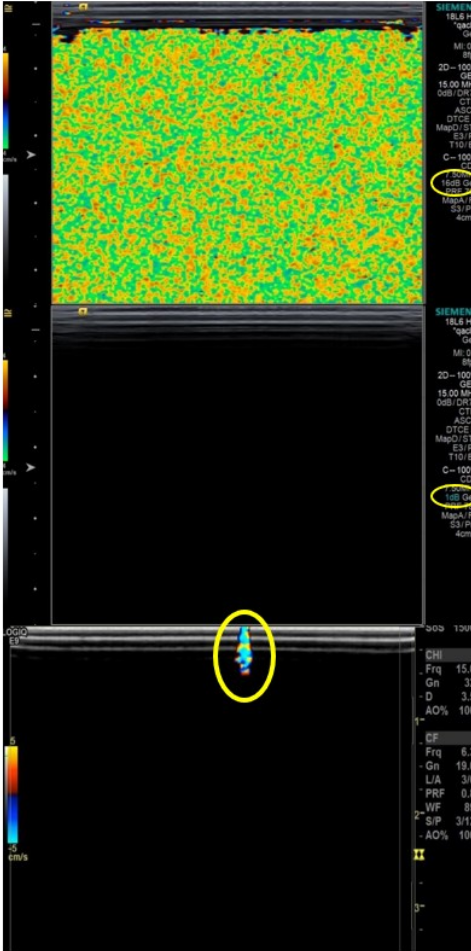
Figure 13. Colour Doppler noise. The top image shows uniform colour noise in the colour box which covers the whole B-mode image area. The middle image shows no visible colour noise after the colour gain has been reduced. The colour gain value is a measure of the colour Doppler noise threshold. The image at the bottom is from a different probe but shows how colour noise can be used to identify problems with a probe. Here the localised region of colour noise is due to element dropout.
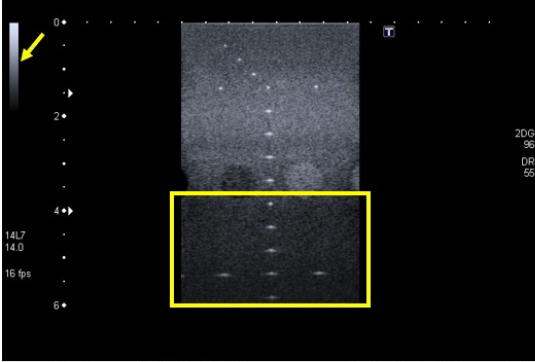
Figure 14. Image of a TMTO, showing the grey-scale bar (top left of image), the filament targets at peak white, mid-grey speckle and low-level noise beyond the low contrast penetration depth (yellow box).
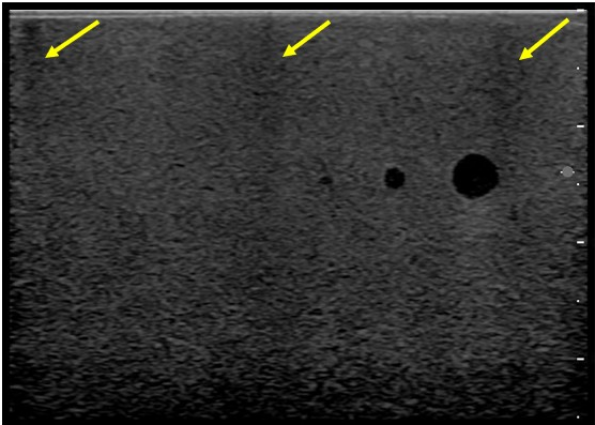
Figure 15. Three distinct dark vertical bands in a TMTO image, showing crystal drop-out. The dark vertical bands start at the top of the probe, a common indication that the probe elements are damaged.
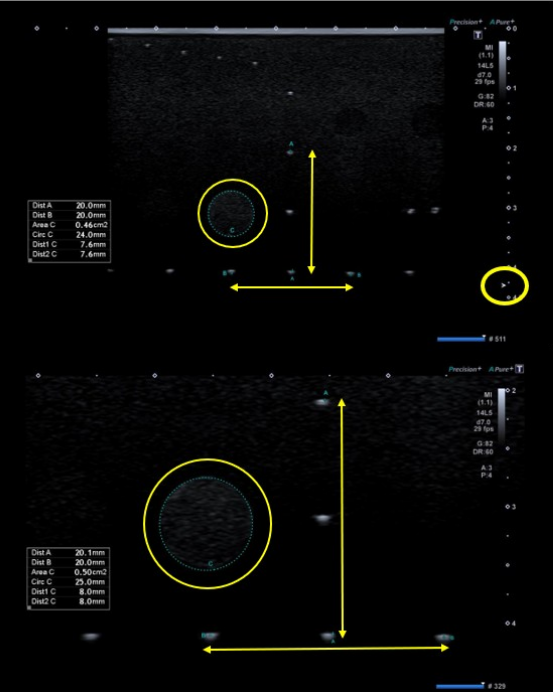
Figure 16. Measurement to check the accuracy of the scanner callipers, using a TMTO. The top image shows a lateral measurement, with the focus adjacent to the line of targets. The bottom image illustrates the use of the READ zoom function to allow a more detailed measurement.
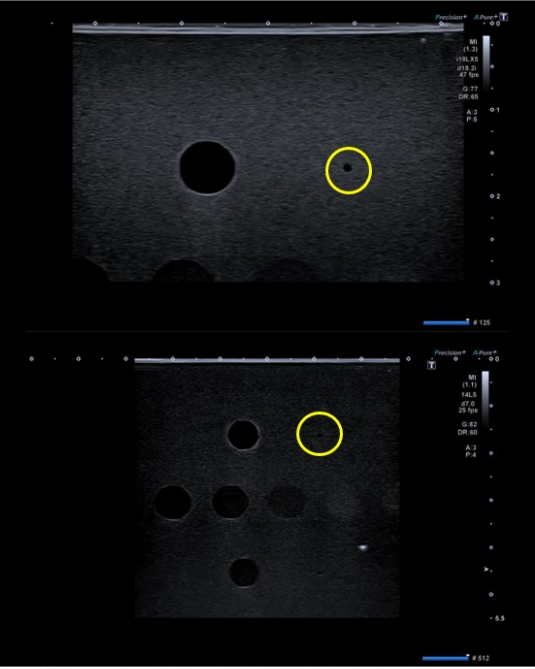
Figure 17. Image of anechoic targets in a TMTO. In the top image the 1.3 mm diameter anechoic cyst is visible using a high frequency and in the bottom image the same size cyst is visible using a lower frequency.
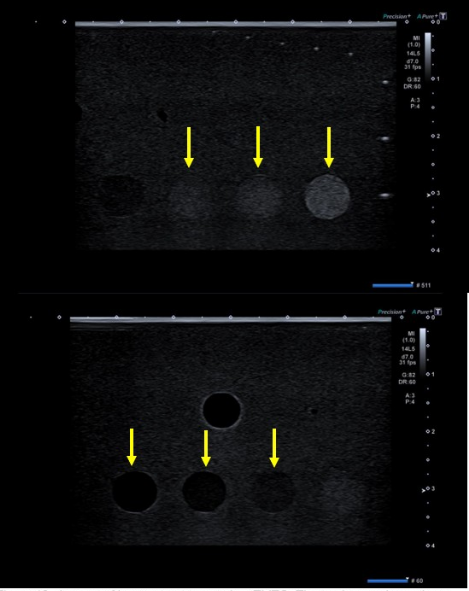
Figure 18. Images of low contrast targets in a TMTO. The top image shows three targets with a contrast high than the background TMTO material. The bottom image shows three targets with a contrast lower than the background TMTO material.
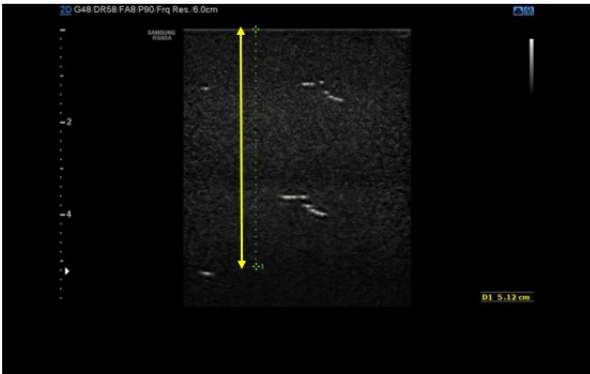
Figure 19. Measurement of low contrast penetration depth in a TMTO. The LCP depth is determined by assessing when the speckle disappears into the noise.
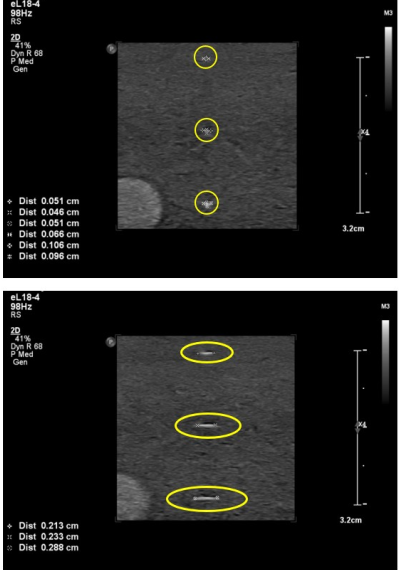
Figure 20. Measurement of the high contrast spatial resolution in a TMTO. The top image shows the measurement of the vertical and horizontal resolution. The bottom image shows the measurement of the beam slice thickness. This is done by turning the probe by 45 degrees.
Authors:
Dr Prashant Verma, Department of Medical Physics & Clinical Engineering, Sheffield Teaching Hospitals NHS Foundation Trust (Editor)
Dr Siȃn Curtis, Department of Diagnostic Medical Physics, University Hospitals Bristol and Weston NHS Foundation Trust
Dr Barry Ward, Northern Medical Physics and Clinical Engineering, Newcastle upon Tyne Hospitals NHS Foundation Trust
Ms Sarah Matthews, Department of Medical Physics and Clinical Engineering, East Kent Hospitals University NHS Foundation Trust
Dr William Teh, Consultant Radiologist, London North West University Healthcare NHS Trust
Mrs Ann Hills, consultant radiographer at the West Suffolk Hospital Foundation trust