Planning
Carrying out a client segmentation exercise will help you gather the information you need to plan effectively.
Carrying out a segmentation exercise is a useful way to assess the impact of Making Tax Digital for Income Tax on you, your practice and your clients. It will help you to take stock of how many of your clients are affected by Making Tax Digital for Income Tax and to think carefully about the extent of the support they will need from you.
As part of your segmentation, you need to know which of your clients:
- meet the qualifying income thresholds
- are exempt
- have another agent acting on their behalf
Use the process flow below or read our guidance to check if and when your clients need to use Making Tax Digital for Income Tax.
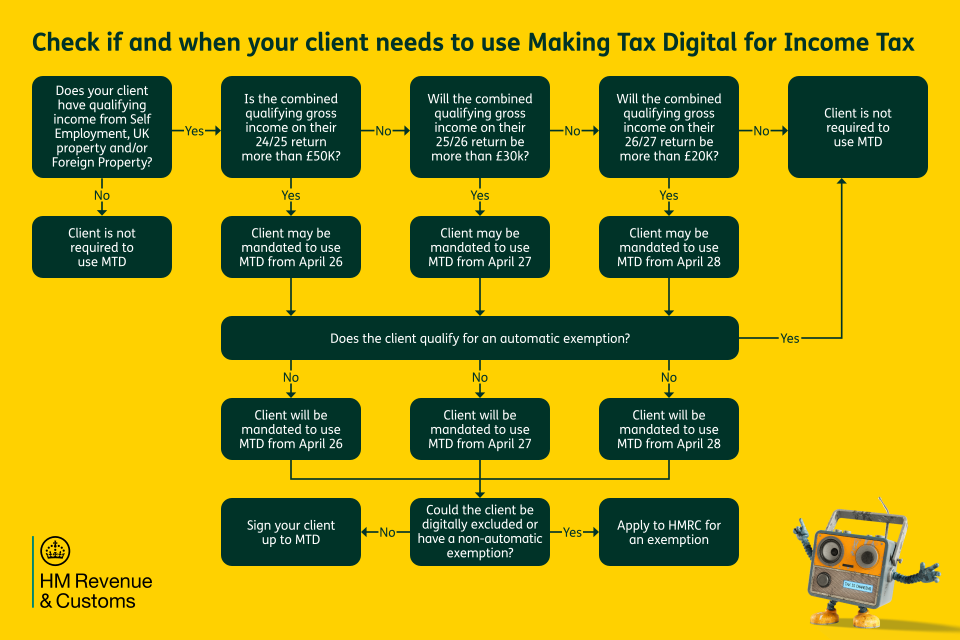
Your client’s qualifying income is what will determine if and when they need to start using Making Tax Digital for Income Tax .
| Tax year | Qualifying income | When to start |
|---|---|---|
| 2024 to 2025 | more than £50,000 | 6 April 2026 |
| 2025 to 2026 | more than £30,000 | 6 April 2027 |
| 2026 to 2027 | more than £20,000 | 6 April 2028 |
As a priority, you need to know which of your clients need to start using Making Tax Digital for Income Tax in 2026. To find this out, you can check a client’s tax return from the 2024 to 2025 tax year.
Using the 2024 to 2025 tax return
If your client’s combined gross income (before expenses and tax) from self-employment and property was more than £50,000 in the 2024 to 2025 tax year, they will be required to use Making Tax Digital for Income Tax from 6 April 2026.
You can calculate your client’s gross income from self-employment in the 2024 to 2025 tax year by looking at their tax return of that year and adding together the figures recorded in:
- SA103F box 15
- SA103F box 16
- SA103S box 9
- SA103S box 10
- SA200 box 3.6
You can calculate your client’s gross property income (UK and foreign) in the 2024 to 2025 tax year, by adding together the figures recorded in:
- SA105 box 5 — furnished holiday lettings
- SA105 box 20
- SA105 box 22 — grant of lease
- SA105 box 23 — reverse premiums
- SA106 box 14 — gross income (Foreign Property Income)
- SA106 box 16 — reverse premiums (Foreign Property Income)
- SA200 box 6.1
Find out more about qualifying income for Making Tax Digital for Income Tax.
There are 2 types of exemption from Making Tax Digital for Income Tax:
- a permanent exemption means you do not need to use Making Tax Digital for Income Tax (unless your circumstances change)
- a temporary exemption means you do not need to use Making Tax Digital for Income Tax before the 2027 to 2028 tax year (at the earliest)
Some exemptions are automatic which means you do not need to apply for them. HMRC gives these exemptions based on information it already has.
Other exemptions must be applied for. When you or your client apply to HMRC you may need to provide supporting evidence. This includes applications for exemption on the basis of being digitally excluded (which means it’s not reasonable for you to use compatible software).
Checking who is exempt
It is important to find out if any of your clients are exempt from Making Tax Digital for Income Tax. This will help you plan any necessary actions, including applying for exemptions where necessary.
You can also use our online tool to check if and when your clients need to use Making Tax Digital for Income Tax.
Determine the category and number of income sources that fall under Making Tax Digital for Income Tax requirements. This will help calculate how many quarterly updates each client will need to send:
- self-employment (each separate business requires its own quarterly submission)
- UK property income
- foreign property income
For each of your clients, you should assess their current digital setup and use this to inform decisions you make together about software, training and support.
The preparing your practice section also contains a useful checklist of topics to discuss with your clients.
If your client is already using Making Tax Digital for VAT
If your client is already using Making Tax Digital for VAT, they might be confident using software to keep digital records and send quarterly returns for VAT.
Even if this is the case, you must still check that their software is compatible for Making Tax Digital for Income Tax.
If your client already uses software or is working with a bookkeeper
If your client already uses software or is working with a bookkeeper you must check that their software if compatible for Making Tax Digital for Income Tax.
You should also consider the roles and responsibilities of all parties involved so you can decide on which services to offer your client and what they want you to do for them.
If your client is digitally capable but not currently using software
If your client is confident doing things online but not currently using software for their taxes, then you might want to recommend suitable compatible software options.
You might also show them our ‘Tax is changing’ campaign page which explains the basics about digital recording keeping and quarterly updates.
If your client has limited technical knowledge and uses paper-based records
If your client has limited technical knowledge and uses paper-based records then Making Tax Digital is likely to be a big change for them.
Set aside time to talk them through the changes and discuss how best you can act on their behalf. They might find it useful to visit our ‘Tax is changing’ campaign page, which is a useful beginners guide to Making Tax Digital for Income Tax.
If your client has no internet access or digital tools
If your client has no internet access, or is highly unlikely to be able to engage with HMRC online, they may qualify for an exemption on the basis of being digitally excluded.
As part of your planning, you should check what’s involved in applying for an exemption, if your client is eligible, and when to do it.
Under Making Tax Digital for Income Tax, ‘Main’ and ‘Supporting’ agents can both act on behalf of one client. You should talk to your clients to make sure you know which of them have bookkeepers or other agents involved as this will be important for:
- understanding and agreeing your responsibilities as either a main or supporting agent
- making sure that digital records can be transferred between software systems
- coordinating workflows and communication between all parties
This information will help if you want to communicate with any supporting agents to clarify workflows and ensure software will meet needs of all users.
Find out more about main and supporting agents for Making Tax Digital for Income Tax
Main agents
Main agents have full access to Making Tax Digital for Income Tax services and can see and do almost everything that their client can do online. Main agents have the same permissions and access to online services as existing agents.
Supporting agents
Supporting agents have restricted permissions and will only able to do certain things for their clients. They can only interact with HMRC on a client’s behalf for their sole trader and property businesses.