
Making sense of mode effects
Published 11 December 2025

© Crown copyright 2025
This publication is licensed under the terms of the Open Government Licence v3.0 except where otherwise stated. To view this licence, visit nationalarchives.gov.uk/doc/open-government-licence/version/3 or write to the Information Policy Team, The National Archives, Kew, London TW9 4DU, or email: psi@nationalarchives.gov.uk.
Where we have identified any third party copyright information you will need to obtain permission from the copyright holders concerned.
This publication is available at https://www.gov.uk/government/publications/making-sense-of-mode-effects/making-sense-of-mode-effects
Author
- Ezekiel Sweiry
With thanks to
- Tom Bramley
- Ian Stockford
- Jo Handford
How to cite this publication
Sweiry, E. (2025). Making sense of mode effects: A framework for anticipating performance differences in equivalent paper-based and digital test items. (Ofqual research report 25/7278). Ofqual. Retrieved from: https://www.gov.uk/government/publications/making-sense-of-mode-effects
1 Introduction
A substantial body of literature comparing performance on equivalent paper-based and digital assessments has accumulated over the past 40 years. Broadly, differences in performance between the 2 modes have come to be known as ‘mode effects’, though the extent of the difference in performance required to warrant the term varies among researchers. Fishbein (2018, page 4) defines mode effects as “substantial differences in student assessment performance between paper and digital modes”, while Way et al. (2015, page 263) consider a mode effect to be “any difference found in test performance that is attributed to the mode of administration”. Jerrim et al. (2018, page 1) take a more specific approach, stating that mode effects “refer to whether questions designed to be administered on paper are systematically easier or harder when delivered on computer”.
Despite this 4-decade focus on the comparability of paper-based and computer-based tests, much of the research literature has limited value in helping practitioners anticipate mode effects in specific assessments. There are several reasons for this limitation.
First, as Keng et al. (2008, page 3) observe, “nearly all online versus paper comparability studies have assessed mode effects at the test level. That is, they have compared whether the overall test results differ for online and paper administrations”. This approach risks overlooking strong mode effects for individual items, which may be masked at test level (for example Pommerich, 2004; Threlfall et al., 2007). Where performance is analysed at item level, insufficient attention is often given to the causes of any mode effects uncovered, and items that show mode effects are rarely shown (for example as screenshots) within published papers, limiting the usefulness of findings.
Second, as Lynch (2022) observes, numerous potential sources of mode effects must be controlled to isolate their impact on performance, yet many studies lack detailed information about their design and the assessments used, making it difficult to evaluate the relevance of their findings. Even when full methodological information is available, assessing the generalisability of results to other testing contexts remains challenging.
Third, the technology landscape has evolved continuously and considerably over the past 40 years. Many features of the software and hardware used in contemporary digital assessments differ greatly from those used in early studies. Features such as low screen resolutions or restrictions on returning to previously answered questions, which were once thought to contribute to mode effects, are now largely obsolete. Additionally, user familiarity with on-screen assessments and the devices used to administer them has grown, further complicating the relevance of older studies.
Finally, there is considerable variation in the robustness of the experimental designs used (for example Lottridge et al., 2010), and only a small proportion of studies have been carried out in high-stakes operational settings. For example, in a review of the mode effects literature carried out by Dodds et al. (2025), only 10 of the 78 empircal studies cited derived their findings from live summative assessment. Motivation levels, which tend to be lower in low-stakes testing environments, are known to influence test performance (for example Wise and DeMars, 2005). Any interaction between mode of assessment and test taker motivation levels, therefore, could further complicate the interpretation of results of comparability studies.
1.1 Purpose and scope
This paper aims to provide a framework to support researchers and practitioners, such as test developers, in anticipating whether specific test items — or features and properties of those items — are likely to elicit mode effects.
To develop this framework, a comprehensive review of the literature was conducted, focusing on mode effects at the item or item feature level. The review explores the underlying causes of mode effects to help practitioners evaluate their generalisability and assist researchers in designing targeted studies to investigate these phenomena further. Given the significant technological advancements over the past 40 years, this paper focuses specifically on studies published since 2000, and greater weight is given to more recent publications.
While this review is thorough, it is not exhaustive. The vast body of published research precludes a complete analysis. The framework is intended to evolve over time as new evidence emerges and as technological developments continue to reshape the assessment landscape.
1.2 Basis of the framework
Analysis of the findings from the literature revealed that the causes of mode effects can be attributed to one of 4 stages in the process of answering test questions. This insight led to the development of a 4-stage framework. By organising the evidence for mode effects according to these stages, the framework (Table 1 below) enables practitioners to systematically review test items under development in relation to potential mode effects at each stage. The aim is to provide a structured and methodical approach to anticipating and mitigating mode effects during the test development process.
Table 1: Framework for anticipating mode effects
| Stage | Description | |
|---|---|---|
| 1 | Information presentation | Amount, nature and layout of information to be processed |
| 2 | Thinking required | Scope and nature of the cognitive processes needed to formulate an answer |
| 3 | Response mechanism | Means through which the test taker provides a response |
| 4 | Appraisal strategy | Ease of modifying initial response and its impact on response strategy |
The information presentation stage concerns the nature of the information that the test taker must process before attempting to answer the question. Mode effects may arise due to various properties of this information, including its length, complexity, layout, and the number and proximity of sources that need to be integrated. Mounting evidence suggests that fundamental differences in reading behaviours between paper and digital modalities may lead to variations in comprehension levels.
The thinking required stage refers to the scope and nature of the cognitive processes needed to formulate a response to the question. Evidence for mode effects at this stage is linked to tasks where unhindered physical access to the question (the ability to write on or next to it), typically available to those answering on paper, supports strategies that can lead to better performance.
The response mechanism stage addresses the means through which the test taker provides their response. For constructed response items, a key distinction lies in the mode of text entry: handwriting on paper versus typing on a digital device. For selected response items, the method of indicating an answer can also vary by mode, particularly when digital formats incorporate interactive features not available on paper, such as drag-and-drop interfaces or drop-down menus. Additionally, certain tasks — such as those requiring drawing, graphing, or construction skills — may utilise simulated tools in digital formats that can affect item difficulty in multiple ways.
The final stage, appraisal strategy, is rooted in the ease with which a test taker can modify a response on screen after it has been produced. For some tasks, this functionality enables alternative strategies that are unavailable to those taking paper-based tests.
Sections 2 through 5 of this paper examine mode effects identified in the literature at each of these 4 stages. Each section offers practical guidance for test developers, grounded in the evidence reviewed. The concluding part of each section serves both as a summary and a set of implications for test design.
2 Information presentation
As stated in the introduction, this stage of the question answering process relates to the nature of the information that needs to be processed. Various properties of this information could be the source of mode effects, including the length, complexity, layout, number and proximity of sources of information that need to be processed.
2.1 Comprehension on paper and screen
A significant portion of the evidence for mode effects at this stage of the answering process stems from studies comparing comprehension and recall of information read in print versus on screen. While research in this area dates back to the 1980s, interest has intensified in recent years as the prevalence of digital device usage has surged. Concerns have grown, not least in educational contexts, about whether comprehension is poorer when information is read on digital devices compared with paper (for example Wolf, 2018).
Broadly, studies investigating the impact of mode on comprehension involve participants reading one or more texts in both print and digital formats, and then being assessed on their comprehension of those texts. There is a lack of clarity, and potentially consistency, about how reading is conceptualised in the literature. In a systematic literature review conducted by Singer and Alexander (2017b), only a quarter of 36 studies included either an explicit or implicit definition of reading. The same authors also documented notable variability in the nature of the task(s) that researchers employed to test participants’ comprehension. Nevertheless, there is growing evidence that readers comprehend texts more accurately when presented on paper than in digital form, a phenomenon often referred to in the literature as the ‘screen inferiority effect’.
While many studies have found no significant difference in performance between modes (for example Margolin et al., 2013; Porion et al., 2016; Ocal et al., 2022), several recent meta-analyses (Delgado et al., 2018; Kong et al., 2018; Clinton, 2019) have identified a small but significant comprehension bias in favour of paper. Kong et al. (2018) analysed 17 studies published between 2000 and 2016 and found an overall effect size of –0.21. Clinton’s (2019) meta-analysis, which included 33 studies from 2008 to 2018, reported an effect size of –0.25. Delgado et al. (2018) examined 54 studies published between 2000 and 2017, also demonstrating an overall advantage for paper-based reading, with an effect size of –0.21. While an effect size of around 0.2 is considered to be small under Cohen’s (1988) guidelines, Kraft (2019) argues that effects of this magnitude represent large and policy-relevant impacts in the context of educational interventions. Reinforcing this view, Delgado et al. (2018, page 34) note that these effects “are relevant in the educational context because they represent approximately two-thirds of the yearly growth in comprehension in elementary school, and half of the effect of remedial interventions”.
These meta-analyses also explore the impact of a range of moderating variables, such as genre and text length. Findings in relation to these variables are considered in Section 2.1.2.
2.1.1 Causes of the screen inferiority effect
Considerable attention, including some empirical investigation, has been devoted to understanding the causes of the screen inferiority effect. While Salmerón et al. (2025, page 176) note that “the exact conditions and causes to explain when and why this effect occurs are not yet clearly identified”, several potential causes have been proposed, the most prominent of which are discussed below.
Shallowing hypothesis
In recent years, increasing attention has been given to what has come to be known as the ‘shallowing hypothesis’ (for example Annisette and Lafreniere, 2017). At the core of this hypothesis is the idea that readers often use digital devices for superficial reading interactions, such as checking messages and social media, that are more likely to involve skimming and scanning than deep reading (for example Wolf, 2018; Meglioli, 2025). Wolf (personal correspondence) argues that this tendency to skim, browse, and spot words when reading on digital screens is increasingly shaping all of our reading practices, with potentially harmful consequences for the depth and quality of our thinking while reading.
This hypothesis has grown in prominence in recent years. Although direct testing of it is challenging, emerging evidence suggests more superficial processing on screens, consistent with its claims. Froud et al. (2024) investigated different levels of processing on paper and screen using electroencephalography (EEG) techniques. Fifty-nine middle school students read passages in both print and digital formats, and those students were then presented with words that were related to the passage to varying degrees. An EEG was recorded for each participant. The researchers focused on a specific type of brain response called the N400, which reflects how the brain reacts to expected versus unexpected information. The N400 was used to provide an index of processing depth for digital and paper reading. The authors predicted that deeper reading of texts on paper would result in stronger associations with subsequently-presented related words, while shallower reading on screen would produce weaker associations. Consistent with their predictions, when passages were read on a laptop, responses to subsequently presented moderately related words evoked activations similar to those associated with words that were unrelated to the text. However, after reading on paper, the brain responses to moderately related words were more similar to those for strongly related words. The authors concluded that their findings “provide evidence of differences in brain responses to texts presented in print and digital media, including deeper semantic encoding for print than digital texts” (Abstract).
Engdal Jensen et al. (2024) conducted an eye-tracking study in which lower secondary students completed reading comprehension tests in both print and digital formats. They found that the students reread to a significantly larger extent on screen compared with paper, indicating that their initial reading on screen was more superficial. The number of transitions negatively correlated with students’ proficiency levels, indicating that poorer readers looked back more frequently than better readers. The authors concluded that “reading on screen leads to more shallow processing and can hinder reading comprehension” (Abstract).
It is important to note that these studies do not demonstrate that shallower reading on screens is a direct consequence of prior superficial digital reading habits, nor do they rule out other possible explanations for the screen inferiority effect discussed in this section.
Delgado et al. (2018) found that the screen inferiority effect increased over the 18-year period (2000 to 2017) of the studies incorporated in their meta-analysis. This trend may reflect the growing prevalence of smaller digital devices, such as tablets and smartphones, which could lend additional support to the shallowing hypothesis. However, Kong et al. (2018), in their meta-analysis, found no significant difference in the magnitude of the comprehension gap between screen and paper-based reading when comparing studies published prior to and after 2013.
Metacognitive deficit hypothesis
This theory is closely linked to the concept of calibration, which refers to the accuracy with which learners perceive their own performance (Pieschl, 2009). Several studies, including those by Ackerman and Goldsmith (2011) and Ackerman and Lauterman (2012), have found calibration accuracy of performance in comprehension tasks to be poorer when material is read on screen than on paper. Specifically, when reading on a screen, readers tend to overestimate how well they have understood the material.
The Clinton (2019) meta-analysis also found that metacognitive awareness of performance is better when reading on paper than on screen. Based on this finding, Clinton suggested that the screen inferiority effect could be attributed to poorer calibration accuracy, with readers processing text on screens less efficiently, while believing they understand the material better than they do.
It is worth noting that these 2 theories (the shallowing hypothesis and metacognitive deficit hypothesis) are not necessarily in competition with one another. For example, Delgado and Salmerón (2021) propose that the relationship between metacognitive monitoring deficits and inattentive reading (as seen in the shallowing hypothesis) may be bidirectional. Lower on-task attention may hinder effective monitoring, while overconfidence in one’s performance could free up cognitive resources, potentially leading to mind-wandering.
Scrolling
At least 2 meta-analyses have investigated the impact of scrolling on reading comprehension. Singer and Alexander (2017b) categorised texts as either short (less than 500 words) or long (more than 500 words), using the 500-word threshold as a proxy for texts where scrolling would likely be necessary. They found no significant effect of medium on comprehension for the shorter texts. However, for longer texts, comprehension scores were significantly better for print than digital reading. Delgado et al. (2018) found that the screen inferiority effect was larger when studies used scrollable texts, although the moderating effect was not statistically significant.
These findings suggest a potential link between scrolling and reduced comprehension, but they do not conclusively prove that scrolling rather than text length is the cause. To isolate the impact of scrolling, studies would need to include dual on-screen conditions — one involving scrolling and another using paging (navigating through the text one page at a time, typically by clicking or tapping to advance). However, as most studies use short texts that do not require page turning, or have the experimenter turn the pages (on cues from the participant), research systematically assessing the effect of scrolling versus page turning on reading comprehension is limited (for example Støle et al., 2018).
Nonetheless, a few studies have directly investigated the effect of scrolling. In a study by Higgins et al. (2005), 219 fourth-grade students (aged 9 to 10) were randomly assigned to take a reading comprehension assessment in one of 3 modes: on paper, on a computer using scrolling text to navigate through passages, or on a computer using paging text. On average, participants answered 58.1%, 52.2%, and 56.9% of items correctly in the paper, scrolling, and paging conditions respectively. However, the difference between the paper and scrolling groups was not statistically significant.
Sanchez and Wiley (2009) conducted 2 experiments demonstrating a significant negative effect of scrolling on reading comprehension. In their study, university students read long texts (over 2,500 words) presented either as a single continuous text (requiring scrolling) or in a paging format. After reading, participants were asked to write summary essays about the texts. Those in the paging condition produced better summary essays, indicating better comprehension.
In 2 experiments carried out by Wästlund et al. (2008), Swedish university psychology students read a 1,000-word text in a scrolling condition and a comparable 1,000-word text in a paging condition. The text was read on a desktop computer and the comprehension of each text was assessed with a short multiple choice test. Despite no significant differences in performance on the multiple choice tests between the scrolling and paging conditions, a secondary task — reaction time to pop-up stimuli — suggested that cognitive load was higher in the scrolling condition than in the paging condition.
The most widely accepted explanation for the negative impact of scrolling, sometimes referred to as the cognitive map mechanism (for example Hou et al., 2017), relates to the fact that print texts have fixed layouts that help readers form a mental map of the content. A printed page offers clear spatial cues — the corners and borders — which enable the reader to locate information relative to these fixed points. This spatial layout assists readers in navigating and recalling information. However, when texts are presented in a scrolling format, readers continuously adjust the position of the text, making it difficult to form a stable cognitive map of the content. As Hou et al. (2017, page 87) describe, “the spatial flexibility and instability of the text presentation makes it hard for readers to reconstruct the physical layout of the text, which interrupts mental map formation”. Without this mental map, readers are forced to expend more cognitive resources navigating the text, which in turn reduces their capacity for comprehension and information retention (Li et al., 2013).
In the Sanchez and Wiley (2009) study mentioned above, the researchers also found that the negative impact of scrolling was much more pronounced for those with lower working memory capacity. This may suggest that the cognitive demands of scrolling disproportionately affect readers who are already operating with limited cognitive resources.
Medium materiality mechanism
Mangen (2008) suggested that differences in haptic interactions — those related to the sense of touch — between reading text in print and on screen might explain the screen inferiority effect. These differences arise from the fact that while printed text is fixed and inseparable from the material object it is printed on, text displayed on a screen is detached from its physical medium, as it is only temporarily visible. Mangen (2008, page 405) argued that “the reading process and experience of a digital text are greatly affected by the fact that we click and scroll, in contrast to the tactilely richer experience of flipping through the pages of a print book”. She added that when reading digital texts, our haptic interaction with the text occurs at an indeterminate distance from the actual content, whereas print reading offers a direct, physical connection to the material substrate of the text. Mangen contended that this detachment from the ‘physical support’ of digital texts could negatively impact information encoding and comprehension. Hou et al. (2017) referred to this potential advantage of printed text as the ‘medium materiality mechanism.’
Hou et al. (2017) conducted a study to investigate whether the screen inferiority effect is better explained by the cognitive map mechanism or the medium materiality mechanism. Forty-five undergraduate students read a comic book under 3 different conditions. The first involved reading a physical print version, while the second (digital equivalent) and third (digital disrupted) conditions involved reading on a 9.7-inch tablet. In the digital equivalent condition, the comic was presented page by page to closely resemble the paper format, whereas in the digital disrupted condition, participants viewed the content panel by panel rather than page by page. The digital equivalent condition was designed to mimic the print experience and test the medium materiality mechanism, while the digital disrupted condition aimed to interfere with readers’ ability to form a coherent spatial representation of the text, thereby testing the cognitive map mechanism. The researchers found no significant differences in comprehension between reading the print and digital equivalent conditions, thereby failing to provide evidence for the medium materiality mechanism. However, comprehension was significantly lower in the digital disrupted condition compared with the print version, lending support to the cognitive map mechanism.
Screen factors
Most research investigating the potential for screen effects (such as glare or fatigue) occurred in the 1980s and 1990s. Screen properties have changed considerably since this period, and using evidence from these studies may therefore be misleading.
However, even in more recent years, some researchers have raised the possibility that screen properties could contribute to the screen inferiority effect. Mangen et al. (2013, page 66) argued that “some of the explanation for the differences between screen reading and print reading might relate to the different lighting conditions in the two modalities”, as LCD screens are “known to cause visual fatigue by their emitting light”.
Hou et al. (2017) raise the possibility that visual fatigue could be exacerbated by scrolling and the inability to form cognitive maps of text on screen. They cite evidence from studies such as Zhang et al. (2012) that suggest that readers’ eyes may grow fatigued from the constantly shifting layouts. Hou et al. (2017, page 87) state that “each time readers transit to a new layout (e.g., each scroll to reveal a new line), their eyes need to adjust, which results in higher visual burdening and higher mental and physical resource exertion”.
2.1.2 Moderating factors
Numerous studies have explored factors that influence the screen inferiority effect, such as participants’ age and ability, text length, and text genre. The findings related to these factors are discussed below.
Age of participants
A key question in the context of educational assessment is whether the screen inferiority effect applies consistently across different age groups. While studies measuring the impact of digitisation on reading comprehension have predominantly focused on university students (for example Singer & Alexander, 2017b), research involving primary and secondary school children has also tended to show a screen inferiority effect.
Öztop and Nayci (2021) carried out a meta-analysis of 12 studies, all undertaken in Turkey, that compared reading comprehension on paper and screen among participants aged 9 to 14 years. Their analysis revealed a significant effect size (g = –0.423) in favour of reading from paper. In a systematic review of 23 publications peer-reviewed between 2015 and 2022 and focused on participants aged between 6 and 18, Peras et al. (2023) concluded that the evidence does not unequivocally support the superiority of one mode over the other, though the studies they reviewed more often reported results favouring paper than digital formats.
At the primary level, Støle et al. (2020) conducted a large-scale study with 1,139 participants aged 10. They completed comparable versions of a reading comprehension test in both paper and digital formats, each containing 5 texts of varying lengths (204 to 683 words) and genres. The study found that comprehension performance was significantly lower when reading on screen. In a test scored out of 70, students in the bottom quartile in terms of achievement scored, on average, just over a mark higher on paper (39.45 vs 38.23). For the highest achieving quartile, the difference increased to approximately 2.5 marks (64.06 vs 61.45).
Other research corroborates these findings. For instance, Halamish and Elbaz (2020), in a study of 38 fifth grade children (aged 10 to 11), and Dahan Golan et al. (2018), in a study involving 82 fifth and sixth grade children (aged 10 to 12), also found that reading comprehension scores were significantly higher when reading on paper than when reading on screen. Each of the participants in the former study read texts on paper and on 19-inch screens. The texts were short (103 to 128 words) and required no scrolling. For each text, participants completed a comprehension test consisting of 6 multiple choice questions. Mean scores for items taken on paper and computer were 0.62 and 0.52 respectively.
At the secondary level, Mangen et al. (2013) randomly assigned 72 tenth grade students (aged 15 to 16) into 2 groups. One group read 2 texts (both over 1,000 words) on paper, while the other read the same texts as PDFs on a computer screen. Students who read on paper performed significantly better on a comprehension test administered after reading.
Finally, the Delgado and Clinton meta-studies both found that age group did not moderate the overall screen inferiority effect, though their analyses incorporated relatively fewer studies on younger children.
Salmerón et al. (2024, page 155) addressed the apparent consistency of the screen inferiority effect across age groups. They stated that “while the shallowing hypothesis predicts a higher screen inferiority effect for older students, who are more used to interacting with social media, existing evidence does not support such an assumption”. However, they also noted the disproportionate number of studies conducted with undergraduate participants and concluded that the moderating effect of academic level remains an open question.
Text length
Singer and Alexander (2017b), in their meta-analysis of studies published between 2001 and 2017, observed that most studies did not report the length of the texts used. In the 15 studies where text length was specified, they found no significant difference in comprehension performance between paper and screen for texts under 500 words. For longer texts, however, a screen inferiority effect emerged. Delgado et al. (2018) also analysed text length as a potential moderator in their meta-analysis, based on a threshold of 1,000 words to distinguish short and long texts. They found that text length did not moderate the screen inferiority effect.
As discussed in the section on scrolling, it remains unclear whether any effect is directly caused by text length or whether it is primarily driven by the need for scrolling, which becomes more likely as text length increases. While some studies specifically investigating scrolling (such as those comparing scrolling with paging) provide evidence of its negative impact on comprehension, there is insufficient research isolating the effect of text length when scrolling is not a factor.
Genre
A number of studies have investigated whether differences in paper and digital reading comprehension are mediated by text genre. These studies tend to show that the screen inferiority effect is limited to, or at least more pronounced in, studies using expository (information) texts.
Both the Delgado et al. (2018) and Clinton (2019) meta-analyses investigated the role of genre. Delgado et al. found that the paper advantage was present only in studies involving expository texts or a combination of expository and narrative texts. Similarly, Clinton found that the screen inferiority effect was evident for expository texts (g = −0.32) but negligible for narrative texts (g = −0.04). While Clinton cautioned that there were considerably more studies with expository texts than narrative texts in her analysis, she also noted that in 3 studies in which both narrative and expository texts were used (and genre-specific findings were available), the negative impact of screens was more pronounced for expository texts.
Schwabe et al. (2022) conducted a meta-analysis specifically focused on comprehension of narrative texts. While the Delgado et al. and Clinton meta-analyses included only recent studies (from 2000 and 2008 respectively), the Schwabe et al. study incorporated studies from the past 4 decades. They found no significant difference in comprehension of narrative texts between screen and print.
Two main theories have been proposed to explain why comprehension differences between mediums are limited to (or at least greater in) information texts. The dominant theory posits that these texts impose a greater cognitive burden than narrative texts. Delgado and Salmerón (2021) argue that while narrative texts can be complex, expository texts generally require more cognitive effort due to their academic focus, dense ideas, infrequent vocabulary, and complex structures. This view is supported by Mar et al. (2021), who note that narrative texts have a familiar and predictable structure, often involving events that align with everyday experience. In contrast, expository texts tend to present abstract or unfamiliar information in a logical but less intuitive format. The theory holds that because narrative texts demand less cognitive effort, readers can process them efficiently even when additional cognitive resources are needed for digital reading (for example Schwabe et al., 2022).
This notion of increased cognitive burden in expository texts is supported by Margolin et al. (2018), who reported that individuals with lower working memory capacity experienced the greatest difficulty comprehending expository texts on screen. Additionally, Kraal et al. (2019) found clear differences in eye-movement patterns between low- and high-comprehending readers for narrative texts, whereas these differences were much less pronounced for expository texts. They suggested that low-comprehending readers may adopt suboptimal strategies for expository texts, failing to adjust to the greater cognitive demands these texts impose.
A second (and somewhat contradictory) explanation for genre-based differences, proposed by Schwabe et al. (2022, page 792), is that “the mind-set of reading a narrative text might trigger a more attentive reading process compared to reading an expository text”. They hypothesise that because every detail in a narrative could be vital to the story, readers may process details deeply to follow the narrative, even if the significance of those details isn’t immediately clear. This immersive engagement may reduce sensitivity to external factors such as the reading medium.
Time pressure
Both Kong et al. (2018) and Clinton (2019) reported in their meta-analyses that there was no reliable difference in reading time across mediums, despite substantial variation among individual studies. Clinton suggested that “reading from paper is more efficient than reading from screens, considering that there is better performance with similar time investments” (page 6).
However, there is evidence that the screen inferiority effect is limited to, or increases in, time-constrained reading scenarios. In a recent study by Delgado and Salmerón (2021), 140 undergraduate participants were assigned to one of 4 experimental conditions that varied by reading medium (print versus screen) and time frame (free versus pressured). Participants who read on screen under time pressure scored significantly lower than those who read on screen at their own pace. In contrast, for the print condition, scores remained consistent regardless of whether participants read under time pressure or at their own pace. Moreover, when comparing the 2 mediums under time pressure, screen readers scored significantly worse than print readers, while no significant differences were observed between mediums in the self-paced condition.
This finding aligns with the results of the Delgado et al. (2018) meta-analysis, which found that the paper-based reading advantage increased when reading occurred under time constraints compared with self-paced conditions.
Depth of comprehension
Singer and Alexander (2017b) observed that few studies have examined comprehension across multiple complexity levels. Among those that have, the most commonly explored distinction is between comprehending or recalling the ‘gist’ or ‘main idea’ of a text and understanding or recalling specific details. This distinction was investigated in the meta-studies carried out by Clinton (2019) and Delgado et al. (2018), and in an empirical study by Singer and Alexander (2017a). All 3 studies found that the ability to comprehend or recall the ‘main idea’ or ‘gist’ of a text does not differ between modes, but participants performed worse on questions related to finer details when reading on screen. Reflecting on this finding, Singer and Alexander (2017b, page 27) cautioned that “looking only globally at comprehension outcomes when concerned about the role of reading medium may well mask important differences that can be seen only when the grain size of understanding is systematically assessed”.
Clinton’s (2019) meta-analysis also found that the screen inferiority effect was similar for both literal and inferential reading tasks. This finding was somewhat unexpected, as inferential reading is generally considered more demanding and might therefore be presumed to be more sensitive to medium effects.
Reading comprehension ability
Research examining the moderating effect of reading comprehension ability on the relationship between reading medium and comprehension has yielded inconsistent findings. A common hypothesis among researchers is that less-skilled comprehenders may be more susceptible to the screen inferiority effect due to their reduced cognitive resources (for example Stiegler-Balfour et al., 2023) or poorer calibration accuracy (as suggested by the metacognitive deficit hypothesis).
Stiegler-Balfour et al. (2023) conducted a study in which participants read 2 expository texts on either paper, a computer or an iPad. They found that less-skilled comprehenders performed worse in the digital conditions compared with print, while there was no evidence of a screen inferiority effect for skilled comprehenders. They also found that while skilled comprehenders took slightly longer to read on computer than in print or on an iPad, less-skilled comprehenders read faster in the digital conditions than on paper. The researchers concluded that less-skilled readers may adopt suboptimal strategies in digital environments.
However, not all studies support this finding. For example, in the Støle et al. (2020) study, participants were categorised into 3 skill levels based on their test performance. Contrary to expectations that low-achieving readers would exhibit a more pronounced screen inferiority effect, the negative effect was most pronounced for high-performing girls.
Device type
Studies comparing reading comprehension on paper and screen have examined various types of digital devices, but in the majority of cases only one screen type is included per study, leaving potential differences between devices underexplored (for example Schwabe et al., 2022).
In the Delgado et al. (2018) meta-analysis, the advantage of paper-based reading was significant when studies used computers (g = −0.23) but not when they used handheld devices (g = −0.12). However, the moderating effect did not reach significance. Based on these findings, the authors emphasised the need to determine whether screen inferiority is limited to desktop computers and eliminated when using handheld devices, and, if so, to identify the cognitive mechanisms that may enable comparable performance between paper and handheld screens.
Salmerón et al. (2024) conducted 2 meta-analyses investigating reading comprehension outcomes specifically comparing paper and handheld devices. While they found a screen inferiority effect for handheld devices, the effect size was approximately half of that found in previous meta-analyses (Delgado et al., 2018; Kong et al., 2018; Clinton 2019) that predominantly analysed paper and desktop or laptop computer comparisons. The authors suggested that handheld devices might offer a reading experience more akin to print than traditional computers, potentially due to the physical interactions they allow. This interpretation aligns with the concept of ‘medium materiality’ discussed in Section 2.1.1.
Most of the studies incorporated in the analysis employed paging methods where readers swiped to read the next page of text. The authors suggested that swiping could facilitate strategic backtracking — deliberately revisiting earlier parts of the text — which may support comprehension more effectively than scrolling. Despite this, they found no significant difference in comprehension between scrolling and swiping conditions. They cautioned, however, that this result might have been influenced by the limited number of studies in their analysis that used scrolling.
In response to their finding that the screen inferiority effect was greater for assessments taken on desktops or laptops than on tablets, Salmerón et al. (2024, page 170) concluded that “while handheld devices seem to provide a reading experience that is closer to printed books than that of computers, still they negatively affect comprehension”. Consequently, they recommended exercising caution when employing handheld devices in educational settings “where the goal is to promote or to assess reading comprehension”.
Screen size
Research has also examined the impact of screen size on comprehension. Davis et al. (2013), as cited in Way et al. (2015), observed students completing test items on 7-inch and 10-inch tablets. Most participants reported finding the 7-inch tablet more challenging to use, with many students stating they would have difficulty using the device for reading longer passages. Some students tried to pinch and zoom to enlarge the text, a feature that was not enabled in the study.
Chen and Perie (2018), in a study with participants aged 9 to 16, found no significant evidence that Apple Macs with high resolution 24-inch screens positively impacted students’ performance on reading comprehension items compared to Chromebooks with standard 14-inch screens. Based on studies including those referred to above, the Council of Chief State School Officers (CCSSO, 2020) recommend screens of at least 10 inches to reduce threats to comparability.
Dadey et al. (2018), based on an analysis of the literature, concluded that provided text is legible, the amount of content shown at once on the display is more important than screen size. They noted that the amount of information shown is often not held constant across devices, and instead may vary depending on screen resolution, font size and test administration platform. This in turn results in differences in the amount of content displayed without the need to scroll. Crucially, they add, these differences can affect test performance, particularly for assessments with reading passages.
In support of this view, Bridgeman et al. (2003) found that performance on verbal skills tasks was better when students used larger, higher-resolution monitors, which allowed more of the reading material to be visible without scrolling. In contrast, mathematics tasks, which required minimal scrolling, showed no significant performance differences between conditions. It is worth noting, however, that in the Chen and Perie study referred to above, the lack of a performance difference between conditions occurred despite the reading passages used requiring more scrolling on the Chromebook.
When the information displayed is not held constant across devices, it may also result in differences in the number of windows or ‘tabs’ that can be viewed simultaneously, depending on the device being used. This is discussed in more detail in the Section 2.2.
2.2 Multiple sources of information
The analysis of potential mode effects at Stage 1 has so far focused on comprehension across paper and digital formats. However, several other factors may also contribute to mode effects at this stage, such as the need for test takers to integrate information from multiple sources and whether these sources can be viewed simultaneously.
Lemmo (2021), drawing on an example from the PISA 2015 mathematics framework (OECD, 2016), compares the paper (Figure 1) and digital (Figure 2) versions of a task. In the paper version, the task elements are arranged vertically, but in the digital version, they are split across 2 columns. The on-screen layout is likely influenced by screen dimensions, which favour horizontal space. This allows for reduced scrolling and supports a standardised layout, which places the response area in one column and question content in the other.
While this layout may offer some advantages, it can also introduce cognitive challenges. Lemmo argues that the on-screen version increases reading complexity because the reader must coordinate information across 2 spatially separated columns. In contrast, the paper version provides a more straightforward linear reading experience, with elements presented sequentially. Moreover, to facilitate integration across columns, the digital version includes an extra sentence in the left column (“Refer to…”), comprising seventeen words.
This difference in layout illustrates the conditions associated with the split-attention effect described in cognitive load theory (for example, Chandler & Sweller, 1992). According to Ayers and Sweller (2005), the effect arises when learners must divide their attention between, and mentally integrate, physically separated but essential sources of information, thereby increasing extraneous cognitive load.
Ayers and Sweller (2005) state that the split-attention effect is unlikely to occur, or will have little impact, when intrinsic cognitive load (that is, the inherent complexity of the material) and element interactivity (that is, the number of elements that must be simultaneously processed in working memory) are low. In the PISA example, any impact may be modest because there are only 2 sources, they are positioned in close proximity, and the amount and complexity of information to integrate is limited. (A more detailed introduction to cognitive load theory is provided in Section 3.1.)
Paper-based version
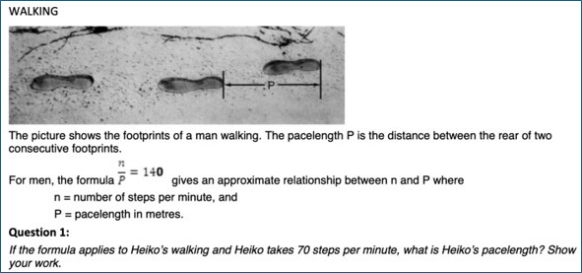
Figure 1: From PISA 2015 Assessment and Analytical Framework (OECD, 2016), as reproduced in Lemmo (2021, page 1669). Licensed under CC BY 4.0. (http://creativecommons.org/licenses/by/4.0/)
Digital version
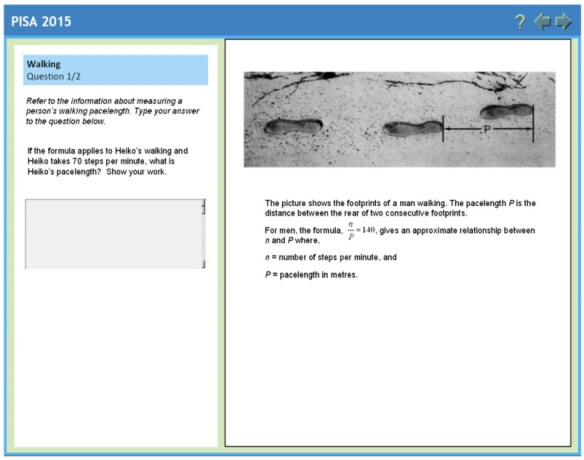
Figure 2: From PISA 2015 Assessment and Analytical Framework (OECD, 2016), as reproduced in Lemmo (2021, page 1669). Licensed under CC BY 4.0. (http://creativecommons.org/licenses/by/4.0/)
Some assessment tasks, when adapted for digital delivery, require test takers to navigate between multiple windows. Few empirical studies have investigated the cognitive impact of switching between windows on a single screen. However, a small body of research has compared performance in single-screen versus dual-screen environments (for example Hsu et al., 2012; Miller et al., 2020). Miller et al. examined performance during a military training program, where participants completed tasks such as searching multiple sources and creating presentations. The findings showed that participants using 2 screens reported significantly lower extraneous cognitive load compared to those using one screen, and the authors suggested that this lower extraneous load was due to the reduced need to switch between multiple windows.
In assessment contexts, dual-screen setups are rarely feasible, and the need to integrate information across multiple tabs or windows is common. Figure 3 shows 2 screenshots from the digitalPIRLS 2021 reading assessment. The first image (labelled ‘a’) shows the opening section of a reading text, with an orange scroll bar visible at the top right. To access the test items, test takers must click the red ‘Questions’ tab at the bottom of the screen. The second image (labelled ‘b’) shows the result of doing so: a test item appears and partially obscures the text. To view the passage without obstruction, the test item must be hidden by clicking the black down arrow.
As with the on-screen item shown in Figure 2, this example is not presented to argue that a more optimal layout is readily achievable. Rather, it illustrates how limitations resulting from screen size and screen dimensions often necessitate compromises in the way information is presented. These compromises may increase extraneous cognitive load relative to optimal paper-based conditions, where text and questions can be laid out side by side and viewed simultaneously. Moreover, this example involves only a single text. Tasks requiring comparison across 2 or 3 passages may demand separate windows or tabs for each passage and the response area, further increasing cognitive demands.
A common alternative layout in digital reading assessments is a split-screen format, with one column for the text(s) and another for the items. However, this approach may also introduce trade-offs, including increased scrolling and narrower viewing areas for both text and questions — issues that become more pronounced on smaller screens.
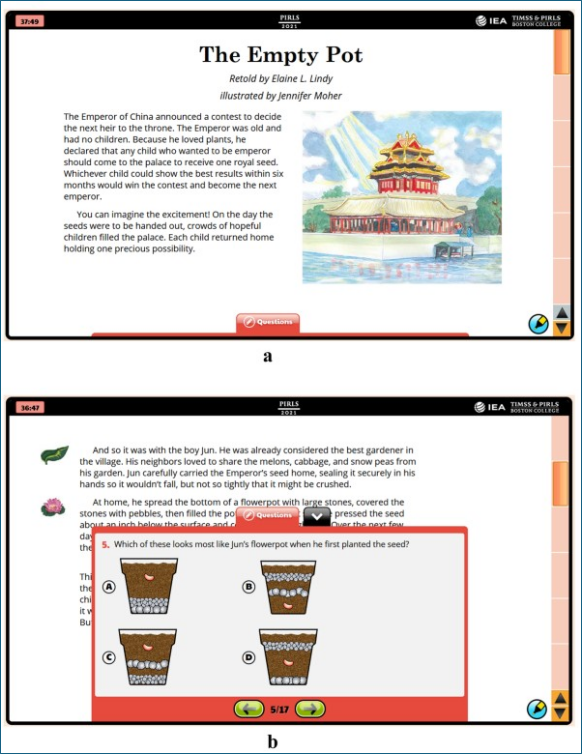
Figure 3: From Anghel and von Davier (2025). Licensed under CC BY 4.0. (http://creativecommons.org/licenses/by/4.0/)
Challenges arising from the inability to view texts and items simultaneously have been documented in assessment contexts. Buerger et al. (2019) trialled paper and computer versions of the same reading assessment with students aged 12 to 13. On paper, the first 2 items of each text appeared on the same (double) page as the text, while in the digital assessment, these items were not presented together with the text. Instead, a paging method was used, where test takers navigated from the text to the first item and then to each subsequent item by clicking on forward and back buttons. The authors found that these items showed a small mode effect in favour of the paper version.
Davis et al. (2016) found that when students were unable to view items and a reading passage simultaneously, they reported that it was difficult to “keep the item in their head while reading the passage” (page 35) and that they would prefer to read the passage and see the item at the same time.
Mangen et al. (2013) found that participants in their study performed better on comprehension questions when reading on paper compared with reading on computer. In considering possible reasons for the effect, they noted that “whereas, in the paper condition, the task of responding to questions involved switching between the 2 media (i.e. between the texts on paper on the desk and the questions on a laptop computer screen), subjects in the computer condition had to switch between different windows on the computer, one displaying the text to be read, the other displaying the questions to be answered” (page 66). They theorised that the need to switch between windows on the same screen might introduce additional cognitive challenges, potentially impairing performance, and stated that these challenges illustrate ‘how the ease of multitasking provided by the computer might come at a cognitive cost” (page 66). It is worth noting that even the paper condition in this study, which required switching between paper and screen, likely imposed greater cognitive load than a fully paper-based assessment.
2.3 Comprehension-phase highlighting and annotation
Highlighting refers to using a highlighter, pen, or pencil to emphasise key information. It can be distinguished from annotation, which refers to other markings (for example arrows and brief notes) made beside the text or on visual resources (such as diagrams).
In broad terms, highlighting and annotation may serve 2 main purposes in assessment contexts:
-
Supporting initial comprehension of test materials, including source material such as reading passages. This function is referred to in this paper as ‘comprehension-phase highlighting and annotation’ and is addressed in the current section.
-
Assisting answer formulation, for example by annotating diagrams, carrying out working, crossing out options in multiple choice questions to rule them out, and highlighting information that is deemed relevant for completing a specific test item. This second function occurs after the initial reading of test items, when the focus shifts from comprehension to task execution. It is referred to as ‘task-phase highlighting and annotation’ and is covered in Stage 2 (Thinking required).
The empirical research literature on the effects of highlighting and annotation on comprehension and recall focuses almost exclusively on comprehension-phase highlighting. These studies are usually conducted outside assessment contexts, and typically require participants to read texts under highlighting and non-highlighting conditions before completing comprehension or memory tasks.
Ben-Yehudah and Eshet-Alkalai (2018) propose several reasons why highlighting might support comprehension: readers may engage in deeper processing before selecting text to highlight; the act of highlighting may help form mental representations that support understanding; and highlighted segments may be easier to recall. Similarly, Miyatsu et al. (2018) argue that underlining and highlighting may serve 2 learning functions: a generative function, where identifying important text prompts elaborative thinking; and a storage function, where marked sections are easier to find later.
For highlighting to elicit mode effects, 2 conditions must be met. First, highlighting must influence relevant performance indicators such as memory or comprehension. Second, these effects must differ between modes.
Despite more than 6 decades of research, findings on the impact of highlighting on comprehension and recall remain inconclusive, though 3 broad trends have emerged.
First, participants are more likely to recall highlighted information than non-highlighted information (for example Nist and Hogrebe, 1987; Miyatsu et al., 2018). However, excessive highlighting can impair performance by reducing the distinctiveness of marked text and because marking large portions requires less cognitive effort than selecting key details (for example Dunlosky et al., 2013).
Second, highlighting tends to support lower-level processes (such as recall) more than higher-level processes (such as comprehension). For example, a meta-analysis by Ponce et al. (2022), based largely on paper-based academic texts, concluded that highlighting promotes superficial text processing, which is helpful for retention but less effective for deeper comprehension.
Third, the ability to identify relevant information — crucial for effective highlighting — varies with age and metacognitive development. Ponce et al. (2022) found that highlighting improved learning for college students but not for school-aged students, attributing this difference to older students’ greater capacity to distinguish essential content from less relevant details. Miyatsu et al. (2018), when reviewing the literature, reported substantial variability in students’ marking strategies, noting that most highlighting, particularly for younger students, was ineffective because students either marked too little or focused on non-critical details.
Evidence on whether highlighting and annotating effects differ between screen and paper is also mixed. The research literature broadly focuses on 2 factors: the amount of highlighting and annotating across modes and its impact on memory and comprehension.
A commonly held view in human-computer interaction (HCI) research is that highlighting and annotating on a computer imposes a greater cognitive load than on paper (for example Inie et al., 2021). Pearson et al. (2012) emphasise that tools for tasks like highlighting and annotation must be intuitive and easily accessible to minimise cognitive effort and allow users to focus their attention on the main task. They argue that while this is usually the case on paper, where, for example, “scribbling notes on a Post-it, then placing it on a particular passage of text, is so straightforward that users often do it without thinking” (page 12), doing the same using digital tools is far less intuitive and results in lower usage rates.
Consistent with this argument, there is some evidence that less highlighting is carried out on screen than on paper. For example, in an international survey of approximately 10,000 students on academic reading preferences, over 80% reported highlighting and annotating printed materials, while only a quarter did so for digital texts (Mizrachi et al., 2018).
Some empirical research also supports this trend. In a study by Goodwin et al. (2020), 371 fifth through eighth grade students (aged 10 to 14) read a National Assessment of Educational Progress (NAEP) reading passage in 2 parts — one on paper and the other on a laptop computer. They found significantly more highlighting and annotating was carried out on paper. Inie et al. (2021) found that university students in their study annotated significantly less on laptops than on paper, though the extent of highlighting was similar in both mediums. Conversely, Ben-Yehudah and Eshet-Alkalai (2018) examined the influence of highlighting on comprehension using a university-level expository text and found no significant differences in the frequency or pattern of highlighting between digital and print conditions.
Whether mode influences the effect of highlighting and annotation on performance is even less clear. In the Ben-Yehudah and Eshet-Alkalai study, highlighting only improved performance in the print condition. The authors suggested that the absence of a highlighting effect in the digital condition might reflect the additional cognitive effort required to highlight on screen or the extra load associated with using less familiar digital annotation tools. In the Goodwin et al. (2020) study, overall comprehension scores were slightly better on paper. However, the authors found that increased paper highlighting was negatively associated with comprehension, whereas increased digital highlighting was positively associated with comprehension. The authors suggested that this may have been due to excessive highlighting on paper, where many of the highlighted elements “occurred outside of important information in the text” (page 1854). In contrast, Inie et al. (2021) found no effect of highlighting or annotation on memory in either mode. The authors concluded that, based on the software used in the study, “highlighting and annotation creation do not seem to be moderating factors in comprehension performance between academic students reading on paper versus laptop” (page 12).
2.4 Information presentation: Implications for test development
2.4.1 Comprehension on paper and screen
There is now strong evidence for a screen inferiority effect — that is, readers comprehend information better when read on paper than on screen. The effect applies across age groups and, while relatively small, may still be meaningful in assessment contexts. Notably, increased digital device familiarity does not appear to diminish this effect — on the contrary, Delgado et al. (2018) suggest it may be increasing over time.
Predicting the likelihood of a screen inferiority effect in a particular assessment is challenging. Based on the research, the effect appears most likely to arise when:
- test takers need to read relatively large amounts of text to answer questions, necessitating scrolling
- time constraints are a factor in performance
- test items require comprehension of fine detail rather than just the ‘gist’ of the text
- the information to be read is expository rather than narrative
- the test is taken on desktops or laptops rather than tablets
Assessments that align closely with these criteria — such as reading comprehension tests featuring expository texts, taken under strict time limits, and requiring precise understanding — may be most at risk of mode effects. Delgado and Salmerón (2021, page 1) state that “the fact that the on-screen inferiority particularly emerges in expository texts and that it increases under time constraints suggests that such effect arises in cognitively demanding tasks”.
The relationship between text length and the screen inferiority effect, whether or not it is mediated by scrolling, is central to assessment contexts. Most summative test items across subjects do not require reading more than 500 words—the threshold below which Singer and Alexander (2017b) found no significant difference in comprehension between paper and screen. However, further research is needed to clarify how text length, scrolling, and text complexity interact to influence comprehension.
In relation to their finding that the screen inferiority effect increases when reading occurs under time constraints, Delgado et al. (2018) highlighted the importance of ensuring that the effect is taken into account by designers of high-stakes assessments, as the disadvantage of digital-based reading would be especially pronounced if not all test takers were tested in the same medium. It is important to emphasise that while most summative assessments are time-constrained, the extent to which they are ‘speeded’ can vary widely between different assessments.
Some studies suggest that participants are aware of the disadvantages of reading on screens. Ocal et al. (2022) found that the majority of the college students in their study, who read expository texts on screen and paper, later reported a preference for paper-based reading. Bridgeman et al. (2003, page 201) reported that 66% of the high school students in their study felt that scrolling “interfered to some degree” when completing on-screen assessments. However, many studies indicate that test takers often lack awareness of these effects and tend to express a preference for taking reading comprehension assessments on screen (for example Meglioli, 2025). Halamish and Elbaz (2020) cautioned that “children, like adults, are metacognitively unaware of the detrimental effect that on-screen reading has on their comprehension, and they are likely to make ineffective medium choices for their reading tasks” (Abstract).
Where mode effects do arise, opportunities to mitigate them may be limited. Proposed causes of the effect, such as the shallowing hypothesis, medium materiality hypothesis and metacognitive deficit hypothesis, suggest that the issue is intrinsic to screen-based reading rather than something that can be easily addressed through test design.
While the need for scrolling can be manipulated by assessment designers, there may be trade-offs in doing so. For example, reducing the amount of scrolling required often involves reducing the font size or increasing the number of characters per line, both of which have also been shown to influence comprehension in some contexts. Additionally, eliminating the need for scrolling altogether by using paging may not always be optimal, particularly for non-passage-based texts or when it results in individual items being split across multiple pages.
As the evidence suggests that the effect only applies (or at least increases) under time pressure, reducing the extent to which speededness is a factor in performance (that is, by increasing the time allowed or reducing the number of questions) may eliminate or reduce the effect. In addition, evidence suggests that the screen inferiority effect is reduced when screen reading occurs on handheld devices. However, while these strategies offer potential avenues for mitigation, their practicality and appropriateness may vary depending on the specific assessment context.
Evidence from a small number of empirical studies suggests that screens of at least 10 inches may help reduce some comparability-related threats. A key consideration for testing organisations is whether the information displayed remains consistent across screen sizes, or whether layout and content positioning vary based on display dimensions. If information is not held constant, assessments could be designed to minimise scrolling and optimise access to multiple sources on larger screens. However, this approach raises concerns about fairness, as test takers without access to larger screens may be disadvantaged.
2.4.2 Other considerations
Beyond the screen inferiority effect, other aspects of how information is presented and accessed in each mode may also influence performance during the information presentation stage.
According to cognitive load theory, cognitive load can increase when test takers need to coordinate multiple sources of information to respond to a question. This demand can be amplified in digital tasks that require navigating between windows that cannot be viewed simultaneously. An example of this effect may be seen in reading comprehension items that require test takers to integrate information from 2 or more texts to answer a question. When each text also involves scrolling — and when responses cannot be typed while the texts are visible — the cumulative load may be even higher.
However, the impact of these challenges on test performance is one of many underexplored areas of research. It is also important to recognise that the existence and extent of any mode effect will likely depend on how information is presented in the paper version. For example, if key information needed to answer a question is located on a different page of the text booklet to the question, this too could increase cognitive load due to the need to flip back and forth between pages.
Nonetheless, the challenges in accessing multiple sources of information simultaneously are generally greater on screen due to the spatial constraints imposed by screen dimensions. For these reasons, test and platform designers should carefully consider how screen layouts can be optimised to minimise unnecessary cognitive load, particularly when maintaining comparability across modes is a key goal.
In broad terms, highlighting and annotation serve 2 main purposes in assessment contexts. One of these, comprehension-phase highlighting and annotation, is intended to support initial understanding of test materials such as reading passages and test items, and occurs during Stage 1 of the question answering process. Research suggests, however, that performance benefits may be modest, largely limited to lower-level process (such as recall), and depend heavily on the ability to identify relevant information — a particular challenge for school-age students. Although some studies indicate that highlighting and annotation are carried out more frequently on paper than on screen, evidence for associated performance-related mode effects remains very limited.
Some platforms do not allow test takers to mark source material such as reading passages, and even when highlighting is permitted, the process may impose greater cognitive load on screen compared with paper, particularly if the highlighting and annotation tools are complex or poorly designed. Therefore, if comprehension-phase highlighting and annotation provide even modest performance benefits, then the inability to use these strategies on computer — or the added effort required to do so using digital tools — could result in mode effects. This possibility underscores the need for further research, particularly in assessment settings.
Annotation — and to a lesser extent highlighting — appears to play a more critical role in Stage 2 (Thinking required), where some functions are more clearly associated with mode effects. These are discussed in Sections 3.2 and 3.3.
2.4.3 Construct validity
It is also worth considering the implications of these findings, and particularly the screen inferiority effect, in situations where mode equivalence is not explicitly sought (for example where assessments are only delivered on screen). Here, the question remains: should test designers still be concerned about screen inferiority? On the one hand, as screen inferiority likely stems in part from increased cognitive load, individuals with lower working memory capacity may be disproportionately affected by taking assessments on screen. On the other hand, digital reading has become ubiquitous in both work and education, and there are key differences between the constructs of ‘online’ and ‘offline’ reading. Notably, some of the very features that may be associated with screen inferiority — such as scrolling and the need to manage and integrate information from multiple sources — are also fundamental characteristics of online reading.
Leu et al. (2011, page 7), for example, argue that online reading goes beyond the simple act of processing a single text, and instead involves “a process of problem-based inquiry across many different online information sources, requiring several recursive reading practices”. Bruggink et al. (2025, page 2) similarly stress that digital reading is not simply the act of reading from a screen instead of paper, noting that when reading digitally, “students need to be able to find information online, decide between skimming versus the deep reading of multiple documents, judge their reliability, deal with different kinds of media in one document, and be able to make sense of it all”. Salmerón et al. (2018) argue that competent digital readers must have 3 skills: the ability to efficiently navigate online information by searching, scanning, and selecting relevant web pages, the ability to understand and integrate different sources of information, and the ability to evaluate the reliability of information.
These differences are reflected in many digital reading test specifications. For example, the PISA 2018 Assessment and Analytical Framework (OECD, 2019, page 23) notes that “as the medium through which we access textual information moves from print to computer screens to smartphones, the structure and formats of texts have changed. This in turn requires readers to develop new cognitive strategies and clearer goals in purposeful reading”. The framework emphasises that success in reading literacy now involves more than comprehending a single text — it requires the “analysis, synthesis, integration and interpretation of relevant information from multiple text (or information) sources”. The document also outlines how the reading framework evolved between 2015 and 2018 to reflect these changes in construct. For example, ‘accessing and retrieving’ in 2015 was divided into 2 categories in 2018: ‘scanning and locating’, which focuses on single texts, and ‘searching for and selecting relevant text’, which addresses tasks involving multiple texts.
3 Thinking required
This stage explores the cognitive processes involved in generating a response to a task. The research suggests that mode effects arise in situations where the unhindered physical access to the question that is afforded by answering on paper results in a relative reduction in the working memory demands of the task.
3.1 Cognitive load theory
Cognitive load theory (CLT), primarily applied to learning and instruction, posits that working memory has a limited capacity, and instructional methods should avoid overloading it to optimise learning (for example Sweller et al., 1988). The classic model of CLT (Sweller et al., 1998) categorises cognitive load into 3 types. The first type of load, known as intrinsic load (IL), is the inherent complexity of the material to be learned. It is generally considered fixed, in that it cannot be manipulated through instructional design. Element interactivity (EI) refers to the number of elements that must be simultaneously processed in working memory in order to understand the information (Ayers and Sweller, 2005). An element could be a concept, a fact, or a procedure. As the amount of EI increases in a task, so do the working memory demands and IL of a task.
The second type of load, extraneous load (EL), is defined as anything in the instructional material that occupies working memory capacity but is irrelevant to the intended material (for example Gillmor et al., 2015), such as irrelevant information, overly complex language or distractions (for example noise) while the learning is taking place.
The third type of load, germane load (GL), is associated with the mental effort that learners devote to the learning. In some recent formulations of CLT (for example Sweller et al., 2019; Duran et al., 2022), including the one adopted in this paper, GL has been incorporated into IL, as it is no longer thought to contribute to the overall load. In this 2-component model, IL and EL can be added to determine the total cognitive load experienced by a learner. When the combination of IL and EL exceed a learner’s working memory capacity, learner performance is negatively impacted.
While originally intended as a framework for learning, CLT has also been applied to assessment contexts (for example Threlfall et al., 2007; Gillmor et al., 2015; Pengelley et al., 2023). In broad terms, the IL is the load associated with the inherent complexity of the task, and the EL encompasses sources of difficulty that are typically construct irrelevant, such as distracting images or overly complex wording. If the combined IL and EL exceed a test taker’s working memory capacity, performance is negatively impacted.
3.2 Calculation and annotation facilitated tasks
One type of task that appears to impose lower EL when completed on paper is mathematical tasks in which unhindered physical access to the question — such as the ability to write on or next to it — supports strategies that can lead to better performance.
Based on the evidence from several published studies, tasks susceptible to this effect (termed ‘calculation and annotation facilitated tasks’ or ‘CAF tasks’ in this document) share one or both of the following properties:
- they require multiple steps to reach a correct solution, and the ability to record intermediate steps (or elements of them) in close proximity to the question reduces cognitive load and supports accuracy
- they include diagrams or visual elements, for which annotation or tactile strategies (such as counting or ‘marking off’ steps) aid performance
When answering questions with these characteristics on screen, test takers must choose whether to solve problems with or without scratch paper. Both approaches appear to introduce additional EL. Using scratch paper requires test takers to shift attention and transfer information between screen and paper, which disrupts thinking and increases the risk of transcription errors. Furthermore, transferring information from screen to scratch paper can consume valuable test time, particularly when the relevant content includes diagrams or more complex information. Conversely, avoiding the use of scratch paper increases reliance on mental strategies, which may be more error-prone because working memory has limited capacity, making it harder to manage multiple steps and intermediate results effectively.
Figure 4, adapted from Pengelley et al. (2023), illustrates how a test taker with fixed working memory capacity may experience different cognitive loads, depending on test mode, when responding to CAF tasks. The IL, which relates to the complexity inherent in the task, is the same across modes. The additional working memory demands imposed in the digital version (shown by the increased EL) mean that the test taker’s working memory resources are overloaded. In the paper version, the test taker’s working memory resources are sufficient to solve the task. (The representation below could be applied to other mode effects where additional EL in one format is the cause.)
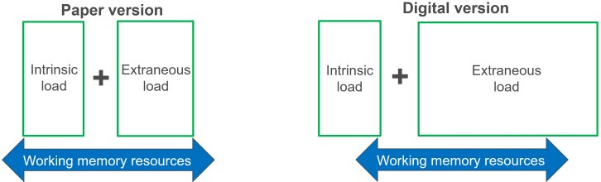
Figure 4: Adapted from Pengelley et al. (2023, page 4). Licensed under CC BY 4.0. (http://creativecommons.org/licenses/by/4.0/)
Johnson and Green (2006) observed many of these effects in a study where 104 11-year-olds answered matched sets of mathematics questions, one set on paper and the other on screen. Students were provided with scratch paper when answering on screen. The authors found that although there were relatively few transcription errors overall, they were more likely to occur when children answered on computer. They theorised that the higher number of transcription errors in the on-screen condition may be related to the “physical distance that the information needs to be carried during the processing of the problem” (page 25). More specifically, they noted that “answering on screen might require that the question is read on screen, details held in memory as attention shifts to paper to allow working to be transcribed on paper, then these details are held in memory while attention shifts back to the screen and then the answer is typed into the answer space” (page 25). In contrast, paper-based responses allow these actions to occur in close physical proximity, reducing working memory load and the likelihood of error.
The study also found that students were generally less likely to use written methods (via scratch paper) when answering on screen. This reluctance led many to rely on mental strategies, which were more error-prone and contributed to poorer performance on certain questions.
Finally, some questions encouraged tactile strategies that were unavailable on screen. For example, in questions that assessed the ability to calculate the perimeter of a shape, children often employed a ‘cumulative approach’ when working on paper that involved ‘ticking off’ or ‘dotting’ each number around the shape as they accommodated it into their calculation.
Additional studies confirm these findings. Hughes et al. (2011), for example, trialled a set of 24 GCSE mathematics questions with approximately 1,500 students. The questions were split into 2 sets (A and B), each of 12 questions. Using a fully counterbalanced design, each participant took one set of questions on paper and the other on computer. One of the questions from the study is shown below (Figure 5) in its paper format. Participants answering on screen were provided with scratch paper. The item facilities were higher in the paper version (0.44 and 0.25 for angle and on paper respectively, and 0.38 and 0.18 for the same parts on computer). Moreover, only 40% of students answering on screen showed any annotation or working on their scratch paper, while 76% of those who answered on paper showed working and/or annotation. In the example shown, the test taker has performed calculations next to the diagram, and annotated the diagram with calculated angles to support the subsequent determination of and . The example illustrates both key features of responses to CAF tasks when taken on paper: the recording of parts of multi-step calculations in close proximity to the question, and the annotation of visual elements.
Way and Strain-Seymour (2021) describe a similar hypothetical example where a student marks elements of a figure (such as complementary or right angles) to determine a missing angle, and argue that cognitive load is reduced when students can “break a larger problem into its component parts, solve one at a time, and rely on the markings instead of maintaining all parts of the solution in working memory” (page 27).
Hughes et al. (2011) also rated each question on a number of characteristics. Across the test, they found that the questions with the greatest performance difference in favour of paper were those which scored highly on the characteristics ‘requiring annotation’ and ‘visual’.
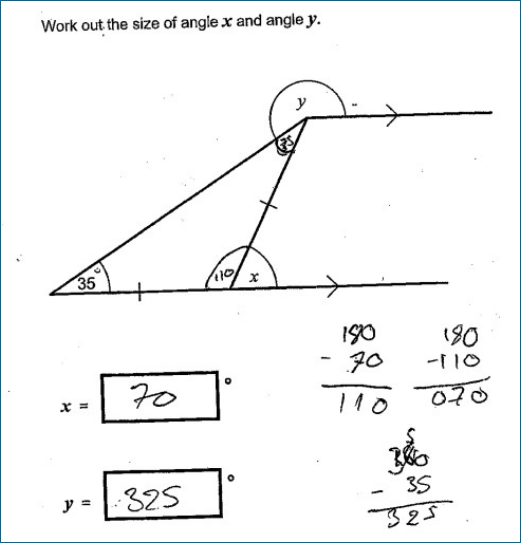
Figure 5: From Hughes et al. (2011, page 4). Reproduced with permission.
Keng et al. (2008) conducted an item-level analysis of on-screen and paper administrations of the Texas Assessment of Knowledge and Skills. The aim of the study was to identify characteristics of items that may have contributed to mode effects. The authors found that 2 mathematics items showing significant paper bias required graphing and geometric manipulations.
Although the original questions were not included in the paper, Keng et al. provided an example (Figure 6), intended to be representative of these tasks. To solve the task, test takers are likely to benefit from drawing all or part of each of the 4 triangles (represented by the options A to D) on the grid. The authors noted that “students who take the item on paper can easily draw in their booklet with a pen or pencil. Students who take the item online, however, need to either reproduce the XY coordinate system on scratch paper, or try to use the drawing tools in the online testing software to draw each triangle on their computer screen” (page 23). They added that “most students learn how to solve this type of problem on paper in the classroom and are generally not as proficient drawing with a mouse on the computer as they are with drawing with a pencil or pen on paper” (page 23).
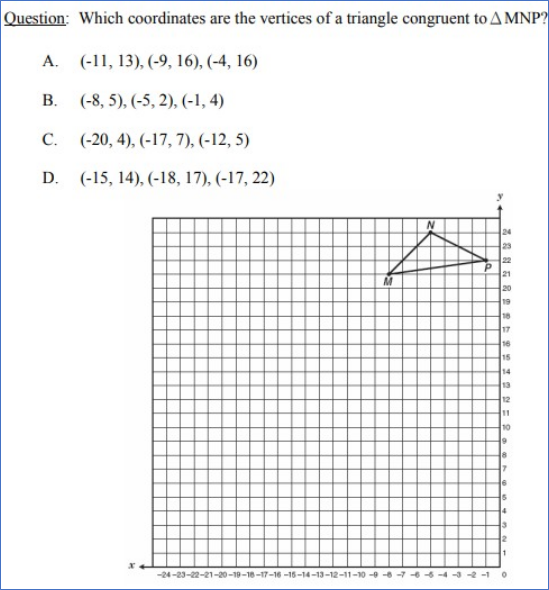
Figure 6: From Keng et al. (2008, page 23). Reproduced with permission.
Lowrie and Logan (2015) trialled a set of mathematics questions, including 6 ‘graphics’ items, with 801 students aged 11 to 12 years. Within each class of students, half solved the graphic items on paper while the other half completed them on an iPad. For all 6 items, performance was better for students who answered on paper, and the effect was statistically significant in each case. Each item demonstrated one or both key characteristics of CAF tasks. In the example below (Figure 7), a tactile strategy on paper, akin to the ‘ticking off’ and ‘dotting’ strategy described by Johnson and Green (2006), would have been available to candidates taking the question on paper only. The mean scores for paper and tablet were 0.82 and 0.68 respectively.
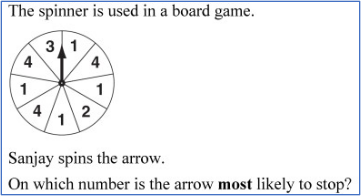
Figure 7: From Lowrie and Logan (2015, page 656). Reproduced with permission. Original source of item: Australian Curriculum, Assessment and Reporting Authority (2010).
Pengelley et al. (2023) administered paper-based and equivalent digital versions of Ohm’s Law calculation questions (each incorporating a circuit diagram) with 263 13- to 14-year-old science students. The study used a repeated-measures design, with each student completing a paper-based test and a computer-based test. Questions were categorised as easy (low intrinsic load) or difficult (high intrinsic load). An example of an easy (top row) and difficult (bottom row) item from the study is shown below (Figure 8).
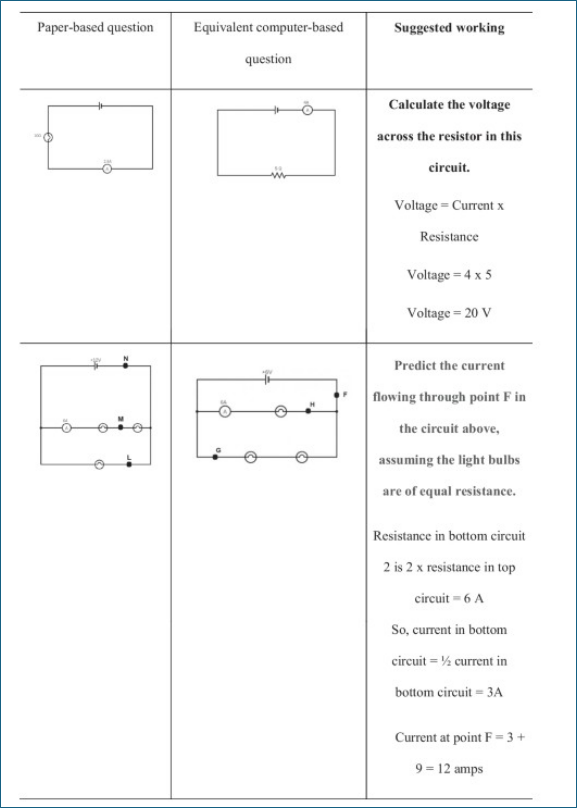
Figure 8: From Pengelley et al. (2023, page 10). Licensed under CC BY 4.0. (http://creativecommons.org/licenses/by/4.0/)
Students performed better on paper for the difficult questions. However, performance in the easy questions was better on computer. For the difficult questions, out of a maximum score of 4, students scored an average of 1.5 marks on paper and 1.03 marks on computer (a difference of about 11.5% of the total possible score). For the easy questions, students scored an average of 2.92 marks on computer and 2.65 marks on paper (a difference of about 7% of the total possible score).
The authors noted that easy items, having lower IL, are less likely to overload working memory. This is consistent with the view in CLT that the experience of EL depends largely on the presence of high levels of IL (for example Sweller and Chandler, 1994). Johnson and Green (2006) similarly noted, in the context of arithmetic, “that simpler questions can be done mentally and it would be expected that mode would have no influence on performance” (page 25). Pengelley et al. (2023) suggested that the computer advantage seen in the easy items may be caused by factors such as motivation (on the basis that the on-screen versions were more engaging) or differences in attentional control.
While, as expected, students used scratch paper less when answering on computer, the authors found that use of scratch paper on computer decreased as question difficulty increased. They proposed 2 alternative explanations for this. First, that working memory is sensitive to extraneous load of computer-based tasks in ways that result in changes to underlying metacognitive processes. Second, they suggested that switching between computer and paper carries a cognitive load cost, and as IL increases, students may have fewer working memory resources to manage this. They added that on-screen performance may have been lower for difficult questions because accessing scratch paper required to support their working was associated with too great a cognitive load cost.
Given the reasons why performance is impacted when CAF tasks are answered on screen, one might assume that assessments administered on a tablet with a stylus (digital pen), which allows test takers to write directly on the screen, might eliminate or substantially reduce any mode effects. Evidence for this possibility is mixed. Fishbein (2018) noted that when participants were interviewed while (using think-aloud protocols) and after taking eTIMSS maths items with a stylus, about half the students at each grade stated that they struggled to use the stylus to show calculations. Aspiranti et al. (2020), in a small-scale study with 6 children aged 7 to 10, reported that the participants experienced difficulties using a stylus to complete simple addition problems. Specifically, the children indicated they could not rest their hand or arm on the tablet as they would when writing on paper, as the cursor moved to where their arm lay when they attempted to do so. All participants later expressed a preference for pencil and paper.
A more recent study by Davis et al. (2021), however, shows some promise relating to the use of styluses in CAF tasks. In their study, 100 high school students responded to mathematics questions using 3 input methods: paper and pencil, a keyboard, and a stylus. Two types of items were included, and one of these (‘math process skills’) exhibited one of the two key properties of CAF tasks. The authors defined these as items “where students are presented with a math scenario and then asked to use more traditional computation and algebraic/numeric manipulation to solve the problem, while showing their work” (page 3). Mean scores for these items were 0.76, 0.64 and 0.74 for the paper and pencil, keyboard and stylus conditions respectively, with no statistically significant differences between any of the conditions. When asked to rank the 3 input methods, students preferred paper and pencil. The preference for paper and pencil over the stylus appeared to relate to concerns about clarity of handwriting and ease of erasing. (It is worth noting that the authors suggested the latter issue stemmed specifically from the software used in the study.) Nevertheless, the stylus was strongly preferred to the keyboard. Notably, most students (71%) said they would not feel comfortable answering questions without scratch paper when using a keyboard, whereas only 17% felt the same way when using a stylus. Additionally, 65% of students said answering questions with the stylus was easy.
3.3 Other task-phase highlighting and annotation
Section 2.3 focused on comprehension-phase highlighting and annotation, which is intended to support comprehension of test materials. This form of highlighting and annotation is the focus of the vast majority of empirical studies, where participants read texts in highlighting and non-highlighting conditions and then respond to comprehension or memory tasks.
In assessment contexts, however, test takers can also highlight and annotate after reading the questions, in ways that respond to the requirements of the task. The annotation carried out in CAF tasks is one example, but other forms of task-phase highlighting and annotation also occur. Two of these are discussed below.
Highlighting and annotating relevant content
After reading a question, test takers may benefit from marking content that they perceive as relevant to the answer. For instance, highlighting portions of a reading passage connected to a particular test item may reduce cognitive load by supporting information retrieval — particularly when the relevant content spans multiple parts of a text or appears across different texts.
The prevalence and impact of this type of highlighting have rarely been studied. Anghel and von Davier (2025) investigated the highlighting behaviour of test takers from 5 countries who completed the digitalPIRLS 2021 reading assessment, focusing on one particular narrative reading passage and its associated items. Their analysis revealed substantial cross-national differences: over half of Singaporean students (the highest prevalence) highlighted text in the passage, compared with only 10% of Maltese students (the lowest). Notably, highlighting item-relevant text from the passage correlated with response accuracy in only one country. It is worth stating that the study did not distinguish between comprehension-phase highlighting and task-phase highlighting, and some highlighting may well have occurred before students read the test questions.
Annotating options in selected response questions
A second way in which marking content may assist test takers is through annotating options in selected response items. Williamson (2025) analysed scripts from 15-16-year-old test takers in science and mathematics to investigate the prevalence and types of annotation carried out on different items. Many of the categories identified reflect uses of annotation in CAF tasks (Section 3.2). For example, graphics tasks and items requiring calculation were more frequently annotated than other items. However, a small number of categories did not relate to CAF tasks. One of these was the category ‘Crossing/ticking multiple choice options’, which related to striking through options or putting crosses next to them (presumably to rule them out) or positively indicating an option (for example by circling it).
This type of annotation was also identified by Crisp et al. (2025). In their study, 52 participants (aged around 17) attempted a digital multiple choice economics test with access to either scrap paper or a print copy of the test. Participants were asked which exam techniques, from a list provided, they usually use when taking paper-based tests. The technique most frequently identified was ‘I rule out answers (A, B, C, D) as soon as I know they’re wrong’. Analysis of the printed test papers confirmed that eliminating or marking options was among the most common types of annotation carried out. A small number of students even attempted to replicate this behaviour on scratch paper, for example by writing down the answer options (A, B, C, D) and crossing out or circling them.
3.4 Thinking required: Implications for test development
3.4.1 Calculation and annotation facilitated tasks
Calculation and annotation facilitated (CAF) tasks are mathematical tasks that share one or both of the following characteristics:
- they require multiple steps to reach a correct solution, and the ability to record intermediate steps (or elements of them) in close proximity to the question reduces cognitive load and supports accuracy
- they include diagrams or visual elements, for which annotation or tactile strategies (such as counting or ‘marking off’ steps) aid performance
Evidence indicates that these tasks are easier when taken on paper than on screen. In the absence of robust, contextually relevant test data to the contrary, mode effects should be anticipated in tasks with moderate or high intrinsic load.
Pengelley et al. (2023) observed that easy items did not show a paper advantage. This is not surprising, as the benefits of annotating visual resources and recording working near the question are likely to diminish as item difficulty decreases. However, the superior on-screen performance for easy items observed in their study cannot be explained by the mode effect described in this paper and warrants further investigation.
Providing digital test takers with scratch paper is considered good practice (for example Crisp et al., 2025). Yet current evidence suggests that this measure is insufficient to mitigate the challenges of completing CAF tasks on screen. The Hughes et al. (2011), Johnson and Green (2006), Threlfall et al. (2007) and Pengelley et al. (2023) studies all noted a reluctance by students to use scratch paper — likely due to the additional extraneous load, the increased risk of transcription errors, and the time and accuracy challenges associated with copying complex diagrams from the test item. In addition, Crisp et al. (2025) note a possible physical factor: paper-based tests naturally involve holding a pen throughout, whereas on-screen assessments do not.
At the test level, mathematics assessments have often shown minimal mode effects. For example, a meta-analysis by Kingston (2008) found only a small paper-based advantage (g = 0.06) across 31 K-12 mathematics comparability studies. However, as mentioned in the introduction, focusing solely on test-level outcomes risks overlooking meaningful item-level effects.
It is important to note that CAF tasks are not confined to mathematics assessments. Rather, they appear frequently in other subjects that involve numerical reasoning and calculation, such as science and economics. In addition, it is plausible that high IL non-numerical tasks that require test takers to maintain and manipulate multiple ideas in their working memory could be subject to the same effect, on the basis that direct physical access to the question on paper would allow these demands to be more effectively managed. However, empirical evidence is lacking.
Reports from study participants indicate that test takers recognise the challenges of responding to CAF tasks on screen. Students interviewed by Crisp et al. (2025), after attempting a digital economics test with access to either scrap paper or a printed copy of the test, reported several advantages of annotating the printed test paper rather than relying on scratch paper. These included the ability to mark up information in the question (such as diagrams), place notes adjacent to relevant content, reduce switching between screen and paper, avoid redrawing diagrams, and lessen reliance on mental calculations. Participants also reported that direct access to the test paper was particularly helpful for multi-step problems or questions involving numerical work. Johnson and Green (2006, page 21) noted that for children interviewed in their study, “the greatest generic reason for preferring paper-based questions related to not having to transfer attention from page to screen when working out problems”.
As with the screen inferiority effect, there are significant challenges in mitigating the effect associated with CAF tasks, but 2 approaches warrant discussion. First, the use of tablets with digital pens (styluses) could eliminate the need to switch from screen to scratch paper, by allowing test takers to directly annotate diagrams and record working on screen. The study by Davis et al. (2021) suggests promise in this area. Some studies have found that test takers experience greater difficulty using a stylus compared to traditional pen and paper, but these usability issues may diminish over time as technology advances and as test takers become more familiar with stylus-based input.
Second, on-screen tools for annotation (and for showing working, covered in Stage 3: Response mechanism) may reduce or even eliminate the need for scratch paper. Crisp et al. (2025, page 106) argue that “providing easy-to-use digital functionality to support annotation is particularly important for those functions that scrap paper does not serve well (e.g., annotating a graph)”. In other words, allowing test takers to mark up diagrams and graphs directly on screen removes the need to recreate these visuals by hand — a process that is time-consuming, prone to transcription errors, and often avoided.
This functionality is increasingly available in digital assessment platforms. However, the extent to which it offsets the disadvantages of responding on screen may depend on how intuitive and flexible the tools are. Way and Strain-Seymour (2021) state that annotating visual resources on screen can be challenging, noting that “the usability of freeform marking tools is a matter of both interface design and ergonomics” and that “on-screen drawing can be awkward using a mouse on an upright screen” (page 27).
3.4.2 Other task-phase highlighting and annotation
Beyond CAF tasks, other forms of highlighting and annotation may also occur during this stage of the question answering process. For example, test takers may highlight parts of a passage they judge relevant to a particular question, or annotate selected response options to eliminate unlikely answers or indicate preferred ones.
Currently, there is no empirical evidence to associate these practices with mode effects. Unlike comprehension-phase highlighting, research on the performance-related benefits of these strategies is extremely limited. If such benefits do exist, they would raise important considerations for test and platform design where mitigating mode effects is a priority. This is particularly the case in relation to annotating selected response options, as this functionality is typically unavailable in on-screen assessments.
3.4.3 Construct validity
A key feature of CAF tasks is that test taker strategy may be influenced by mode. In particular, digital test takers, due to a lack of direct physical access to the question, are more likely to rely on mental strategies. On this basis, it is important to evaluate the construct validity of these tasks in the 2 modes. This requires a clear understanding of what the item writer intends to assess in a particular question, as well as whether the cognitive processes elicited by the item align with those intentions.
Threlfall et al. (2007) examined construct validity in a series of mathematics questions that were trialled on both paper and computer. An example of one of these questions is shown below (Figure 9). The paper version of the item is shown on the left, and the computer version on the right. Children performed considerably better on paper, and central to this was the ease of recording working beside the question. While on-screen test takers were provided with scratch paper, very few children used it. The authors noted that it was not intended that the answer be calculated mentally, as this would increase cognitive load too much. As a result, they determined that “the paper-based affordance is legitimate, and the assessment on computer is likely to be giving ‘false negatives’ — pupils who have the required competence nevertheless failing the assessment because irrelevant aspects of the task bring too great a burden onto working memory” (page 344).
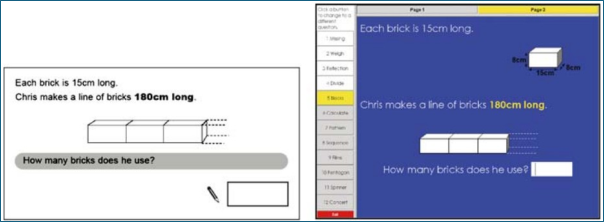
Figure 9: From Threlfall et al. (2007, page 340). Reproduced with permission from Springer via the Copyright Clearance Center.
Similarly, the construct validity of the angles question (Figure 5) depends on the precise nature of the skills and knowledge the question is intended to assess. If the primary goal is to assess knowledge of angle rules, the paper version may have greater construct validity, on the basis that the performance deficit observed in the digital format is more likely to have resulted from arithmetical error than conceptual misunderstanding.
A clear understanding of the skills and knowledge an item is designed to assess, along with the cognitive processes it aims to elicit, is therefore fundamental. Most current test specifications lack sufficient detail about these elements to support comparisons of the construct validity of items in the 2 modes. For example, where cognitive domain attribution uses a taxonomy such as Bloom’s (Bloom et al., 1956), paper and computer versions of items shown in this section would be attributed to the same category (usually ‘application’). Yet such high-level, single-word classifications of cognitive demand are insufficiently granular and fail to capture subtle but meaningful differences in cognitive processing introduced by mode. In addition, when an item is attributed to multiple content references, those references may remain consistent across modes, but the mode of assessment may cause the emphasis to shift. The angles question (Figure 5) illustrates this, with the on-screen version placing greater emphasis on mental arithmetic.
4 Response mechanism
The response mechanism refers to the means through which test takers provide their answer to a question. Fishbein (2018, page 8) uses the term ‘response actions’ to describe how students respond to digital versions of test items. This section categorises response mechanisms into 4 types:
- Selected response items, where test takers indicate the correct option(s) from a provided list.
- Constructed response items, where the primary difference between paper and digital formats is that paper responses are handwritten, while digital responses are typed. Digital formats also typically include text-editing features.
- Construction, measurement and graphing items, where test takers use simulated tools to respond on screen.
- Calculator and notation editor items, where digital assessments provide on-screen tools to facilitate calculations and the demonstration of working methods.
4.1 Selected response items
Broadly, on-screen selected response items can be categorised into 2 types: those that are also used on paper and those that specifically leverage digital functionality and do not exist in paper assessments. The former are referred to in this paper as ‘standard selected response items’, and include multiple choice, true-false, cloze and matching questions. The latter are an example of what are commonly known as technology-enhanced items (for example Bryant, 2017), or TEIs. While TEIs range widely in terms of innovation and complexity — encompassing formats such as video and simulation — they also include more interactive methods of administering selected response items, such as drag-and-drop and drop-down menus.
4.1.1 Standard selected response items
Multiple choice questions (MCQs) are widely used in educational assessments and form a key component of many comparability studies. Determining whether an item format contributes to mode effects is challenging. When mode effects are observed in MCQ items, for example, distinguishing their cause from other factors, such as the screen inferiority effect (see Stage 1: Information presentation) or the impact of CAF tasks on extraneous load (see Stage 2: Thinking required), is difficult. The possibility that other factors are responsible for mode effects in MCQs is supported by the fact that in studies where multiple subjects were investigated, the direction of mode effects often varies by subject. For example, when Kingston (2008) synthesised the results of 81 studies using MCQs performed between 1997 and 2007 on K-12 students, English Language Arts and Social Studies showed a computer bias (effect sizes of 0.11 and 0.15, respectively), while Mathematics exhibited a slight paper bias (effect size of −0.06).
There is little or no evidence in the literature to suggest that MCQs inherently perform differently depending on mode of assessment. However, there is some evidence to suggest that the way in which on-screen MCQs are presented can influence performance — particularly when scrolling is required to view all answer options.
Keng et al. (2008) compared student performance on equivalent on-screen and paper-based versions in 4 subjects of the Texas Assessment of Knowledge and Skills. In one of the items that performed differently between modes, they noted that only the first 2 of 4 options were visible without scrolling, and the correct answer was the second option. They theorised that performance may have been inflated on screen because some students did not realise there were 2 other options, reducing their choice to only the correct answer and a single distractor. In another item where scrolling was required to see all of the options, they hypothesised that the online version may have been more difficult because students would have needed to continually scroll back and forth on their computer screens to read the entire item. Fishbein (2018, page 53) reported high omission rates in trials of eTIMSS MCQs that required scrolling compared to their equivalent paper versions, suggesting that “students did not see entire parts of an item and so left them blank”.
Other aspects of MCQ layout can also influence performance. Herrmann-Abell et al. (2018) randomly assigned approximately 10,000 students aged 9 to 18 to one of 4 test conditions. One condition used a standard paper-based format, while another employed a digital format in which participants could not select answers directly but instead clicked radio buttons positioned below the options to indicate their choice. Figure 10 shows an example of this layout.
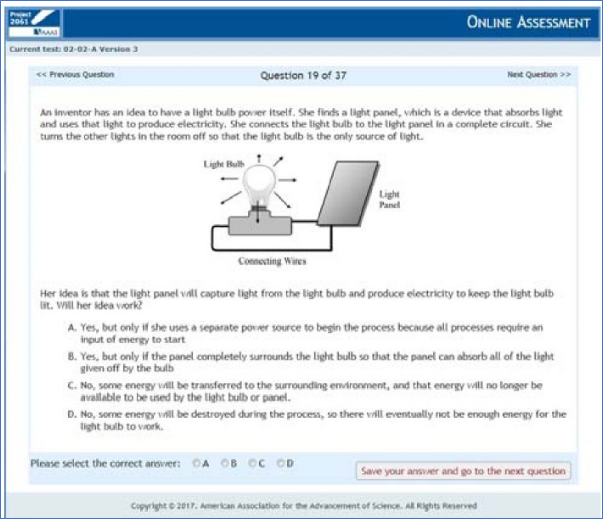
Figure 10: From Hermann-Abell et al. (2018, page 4). Reproduced with permission.
Students in this digital condition performed significantly worse than the participants who took the paper version. The authors theorised that the extra step in matching an answer within the question to a corresponding letter below the question increased the cognitive load. While they noted that other researchers have suggested that indicating an answer in a different location to where the item appears could be challenging for specific groups (for example younger students or students with concentration or physical difficulties), their study showed that effect sizes between the paper version and this digital version were small but significant for the entire sample and for high school students (aged 14 to 18) specifically. It should be noted, however, that while the layout used in the digital version may be more common in digital formats, it is not exclusive to them — paper-based items could, in principle, be designed in the same way.
4.1.2 Technology-enhanced selected response items
At least 2 types of technology-enhanced selected response items have been the subject of research: drag-and-drop items and drop-down menu items.
Drag-and-drop items
Russell and Moncaleano (2019) reviewed 236 TEIs across several K-12 testing programs, and found the drag-and-drop format to be the most common. Drag-and-drop items allow a student to click and drag a response to a target location. These items can assess a student’s ability to place words or phrases into text, classify, categorize, build numeric or algebraic expressions or equations, or label diagrams or graphs (Crabtree, 2016). For example, in a paper-based question requiring test takers to label parts of a flowering plant by selecting from a list of words and writing them in the correct place on a diagram, a drag-and-drop version would likely require test takers to drag the words from the list to the correct labels on the diagram.
Ponce et al. (2020) highlight the importance of both item performance and response time when evaluating innovative item formats. Shorter response times, they argue, can enable more items in a test, improving reliability without compromising validity. The authors conducted 2 experiments with participants aged 9 to 12 to compare performance and response time on items using a traditional paper-based format and 3 variations of the drag-and-drop format. They found that students completed digital versions significantly faster while maintaining comparable accuracy to paper-based items.
Threlfall et al. (2007) trialled equivalent paper-based and computer-based mathematics items with participants in year 6 (aged 10 to 11) and year 9 (aged 13 to 14). Some of the computer-based items used drag-and-drop. An example of one of these items is shown below (Figure 11), with the paper version on the left and digital version on the right.
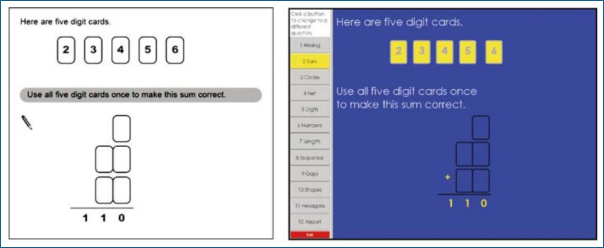
Figure 11: From Threlfall et al. (2007, page 339). Reproduced with permission from Springer via the Copyright Clearance Center.
Participants performed significantly better in the digital version, with item facilities of 77.1% on paper and 94.9% on computer. The primary reason for this mode effect relates to Stage 4 (Appraisal strategy), and is covered in Section 5.2.1. Secondary reasons noted by the authors include that the drag-and-drop mechanism allows participants to keep track of which digit cards have been used (as once dragged, they will no longer appear in the set near the top of the question). In addition, the drag-and-drop mechanism eliminates the possibility of errors from repeating digits or using digits that are not in the provided set. They found a number of examples of these errors within participant responses in their study, though they stressed that these were not sufficient to have a significant impact on item facilities.
On the other hand, Davis (2015) carried out a study in which 3,602 students in years 3, 5, 7 and 9 (aged 8 to 15) responded to maths and reading items on different devices (PC, tablet, and tablet with external keyboard). In general, students found click item interactions (including multiple choice) easy to use across all devices, and the authors found that using different devices had little or no impact on student performance on these items. However, this was not the case for drag-and-drop items. Davis reported that across all devices, students found the drag-and-drop functionality frustrating, time consuming and difficult to use. Some of the challenges (including a lack of awareness of how to change a response) may have been caused by a lack of familiarity. There were specific challenges in the tablet conditions, where students had difficulties in manipulating the draggers accurately. Observers noted several reasons for this, including that students’ fingers obscured the draggers and drop zone, that students were unable to see the drop zone after zooming in on the dragger and that the draggers and/or drop zones were sometimes too small or too close together.
A specific example of these challenges with tablets was described by Strain-Seymour et al. (2013), cited by Way et al. (2015). They found that students had difficulty in using a touch screen interface on a tablet to respond to a drag-and-drop item that required placing commas in the appropriate places in a sentence to make it grammatically correct, because the draggable commas and answer bays were so small that they were obscured by the students’ fingers when attempting to answer. This issue was not observed when students responded using a mouse on a computer.
Drop-down menu items
Another commonly used on-screen mechanism for administering selected response items is the drop-down menu (or drop-down list). These items require test takers to select one or more options from an established list. Drop-down menus are often used for labels on a diagram, words in a paragraph (for example in cloze items) or input into a chart or table. Buerger et al. (2019, page 3) note that these items have a “higher degree of complexity” than equivalent tasks on paper because they require opening the drop-down menu using a pointing device (mouse), scrolling down a presented list of response entries in cases where not all entries are immediately visible, and selecting an entry. Similarly, Crisp and Ireland (2022) stress that selecting from a drop-down list requires on-screen navigation skills and care to select the desired option, particularly where the list of options is long.
There is some evidence that drop-down menus can negatively impact performance. Buerger et al. (2019) trialled a reading assessment on paper and computer with students aged 12 and 13 to investigate whether mode effects can be explained by item properties. While no difference in the difficulty of MCQs was found, items that used drop-down menus on computer were more difficult than paper versions of the same question, with a small, but not negligible effect in terms of Cohen’s classification. The effect occurred regardless of whether test takers had to scroll within the list of entries in the drop-down menu.
4.2 Constructed response items
Little or no evidence exists that performance on short constructed response items (which broadly require responses from a single word to a paragraph) is affected by mode of text entry (that is, handwritten or typed). Most studies comparing performance in constructed response items in paper-based and computer-based assessments have focused on extended constructed response (ECR) items, and usually essays. A substantial proportion of these studies have been conducted within language assessment contexts, and in particular English as a second or foreign language (for example Lestari, 2024).
While research appears more likely to show writing performance on ECR items to be superior when responses are typed (for example Russell and Plati, 2002; Cheung et al., 2016) or to show equivalence between modes (for example Horkay et al., 2006; Chan et al., 2018), some studies have found handwritten responses to be superior (for example Connelly et al., 2007). Where mode effects have arisen, they have tended to be relatively small. The lack of consistency in findings is likely to relate, in part, to the multiple factors involved, many of which are listed in Table 2 below.
Table 2: Potential causes of mode effects in extended constructed response items
| Factor | Description | Examples | |
|---|---|---|---|
| 1 | Individual | Factors resulting from differences between test takers | • automaticity and speed of typing versus writing • fatigue effects in typing versus writing • handwriting legibility |
| 2 | Mode | Factors caused by differences in the mode | • digital editing or formatting affordances and their impact on test taker approach • screen factors (such as eye strain, screen size) |
| 3 | Task | Factors relating to the assessment task | • length of required response, for example essay versus short constructed response • subject or type of writing, for example narrative versus expository • time allowed to complete the task |
| 4 | Rater | Factors relating to the scoring of responses | • rater bias towards typed or handwritten responses |
The inconsistency in findings may also stem from limitations in many of the studies. Factors such as participant typing proficiency levels have not been controlled for in much of the published literature. In addition, in some studies, essays were scored in the format in which they were originally composed (that is, typed or handwritten), making it impossible to separate response quality in the 2 modes from rater effects caused by the mode of response. Masterman (2018) has also noted that few of the studies in the literature were carried out in actual examination settings, a limitation common across much of the comparability literature. Finally, inconsistencies may also reflect changes in test taker familiarity with digital devices over time (for example Jin and Yan, 2017).
Handwriting and typing proficiency
There is strong evidence that proficiency in mode of text entry (typing or handwriting) is related to performance in ECR tasks. Along with speed, a key component of proficiency is automaticity, which means having acquired sufficient familiarity that a task can be performed accurately and fluidly with minimal conscious effort (for example Sweller et al., 1998). By freeing up space in working memory, automaticity in typing and handwriting allows more of an individual’s working memory to be devoted to carrying out higher order tasks, including composition (for example Berninger, 1999; Malpique et al., 2017).
A wealth of evidence shows handwriting automaticity to be associated with the quality of handwritten texts (for example Jones and Christensen, 1999; Malpique et al., 2019). Not surprisingly, many of these studies are focused on young children, typically aged between 4 and 6, who are learning to write. However, there is evidence to suggest handwriting automaticity levels still affect composition in older children and adults. Feng et al. (2019), in a meta-analysis of 19 studies focused primarily on children aged between 5 and 12, found that handwriting fluency correlated to writing measures with a significant effect size of 0.431. They also found the contribution of handwriting fluency to writing was relatively robust, with none of the moderator variables (which included grade levels and genres) showing statistical significance. Connelly et al. (2005, Abstract) found the undergraduates in their study “were very slow writers whose writing speed was equivalent to published fluency data on 11-year-old schoolchildren”. While this had no effect on performance in an unpressurised situation, students’ fluency in writing accounted for a significant proportion of the variance in their final mark in a pressurised exam task. The authors concluded that “lower level processes constrain the higher level performance of undergraduate students to a significant extent” (Abstract) and theorised that the low handwriting fluency levels of undergraduates may result from a lack of practice, given their increasing reliance on word processors for written work. Evidence such as this led Mogey et al. (2010, page 43) to argue that “the assumption that all students are equally able to handwrite examinations is fundamentally flawed”.
While less research has explored the relationship between typing proficiency and performance on digital ECR assessments (for example Malpique et al., 2024), the available evidence suggests that typing proficiency is related to performance in on-screen ECR tasks. In studies that investigate this relationship, the researchers must obtain a measure of each student’s typing proficiency level. The most straightforward (and arguably, optimal) way of doing this is via a copy-typing task. However, it is not always possible to administer a copy-typing task in addition to the main assessment task administered in a study. Other studies (for example Gong et al., 2022) have extracted a keyboarding fluency metric based on keystroke logs captured during the writing task administered in the study.
The Gong et al. (2022) study, which involved 1,300 middle school students, found ‘keyboarding literacy’ to be related to performance in word-processed ECR tasks. Based on the outcomes, the authors proposed the ‘keyboarding threshold hypothesis’, which asserts that “there exists a minimum level (threshold) of keyboarding skill, which does not constrain writing performance for a writing task. Below the threshold, keyboarding fluency is closely related to writing performance; above it, the association decreases” (page 13). In other words, once students reach a certain level of keyboarding fluency, typing no longer constrains writing performance; however, below this threshold, the cognitive effort required for typing competes with higher-level processes, reducing both quality and efficiency.
Above the keyboarding threshold, Gong et al. found that students exhibited more frequent editing, increased typing speed, and longer bursts of text — suggesting more efficient use of working memory and a more effective translation of planned ideas into language. They also produced essays which were more elaborate (indicated by development and organisation features), contained fewer grammatical and mechanical errors, and demonstrated greater syntactic variation.
Malpique et al. (2024) examined the contributions of automaticity in both writing modalities (handwriting and typing) after controlling for students’ literacy skills. They found that for the second grade (aged 7 to 8) students who took part in the study, the relationship between automaticity and writing performance was stronger for typing than for handwriting.
Horkay et al. (2006) investigated the comparability of scores for paper and computer versions of a writing test administered to eighth grade students (aged 13 to 14). As part of the 2002 main NAEP writing assessment, 2 essay prompts were administered on paper to a nationally representative sample, and the same prompts were later presented on a computer to a second nationally representative sample. The study found no significant differences in mean scores between the 2 formats. Additionally, the researchers assessed participants’ keyboarding proficiency through a hands-on computer skills test, which included 3 components: typing speed, typing accuracy, and editing accuracy. Their findings revealed that keyboarding proficiency was a strong predictor of performance on the online writing test, even after accounting for paper-based writing skills. Specifically, paper-based writing ability explained 36% of the variance in on-screen writing scores, while incorporating the keyboarding proficiency measure increased the variance explained by an additional 11%.
These studies also underline that as with handwriting automaticity, it cannot be assumed that students, even at secondary level, have high levels of typing automaticity. Way and Strain-Seymour (2021, page 15) note that “although the implication is that the cognitive demand of typing may be negligible for a fluent typist whose keyboard mastery has reached the level of automaticity, many students fall short of that mark”.
Sperl et al. (2023) investigated the relationship between typing speed and performance in an on-screen undergraduate psychology exam. Sixty-three students participated, and the assessment counted towards their final grade. The study found a significant correlation between individual typing speed and text length, indicating that participants who were able to copy-type more text produced more text in the exam. In addition, text length was highly correlated with exam score. However, typing speed did not correlate with exam score. The authors suggested that this may have been because the exam emphasised factual correctness over writing quality unlike, for example, in the study by Gong et al. (2022) referred to above. They also noted that students had ample time to complete the exam, which may have mitigated the negative impact on those with low typing skills. These considerations — the emphasis on factual correctness and the lack of time pressure — highlight how outcomes from comparability studies can depend on multiple uncontrolled factors, posing significant challenges in generalising from previous research.
Computer familiarity and word processing experience
Computer familiarity has also been shown, in some studies, to be positively related to performance in typed ECR tasks. Jin and Yan (2017) conducted a study in which 116 students completed a paper-based and computer-based writing test of English as a foreign language. Each student also completed a survey questionnaire designed to ascertain their level of computer familiarity, and participants were divided into 3 groups (high, medium and low computer familiarity) based on the outcomes of the questionnaire. Overall, computer-based writing scores were significantly higher than paper-based scores. In addition, a high level of computer familiarity had a facilitative effect on test takers’ performances, while participants in the low computer familiarity group performed better on paper.
Tate et al. (2016) examined the relationship between reported prior use of computers and students’ achievement on the first national computer-based writing assessment in the United States, the 2011 NAEP assessment. Based on data from approximately 24,000 eighth grade students (aged 13–14), they found that prior use of computers for school-related writing had a positive effect on test scores on the computer-based NAEP assessment. Use of computers for other purposes did not improve writing achievement.
In the Horkay et al. (2006) study referred to above, in addition to the measure of keyboarding proficiency that was employed, the researchers obtained a measure of participants’ computer familiarity through a 37-item self-report questionnaire. The questionnaire included components focused on ‘computer use’ and ‘computer use for writing’. Unlike the keyboarding proficiency measure, neither of the computer familiarity components were found to be related to on-screen writing performance.
Response length
Most research comparing typed and handwritten responses to ECR items indicates that typed responses tend to be longer (for example Whithaus et al., 2008; Berger and Lewandowski, 2013; Jin and Yan, 2017).
In the Jin and Yan (2017) study referred to above, computer-based texts were significantly longer than paper-based texts. On average, participants produced around 183 words on screen and 160 words on paper, and students at all levels (low, medium and high) of computer familiarity wrote more words on computer than paper.
Approach to composition
There is some evidence to suggest that the composition approach to ECR items changes when responses are typed rather than handwritten. This is generally assumed to be due to the ease of both micro-formatting (for example editing individual words) and macro-formatting (for example switching paragraphs) on screen. This issue is considered to relate to Stage 4 (Appraisal strategy), and is discussed in Section 5.2.1.
Rater effects
Another strand of research has investigated rater bias. Typically, identical essays are presented to trained markers in both typed and handwritten form. These studies tend to show that typed responses are marked more harshly than handwritten responses (for example Brown, 2003; Russell and Tao, 2004a). This trend is supported by a meta-analysis of 5 studies (Graham et al., 2011). Canz et al. (2020) also noted that while rater effect studies had revealed mixed results, the majority yielded an advantage for handwritten texts.
Russell and Tao (2004a) note several potential reasons for this bias, including that errors are more visible in typed responses; markers perceive handwritten responses as longer; handwritten essays appear more personal, creating a stronger sense of connection between the marker and the writer; and markers tend to hold higher expectations of quality for typed responses. Regarding the latter point, students interviewed by Mogey et al. (2008) expressed concern that typing their exams might lead markers to expect a standard closer to coursework submissions.
Russell and Tao (2004b) found that the rater bias towards handwritten responses can be reduced or eliminated through training, including “describing the presentation effect to raters, discussing the possible causes of the effect, providing samples of responses that appear very different when presented in handwritten and computer-printed form, by suggesting that raters maintain a mental count of the number of mechanical errors they observe while carefully reading a response, and by encouraging raters to think carefully about the factors that influence the scores they award” (page 11).
However, not all studies have shown a rater bias towards handwritten responses. Canz et al. (2020), in a study that used 430 lower-secondary school essays scored by 19 trained markers, found a rater bias towards typed responses. They reported that this bias was stronger for lower-quality texts and that for essays with several grammatical errors, the advantage for typed responses was smaller compared with essays containing few or no errors.
Handwriting legibility and fatigue
There is evidence that poor handwriting legibility affects scores awarded by markers to ECR tasks. Greifeneder et al. (2010) carried out 3 experiments in which more and less legible handwritten essays were rated. They found that handwriting legibility systematically biased evaluations of author abilities and grades assigned to the respective essays. The effect was observed for different levels of content quality (good, medium and poor). The authors determined that essays in more legible handwriting were evaluated more positively because of the increased fluency associated with their processing. Graham et al. (2011), in a small meta-analysis of 5 studies with students in grades 6 to 12 (aged 11 to 18), found that teachers score the writing in a less legible version of a paper more harshly than they score a more legible version of the same paper.
Brown (2003), in a study looking at rater bias between typed and handwritten International English Language Testing System (IELTS) essay scripts, found that handwritten scripts gained higher scores than typed responses. Contrary to expectations, however, handwritten scripts with poor legibility showed the greatest score difference, meaning that test takers were advantaged rather than disadvantaged for having poor handwriting. The authors suggested that poor legibility had the effect of “masking or otherwise distracting from mechanical errors”, and the “extra effort required to decipher illegible scripts distracts from a greater focus on grammar and accuracy” (page 138). Conversely, errors are more salient when essays are typed or written in clear handwriting.
Hillier (2015) investigated undergraduate students’ experiences with typing versus handwriting during extended assessments. The study found that most students who handwrote for more than approximately 70 minutes reported physical discomfort, whereas those typing for the same duration did not experience similar strain.
Device factors
Research on writing performance by device type has often focused on external keyboards versus on-screen (virtual) keyboards. Way and Strain-Seymour (2021) note that prohibiting the use of virtual keyboards for longer writing sections within high-stakes assessments is routine, due to several disadvantages associated with their use. These include the fact that virtual keyboards have smaller keys (which may hinder typing efficiency) and obstruct on-screen content, requiring test takers to constantly hide and reactivate the keyboard when switching between reading and writing. Davis et al. (2015) note that virtual keyboards prevent the use of conventional keyboarding techniques (where fingers are rested on part of the keyboard). Pisacreta (2013), as cited in Dadey et al. (2018), found participants’ typing to be slower and less accurate when using an on-screen keyboard, and most participants reported a preference for using an external keyboard to type essays.
On the other hand, Davis et al. (2015) found no significant differences in essay scores between students using a 15-inch laptop, a 10-inch tablet with external keyboard, or a 10-inch tablet with the on-screen (virtual) keyboard. However, they noted that the essays were very short (around 250 words), and raised the possibility that responses of this length did not pose the same level of challenge in using the virtual keyboard than might have been the case with longer responses.
Dadey et al. (2018) stress the importance of student fluency with the virtual keyboard they are using. This includes knowing how to switch between letters and numbers, move text and toggle the keyboard (as it may take up valuable on-screen space).
4.3 Construction, graphing and measurement items
Research on questions requiring the use of construction, graphing and measurement tools in digital assessments is scarce. Very few studies have examined performance differences directly, and most available insights come from participant feedback or administrator observations. Furthermore, the generalisability of findings is likely to be limited, with performance outcomes at least in part tied to the specific on-screen tools that are used. Nevertheless, there are a number of reasons why performance in items that use these tools may be subject to mode effects. These are discussed below.
Manipulating digital tools
Achieving precision with a mouse or touchpad can be more difficult than with manual tools. Fishbein (2018), in the context of trialling eTIMSS items, reported that ‘canvas item types’ — which require students to draw or write responses with a mouse, finger, or stylus — were sometimes found to be difficult to use. For the 6 canvas items that were trialled with fourth-grade test takers, performance was superior on paper (39.4% correct responses) compared with computer (35% correct responses).
Way and Strain-Seymour (2021) state there are some maths tools for which it may be particularly challenging for students to transition from physical tools to digital assessments. For example, in the case of a compass, they note that “placement, radial adjustments, and rotation with and without ‘inking’ are all required actions for proper compass usage in a digital assessment” (page 30).
Johnson and Green (2006), in their mathematics comparability study, highlighted how perceptions of the ease of manipulating digital tools vary among students. For example, while some students found it easier to position a manual protractor compared to an on-screen version, others preferred the digital protractor for its stability, with one student reporting that it wobbled less.
Ease of manipulation may also be influenced by the screen size and input device used, for example touchscreen versus mouse. Way and Strain-Seymour (2021, page 27), in the context of using digital tools for the annotation of visual resources such as diagrams, note that “on-screen drawing can be awkward using a mouse on an upright screen”, and that “marking up a figure … may be best done with a stylus on a horizontal screen”. In addition, Davis (2015, page 22) argues that for graphing items “the key factor is for the student to have good visibility of the graph while creating it using either the mouse or the finger on a touch-screen device”. The author adds that “this includes visibility of the graph structure itself (e.g. cartesian coordinates) … so that dots, lines, or bars may be precisely placed in the correct and intended location with confidence”.
Task simplification and scaffolding
Digital tools are simplified models of real-world instruments, incorporating features such as automated alignment or restricted movement that may eliminate or reduce some of the demands involved in using manual instruments. These modifications can make on-screen tasks easier in ways that are irrelevant to the intended construct.
For example, Clesham (2010) found that in a circuit diagram construction task, students performed better on screen than on paper. In the paper version, test takers were required to join the given symbols for the bulb, switch and battery to make a series circuit. A common error was for students to leave small gaps when connecting circuit lines to symbols. Gaps of more than 0.1cm in size were deemed to indicate a break in a circuit and were therefore not creditworthy. In the on-screen version, test takers had to drag nodes at either end of each circuit part to join the parts together, eliminating the possibility of leaving these gaps.
Similarly, when taken on screen, the protractor tool in the items trialled by Johnson and Green (2006) was fixed in the correct orientation. This design feature prevented test takers from placing the protractor upside down, an error that some test takers are known to make when using physical protractors.
Scoring tolerance considerations
Most tasks involving measurement or construction (for example angle measurement, drawing, or plotting points) are scored, at least in part, on accuracy. On paper, a tolerance margin (for example 2mm or 3 degrees) is typically applied. Establishing equivalent tolerances across modes, however, can be challenging. Accuracy in digital assessments may also vary due to factors such as screen size and input method (such as stylus, mouse or touchscreen).
Spatial challenges
Digital items can constrain student response strategies by preventing some physical interactions that are possible with paper-based items. This is particularly the case where items have a strong spatial element. Johnson and Green (2006) observed that students often rotated the test paper when responding to such questions on paper, a strategy unavailable to students answering on screen.
Test taker familiarity
Test takers may have limited experience using on-screen tools such as compasses, rulers and protractors, especially compared to corresponding manual tools. Even when they are accustomed to a specific digital tool, there is often a lack of standardisation across platforms, meaning that differences in how similar tools are implemented can create additional challenges for users.
Tool authenticity
Williamson (2023) notes that on-screen versions of physical tools can appear inauthentic and confusing, for example when the screen size and resolution mean that an on-screen ruler appears at odds with its own measurement.
4.4 Calculator tools and notation editors
Ersan and Parlak (2023) observe that while extensive research has examined the role of calculators in paper-based assessments, studies on digital tools in on-screen assessments are limited. Some recent studies (for example Jiang and Cayton-Hodges, 2023; Jiang et al., 2023) have explored the use of on-screen calculators using process data. These studies typically examine calculator keystroke data to investigate aspects such as how frequently calculators are used in different items and the nature of the operations performed on them. However, few, if any, studies have directly compared their use in paper-based and digital assessments.
On-screen calculators range from basic numerical entry tools to equation editors that allow for more complex notation. Some calculators allow test takers to directly show their ‘working’ or ‘method’. In the example below (Figure 12), the tool enables test takers to show their working by dragging a strip of ‘printout’ from the calculator to the answer space. Other items that ask test takers to show their working may only provide standard text boxes, requiring test takers to use the keyboard to enter a response, as is the case with the PISA 2015 item shown in Section 2.2 (Figure 2).
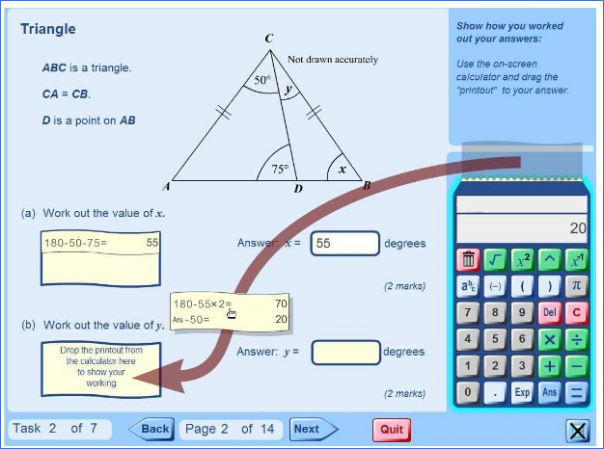
Figure 12: From Pead (2010, page 142). Reproduced with permission.
Researchers have noted several challenges in using text boxes and on-screen calculator and notation editor tools compared to handwriting and traditional calculators, particularly for items requiring detailed working. Broadly, these challenges stem from 2 factors: difficulties in entering mathematical notation, and the impact of those difficulties on problem-solving strategies and the nature of working shown.
Difficulties in inputting mathematical notation
While most students are accustomed to typing words and sentences on a keyboard, they may have more limited experience inputting mathematical notation. Williamson (2023, page 6) notes that “unlike typing words, typing mathematical and scientific notation doesn’t get extensively practised outside of maths and science contexts, and at school level is usually not extensively practised even within maths and science contexts”.
Even where students have some experience of typing mathematical and scientific notation, the tools are non-standardised and there is significant variation between them in the way in which notation is entered. Furthermore, even if students gain familiarity with a specific tool, entering mathematical notation on screen remains slower than on traditional calculators due to additional steps, such as the need for multiple clicks to insert symbols. As Williamson (2023, page 6) states: “The expression of mathematical and scientific ideas requires frequent use of non-standard characters (e.g., Greek letters, a degree symbol), special formatting (at a minimum, subscripts, superscripts, and fraction notation) and drawing. The difficulty with all of these is that they are not easy or seamless to input using a keyboard and mouse”.
Anthony et al. (2005) asked 48 university students to enter mathematical equations of varying complexity using 4 different modalities, 2 of which were keyboard-and-mouse (using Microsoft Equation Editor) and handwriting using a stylus. Most of the participants had no experience of using Microsoft Equation Editor, and all participants were given a 5-minute ‘practice’ period to familiarise themselves with it. The authors found that the keyboard-and-mouse condition was significantly slower and more error-prone than the handwriting condition — keyboarding equations took nearly 3 times as long as handwriting and had twice the number of errors. Furthermore, the disparity in response time increased with equation complexity.
Ryan and Balaban (2022) observed how students faced these challenges in on-screen GCSE assessment pilots in mathematics and science. While the students became accustomed to using the on-screen calculator and maths entry tool during the course of the maths assessment, they remained slower than when using traditional tools. One student stated that “I didn’t know how to find some symbols that I wanted. And then it took extra time. It’s just easier to write the symbols than it is to type them” (page 9). Students also expressed concerns about the use of on-screen scientific calculators in the science pilots, with one student stating “it’s sometimes difficult to do special characters, like if you have to square or something” (page 10).
Pead (2010) found that 11-year-olds using the on-screen calculator shown above (Figure 12) were more likely to dislike it (n=22) than to like it (n=5), primarily because they found it more difficult to use than a traditional calculator.
Impact on strategy and nature of working shown
Beyond input difficulties, the constraints of digital tools may influence the way test takers approach problems that require them to show their mathematical working. Williamson (2023, page 7) notes that when inputting multiple lines of mathematical reasoning on screen, “the user must mentally plan each line of working, work out the symbols required and the order in which to click to achieve the correct arrangement (which is non-trivial, since a single line of working is itself not linear in construction), then repeat the planned clicking and typing of digits many times”.
Some of these issues can be seen in the PISA 2015 mathematics task shown in Section 2.2 (Figures 1 and 2). Lemmo (2021) states that the paper version affords test takers far greater expressive freedom, enabling them to combine multiple modes of presentation, including “the possibility to produce sketches, set and perform calculations, and write texts in both natural and symbolic languages” (page 1,670). In the digital version, students are confined to using only the symbols supported by the keyboard and text box and must arrange their work according to the fixed layout prescribed by the software. Lemmo argues that even if the student is familiar with using the relevant digital tools, “it is reasonable to suppose that this change would result in significant differences in the solution process” and that these differences “have an impact both on the user’s possibilities for implementing actions and operations, and on how to respond” (page 1,670).
These issues could ultimately discourage test takers from recording potentially creditworthy intermediate steps, particularly when under time pressure. In addition, the increased reliance on mental strategies when responding on screen, discussed in Stage 2 (Thinking required), may also manifest in this context.
The image below (Figure 13), from the study by Davis et al. (2021) referred to in Section 3.2, shows responses to the same maths item, taken by different students using paper and pencil, a digital pen (stylus) and keyboard. Many of the challenges described above are evident when comparing the keyboard response with the others. The authors noted that in the keyboard condition, “it was hard to represent the symbols and list the process step by step”.
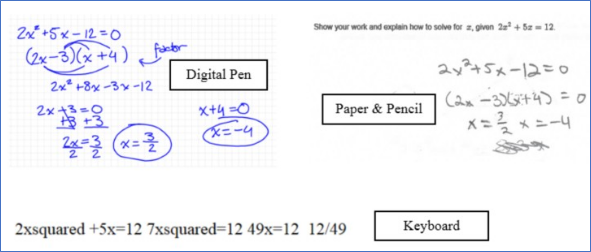
Figure 13: From Davis et al. (2021, page 8). Reproduced with permission.
4.5 Response mechanism: Implications for test development
4.5.1 Selected response items
There is little evidence to suggest that multiple choice questions (MCQs) inherently cause mode effects. However, there are at least 2 situations in which MCQs may not show mode equivalence. First, sub-optimal on-screen presentation – such as requiring scrolling to view all options — can lead to mode effects. As well as any additional cognitive load incurred by the need to scroll, this approach may increase the risk that test takers do not realise, when scrolling is required to see all of the options, that there are additional options in a question. Some platforms mitigate these risks by alerting test takers when they try to navigate to the next question without viewing all content on the current one. Similarly, Fishbein (2018) describes an approach used in eTIMSS trials where an arrow was programmed to appear at the bottom of the screen to indicate to students that there is more content.
Second, mode effects are still liable to arise when MCQs are combined with other elements known to trigger them, like the screen inferiority effect (in Stage 1: Information presentation) or the effect associated with CAF tasks (in Stage 2: Thinking required).
Other standard selected response formats (for example multiple response and true-false) have been less studied on screen, but the principles outlined for MCQs may also apply.
Technology-enhanced selected response items — such as drag-and-drop and drop-down menu tasks — introduce additional complexities. Comparability between TEIs and their paper-based alternatives should not be assumed. Indeed, Way et al. (2015, page 269) caution that “issues of comparability across testing modes are complicated when TEIs are included in the computer-based version of the test”, and that “requiring strict comparability between paper and computer versions of a test may be inappropriate when TEIs are included in the computer-based version”.
Indeed, there is some evidence that items that use drop-down menus are more difficult than paper-based alternatives. Where mode equivalence is a priority, it may be preferable to replicate paper formats on screen instead of using drop-down menus. Since any negative impact on performance linked to drop-down menus is likely construct-irrelevant, excluding them even in assessments delivered exclusively on screen may be advisable until the issues are more fully understood.
Drag-and-drop items may reduce cognitive load because selected options are typically removed from the remaining choices. They also eliminate the possibility of transcription and duplication errors, both of which would normally be considered construct irrelevant. There is currently little evidence to suggest that these advantages lead to systematic performance differences, though there is some evidence to suggest that items that use a drag-and-drop mechanism are faster to complete than paper-based alternatives.
Usability challenges have also been reported in some studies, particularly on tablets, where interface limitations — such as small targets and finger obstruction — can make drag-and-drop interactions frustrating and difficult to execute. Way et al. (2015) argued that the comparability of TEIs across devices cannot simply be assumed, as the different response mechanisms available to students (for example mouse and touchscreen) can influence the test taker’s experience and result in different tasks being easier or more difficult on different devices.
Given these usability concerns when responding to formats such as drag-and-drop on touchscreens, the CCSSO (2020, page 3) recommends that “the objects requiring input or interaction are sufficiently large (e.g., bigger in size than students’ fingertips) and spread apart as to avoid issues with precision”.
4.5.2 Constructed response items
There is little or no empirical evidence to suggest that short constructed response items (of a paragraph or less) are subject to mode effects. Predicting mode effects in extended constructed response (ECR) items is particularly challenging due to the number of individual test taker, mode-related, task-related and rater factors involved, as well as the fact there are potential effects in favour of both mediums.
There is evidence that proficiency (broadly, speed and automaticity) of individual students’ typing and handwriting is related to performance in ECR tasks. Additionally, the text editing (micro and macro) affordances of digital platforms (covered in Stage 4: Appraisal strategy) may advantage those with greater keyboard familiarity or typing fluency. On the other hand, test takers that do not have the necessary keyboarding skills may perform better on paper. In addition, raters tend to score the same response more harshly when it is typed than when it is handwritten.
Masterman (2018, page 210) argues that “the largely insignificant differences between the marks achieved in typed versus handwritten exams suggest that the risk of grade inflation (conversely, deflation) resulting from the change of tool is negligible”. Nevertheless, Masterman also notes that even small differences “matter to students whose marks hover on the boundaries between grades”.
The question of whether ECR assessments should be delivered on paper, on computer, or in both modes has been widely debated. Much of this discussion has taken place in the context of university assessment.
On the basis that mode effects tend to be small, and because of the ease of editing text on screen, many researchers advocate for essay questions to be assessed on screen, or for test takers to be given a choice of modes. Mogey et al. (2010) explore both of these options. In favour of the former, they note that it is “not substantially different from the current position where all students (with the exception of some with special requirements perhaps) are forced to handwrite their responses”, and that variations in typing speed “can be addressed relatively simply by ensuring students have enough pre-warning that their examination will be typed — and by providing opportunities to increase individual typing skills” (page 45). In support of the latter option, they state that while mode effects may occur, these are “negligible compared with variation due to differences between markers” (page 46).
Lestari (2024), based on a literature review comparing handwriting and typing across different educational levels, also stresses the need to ensure students have adequate computer familiarity, especially with typing and word processing, before being required to complete digital assessments. The author adds that “when it is known that a candidate pool varies considerably in their level of computer familiarity, it is recommended for test developers to offer both options of writing mode” (page 75).
Masterman (2018, page 210) argues that we should balance the concern that some test takers may be advantaged or disadvantaged by taking their assessment on computer “against the inequity that has historically existed in handwritten exams, where some students can write more fluently than others, thereby achieving higher marks”. Rather than continuing to debate conflicting evidence or conducting further studies that attempt to replicate high-stakes exam conditions in low-stakes or mock settings, she suggests it may be more productive to adopt on-screen assessments universally. Doing so would allow researchers and educators to leverage the analytical tools embedded in on-screen platforms to gain deeper insights into students’ writing behaviours and examiner scoring strategies in a digital environment. She argues that with such tools, digital assessments “may ultimately prove more equitable — or at least less inequitable — than handwritten exams”.
Despite these arguments, some concerns persist about disparities in students’ access to digital devices and experience with extended digital writing. These concerns remain relevant whether score equivalence between modes is sought or assessments are delivered exclusively on screen. For example, Chan (2023), following a comprehensive overview of factors and stakeholder perceptions related to typed versus handwritten examinations, noted that there are “valid concerns about the impact of compulsory typed examinations on students’ test performance and the potential for inequality among students from different backgrounds and disciplines” (page 1,395).
When mode equivalence is not sought, a further argument in favour of digital writing assessments is the central role of computer literacy in 21st-century academic and workplace skills. For example, Chan (2023, page 1,389) argues that “the integration of computers in educational settings not only facilitates students’ learning and communication processes, but also promotes their active participation in the educational, social and professional spheres of the twenty first century”.
Beyond questions of mode equivalence, attention has also been given to how digital writing environments should be designed to support effective performance. Way and Strain-Seymour (2021) argue that effective digital writing assessments must treat reading as an integral component of the writing process. They note that “an assessment system designer who does not explicitly acknowledge reading as a critical aspect of writing may not pay the same amount of attention to optimizing an open text area for reading purposes” (page 18). To address this, designers should ensure that the text produced by the test taker is highly legible, and that a substantial portion of the text that has already been written remains visible to test takers as they write. This visibility enables test takers to more easily reread their work, make revisions and maintain coherence.
4.5.3 Construction, graphing and measurement items
Research on digital items that incorporate construction, graphing and measurement tools remains sparse, with most available evidence based on participant reports or administrator observations. Performance on these items may be influenced by several factors, including difficulties in manipulating digital tools, challenges in establishing equivalent accuracy tolerances, and the consequences of task simplification or scaffolding. In addition, test takers may lack experience with these tools, and because digital tools are not standardised, familiarity with one particular tool may not transfer to others.
Other than in the simplest tasks (that is, tasks that do not require precise digital tool manipulation, do not involve simplifications to the digital tools that reduce item difficulty, and do not rely on accuracy tolerances of practical significance), it may be unrealistic to expect performance equivalence between digital and traditional formats for tool-based items.
Even in the case of assessments designed solely for digital delivery, there are at least 2 reasons to question the value of including items that rely heavily on digital tools. First, issues of tool familiarity and ease of manipulation remain relevant. Way and Strain-Seymour (2021) note that unfamiliarity with a device, tool, or interface can introduce construct-irrelevant variance. As they put it, “when the tools used for a task are not second nature, and when the student’s proficiency with them does not approach automaticity, some extraneous cognitive load can be anticipated.” They further argue that “if device, tool, or interface unfamiliarity introduces extraneous cognitive load, and if familiarity varies across test-takers, then score differences cannot be entirely attributable to construct knowledge” (page 12). Second, although effective digital tools may assess conceptual understanding effectively, they may not provide an authentic measure when the aim is to evaluate students’ ability to use physical tools.
Sandene et al. (2005) included items that were intended to determine how effectively students can manipulate physical tools (such as rulers or protractors), or require students to create drawings, in a list of item types less likely to be suitable for inclusion in an online NAEP assessment.
4.5.4 Calculator tools and notation editors
Empirical research on questions requiring the use of on-screen calculators and notation editors is lacking. Entering notation on screen is slower and more cumbersome than doing so by hand. Like construction, graphing, and measurement tools, calculators and notation editors are non-standardised, and familiarity with one tool may not transfer easily to others. Notation editors also typically offer considerably less flexibility in laying out and structuring responses. These challenges may lead test takers to rely more heavily on mental strategies, which are often more error-prone, and may discourage them from showing potentially creditworthy intermediate steps — particularly under time pressure.
Guo et al. (2025), following a study examining students’ use of various digital tools (including an on-screen calculator and equation editor) when responding to NAEP mathematics items, made 2 recommendations. First, students should have opportunities to develop familiarity with these tools gradually and at their own pace; and second, the tools should be integrated into regular classroom practice — not only to increase student proficiency, but also to enable teachers to observe how students use them and adapt their teaching as needed.
However, while familiarity with a particular tool may mitigate some of the disadvantages of responding on screen, it may be unrealistic, particularly for more complex calculations (for example multi-step calculations and those requiring the input of more complex notation), to assume comparability in equivalent items that use traditional calculators and calculator tools respectively. The use of digital pens (styluses), discussed in Section 3.2, may offer the most promising means of mitigating any mode effects in questions where test takers are required to show working.
Way and Strain-Seymour (2021) consider the advantages and disadvantages of using traditional (physical) calculators versus on-screen (integrated) calculators in digital assessments. They state that traditional calculators can offer various benefits in addition to those relating to the impact on speed, accuracy and cognitive load, such as tactile feedback and the ability to work in proximity to scratch paper. On-screen calculators can also take up valuable screen space when opened and obscure question content, particularly if they can’t be moved around the screen. At the same time, the authors highlight several advantages of integrated calculators. These include improved security (as no hints or formulas can be stored in memory), lower costs, and simpler logistics for schools. They add that for assessment designers, “the ability to include a calculator with some items but not others allows for greater nuance” (page 25). Furthermore, on-screen calculators avoid the variability associated with traditional devices, where differences in model functionality and usability can raise concerns about fairness.
A consistent theme in relation to all digital tools is the importance of minimising extraneous load. Reducing the conscious effort required to interact with a tool allows more working memory to be devoted to the task itself. To support this, Oviatt (2006) emphasises that user interfaces should accommodate (rather than attempt to change) users’ existing work practices, avoid unnecessary complexity, minimise interruptions and distractions, and support the representational systems needed to perform the required tasks. On this final point, Oviatt notes that “traditional graphical interfaces still are surprisingly limited in the expressive power and breadth of input capabilities that they support” (page 879).
5 Appraisal strategy
The final stage, appraisal strategy, relates to the ease of changing and appraising a response after its initial formulation by the test taker. While this is another area where more research is needed, there appears to be a range of potential advantages for digital test takers at this stage of question answering. These advantages stem from 2 factors — the relative ease of (repeatedly) modifying a response on screen, and alternative strategies to answering questions that capitalise on this functionality.
5.1 Ease of changing responses on screen
Changes to on-screen responses can be made easily and repeatedly without leaving a trace. Conversely, paper-based test takers must manually alter their answers, often by crossing them out, which can raise concerns about readability. As a result, paper-based test takers may be more hesitant to revise their responses.
This greater reluctance to change responses on paper has been documented most extensively in extended constructed response items. For example, Jin and Yan (2017) and Chan et al. (2018) reported that essay writers were reluctant to revise handwritten scripts due to concerns about tidiness. Similarly, in a study by Lee (2004), participants responding to a post-test survey described the “cumbersome nature of the process of correcting and editing their text” on paper, and “complained of time consumption in the editing process in paper writing and the difficulty of focusing on content development” (page 17).
Possibly as a result of the relative ease of revising text on screen, Jin and Yan (2017) found that typed responses contained fewer errors per hundred words than handwritten ones, regardless of participants’ familiarity with computers.
Graham (2016), in an interview with the education website Hechinger Report about writing on paper and computer, argued (in words paraphrased by the interviewer) that provided students are sufficiently proficient in using a computer, “research evidence shows that a computer is ultimately a superior tool to write with because it makes it easier to move words around, or replace and delete them. So it’s not surprising that a student who can already type well, and is comfortable with copy-and-paste commands, might produce a better essay on the computer than by hand”.
However, other studies, such as Chambers (2008), have found comparable error rates across both modes. Furthermore, Lestari (2024), in a review of the literature, concluded that overall there were no major differences in the frequency of errors in handwritten and word-processed essays, though the nature of errors might differ.
The greater reluctance to change answers on paper may extend to other item formats. Two studies (Khoshsima et al., 2017; Ebrahimi et al., 2019) reported that university students taking multiple choice assessments on screen and paper cited the ease of changing answers as a key reason for preferring the on-screen version. Any reluctance to change answers to multiple choice questions on screen may be important because there is strong empirical evidence that changing initial answers to multiple choice questions is more likely than not to improve test performance (for example Bauer et al., 2007; Tiffin-Richards et al., 2022).
Furthermore, for tasks involving drawing, such as construction or graphing, repeated corrections and re-drawing may not be always feasible for paper-based test takers.
5.2 Strategies that capitalise on the ease of changing responses
The ease of changing responses on screen may itself offer a performance advantage in some contexts, though its empirical impact has rarely or never been investigated. In addition to this, some types of on-screen items present test takers with alternative strategies, not available to paper-based test takers, that capitalise on this ease of changing responses. These alternative strategies are apparent in at least 2 areas, though given the limited research, additional examples may exist.
5.2.1 Composition in extended constructed response items
The first area is in the typing of extended constructed responses such as essays. Some research has shown that the approach to answering ECR items differs based on whether responses are typed or handwritten. This is assumed to be due to the ease of micro-formatting (for example replacing individual words) and macro-formatting (for example switching paragraphs) on screen. Mogey et al. (2010, page 30) state that “the process of composing an essay using a keyboard is different to using pen and paper. When writing by hand, planning what is to be written is a critical and important element, but use of a word processor makes editing text easy and therefore means the author can afford to spend less time in planning their work”. Similarly, according to Way et al. (2008), when responses are written by hand, test takers are more likely to plan their response before writing. When typing, test takers are more likely to compose ‘on the fly’ and edit as they write.
Chan et al. (2018) investigated the writing processes of undergraduate students taking a writing test via a questionnaire and interviews. While the questionnaire did not reveal differences in writing processes between modes, the interviews highlighted some distinctions. The authors state that “participants tended to be more cautious with their planning under the paper-based than computer-based modes. Many reported strategies of producing a writing plan or listing the key ideas. It is interesting to note that most participants stayed very closely to this initial plan as they produced their essay on paper” (page 13). In contrast, they note that when composing on computer, “participants were relaxed with their initial planning under the computer-based mode. They believed they did not need to start with a perfect plan because they felt more comfortable making changes to the plan or to the essay, processes which CB mode facilitates” (page 13).
However, it is worth stating that not all studies have found this difference in composition strategy between modes. Zhi and Huang (2021) conducted a study in which sixty international ESL students completed 2 writing tasks, one on paper and one on computer. Interestingly, more participants reported planning their ideas when writing on a computer than on paper. Furthermore, interview data suggested that this may have been attributable to participants’ relatively faster typing speeds. Specifically, some participants explained in interviews that they spent more time planning and revising “because they knew their fast typing speed could allow them more time”, whereas many paper-based test takers “were concerned about running out of time and decided not to spend time planning before writing” (page 10).
It is also important to note that potential shifts in composition strategy do not necessarily translate into improved performance. In Chan et al.’s (2018) study, for example, the reported change in strategy on computer did not result in higher scores. Furthermore, in Zhi and Huang’s (2021) study, one participant viewed the ease of editing on a computer as a drawback, stating: “I think it’s a negative, because I don’t do any structure before writing. So, I think because we erase things quicker and faster, we don’t think enough before writing” (page 9).
5.2.2 Affordances that reduce cognitive load in some mathematics items
Much of the remainder of the evidence that digital items permit alternative strategies comes from a single study carried out by Threlfall et al. (2007). On-screen and paper versions of several mathematics items (half of which were aimed at 11-year-olds, and the other half at 14-year-olds) were trialled. While overall performance was slightly better on paper for both age groups, some items performed considerably better when taken on computer. The authors attributed these differences to affordances of the digital format, such as enabling trial-and-error approaches that reduce cognitive load.
The item below (Figure 14), shown in both paper (left) and computer formats, performed considerably better on computer (facility of 88.1%) than paper (facility of 64.5%). It requires test takers to add 2 circles to the grid to make a symmetrical pattern. The authors note that on paper, the test taker needs to determine that it will ‘look right’ in advance of responding, either by visualising or by being analytic (for example, matching pairs across possible lines of symmetry). On computer, however, the ease of changing responses affords test takers an alternative strategy — to attempt to put the 2 circles in the correct place, and then determine if the arrangement looks symmetrical. If not, the test taker can simply try again. The authors state that this ‘sequential affordance’ carries a smaller cognitive load.
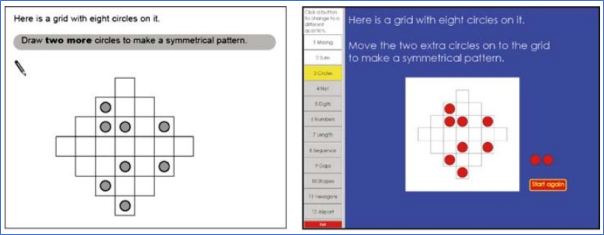
Figure 14: From Threlfall et al. (2007, page 339). Reproduced with permission from Springer via the Copyright Clearance Center.
The item shown in Figure 11 (Section 4.1.2), from the same study, also permits strategies on computer that are not available to test takers on paper. The authors note (page 343) that “the affordance of moving numbers into position without cost in turn affords the strategy of trial and error, another clear example of a sequential affordance, with the opportunity for dealing with elements successively bringing low cognitive demand”. They add that test takers can put different combinations of numbers down until they find a correct combination. On the contrary, they note that on paper “this is usually done mentally, and it is implicit in the paper and pencil assessments that a desirable skill in number work is to be able to organise and manipulate numbers in the abstract, i.e. to have the ability to add and subtract numbers that are arranged and rearranged mentally — even though this is a more cognitively demanding activity”.
5.3 Appraisal strategy: Implications for test development
Changing a response in a digital assessment is easier than in a paper-based assessment, and can be done repeatedly without leaving a trace. In itself, this could offer advantages to digital test takers across a range of item formats. However, these differences have rarely, if ever, been empirically tested.
In addition, this functionality provides digital test takers with alternative strategies that paper-based test takers do not have, both in relation to extended writing tasks and some types of mathematics items. In extended writing, the ease of editing may influence composition strategies, but the extent to which this affects performance remains uncertain and difficult to measure. In contrast, although based on limited research, the advantages observed in some mathematics items appear to be clearer and more pronounced. Evidence from Threlfall et al. (2007) suggests that these items often involve arranging elements to form a correct solution, where the digital format facilitates alternative approaches, such as trial and error, that reduce cognitive load. On computer, students “can move objects or tokens into position, see how they look, and then move them back again or into a different position” (page 342). A more comprehensive understanding of the types of items most susceptible to this mode effect is needed. In the meantime, test developers should carefully consider whether the ease of modifying responses in a particular item might offer digital test takers alternative strategies that could reduce cognitive load.
In both cases, there may be little merit in exploring the potential to mitigate any effects. The ability to easily and repeatedly edit responses is inherent in digital assessment (and computer use in general), and limiting the number of times test takers are permitted to make changes to responses would likely introduce other issues.
Threlfall et al. (2007) reflect on how the construct validity of the items in their study is impacted by assessment mode, arguing that such judgements require an understanding of the intentions of the question writer. In the case of the symmetry question (Figure 14) for example, they note that the paper version demands more than just the ability to recognise symmetry when one sees it — test takers must be able to demonstrate visualisation or analysis skills to successfully answer the question. Construct validity, therefore, depends on whether these additional skills are considered to be part of understanding symmetry or whether they are just ‘constraints of the medium’. If the former is the case, they argue, then the paper version is the more valid version of the question. Conversely, if recognising symmetry alone is sufficient to show understanding of symmetry, the paper version could be considered flawed.
6 Concluding reflections
This paper presents a framework designed to help practitioners — such as test developers — anticipate whether specific test items or their features are likely to give rise to mode effects, and to assist researchers in designing targeted studies to investigate these phenomena further. The framework is grounded in a comprehensive review of the literature focused on mode effects at the level of individual items and item features. The review indicated that the causes of mode effects can be mapped to one of 4 distinct stages in the process of answering test items, which informed the development of a 4-stage framework. The framework enables practitioners to systematically evaluate test items under development for potential mode effects at each stage, supporting a more structured and methodical approach to identifying and mitigating these effects during test design.
Several important considerations emerged from the review, and these are discussed below.
Limitations in existing evidence
Although a substantial body of literature comparing performance on equivalent paper-based and digital assessments has accumulated over the past 40 years, there is still a lack of robust evidence underpinning many of the mode effects discussed.
Two implications for future research emerge from this review.
First, there are numerous examples across all 4 stages of the framework where potential mode effects have received little attention. Many of these have been highlighted in this review. For example, research is sparse on the use of drop-down menu items in assessment contexts and on the cognitive demands of integrating information across multiple tabs or windows. In addition, the impact of on-screen tools (for example for construction, measuring, or showing working) on test performance remains almost entirely unexplored.
Second, even in areas that have been more extensively studied, the evidence often remains inconclusive. Some reasons for this are inherent or at least difficult to overcome, including substantial changes in the technological landscape and in test takers’ familiarity with digital devices over time; uncertainty over the extent to which increased familiarity with digital devices and features will offset observed effects; barriers to conducting comparability studies in high-stakes operational environments; and the lack of standardisation in on-screen tools (including those for annotation, construction, measuring, or showing working), which limits the generalisability of findings. Other shortcomings reflect methodological gaps, such as insufficient detail provided in reporting (for example Lynch, 2022), a predominant focus on test-level outcomes that may obscure item-level effects, and limited control of potentially influential factors — such as screen size or the extent to which assessments are administered under time-pressured conditions.
To generate clearer and more interpretable results, future comparability research may benefit from moving beyond broad test-level comparisons and instead examining specific, hypothesised causes of mode effects. Studies that systematically manipulate individual features offer stronger experimental control and substantially reduce confounding influences. When all other task-related, technology-related, and test taker-related characteristics are held constant across conditions, any performance differences can be more confidently attributed to the feature under investigation. Many influential studies in this review adopted such an approach.
The gaps and limitations in the existing evidence also underscore the importance of viewing both the framework, and the evidence base on which it rests, as dynamic and evolving. It is intended to be refined over time in response to emerging research and ongoing technological developments.
Challenges in applying findings to other contexts
Beyond these limitations in the evidence base, practitioners face additional challenges when applying existing findings to their own contexts. Any framework for anticipating mode effects can only identify the potential for such effects to occur; whether they actually do so depends on the interaction of a range of task-related, technology-related, and test taker-related factors. This is apparent, for example, in the case of comprehension differences when reading on paper versus digital devices. While all test items involve some reading, it is evident that only a small subset exhibit a screen inferiority effect. The research suggests that this effect is most likely in cognitively demanding tasks — typically those involving time pressure, longer texts, scrolling, desktop or laptop (rather than tablet) use, expository (rather than narrative) content, and the need to understand fine detail rather than just the gist of the information. However, applying research insights like these to a specific context — such as a set of text-based history source material accompanied by related test items — is far from straightforward.
Similarly, the presence of mode effects in calculation and annotation facilitated (CAF) tasks is influenced by a combination of factors, including test takers’ cognitive abilities (particularly mental arithmetic and working memory), the intrinsic load (IL) of the task, and the additional extraneous load (EL) imposed in the digital format. Figure 4 (Section 3.2) illustrates a scenario in which a test taker’s working memory is sufficient to manage the combined IL and EL on paper, but is overloaded by the added EL in the digital version of an item. However, this effect is clearly not uniform. The likelihood of overload depends on the IL of the task: tasks with lower IL are less likely to overwhelm working memory, both because the intrinsic demands are lower and because the additional EL has a more pronounced impact when IL is high. In addition, test takers with greater working memory resources may still complete the task successfully on screen, while those with more limited working memory resources might struggle even with the paper version.
Some types of items, such as extended constructed response items and construction, graphing and measurement tasks, present potential advantages for both modes. In these cases, the challenges in anticipating mode effects are even greater, as test developers must weigh the likelihood and magnitude of competing effects.
Given the multitude of interacting variables, correctly anticipating mode effects remains a considerable challenge for practitioners even when the underlying mechanisms of a particular effect are well understood. This is unsurprising, given that predicting performance in traditional paper-based formats is itself notoriously difficult. El Masri et al. (2017, page 27), for example, observed that the assessment research community is “still incapable of predicting item difficulty accurately or determining its direction after its manipulation”.
Ultimately, in contexts where the aim is to move beyond identifying potential mode effects and instead establish robust evidence about their likelihood and magnitude, nothing can replace studies that replicate the exact conditions of the target test. As Pommerich (2004) cautions, “testing programs should conduct their own comparability studies using their own tests and technology, as comparability results might not generalize beyond a given test and computer interface” (page 4).
Impact on constructs assessed
Administering an item on screen rather than on paper can influence not only its difficulty but also the construct(s) being assessed. This consideration is important not just when comparing paper and digital formats, but also for assessments delivered exclusively on screen.
Some effects on construct are quite evident. For example, extended writing tasks may, in part, assess different skills depending on the mode of delivery, with on-screen responses reflecting typing and word processing proficiency, and paper-based responses capturing handwriting ability.
Other impacts are more subtle. Any variation in cognitive load between modes could be said to represent a shift in construct, with a greater emphasis on working memory demands in the mode associated with greater load. For example, in the angles question (Section 3.2, Figure 5), digital test takers — lacking direct physical access to the question — are more likely to rely on mental strategies. This shifts the construct toward greater emphasis on mental arithmetic and working memory, potentially at the expense of knowledge of angle rules. Similarly, the additional strategies available to digital test takers in some mathematics items (Stage 4: Appraisal strategy) alter the construct by enabling alternative approaches that reduce cognitive load.
Current methods for classifying the cognitive demands and content assessed in test items are often insufficiently granular to capture these differences introduced by mode. To ensure that items assess the intended knowledge, skills, and cognitive processes, test developers may benefit from more precisely articulating the cognitive demands and content emphases of each item, and carefully considering how these may shift across different delivery modes.
One domain where construct differences have been explicitly acknowledged is reading, with frameworks such as PISA recognising the distinct nature of online versus paper-based reading. Online reading involves navigating non-linear texts, managing multiple sources of information, evaluating the credibility of digital content, and integrating multimedia elements — all of which require different cognitive strategies than traditional print reading.
In some cases, differences between modes can also remove or introduce more overt examples of construct-irrelevant variance. For example, drag-and-drop items eliminate the potential for transcription and duplication errors present in paper-based formats.
The importance of cognitive load
It is noteworthy that a high proportion of the mode effects, across all 4 stages of the framework, appear to be linked to differences in cognitive load between paper and digital formats.
This is most evident in Stage 2 (Thinking required), where the mode effects seen in CAF tasks arise from the additional extraneous load (EL) in digital formats. In Stage 1 (Information presentation), at least one of the proposed underlying causes (scrolling) is assumed to impose a greater cognitive load on test takers. Tasks that require integration or synthesis across multiple texts — particularly when those texts cannot be viewed simultaneously — also contribute to higher cognitive demands. In Stage 3 (Response mechanism), greater automaticity of handwriting and typing results in a reduction in cognitive load, allowing more of working memory to be devoted to writing composition. In Stage 4 (Appraisal strategy), the ease of modifying responses on screen results in affordances (such as the ability to deal with elements in a task successively rather than simultaneously) that reduce cognitive load. Finally, some of the challenges caused by on-screen tools (for annotation, highlighting, drawing, graphing, measuring and showing working) appear to relate to an increase in EL.
Given that many mode effects appear to stem from differences in EL between paper and digital formats, a useful strategy for test and platform developers may be to deepen their understanding of cognitive load theory and focus on minimising EL. This may involve designing tasks and interfaces that reduce unnecessary cognitive demands such as excessive scrolling, fragmented information presentation, or complex tool interactions, so that test takers can devote more of their working memory to the core cognitive processes required by the task. However, it is also important to recognise that the potential to mitigate mode effects may be limited in many instances, as discussed in the final section.
The potential to mitigate mode effects
A longstanding assumption is that mode effects stem primarily from a lack of experience with digital devices — or at least with using them in assessment contexts — and that they will diminish as test takers become more familiar with digital formats (for example Clarianna and Wallace, 2002). While increased familiarity may alleviate some mode effects, a closer examination of their underlying causes — not least the impact on cognitive load — suggest that many of the challenges appear to be intrinsic to the medium itself.
Well-designed on-screen tools that help test takers focus fully on the task, combined with greater familiarity, can mitigate some mode effects. However, as Williamson (2023) observes, “some digital assessment solutions can be both unfamiliar and objectively cumbersome” (page 6). In practice, certain digital tools — such as calculators and notation editors for showing working — are likely to be slower and less intuitive to use than traditional paper-and-pencil methods, even for experienced users. Moreover, the constraints imposed by on-screen tools on expressing mathematical reasoning (outlined in Section 4.4) cannot be substantially overcome through familiarity alone.
Performance differences in extended constructed response items are in part linked to handwriting and typing proficiency, which reflect individual differences between test takers rather than properties of the assessment. While typing skills can be developed over time, the evidence suggests that handwriting proficiency levels also vary considerably, even among older students. In addition, the relative ease of making changes to extended responses on digital devices compared with paper reflects inherent characteristics of the 2 media.
There are areas where test design and administration decisions could help to mitigate mode effects. For example, while most proposed causes of the screen inferiority effect appear to be intrinsic to screen-based reading, evidence suggests that the effect is most pronounced under time pressure and is greater on laptops and desktops than on handheld devices. As noted earlier, however, increasing test time or shifting to tablet-based delivery may not be feasible or appropriate in many assessment contexts. Using paging instead of scrolling may also reduce the effect, but potentially at the cost of introducing other challenges to test takers, particularly for non-passage-based texts or when it results in individual items being split across multiple pages.
Technology also offers potential solutions in some areas. For instance, assuming that any remaining usability challenges are addressed, digital pens have the potential to mitigate mode effects in CAF tasks by allowing test takers to annotate visual resources and record their working next to the question.
References
Australian Curriculum, Assessment and Reporting Authority (ACARA). (2010). Item 7, 2010 Year 5 Numeracy paper: National Assessment Program Literacy and Numeracy. Sydney, Australia: Ministerial Council for Education, Early Childhood Development and Youth Affairs (MCEECDYA)
Ackerman, R., & Goldsmith, M. (2011). Metacognitive regulation of text learning: On screen versus on paper. Journal of Experimental Psychology: Applied, 17, 19–32
Ackerman, R., & Lauterman, T. (2012). Taking reading comprehension exams on screen or on paper? A metacognitive analysis of learning texts under time pressure. Computers in Human Behavior, 28(5), 1816–1828
Anghel, E., & von Davier, M. (2025). The highlighting divide: does highlighting strategy help explain international gaps in reading achievement? Large-scale Assessments in Education. 13:6
Annisette L.E., & Lafreniere K.D. (2017). Social media, texting, and personality: A test of the shallowing hypothesis. Personality and Individual Differences, 115, 154–158
Anthony, L., Yang, J., & Koedinger, K. R. (2005). Evaluation of multimodal input for entering mathematical equations on the computer. ACM Conference on Human Factors in Computing Systems (CHI 2005), Portland, OR, 1184–1187
Aspiranti, K.B., Henze, E.E.C., & Reynolds, J.L. (2020). Comparing Paper and Tablet Modalities of Math Assessment for Multiplication and Addition. School Psychology Review, 49(4), 453–465
Ayres, P., & Sweller, J. (2014). The split-attention principle in multimedia learning. In R. E. Mayer (Ed.), The Cambridge handbook of multimedia learning (2nd ed., pp. 206–226). Cambridge University Press.
Bauer, D., Kopp, V., & Fischer, M.R. (2007). Answer changing in multiple choice assessment change that answer when in doubt–and spread the word! BMC Medical Education, 7(1), 1–5
Ben-Yehudah, G., & Eshet-Alkalai, Y. (2018). The contribution of text-highlighting to comprehension: A comparison of print and digital reading. Journal of Educational Multimedia and Hypermedia, 27, 153–178
Berger, C., & Lewandowski, L. (2013). The effect of a word processor as an accommodation for students with learning disabilities. Journal of Writing Research, 4(3), 300–318
Berninger, V. W. (1999). Coordinating transcription and text generation in working memory during composing: Automatic and constructive processes. Learning Disability Quarterly, 22(2), 99–112
Bloom, B.S., Engelhart, M.D., Furst, E.J., Hill, W.H. & Krathwohl, D.R. (1956). Taxonomy of educational objectives Handbook 1: cognitive domain. London, Longman Group Ltd.
Bridgeman, B., Lennon, M.L., & Jackenthal, A. (2003). Effects of screen size, screen resolution, and display rate on computer-based test performance. Applied Measurement in Education, 16, 191–205
Brown, A. (2003). Legibility and the rating of second language writing: An investigation of the rating of handwritten and word-processed IELTS Task Two essays (IELTS Research Reports, Issue 4). IDP: IELTS Australia. Retrieved from: https://ielts.org/cdn/Research/legibility-and-rating-of-second-language-writing-brown-2003.pdf
Bruggink, M., Swart, N., van der Lee, A., & Segers, E. (2025). Theories of Digital Reading: The Current State of Affairs on Digital Reading Research. Retrieved from: https://link.springer.com/content/pdf/10.1007/978-3-031-75121-9_1.pdf
Bryant, W. (2017). Developing a Strategy for Using Technology-Enhanced Items in Large-Scale Standardized Tests. Practical Assessment, Research & Evaluation, 22(1), 1–10
Buerger, S., Kroehne, U., Koehler, C., & Goldhammer, F. (2019). What makes the difference? The impact of item properties on mode effects in reading assessments. Studies in Educational Evaluation, 62, 1–9
Canz, T., Hoffmann, L., & Kania, R. (2020). Presentation-mode effects in large-scale writing assessments. Assessing Writing 45(2), 100470
Chambers, L. (2008). Computer-based and paper-based writing assessment: a comparative text analysis. Research Notes, 34, 9–15
Chandler, P. and Sweller, J. (1992). The split-attention effect as a factor in the design of instruction. British Journal of Educational Psychology, 62 (2)
Chan, C.K.Y. (2023). A systematic review – handwritten examinations are becoming outdated, is it time to change to typed examinations in our assessment policy? Assessment & Evaluation in Higher Education, 48 (8), 1385–1401
Chan, S., Bax, S., & Weir, C. (2018). Researching the comparability of paper-based and computer-based delivery in a high-stakes writing test. Assessing Writing, 36, 32–48
Chen, J., & Perie, M. (2018). Comparability within Computer-Based Assessment: Does Screen Size Matter? Computers in the Schools, 35, 268–283
Cheung, Y.L. (2016). A comparative study of paper-and-pen versus computer-delivered assessment modes on students’ writing quality: A Singapore study. The Asia Pacific Education Researcher, 25, 23–33
Clariana, R., & Wallace, P. (2002). Paper-based versus computer-based assessment: Key factors associated with the test mode effect. British Journal of Educational Technology, 33(5), 593–602
Clesham, R. (2010). Changing assessment practices resulting from the shift towards on-screen assessment in schools. Doctor of Education, University of Hertfordshire. Retrieved from: https://uhra.herts.ac.uk/id/eprint/16425/1/Rose%20Clesham%20-%20final%20EdD%20submission.pdf
Clinton V. (2019). Reading from paper compared to screens: A systematic review and meta‐analysis. Journal of Research in Reading, 42, 288–325
Cohen J. (1988). Statistical power analysis for the behavioral sciences. 2nd ed. Lawrence Erlbaum Associates; Hillsdale, NJ
Connelly, V., Dockrell, J.E., & Barnett, J. (2005). The slow handwriting of undergraduate students constrains overall performance in exam essays. Educational Psychology, 25(1), 99–107
Connelly, V., Gee, D., & Walsh, E. (2007). A comparison of keyboarded and handwritten compositions and the relationship with transcription speed. British Journal of Educational Psychology, 77(2), 479–492
Council of Chief State School Officers (CCSSO). (2020). Supplement to Score Comparability across Computerized Assessment Delivery Devices An update on literature produced since the June 2016 Report. Retrieved from: https://files.eric.ed.gov/fulltext/ED610778.pdf
Crabtree A. R. (2016). Psychometric properties of technology-enhanced item formats: An evaluation of construct validity and technical characteristics. University of Iowa.
Crisp, V., & Ireland, J. (2022). A structure for analysing features of digital assessments that may affect the constructs assessed. Cambridge University Press & Assessment. Retrieved from: https://www.cambridgeassessment.org.uk/Images/675064-a-structure-for-analysing-features-of-digital-assessments-that-may-affect-the-constructs-assessed.pdf
Crisp, V., Vitello, S., Khan, A.A., Mahy, H., & Hughes, S. (2025). Learners’ annotations and written markings when taking a digital multiple-choice test: What support is needed? Research Matters: A Cambridge University Press & Assessment publication, 39, 90–109
Dadey, N., Lyons, S., & DePascale, C. (2018). The comparability of scores from different digital devices: A literature review and synthesis with recommendations for practice. Applied Measurement in Education, 31, 30–50
Dahan Golan, D., Barzillai, M., & Katzir, T. (2018). The Effect of Presentation Mode on Children’s Reading Preferences, Performance, and Self-Evaluations. Computers and Education. 2018, 126, 346–358
Davis, L.L. (2015). Device Effects in Online Assessment: A Literature Review for ACARA. Retrieved from: https://nap.edu.au/docs/default-source/default-document-library/naplan-online-device-effect-study.pdf
Davis, L.L., Orr, A., Kong, X., & Chow-Hong, L. (2015). Assessing student writing on tablets. Educational Assessment, 20(3), 180–198
Davis, L.L., Janiszewska, I., Schwartz, R., & Holland, L. (2016). NAPLAN Device Effects Study. Pearson, Melbourne. Retrieved from: https://nap.edu.au/docs/default-source/default-document-library/naplan-online-device-effect-study.pdf
Davis, L.L., Morrison, K., Schnieders, J.Z.-Y., & Marsh, B. (2021). Developing Authentic Digital Math Assessments. Journal of Applied Testing Technology, 22(1), 1–11
Delgado P., Vargas C., Ackerman R., & Salmerón L. (2018). Don’t throw away your printed books: A meta-analysis on the effects of reading media on reading comprehension. Educational Research Review. 25, 23–38
Delgado, P., & Salmerón, L. (2021). The inattentive on-screen reading: Reading medium affects attention and reading comprehension under time pressure. Learning and Instruction, 71, 101396
Dodds, H. J., El Masri, Y., Stratton, T. (2025). On-screen Assessment and Mode Effects: A review of the effects of on-screen assessment on levels of engagement, cognitive demands and performance. (Ofqual research report 25/7280). Ofqual.
Dunlosky, J., Rawson, K. A., Marsh, E. J., Nathan, M. J., & Willingham, D. T. (2013). Improving students’ learning with effective learning techniques: Promising directions from cognitive and educational psychology. Psychological Science in the Public Interest, 14(1), 4–58
Duran, R., Zavgorodniaia, A., & Sorva, J. (2022). Cognitive load theory in computing education research: A review. ACM Transactions on Computing Education, 22(4), 1–27
Ebrahimi, M.R., Hashemi Toroujeni, S.M., & Shahbazi, V. (2019). Score equivalence, gender difference, and testing mode preference in a comparative study between computer-based testing and paper-based testing. International Journal of Emerging Technologies in Learning (IJET), 14(07), 128
El Masri, Y.H., Ferrara, S., Foltz, P.W., and Baird, J. (2017). Predicting item difficulty of science national curriculum tests: the case of key stage 2 assessments. The Curriculum Journal, 28 (59–82)
Engdal Jensen, R., Roe, A., & Blikstad-Balas, M. (2024). The smell of paper or the shine of a screen? Students’ reading comprehension, text processing, and attitudes when reading on paper and screen. Computers and Education, 219, 1–12
Ersan, O., & Parlak, B. (2023). The use of on-screen calculator as a digital tool in technology-enhanced items. International Journal of Assessment Tools in Education. 10 - Special Issue, 224–242
Feng, L., Lindner, A., Ji, X.R., & Joshi, R.M. (2019). The roles of handwriting and keyboarding in writing: A meta-analytic review. Reading and Writing, 32(1), 33–63
Fishbein, B. (2018). Preserving 20 years of TIMSS trend measurements: Early stages in the transition to the eTIMSS assessment (Doctoral dissertation). Boston College
Froud, K., Levinson, L., Maddox, C., & Smith, P. (2024). Middle-schoolers’ reading and lexical-semantic processing depth in response to digital and print media: An N400 study. PLOS One, 22,19(5)
Gillmor, S., Poggio, J., & Embretson, S. (2015). Effects of Reducing the Cognitive Load of Mathematics Test Items on Student Performance. Numeracy, 8(1)
Gong, T., Zhang, M., & Li, C. (2022). Association of keyboarding fluency and writing performance in online-delivered assessment. Assessing Writing, 51, 27–45
Goodwin, A. P., Cho, S.J., Reynolds, D., Brady, K., & Salas, J. (2020). Digital versus paper reading processes and links to comprehension for middle school students. American Educational Research Journal, 57(4), 1837–1867
Graham, S. (2016). Interview with Hechinger Report. Retrieved from: https://hechingerreport.org/online-writing-tests-widen-achievement-gap/
Graham, S., Harris, K., & Hebert, M. (2011). Informing writing: The benefits of formative assessment. Washington, DC: Alliance for Excellence in Education
Greifeneder, R., Alt, A., Bottenberg, K., Seele, T., Zelt, S., & Wagener, D. (2010). On writing legibly: Processing fluency systematically biases evaluations of handwritten material. Social Psychological and Personality Science, 1(3), 230–237
Guo, H., Johnson M., Saldivia, L., & Worthington, M. (2025). Toward better digital tool designs to assist students on math assessments. Chinese/English Journal of Educational Measurement and Evaluation. Vol 6: Issue 1, Article 5
Halamish, V., & Elbaz, E. (2020). Children’s Reading Comprehension and Metacomprehension on Screen versus on Paper. Computers &. Education, 145, 103737
Herrmann-Abell, C. F., Hardcastle, J., & DeBoer, G. E. (2018). Comparability of Computer-Based and Paper-Based Science Assessments. Paper presented at the NARST Annual International Conference, Atlanta, GA. Retrieved from: https://files.eric.ed.gov/fulltext/ED581626.pdf
Higgins, J., Russell, M., & Hoffmann, T. (2005). Examining the Effect of Computer-Based Passage Presentation of Reading Test Performance. The Journal of Technology, Learning and Assessment, 3(4)
Hillier, M. To type or handwrite: student’s experience across six e-Exam trials. (2015). In T. Reiners, B.R von Konsky, D. Gibson, V. Chang, L. Irving, & K. Clarke (eds.) Proceedings of the ASCILITE conference, Perth, Australia. Retrieved from: http://transformingexams.com/files/Hillier_2015_ascilite_fp.pdf
Hou, J., Rashid, J., & Min Lee K. (2017). Cognitive map or medium materiality? Reading on paper and screen. Computers in Human Behavior 67, 84–94
Horkay N., R.E. Bennett, N. Allen, B. Kaplan, & F. Yan. (2006). Does it matter if I take my writing test on computer? An empirical study of mode effects in NAEP. Journal of Technology Learning and Assessment 5, 2 (4–49)
Hsu, J.-M., Chang, T.-W., & Yu, P.-T. (2012). Learning effectiveness and cognitive loads in instructional materials of programming language on single and dual screens. Turkish Online Journal of Educational Technology, 11(2), 156–166
Hughes, S., Custodio, I. Sweiry, E. & Clesham, R. (2011). Beyond multiple choice: Do e-assessment and mathematics add up? Proceedings of the Association for Educational Assessment Conference, Queen’s University, Belfast
Inie, N., Barkhuus, L., & Brabrand, C. (2021). Interacting with academic readings - A comparison of paper and laptop. Social Sciences & Humanities Open, 100226
Jerrim J., Micklewright J., Heine J.-H., Sälzer C., & McKeown C. (2018). PISA 2015: how big is the ‘mode effect’ and what has been done about it? Oxford Review of Education, 44(4), 476–493
Jiang, Y., Cayton-Hodges, G. A., Oláh, L. N., & Minchuk, I. (2023). Using sequence mining to study students’ calculator use, problem solving, and mathematics achievement in the National Assessment of Educational Progress (NAEP). Computers & Education, 193, 1–21
Jiang, Y. & Cayton-Hodges, G. A. (2023). Investigating problem solving on calculator items in a large-scale digitally based assessment: A data mining approach. Journal for Research in Mathematics Education, 54(2)
Jin, Y., & Yan, M. (2017). Computer literacy and the construct validity of a high-stakes computer-based writing assessment. Language Assessment Quarterly, 14(2), 101–119
Johnson, M., & Green, S. (2006). On-Line mathematics assessment: The impact of mode on performance and question answering strategies. Journal of Technology, Learning, and Assessment, 4(5), 1–34
Jones, D., & Christensen, C. A. (1999). Relationship between automaticity in handwriting and students’ ability to generate written text. Journal of Educational Psychology, 91(1), 44–49
Keng, L., McClarty, K.L., & Davis, L.L. (2008). Item-level comparative analysis of online and paper administrations of the Texas Assessment of Knowledge and Skills. Applied Measurement in Education, 21(3), 207–226
Khoshsima, H., & Hashemi, M. (2017). Comparability of Computer-Based Testing and Paper- Based Testing: Testing Mode Effect, Testing Mode Order, Computer Attitudes and Testing Mode preference. International Journal of Computer (IJC). 24(1), 80–99
Kingston, N.M. (2008). Comparability of computer and paper-administered multiple-choice tests for K-12 populations: A synthesis. Applied Measurement in Education, 22(1), 22–37
Kong, Y., Seo, Y.S., Zhai, L. (2018). Comparison of Reading Performance on Screen and on Paper: A Meta-Analysis. Comput. Educ. 123, 138–149
Kraal, A., van den Broek, P.W., Koornneef, A.W., Ganushchak, L.Y., & Saab, N. (2019). Differences in text processing by low- and high-comprehending beginning readers of expository and narrative texts: Evidence from eye movements. Learning and Individual Differences, 74, 101752
Kraft, M. (2019), Interpreting Effect Sizes of Education Interventions, EdWorkingPaper 19-10, Annenberg Institute at Brown University. Retrieved from: https://files.eric.ed.gov/fulltext/ED602384.pdf
Lee, H. K. (2004). A comparative study of ESL writers’ performance in a paper-based and a computer-delivered writing test. Assessing Writing, 9, 4–26
Lemmo, A. (2021). A Tool for Comparing Mathematics Tasks from Paper-Based and Digital Environments. International Journal of Science and Mathematics Education. 19. 1655–1675
Lestari, S. (2024). Does typing or handwriting exam responses make any difference? Evidence from the literature. Research Matters: A Cambridge University Press & Assessment publication, 38, 66–81
Leu, D.J., Gregory McVerry, J., Ian O’Byrne, W., Kiili, C., Zawilinski, L., Everett-Cacopardo, H., Kennedy, C. & Forzani, E. (2011). The New Literacies of Online Reading Comprehension: Expanding the Literacy and Learning Curriculum. J. Adolesc. Adult Liter., 55, 5–14
Li, L. Y., Chen, G.D., & Yang, S.J. (2013). Construction of cognitive maps to improve e-book reading and navigation. Computers and Education. 60, 32–39
Lottridge, S, Nicewander, A., Schulz, M., & Mitzel, H. (2010). Comparability of paper-based and computer-based tests: A review of the methodology. In P.Winter (Ed). Evaluating the Comparability of Scores from Achievement Test Variations. Council of Chief State Schools Officers, Washington, DC https://files.eric.ed.gov/fulltext/ED543067.pdf
Lowrie, T. and Logan, T. (2015). The role of test-mode effect: Implications for assessment practices and item design. 7th ICMI-East Asia Regional Conference on Mathematics Education, Philippines. Retrieved from: https://mathted.weebly.com/uploads/7/8/5/0/7850000/pp_649_tom_lowrie_final_paper_edited.pdf
Lynch, S. (2022). Adapting paper-based tests for computer administration: Lessons learned from 30 years of mode effects studies in education. Practical Assessment, Research, & Evaluation, 27(22)
Malpique, A., Pino-Pasternak, D., & Valcan, D. (2017). Handwriting automaticity and writing instruction in Australian kindergarten: An exploratory study. Reading and Writing, 30(8), 1789–1812
Malpique, A., Pino-Pasternak, D., & Roberto, M. S. (2019). Writing and reading performance in Year 1 Australian classrooms: Associations with handwriting automaticity and writing instruction. Reading and Writing, 33(4), 783–805
Malpique, A., Pino-Pasternak, D., Ledger, S., Valcan, D., & Mustafa, A. (2024). The effects of automaticity in paper and keyboard-based text composing: An exploratory study. Computer and Composition, 72, 102848
Mangen, A. (2008). Hypertext fiction reading: Haptics and immersion. Journal of Research in Reading, 31(4), 404–419
Mangen, A., Walgermo, B.R., & Bronnick, J. (2013). Reading linear texts on paper versus computer screen: Effects on reading comprehension. International Journal of Educational Research, 58, 61–68
Mar, R.A., Li, J., Nguyen, A.T.P., & Ta, C.P. (2021). Memory and comprehension of narrative versus expository texts: A meta-analysis. Psychonomic Bulletin Review, 28(3), 732–749
Margolin, S.J., Driscoll, C., Toland, M.J., & Kegler, J.L. (2013). E-readers, computer screens, or paper: Does reading comprehension change across media platforms? Applied Cognitive Psychology, 27, 512–519
Margolin, S.J., Snyder, N., & Thamboo, P. (2018). How Should I Use My E-Reader? An exploration of the circumstances under which electronic presentation of text results in good comprehension. Mind, Brain, and Education, 12(1), 39–48
Masterman, E. (2018). Typed versus handwritten essay exams: is there a need to recalibrate the gauges for digital assessment? In M. Campbell, J. Willems, C. Adachi, D. Blake, I. Doherty, S. Krishnan, S. Macfarlane, L. Ngo, M. O’Donnell, S. Palmer, L. Riddell, I. Story, H. Suri & J. Tai (Eds.) (2018). Open Oceans: Learning without borders. Proceedings ASCILITE 2018 Geelong.
Meglioli, E. (2025). Reading on Paper and Reading on Screen: The State of Research. Sistema Editoria 1
Miller, R. A., Stenmark, C. K., & Ittersum, K. van. (2020). Dual computer displays reduce extraneous cognitive load. Journal of Computer Assisted Learning, 36(6), 890–897
Miyatsu, T., Nguyen, K., & McDaniel, M. A. (2018). Five popular study strategies: Their pitfalls and optimal implementations. Perspectives on Psychological Science, 13(3), 390–407
Mizrachi, D., Salaz, A. M., Kurbanoglu, S., and Boustany, J. (2018). Academic reading format preferences and behaviors among university students worldwide: a comparative survey analysis. PLoS One 13(5)
Mogey, N., Sarab, G., Haywood, J., van Heyningen, S., Dewhurst, D., Hounsell, D., & Neilson, R. (2008). The end of handwriting? Using computers in traditional essay examinations. Journal of Computer Assisted Learning, 24, 39–46
Mogey, N., Paterson, J., Burk, J., & Purcell, M. (2010). Typing compared with handwriting for essay examinations at university: letting the students choose. ALT-J, Research in Learning Technology, 18(1) 29–47
Nist, S.L., & Hogrebe, M.C. (1987). The Role of Underlining and Annotating in Remembering Textual Information. Reading Research and Instruction, 27(1), 12–25
Ocal, T., Durgunoglu, A., & Twite, L. (2022). Reading from Screen Vs Reading from Paper: Does It Really Matter? Journal of College Reading and Learning 52(2), 130–148
OECD (2016). PISA 2015 Assessment and Analytical Framework. Paris, France: OECD Publishing
OECD (2019). PISA 2018 Assessment and Analytical Framework. Paris, France: OECD Publishing
Oviatt, S. (2006). Human-centered design meets cognitive load theory: Designing interfaces that help people think. In Proceedings of the 14th ACM International Conference on Multimedia, 871–880
Öztop, F., & Nayci, Ö. (2021). Does the digital generation comprehend better from the screen or from the paper?: A meta-analysis. International Online Journal of Education and Teaching, 8(2), 1206–1224
Pead, Daniel. (2010). On computer-based assessment of mathematics. PhD thesis, University of Nottingham. Retrieved from: https://eprints.nottingham.ac.uk/11662/
Pearson, J., Buchanan, G., Thimbleby, H., & Jones, M. (2012). The digital reading desk: A lightweight approach to digital note-taking. Interacting with Computers, 24(5), 327–338
Pengelley, J., Whipp, P.R., & Rovis-Hermann, N. (2023). A testing load: Investigating test mode effects on test score, cognitive load, and scratch paper use with secondary school students. Educational Psychology Review, 35(67)
Peras, I., Klemenčič Mirazchiyski, E., Japelj Pavešić, B., & Mekiš Recek, Ž. (2023). Digital versus paper Reading: A systematic literature review on contemporary gaps according to gender, socioeconomic status, and rurality. European Journal of Investigation in Health, Psychology and Education, 13(10)
Pieschl, S. (2009). Metacognitive calibration - An extended conceptualization and potential applications. Metacognition and Learning, 4(1), 3–31
Pommerich, M. (2004). Developing computerized versions of paper-and-pencil tests: Mode effects for passage-based tests. Journal of Technology, Learning, and Assessment, 2(6), 1–45
Ponce, H.R., Mayer, R.E., Sitthiworachart, J., & Lopez, M.J. (2020). Effects on response time and accuracy of technology-enhanced cloze tests: An eye-tracking study. Educational Technology Research and Development, 68(5), 2033–2053
Ponce, H.R., Mayer, R.E., & Méndez, E.E. (2022). Effects of learner-generated highlighting and instructor-provided highlighting on learning from text: A meta-analysis. Educational Psychology Review, 34(2), 989–1024
Porion, A., Aparicio, X., Megalakaki, O., Robert, A., & Baccino, T. (2016). The Impact of Paper-Based versus Computerized Presentation on Text Comprehension and Memorization. Computers in Human Behavior. 54, 569–576
Russell, M., & Plati, T. (2002). Does it matter with what I write? Comparing performance on paper, computer and portable writing devices. Current Issues in Education, 5
Russell, M., & Tao, W. (2004a). Effects of handwriting and computer-print on composition scores: A follow-up to Powers, Fowles, Farnum, & Ramsey. Practical Assessment, Research, and Evaluation, 9(1)
Russell, M., and W. Tao. (2004b). The influence of computer print on rater scores. Practical Assessment, Research and Evaluation 9(10), 1–14
Russell M., and Moncaleano S. (2019). Examining the use and construct fidelity of technology-enhanced items employed by K-12 testing programs. Educational Assessment, 24(4), 286–304
Ryan, JM., and Balaban, C. (2022). AQA on-screen assessment pilots: insights from focus groups. Retrieved from: https://filestore.aqa.org.uk/content/research/AQA-OSA-PILOTS-FOCUS-GROUP-INSIGHTS.PDF
Sandene, B., Bennett, R., Braswell, J., & Oranje, A. (2005). Online assessment in mathematics and writing: Reports from the NAEP technology-based assessment project, research and development series (NCES 2005–457). In National Center for Education Statistics. ED Pubs. Retrieved from: https://files.eric.ed.gov/fulltext/ED485780.pdf
Sanchez, C. A., & Wiley, J. (2009). To Scroll or Not to Scroll: Scrolling, Working Memory Capacity, and Comprehending Complex Texts. Human Factors, 51(5), 730–738
Salmerón, L., Strømsø, H. I., Kammerer, Y., Stadtler, M., & van den Broek, P. (2018). Comprehension processes in digital reading. In M. Barzillai, J. Thomson, S. Schroeder, & P. van den Broek (Eds.), Learning to read in a digital world (pp. 91–120). John Benjamins
Salmerón, L., Altamura, L., Delgado, P., Karagiorgi, A., & Vargas, C. (2024). Reading comprehension on handheld devices versus on paper: A narrative review and meta-analysis of the medium effect and its moderators. Journal of Educational Psychology, 116(2), 153–172
Salmerón, L., Altamura, L., Blanco-Gandía, M.C., Mañá, A., Montagud, S., Romero, M., Vargas, C., & Gil, L. (2025). Did screen reading steal children’s focus? Longitudinal associations between reading habits, selective attention and text comprehension. Journal of Research in Reading, 48(2), 175–198
Schwabe, A., Lind, F., Kosch, L., & Boomgaarden, H. G. (2022). No negative effects of reading on screen on comprehension of narrative texts compared to print: A meta-analysis. Media Psychology, 25(6), 779–796
Singer, L.M., & Alexander, P.A. (2017a). Reading across mediums: Effects of reading digital and print texts on comprehension and calibration. Journal of Experimental Education, 85, 155–172
Singer, L.M., & Alexander, P.A. (2017b). Reading on paper and digitally: What the past decades of empirical research reveal. Review of Educational Research, 87, 1007–1041
Sperl, L., Breier, C., Griessbach E., & Schweinberger S. (2023). Do typing skills matter? Investigating university students’ typing speed and performance in online exams. Higher Education Research & Development, 43, 1–15
Stiegler-Balfour, J.J., Roberts, Z.S., LaChance, A.S., Sahouria, A.M., & Newborough, E. D. (2023). Is reading under print and digital conditions really equivalent? Differences in reading and recall of expository text for higher and lower ability comprehenders. International Journal of Human-Computer Studies, 176, 1–12
Støle, H., Mangen, A., Stjern Frones, T., & Thomson, J. (2018). Digitisation of reading assessment. In Learning to Read in a Digital World; Barzillai, M., Thomson, J., Schroeder, S., & van den Broek, P., Eds. John Benjamins: Amsterdam, 2018
Støle, H., Mangen, A., & Schwippert, K. (2020). Assessing children’s reading comprehension on paper and screen: A mode-effect study. Computers & Education, 151, 103861
Sweller, J. (1988). Cognitive load during problem solving: Effects on learning. Cognitive Science, 12(2), 257–285
Sweller, J., & Chandler, P. (1994). Why some material is difficult to learn. Cognition and Instruction, 12(3), 185–233
Sweller, J., van Merrienboer, J.J.G., & Paas, F.G.W.C. (1998). Cognitive architecture and instructional design. Educational Psychology Review, 10(3), 251–296
Sweller, J., van Merriënboer, J.J., & Paas, F. (2019). Cognitive architecture and instructional design: 20 years later. Educational Psychology Review, 31(2), 261–292
Tate, T., Warschauer, M., & Abedi, J. (2016). The effects of prior computer use on computer-based writing: The 2011 NAEP writing assessment. Computers & Education, 101, 115–131
Threlfall, J., Pool, P., Homer, M. & Swinnerton, B. (2007). Implicit Aspects of Paper and Pencil Mathematics Assessment that Come to Light through the Use of the Computer. Educational Studies in Mathematics, 66(3), 335–348
Tiffin-Richards, S.P., Lenhart, J., & Marx, P. (2022). When do examinees change their initial answers? The influence of task instruction, response confidence, and subjective task difficulty. Learning and Instruction, 82, 1–9
Wästlund, E., Norlander, T., & Archer, T. (2008). The effect of page layout on mental workload: A dual-task experiment. Computers in Human Behavior, 24(3), 1229–1245
Way, W., David, L., & Strain-Seymour, E. (2008). The Validity Case for Assessing Direct Writing by Computer. A Pearson Assessments & Information White Paper. Retrieved from: https://www.pearsonassessments.com/content/dam/school/global/clinical/us/assets/testnav/assessing-direct-writing-by-computer.pdf?srsltid=AfmBOoroKdcAscs87dmOrbouPqBUD9QNS9a8dJOMFmWI8yaROAbaiwMM
Way, W.D., Davis, L.L., Keng, L., & Strain-Seymour, E. (2015). From standardization to personalization: The comparability of scores based on different testing conditions, modes, and devices. In F. Drasgow (Ed.), Technology and Testing: Improving Educational and Psychological Measurement, 260–284. Taylor and Francis
Way, D., & Strain-Seymour, E. (2021). A framework for considering device and interface features that may affect student performance on the National Assessment of Educational Progress. NAEP Validity Studies Panel. Retrieved from: https://www.air.org/sites/default/files/Framework-for-Considering-Device-and-Interface-Features-NAEP-NVS-Panel-March-2021.pdf
Whithaus, C., Harrison, S.B., & Midyette, J. (2008). Keyboarding compared with handwriting on a high-stakes writing assessment: Student choice of composing medium, raters’ perceptions, and text quality. Assessing Writing, 13, 4–25
Williamson, J. (2023). The feasibility of on-screen mocks in maths and science. Cambridge University Press & Assessment. Retrieved from: https://www.cambridgeassessment.org.uk/Images/673946-the-feasibility-of-on-screen-mocks-in-maths-and-science.pdf
Williamson, J. (2025). How do candidates annotate items in paper-based maths and science exams? Research Matters: A Cambridge University Press & Assessment publication, 39, 66–89
Wise, S.L., & DeMars, C.E. (2005). Low Examinee Effort in Low-Stakes Assessment: Problems and Potential Solutions. Educational Assessment, 10(1), 1–17
Wolf, M. (2018). Reader, come home: The reading brain in a digital world. Harper
Zhang, H., Yan, H.-M., Kendrick, K., & Li, C. (2012). Both lexical and non-lexical characters are processed during saccadic eye movements. PLoS ONE 7(9)
Zhi, M., & Huang, B. (2021). Investigating the authenticity of computer- and paper-based ESL writing tests. Assessing Writing, 50, 100548