Stakeholder Forum Papers: Television - Usability in the future of TV experience
Published 23 June 2026

© Crown copyright 2026
This publication is licensed under the terms of the Open Government Licence v3.0 except where otherwise stated. To view this licence, visit nationalarchives.gov.uk/doc/open-government-licence/version/3 or write to the Information Policy Team, The National Archives, Kew, London TW9 4DU, or email: psi@nationalarchives.gov.uk.
Where we have identified any third party copyright information you will need to obtain permission from the copyright holders concerned.
This publication is available at https://www.gov.uk/government/publications/future-of-tv-distribution-stakeholder-forum-papers/stakeholder-forum-papers-television-usability-in-the-future-of-tv-experience
The purpose of this paper is to set out how the connected TV experience has evolved and the implications for usability, and in particular some of the areas the Audiences Group identified that were problematic for people with low digital skills. This paper specifically focuses on the on-screen experience a viewer gets when watching TV.
Section 1. The evolution of the TV experience
In simple terms the evolution of connected TV can be considered to have gone through three broad phases:
- Digital broadcast TV (1998 to c 2010) – where the TV content watched by the viewer was mainly delivered over broadcast networks (DTT, cable and DSAT)
- Smart/Hybrid TV (2010s) – where live broadcast TV content watched by the viewer was complemented by delivery of VOD content delivered over the internet
- Connected TV (2020s) – where the TV is designed for a fully connected TV experience and the majority (and for some all) of the TV content watched is likely to be delivered over the internet.
The value chains below contrast DTT with the more complex connected IPTV.
Figure 1: DTT and IPTV Value chains
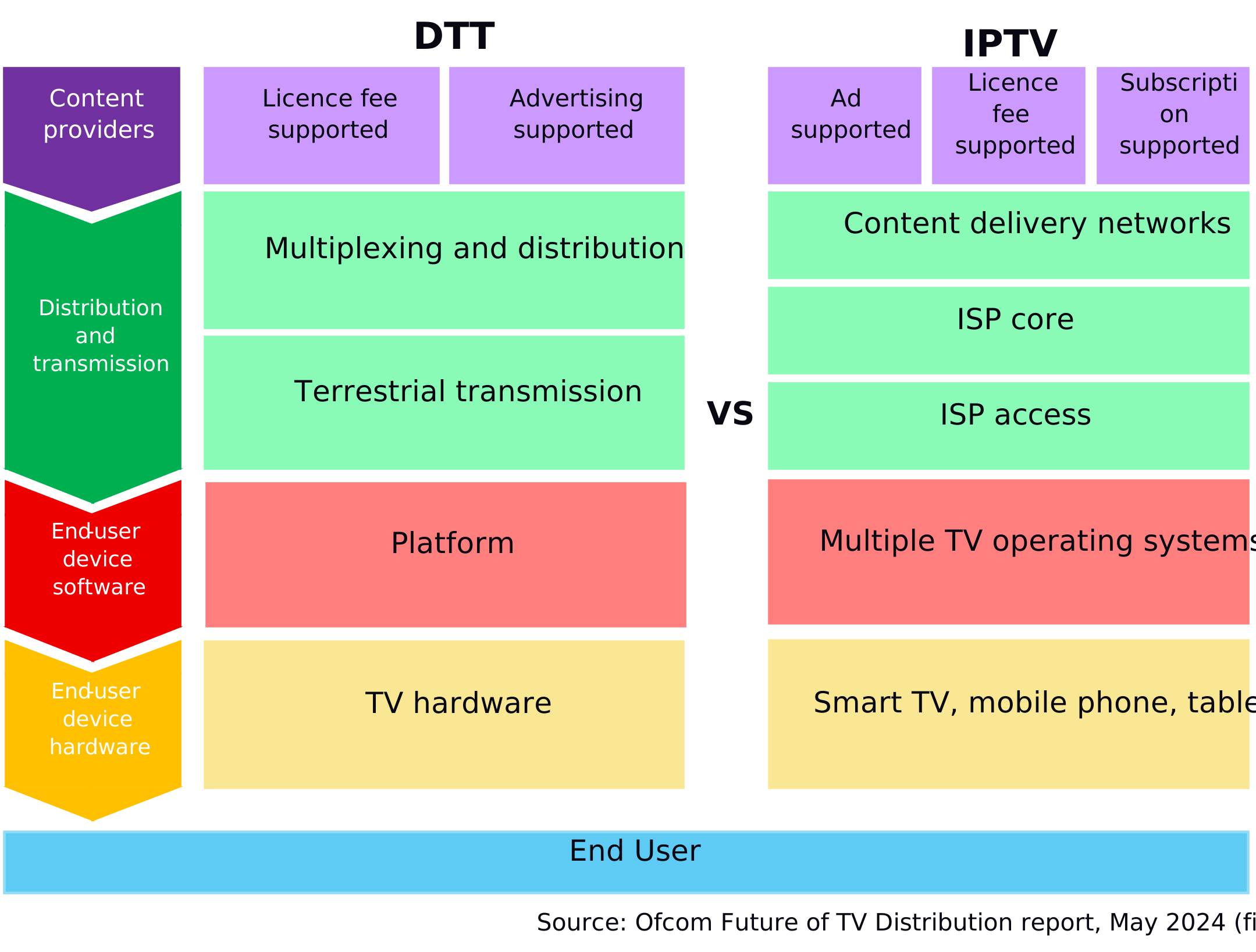
This paper will focus on the end-user devices (platforms/operating systems and TV/streaming devices), but also notes when regulatory intervention and industry co-ordination in the distribution and transmission part of the DTT value chain have affected usability.
It is also important to note some distinction in the market between two models of TV experience for viewers which has the potential to shape the nature of the usability and experience.
- Horizontal TV services/offerings – where the viewer’s experience is determined by a number of different parties across the value chain
- Vertically integrated TV services/offerings – where the viewer’s experience is determined in broad terms by a single operator who has some degree of control over the overall value chain, albeit is reliant on being able to strike a series of commercial carriage arrangements for the supply of content.
In practice the distinction between TV platforms is increasingly not as clear cut as to say that a vertical operator has “full control” of the viewer’s TV experience. For example, in Sky Stream households the Sky device is required to be attached to a third party TV via HDMI, as would be the case for other services — and is therefore closer to the vertical model described above.
1a. Broadcast TV
Prior to the emergence at scale of TVs that connected to the internet, and the wide adoption of broadband with sufficient capacity and speeds to support high quality streamed content, the UK horizontal television (and set top box) market was underpinned by a number of key characteristics. The broad landscape for the DTT platform in 2025 is set out in Figure 2 below.
Figure 2: DTT Landscape in 2025
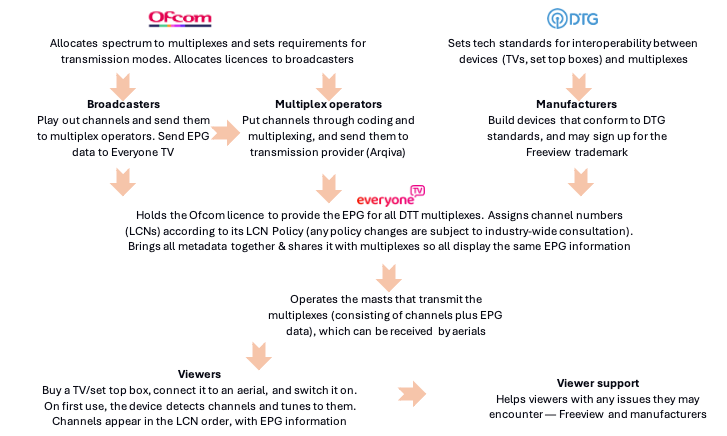
- TV manufacturers took responsibility for the build/development, retailing, operation and monetisation of the hardware of the TV set. Monetisation was through device sales
- Broadcasters took responsibility for the delivery, provision and monetisation of the broadcast channels made available on that TV set (via the TV guide). Monetisation on DTT was mainly through advertising, although historically there were pay-TV channels.
Despite this separation of responsibilities, in order to ensure consistency of the viewer experience – there were a number of areas of either regulatory intervention or industry co-ordination. For example,
- Ofcom licensing of DTT multiplex operators (which set specific requirements on the multiplex operators in terms of service provision)
- The D-Book[footnote 1] – created and overseen by the DTG – which sets out the technical requirements for all devices with a DTT tuner as well as over-seeing a testing and conformance regime to ensure devices worked efficiently.
- Industry labelling – the creation of the Freeview brand by DTVSL which was used by many (but not all) TV manufacturers to identify TVs that conformed to the D-Book
- Common meta-data – the UK DTT multiplex operators co-ordinated on the provision over-the-air to all consumer devices of aggregated metadata for accurate channel listings which was used in the EPGs on all devices
- LCN policy – Digital UK operated a Logical Channel Numbers policy which ensured that all channel listings were consistent on any TV, with the five main PSB channels given numbers one to five, and channels grouped by genre
- Ofcom regulatory requirements on accessibility features on broadcast channels (such as sub-titling and audio description).
This structure helped to ensure that whilst DTT TV and set top box manufacturers were able to compete on functionality, screen size, picture quality and price – as well as introduce new innovations –the core live TV experience enjoyed by a viewer in terms of channel availability, picture quality, channel ordering, accessibility features, channel listing information etc were consistent.
1b. Smart TV/Hybrid TV
The first smart TVs offered the same experience as set out above, but this was enhanced by the ability of a viewer to connect their TV to the internet as well as a broadcast feed to access a range of new IP-delivered services. Initially, these new IP services were primarily a range of VOD players offered by a growing number of UK and international players (e.g. iPlayer, YouTube). These VOD players were usually made available to the viewer in a designated rail/area of the app store alongside the traditional broadcast TV experience.
The availability and on-screen access (e.g. where they appeared) to VOD applications was determined by the Smart TV manufacturer or TV Operating Systems TV provider (TVOS) through commercial negotiations. The on-boarding of a VOD application might also require technical integration and conformance to ensure that the build of the player worked effectively on the hardware and software (e.g. browser) of that TV.
In the early phases of Smart TV the availability of VOD applications on Smart TVs could vary quite significantly, depending on the nature of commercial terms agreed. However, over time a fairly consistent line up of global SVOD services would become available, alongside the provision of BVOD applications (PSB and commercial) either negotiated bilaterally or via the Freeview Play service launched by the PSBs and Arqiva via Digital UK.
The MHEG Interaction channel was also used to offer a range of streamed services usually under a banner operator and via a Channel Number. Tuning to this channel number downloaded interactive code to allow a mini launcher to appear offering a selection of services. Latterly these have been improved by utilising HbbTV which is widely supported in modern TV sets, MHEG having been phased out.[footnote 2]
During this phase – some consumer electronic manufacturers began to adopt third-party TV operating systems which would help to provide a range of TV VOD apps in one service (e.g. Android TV). This development materially shaped the third-phase which we are now in today – the Connected TV market.
1c. Connected TV
Whilst an evolution on the previous phase, the Connected TV phase significantly differs in terms of the usability, content offering and services offered to viewers.
Alongside innovations in the quality of screen hardware, we have seen significant developments in the functionality and capability of Smart TVs in the user experience and service offering to viewers.
In broad terms, the value chain of a typical Connected TV experience involves multiple different actors and services co-existing on a modern device – increasingly like a modern smart phone or lap-top. A simplistic experience is set out below:
Figure 3: Connected TV experience
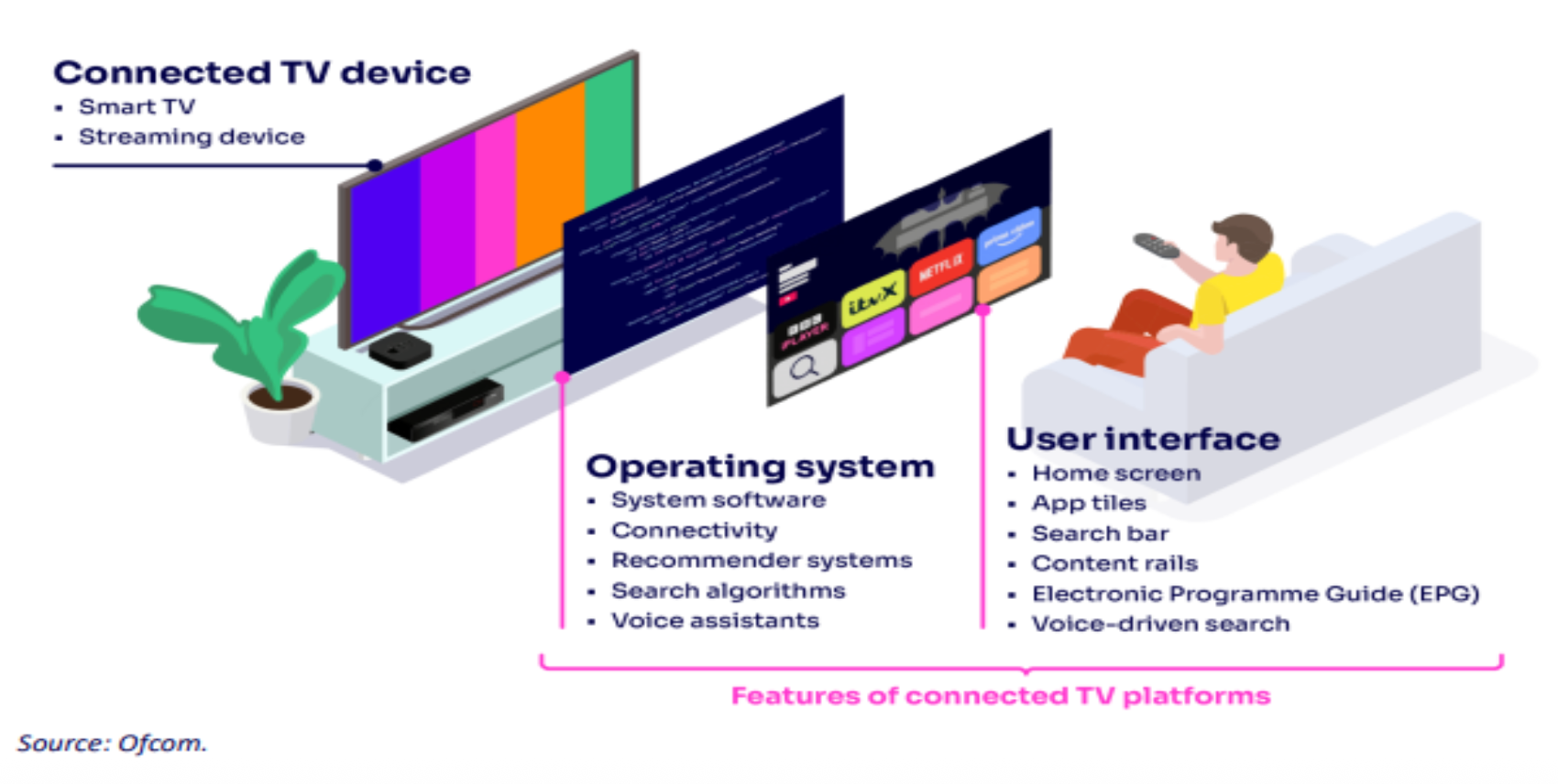
- The TV manufacturer will be responsible for underlying hardware and core-software components that allow the device to operate.
- A TV Operating System (TVOS) will sit upon the manufacturer’s device and control much of the user experience, content offering and functionality of that device.
- The user interface is the means by which the viewer navigates to different content services or content choices, and is supported by a TV remote control unit (RCU)
- Individual content services will be available to the viewer via the TVOS and with access via both the user interface (e.g. app tiles) and also the RCU (e.g. dedicated remote control buttons).
Fundamentally, the TV experience of the viewer and content, services and functionality (including the content offering and features such as voice control) will be determined by the TVOS provider, but will depend on the deals which they can strike with individual content providers, whilst also conforming to local regulatory prominence requirements. These TVOS are normally either developed and operated by the TV manufacturer (e.g. Tizen by Samsung) or a global third-party who licenses the TVOS to the TV manufacturer (e.g. Google TV, Roku etc).
In DTT, the choice of channels—outside the regulated PSB channels— is determined by the multiplex operator, which is licensed by Ofcom, while channels are allocated individual EPG numbers. The TV manufacturer has no responsibility for which channels are available and cannot monetise the content it displays. This is in stark contrast to connected TVs. Here, content providers (whether broadcasters, FAST channels, SVOD services, video-sharing platforms, Spotify and so on) need to negotiate access with each TVOS.
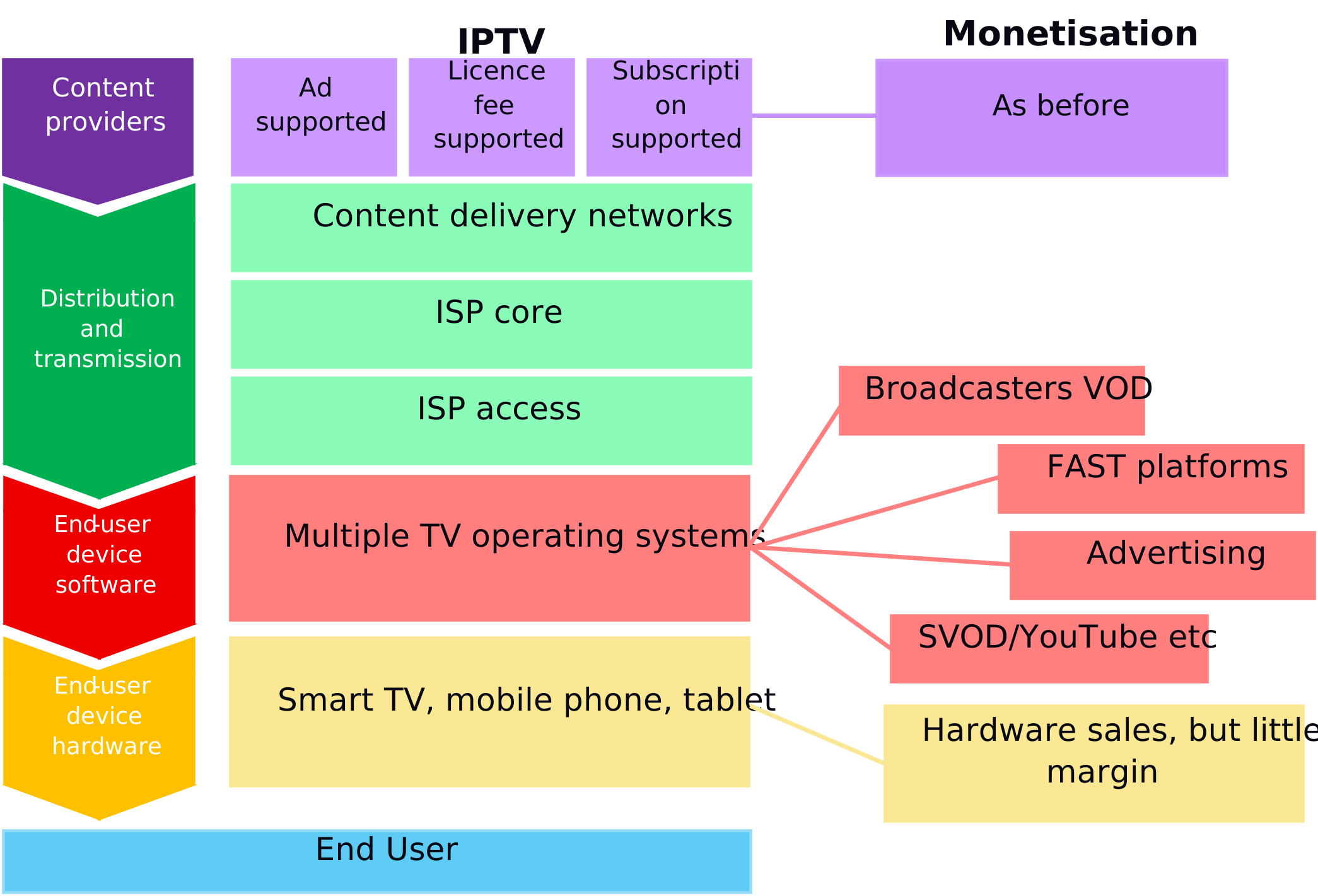
The emergence of the role of TVOS has built an economic model that depends on raising revenue from third party content services that are accessible via that operating system. For example, the TVOS often has areas or services that it monetises (such as a FAST channel offering, the promotional rail, or targeted advertising - see figure 4) and may have more general revenue or advertising sharing requirements of services available via that TVOS. These business models have been driven by the decreasing margins on old hardware-only business models.
In the horizontal market some of these are global platforms, and while decisions as to which content they carry may vary by country the user interface and many of the features (such as voice control) they offer are decided at a global level. In the vertical UK pay-TV market the platform (e.g. Sky, Virgin Media, BT/EE) determine the presentation of content and the user experience, dependent on the specific agreements that they can strike with individual content providers. Given all parties differing business models and objectives, there are a wider range of viewing experiences available in IPTV than UK audiences have previously experienced through DTT.
Thus, whilst the core broadcast TV experience on a connected TV in the UK remains the same, much of the wider experience on the device is shaped by the TVOS.
Figure 4: IPTV monetisation chain
The home screen of a connected TV will offer viewers a much richer visual experience with the ability to access a range of content services. On most connected TVs this will include access to broadcast live TV as well as a mixture of BVOD and SVOD apps, individual programme recommendations, and additional services such as FAST channels, or gaming services. Normally the screen will also offer a dynamic area which promotes content and services available on the device (see figure 5). Often areas of this home screen will also be monetised (i.e. visibility will be traded).
Figure 5: An example of a standard home screen for a connected TV.
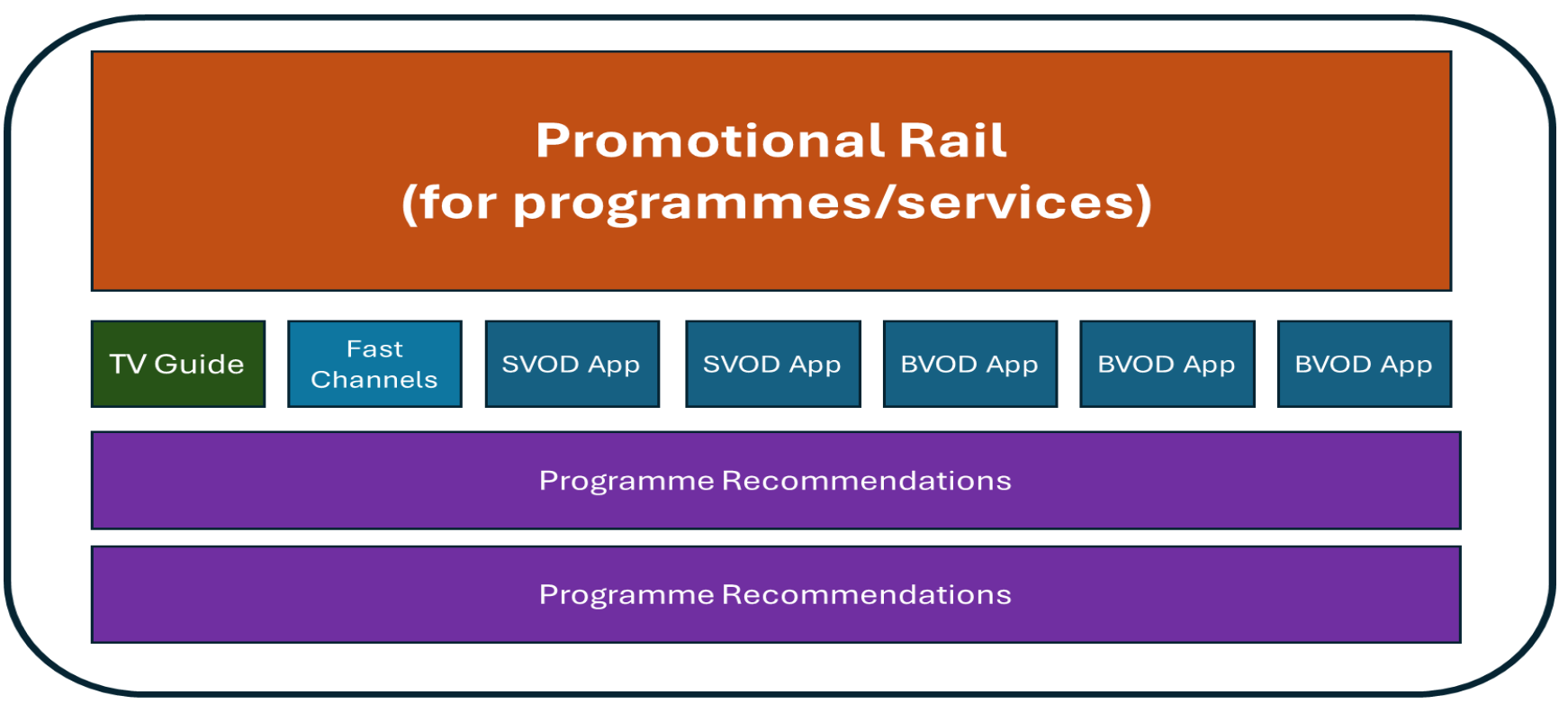
The availability of IP delivered content services on a TVOS is not only determined via commercial negotiation but it will also require the content provider to ensure that its application runs effectively on that device and conforms to its technical requirements. Alongside the provision of a working VOD application to the TVOS, the provider will often provide metadata on its programme offering to integrate into the TVOS programme recommendations and services such as voice search.
It is important to note that this evolution has led to many benefits to the viewer, with a much greater breadth of content and services available to watch at any time. Innovations such as watch-from-start or voice search/control allow for enhanced navigation and discovery for all viewers, but can be particularly helpful for those that are more vulnerable or older who can benefit from accessibility features tailored to them.[footnote 3] This can deliver significant benefits to viewers compared to the TV experience of a decade ago,
Broadcasters and platform owners can better personalise and promote certain content once they understand the users’ preferences for certain programme genres, promoting catch up series and box sets where relevant by using recommendation engines. Sign-in procedures and data-tracking enable much greater advertising targeting opportunities for content owners. The data can be better analysed to prove the effectiveness of a particular TV campaign, which in an increasingly data driven advertising market (where competitors to TV include Social Video, YouTube, Netflix etc) leads to more advertising money flowing into television than would otherwise be the case, helping to (partly) offset the decline in linear broadcast revenue. Ultimately, this enables broadcasters to invest more money into content than they would otherwise be able to , thus benefiting the viewer. Additionally the viewer of this advertising should benefit by receiving more relevant adverts.
In order to deliver these benefits it is necessary for the viewer to sign into the various content apps, voice assistants (e.g. Amazon Alexa, Samsung Bixby), and many of the TVOSs. Some sign-in processes may just require names and email addresses, but in order to deliver the different regional BBC and ITV (including STV) services, along with all their local news programming, it is necessary for the viewer to supply their postcode, although other regionalisation solutions may be possible. This ensures the relevant stream is delivered to them. We appreciate that this is a more complicated process than DTT, where once after the initial TV was setup, the relevant broadcast services were delivered to each household.[footnote 4]
For many users with relatively good digital capability, the ability to use and navigate a modern connected TV experience – whilst requiring knowledge is relatively intuitive.
But as highlighted by the Audiences Group, the development of this connected TV experience can – for some viewers – be more confusing or challenging to use, and of course is not accessible to those that do not have internet connectivity.
Section 2: The implications for TV usability
As this paper sets out, the modern connected TV experience is shaped by several global TV operating systems within which multiple different services operate providing content and services to viewers. Before addressing the specific issues on usability raised by the Audiences Group, we have set out below how responsibility for a connected TV experience works in practice today. For ease of explanation, we have set out four areas of the value chain – the TV hardware, the TV operating system, the user experience, and the content and services available on the device.
Figure 6: Connected TV value chain responsibilities
| Service level | Responsibility | Example |
|---|---|---|
| TV hardware/device | Specifies, develops, builds, retails and supports the device hardware | Panasonic, Sony, Samsung, LG |
| TV Operating System (TVOS) | Operates the underlying TV OS that powers much of the IP delivered functionality of the TV (and provides ongoing support) | Google TV, Tizen, WebOS, Roku, TiVo, Vidaa etc |
| User Experience | The means by which a viewer navigates to the content and services available and wider functionality such as voice search | The home screen experience and overall navigation (both-on screen and RCU) is determined by the TVOS and/or CE manufacturer dependent on the commercial arrangements that they have agreed with the individual content providers – other than within Apps (see below) |
| Individual Content/Service Offerings (Apps) | The individual service offerings available on the TV – the content and UX of which will be determined by the relevant individual provider | Netflix, Samsung TV Plus, iPlayer, Pluto, ITVX etc |
The underlying experience of using a connected TV will be determined by the interactions of these different layers – and the underlying commercial negotiations and technical integrations that take place between the parties.
Figure 7 details some of the key usability features of the DTT and IPTV platforms. It is clear that IPTV offers many more features. While this has produced much better range, personalisation and accessibility features for viewers, it has also led to a broader range of user interfaces across devices and platforms than with DTT.
Figure 7: Common usability features of DTT and IPTV in the UK today
| Feature | DTT | IPTV |
|---|---|---|
| Accessibility | ||
| Subtitles | Y | Y – more user choice |
| Audio Description | Y | Y |
| On-demand content | N (unless hybrid) | Y |
| Sign-interpreted | Y | Y - simultaneous |
| Accessible TV Guide | Some exist, but IP delivery simpler | Y |
| Voice control/guidance | Possible, but IP simpler | Y |
| Text-to-speech | Yes, (appropriate box) | Y |
| Discoverability | ||
| Backwards EPG/MiniGuide to link linear and on-demand content | ||
| Recording (inc. series link) | Yes, with PVR attached | Y |
| Pause live TV, rewind/fast-forward | Yes, with PVR attached | Y |
| Restart | N | Y |
| Voice search | N | Y** |
| Text search | N | Y** |
| Standard linear EPG | Y | N – horizontal market Y – Sky and VM boxes/TVs |
| Personalisation | ||
| Recommendations based on viewing | N | Y |
| Targeted advertising | Starting to be deployed | Y |
| Dialogue enhancement | N | Y |
- The ability to record content varies depending on IPTV device. For example, whilst Sky Glass/Stream does not record programming to a hard drive, it provides viewers the ability to record to the cloud or bookmark (depending on Sky’s commercial agreement with the content provider) content they want to watch to their ‘Playlist’ for viewing via an aggregated UI destination, aiming to mirror the recorded experience of Sky Q/PVR devices. The ability to do this on differing IPTV devices is dependent on commercial agreements between IPTV provider and content providers.
** We note that currently the majority of devices are unable to recognise either the Welsh language or Welsh pronunciation, nor predicted text search in minority UK languages. Most TV manufacturers need to buy in the Natural Language Processing technology, and this frequently does not yet exist for smaller European languages
Product and service innovation in IPTV has been completely market-led until the recent introduction of the Media Act. This has meant that platforms have designed their user interfaces to provide the best experience for their customers to drive commercial performance. This has led to benefits for audiences through significantly expanded ranges of content, innovation of content delivery, aggregation, better functionality such as watch-from-start, and the emergence of interactive and immersive features. However, concerns have also been raised about the impact amongst certain groups who may not be as comfortable with technology, particularly:
- Vulnerable and low digital skill UK audiences. This group can handle watching basic linear TV via DTT, but may struggle to engage with IPTV devices and the additional services. This will be discussed further in Section 3
- Other UK audiences. Regardless of skill-level, some of the public might find it difficult to access and navigate IP platforms and apps. Whilst as noted above, for many viewers navigating IPTV will be intuitive, some may struggle to get to what it is they want to watch as (i) not all mainstream services are on all devices, and (ii) some of the interfaces and apps can be more complicated than on DTT, meaning the full breadth of features and services is not immediately obvious to viewers
- UK’s cultural and creative sector. Market-led self –preferencing and the monetisation of prominence on TV UIs is driving the decline of the UK PSB viewer share as a result of the availability and increased visibility of a broader range of services and content as well as increased competition for viewers.
Each of these groups require different degrees of solutions, but the overlap between viewers most at risk of exclusion and their usage of legacy TV services/PSB content illustrates the need on certain platforms to replicate the simple linear TV experience currently on DTT at a bare minimum. This should be achieved through designing features in a way that makes broadcasters’ existing content easily discoverable.
As we have discussed in this paper, usability challenges can arise due to how connected TVs, TV operating systems, TV platforms and apps are designed. In short, the main issue is, on IPTV, the viewer journey to content includes products owned by different services, all of which have their own standards, commercial arrangements and preferences. These decisions lead to complexity and a lack of standardisation in the TV user interface as they reflect the device/platform’s own individual arrangements. Having said that, on Sky’s IP platforms for example, the TV guide is prominent and easy to use in the same way as a traditional DTT EPG, and integration enables easy navigation to other PSB content (e.g. via voice search).
Below we have set out in more detail some different ways in which the usability features of IPTV could be enhanced further, including where the PSB/ EPG offering can be amplified to give audiences an easy-to-use and familiar experience. Most of these possible changes are not within the control of the PSBs or broadcasters/streamers more broadly but rather sit with TV manufacturers and TVOS providers.
Use of modern remote control units (RCUs)
There is no consistent standard on remote controls with manufacturers designing them in a way that fits their own criteria. This may make it difficult for some viewers to adjust when changing device, especially moving from traditional broadcast (channels 1 – 5) to a smart TV, although a well-designed remote control with shortcuts could help audiences clearly get to where they need and help alleviate skills challenges. Potential solutions that could be explored include:
- Navigation should present easy viewer error handling and make it easy to get back to the start page/home page
- A clear route to redirect the viewer back to live TV
- Ensure the number buttons can be used from anywhere in the device UI.
Voice control
Voice control is a major development that is helping audiences navigate TV platforms and find what they are looking for. It is likely to develop and refine significantly over the coming years. However, the majority of devices are unable to recognise minority UK languages, as they have not integrated Welsh/Gaelic language support into the platform, nor are they recognised by the algorithms that power text and voice search. There are also challenges for people who do not have a southern English accent. This is because as yet the companies that make this Natural Language Processing (NLP) technology have not done so for some minority languages.
In addition, results from voice-control requests do not guarantee where playback happens – the viewer could be taken directly to the content, or to the home page of that app (where they have to search again), or potentially to that content recorded on the platform. Potential solutions that could be explored include:
- Encourage NLP technology companies to invest in the support of Welsh/Gaelic languages, so that all TVOS accommodate the Welsh and Gaelic languages in text and voice search to drive discovery and prominence
- Encourage NLP technology companies to invest in better training of voice-only features to improve recognition of accents
- Ensure clear attribution of content to linear broadcaster libraries when listing results (so audiences receive the cost-free option before being presented with one that requires a subscription).
On-screen lay-out and navigation
Platforms and content providers, including broadcasters, have developed different UIs and navigational models to deliver their view of the best possible user experience for their audiences and to differentiate themselves in the market. This means that there is no standardised presentation on smart TVs or across content services/players – different manufacturers chose to present their platforms to customers in different ways, exactly as the content providers present their apps to audiences in different ways. This a different experience and requires adjustment from the simpler, familiar EPG.
The broader range of content available can make it more difficult to find broadcasters’ channels or on-demand services and in some cases requires more clicks to get to content than on DTT. This issue is partly resolved with mouse-based remotes or voice control, but is still an issue for many households. Potential solutions that could be explored include:
- Conduct research/build an evidence base and then provide guidance on how many button presses to the linear broadcaster content offer and playback is generally appropriate
- Live EPG should be prominent and easy-to-find e.g. this could be by making ‘live’ the default setting when you turn on the television
- Limitations to nested menus and journeys
- Limit use of floating panels and pop-ups and noises
- Pre-installed and appropriately prominent PSB apps.
User experience
Terms and phrases may not be immediately clear to the viewer, making it difficult for them to navigate. Platforms should give consideration in the design choices that they make to how viewers can most easily engage with the most relevant and common terms within the experience, for example, TV guide / Programme guide, TV listings.
Meeting TV accessibility guidelines
ETV is in the process alongside other PSBs of documenting an agreed set of accessibility standards in a similar format to WCAG for web. This cover key elements on font size, contrast, animation etc. Ofcom does this for regulated EPGs, and there is an argument that Ofcom’s responsibilities in this area should be expanded to all EPGs.
The solutions above should be explored and we would recommend that broadcasters, TV manufacturers and TVOS work together to develop some usability guidelines.
Section 3: Potential usability issues for people with low digital skills
The Audiences Group highlighted a number of areas where people with low digital skills may find using a modern connected TV challenging. This paper suggested that solutions to these challenges could include:
- Remote controls should be redesigned with accessibility in mind, including clearer labels, larger fonts and/or specific buttons for accessibility features (such as subtitles)
- Voice control should be integrated as standard
- On-screen layouts should minimise clutter to reduce confusion and mimic the simplicity of DTT systems
- IPTV systems need to be more intuitive and tested by those with low digital skills in real-world settings with reduced support
- Usability issues would be minimised if all TV sets providing PSB services—regardless of the platform selected—offer a service identical to the current experience of being able to watch live, linear TV without the need for sign-in or troubleshooting, with the ability to move through linear TV channels by selecting one channel on a remote or using buttons on the set
- Sign-in, data-tracking, or any issues requiring digital skills, such as running updates or creating passwords, are likely to create usability issues for certain audiences, and therefore require careful consideration.
3a. The issue of sign-ins
Most of those issues identified by the Audiences Group have been covered in section 2. However, the issues of having to initially sign-in to a TV on set-up, and then the requirement for sign-ins to content provider apps, or on updates, has been identified as a concern for those who are vulnerable or have low digital skills. This section will cover this in more detail.
Once a consumer has purchased a TV in retail, as part of the set-up process they will normally be required to provide basic information such as their post-code (for regionalisation of live channels). But they may also be asked to provide some further information including potentially an email log-in to enable the TVOS to provide them with a tailored service (e.g. voice search). These specific requirements on set-up and use will be determined by the TVOS and/or the TV manufacturer.
Once the TV is set up and the user accesses a VOD application for the first time via a RCU button, almost all users will require the user to log-in with an email address, postcode and password (or set up an account if not already established). This information is used both to help personalise the service for the viewer and provide enhanced monetisation services (such as targeted advertising). Log-in can often be completed on a second screen using a mobile phone. This log-in requirement is determined by the individual app provider.
Not only do viewers have to sign in to multiple services, the method of so doing is likely to vary by app. Examples include:
- Username and password
- Passkeys
- PINs
- Biometric authentication
- OAuth 2.0
- Keyed passwords
- Device pairing (e.g. QR codes on TVs or phone, multi-factor authentication etc)
The initial sign-in can be complicated for vulnerable audiences, with this problem further exacerbated by there being multiple sign-ins to access each individual platform and sometimes the device/ operating system itself. This is difficult for vulnerable viewers who struggle to remember usernames/ passwords, do not have email addresses, or cannot easily navigate the ‘shortcut’ options (e.g. QR codes). This process can be especially difficult when using a TV remote control.
We note these challenges are common across many sectors offering digital access and there is an evolving policy agenda around digital ID and sign on. The DSIT Data (Use and Access) Act which has just received Royal Assent aims to ‘unlock the secure and effective use of data for the public interest’.[footnote 5] The Act creates a ‘trust framework’ for digital identity providers to become certified against robust government rules on privacy, security and inclusion’.[footnote 6]
These sectors are dealing with the same challenges as television when it comes to sign-in. Both are addressing the same group of individuals who may struggle with remembering passwords or navigating devices and user interfaces. Treating these processes in isolation ignores the cross-over between the two and the potential to explore a universal solution that (a) designs a simple, user-friendly process; (b) builds skills and confidence as users learn one process that they can then replicate across platforms; and c) still allows for broadcasters and other sectors to collect substantial data suitable for their own needs.
As the broad challenge is the same, the thinking around the solution needs to be cross-sector and factor in different services and needs. The DCMS should seek to coordinate with these parallel processes wherever possible, rather than pursue TV specific approaches.
3b. The requirement for sign-ins
We have noted in previous sections of this paper the benefits for the viewer and for the content provider/TVOS in signing in to apps and platforms. In addition, for pay-services such as Netflix or Amazon Prime Video this protects their content as it is accessed only by authorised users to prevent piracy and unauthorised distribution and they can implement measures to restrict the sharing of account credentials among multiple users. [footnote 7]
In addition, while it is recognised that it can be cumbersome when people have to sign back in to a service if they have not used it for a period of time, this re-authentication is an important way to help protect against security breaches of that person’s account. When apps are updated with additional functionality or security features, this does not usually necessitate the user to log in once again. The balance between having to re-sign in for safety and security reasons versus the ease of use of the service, is an act being played out across the UK, whether on NHS or HMRC apps (as two examples). This problem is not unique to connected TV.
TVOS platforms’ own password stores, or having the same authentication procedure for each TVOS/app may simplify the process for many households and improve connected TV usability for them. We note that vertical pay-TV platforms (such as Sky and VMO2) have the advantage of being able to apply their solution end-to-end, although additional sign-ins may be required for some apps aggregated on the platform.
Industry needs to discuss and agree the best common approach for sign-ins which gives the least friction for viewers, while offering tight security and the tracking required by operators to ensure content is going to those who are entitled.
There may be potential for a working party between content providers to agree to use a common approach at the basic level without compromising the security layers they need for more complex services. Research should be undertaken to understand what the preferred route is to authenticate sign-on, and how can this be deployed at scale. The outcome of any research into this could then be mandated as a standard across all services requiring a sign-on. Technology change may occur making other options available over time – it would be more sensible to approach these issues as an industry collective rather than introduce piecemeal improvements over time at the risk of causing further confusion.
3c. Solutions to lack of digital skills is not a barrier to PSB universality
The vast majority of households are able to sign in to the PSB BVOD apps to access TV content. However, in say ten years’ time there will still be households that lack the digital skills to do so. The core challenge is to ensure that these households can continue to watch PSB content. There are two approaches to consider and the possible solutions for them:
- Having no sign-in to access PSB services
- To make any sign-in as easy as possible
Having no sign-in to access PSB services
In theory live streams of PSB channels could be made available to everyone. However, those viewers would not benefit from having access to the on-demand services, and importantly they would not benefit from IP-delivered accessibility features nor personalised services (for example promo trails). It would also be an approach that leans into barriers to digital inclusion (of which the capacity to sign to a service is key) rather than aiming to provide and support individuals to develop this skill, and thus represents a fundamental choice for policymakers.
But even more problematically, this two-tier system which has no sign in requirement for PSB streamed channels would mean that commercial PSBs would not be able to benefit from any addressable advertising, which would make them much less competitive against all other commercial content providers as well as the broader online advertising market dominated by Google, Meta and Amazon (a market where new, scaled, data driven entrants are common). This would be an existential problem for commercial PSB – it would continue to lose broadcast advertising revenue as viewing patterns continue to change but be unable to compete effectively in the streaming world too. Theoretically perhaps, households that did not need a sign-on to access linear PSB channels could be limited to those available to participate in a help scheme. However, there is no obvious mechanism that would ensure that just this relatively small group with no digital skills had access without sign-in, and thus the very serious risk is that overall advertising revenues would be severely impacted over time.
To make any sign-in as easy as possible
Creating a single sign-on (SSO) solution across the PSB VOD services is significantly more complex than it might first appear. Each broadcaster already operates its own individual identity system, with its own data, processes, and security models. Any SSO approach is likely to need to involve building a new unified ID from scratch or attempting to federate the existing ones – which would require not only major product, legal and technical co-ordination but also likely significant investment.
From a user perspective, the actual benefit is more limited than it might sound. For the millions of people who already have accounts with one or more PSBs, with SSO, viewers would still need to manually link existing accounts the first time, so a full system doesn’t eliminate setup pain for these users.
There are likely to be more immediate, cost-effective wins in improving the onboarding experience rather than trying to solve everything with a single ID. Indeed, given the speed of change within the wider market, it is likely premature to devise a precise solution today.
Even if it was possible to create a single sign-on across all apps and the TVOS, this would not solve the problem of some viewers being unable to navigate this process at all.
Potential solutions to sign-on to ensure continued universality of PSB access
The solution for these households is not in removing the requirement to sign-on, but in simplifying the process. If single sign-on is seriously considered as a solution, policy makers should explore whether this can be done in conjunction with other sectors and government services. A single sign-on for television in isolation is a missed opportunity to target support for all individuals who struggle with sign-on and ignores the commercial needs of PSBs in a competitive market. We understand that DSIT’s new Digital Inclusion Action Committee will aim to explore these questions across the economy.
How audiences could be supported for transition to all-IP TV
There are broadly three ways audiences can be supported in the event there is a managed transition to all-IP TV distribution.
-
Simple design: User-centred design with a view to aiding those audiences with low-digital skills or those who face other barriers when accessing IPTV
- The BBC is actively exploring designs for a radically simplified user interface, specifically designed to help those currently underserved by digital services. This could take the form of a low-cost streaming stick that the BBC could help promote and distribute. The BBC would be very happy to present this work to the programme.
-
Regulation: To ensure that navigation to content, including live/linear channels, meets audience expectations and that this experience is broadly consistent across connected TV
- To best support audience and digital inclusion outcomes, Government or Ofcom could issue guidance to platforms and content providers to support usability, accessibility and safety of design of all connected TVs, apps and services
-
Signposting and assistance: To ensure that all audiences have the information that they need to transition, with the most vulnerable offered suitable proactive support via a help scheme
- A clear and timely information campaign on linear TV would effectively target those audiences who rely on broadcast. A comprehensive campaign would prompt some broadcast audiences to take action to prepare for transition without needing further support, as happened in Digital Switchover
- The most vulnerable audiences requiring support would need a help scheme. It could include one-to-one support to sign in to services, and as part of a wider digital inclusion support offer, it could help to set up e.g. an email address, if required. This would create a significant digital inclusion dividend for citizens and the economy.
- A clear and timely information campaign on linear TV would effectively target those audiences who rely on broadcast. A comprehensive campaign would prompt some broadcast audiences to take action to prepare for transition without needing further support, as happened in Digital Switchover
Bringing together support across these three areas will help ensure that all audiences have the confidence and skills to use IPTV in a way that’s comfortable and suitable for them. To further validate and prioritise the ideas for supporting vulnerable audiences, a cost-benefit analysis should be conducted.
There is a commonly held belief that broadcast, while restrictive, is familiar. And that, conversely, IPTV is limitless yet complex. This doesn’t need to be the case, and market forces can create this complexity in whichever way a household chooses to receive its TV. Some users already find connected TVs too complicated, with research showing that some users can opt for using tablets instead as they are more “accessible” [Johnson et al, 2024]. This is why the BBC is exploring a ‘radically simple’ approach to make experiences usable by all, which harnesses the choice and flexibility allowed by IPTV with the simplicity and familiarity of broadcast.
Research also shows that support is crucial when migrating to a new technology, whether this be through formal channels or via friends and family. In 2007, 15% of households relied on analogue TV – higher than the number of unconnected TV households today – and to ensure that everyone could continue watching television after Digital Switchover a comprehensive public information campaign was launched alongside a help scheme for the elderly and those in receipt of certain benefits.
The Digital Switchover help scheme was very successful, demonstrating that well-planned and executed support for vulnerable audiences can ensure that nobody is left behind. It targeted those most likely to struggle with the transition to ensure they received the help they needed. This included extensive outreach efforts through direct mail, advertising, local publicity, and collaboration with thousands of charities and community organisations to spread the word about the available help. The help scheme offered installation and aftercare support for 12 months. As a result of this effective targeted outreach, actual take-up of the scheme was less than anticipated. Using the learnings from the successful Digital Switchover help scheme, it is possible to design a similar scheme for users who require help with IPTV switchover.
Interventions and messaging that could be explored are:
- Awareness that how audiences will get TV is changing
- Central destination for information (e.g. website or call centre)
- Messaging on who will need to update their TV set up and how
- Explaining the benefits of IPTV
- Brand awareness for IPTV services
- Connected devices (e.g. sticks) for households that don’t have IPTV
- In-home installation and support
Furthermore, some charities have already identified an IPTV switchover as an opportunity for achieving the government’s wider digital inclusion aims [Good Things Foundation 2025, Digital Poverty Alliance 2023]. For these benefits to be realised, this would require coordination from government to engage multiple services, including banking and healthcare, to deliver a comprehensive intervention where all households have the access and skills required to meaningfully engage in the digital world.
Support PSBs already offer
Historically, the PSBs have always offered various routes to support viewers, so this is not a new challenge. It is often the case that, when a viewer experiences an issue, they contact broadcasters as they assume the fault lies with them.
Though out of scope for the purposes of this paper, it is important to note how the complexity of the IPTV value chain has an adverse effect on viewer satisfaction and usability when experiencing a fault. This is because it is not immediately obvious to the viewer who is responsible when there is an issue on their television. Without proper signposting and education of the players’ responsibilities, viewers will face a lengthy process of identifying who they need to contact.
However, PSBs already offer a range of support for viewers in the current hybrid TV environment, varying in degree and detail. A full list of support routes is captured in Annex 1, but in brief they are extremely comprehensive and offer direct contact routes (telephone, webforms, live chat, writing in, e-mails) as well as detailed online self-help tools and resources which guide viewers through the journey and mirror the conversation you would have with a customer support staff. There are also clauses within the BBC Charter which, taken together, lay out obligations for the BBC to handle complaints and support viewers.[footnote 8]
Through these routes, broadcasters are already supporting viewers with the sign-on process. One broadcaster reported that they deal with roughly 2,000 sign-on requests in a month and will support viewers with all the steps required, either encouraging them to use a secondary device pairing or guiding them with the remote control. Similarly, if a viewer does not have a secondary device, the BBC has alternative ways to use iPlayer. Here, viewers can call Capita and receive a four-digit code to sign-in which creates a temporary guest account.
Interventions like these are already available and proving to be effective, demonstrating how sign-on difficulties can be handled as and when issues arise. However, better data-sharing across different players, having better design and requiring consistent standards and cooperation from service providers across and beyond the sector will reduce the number of people experiencing sign-on challenges from the off.
The BBC is at an early stage of exploring whether and how a radically simple approach to design of IP services can better support low digital skills audiences.
Additionally, in anticipation of a more complicated value chain where fault could rest with any player, audiences need to be better-informed on where responsibility lies, so they know who to get in touch with in the first instance.
Annex 1. Current examples of viewer support offered by the market
The BBC offers:
-
Multi-channel contact centre. The contact centre is outsourced to a third party provider, Capita, who offers a comprehensive help service. Viewers can get in touch through:
- Helpline. A dedicated phone line is available to report an issue and seek instant advice. Most enquiries are handled with either a resolution or audiences are sent away with information to guide them, or if unresolved it is escalated to a team to investigate. A reasonable adjustments service is also available
- Phone Interactive Voice Response system (IVR). Automated telephony system that interacts with callers, routes calls to the appropriate recipient or messages. It is currently used by Reception advice to pre-record messages concerning known issues such as major transmitter outage, service closures, effects of weather
- Letters. People can write in with the issues they’re experiencing. BBC address details are listed online, physical copies of the TV licence and in the Radio Times
-
BBC Reception Advice. This is a BBC online webpage which has several self-service tools to help identify the issue. This has FAQs, help guides, transmitter checker tool, problem assistant tool and a ‘Known issues’ feature
- Live chat. This is manned by a team of contact centre staff to diagnose issues and can direct audiences to further online resources
- Webforms. A basic webform is available to report problems or make comments. There is also a webform at the end of the problem assistant journey
- Guest accounts. For BBC iPlayer, those who are unable to use the “pin and pair” process due to a lack of a second screen can sign in as a guest by using a code that will be available via an automated telephone IVR service. Welsh language version also available
- Red button text service. A dedicated page signposts to Reception Advice information and contact details
- Online FAQs. These prompt you with questions to narrow down what the issue is and then share instructions. It replicates the experience you would receive if you rang the helpline. There are also signposts to the Freeview call centre
- Radio stations/ MP contact/ Director Generals Office. Viewers can get in touch with a radio station or MP, who communicate their issue via a direct contact route (e.g. specific mailbox).
ITV offers:
-
Multi-channel contact centre. The ITVX Viewer Support team is available 9am-10pm, 7 days a week. Viewers can get in touch through:
-
Phone. ITV agents will support a viewer throughout the sign-in journey to resolution, encouraging use of the simpler ‘pairing’ option (using a secondary device), and guiding viewers through the steps. Support is also provided with related issues, including re-setting or forgotten passwords.
-
Chat. Similar to the phone experience, agents will support a viewer through the steps to sign-in. If a chat ends before it is clear it has been resolved the agents will make an outbound phone call to the individual to check they have successfully signed in.
-
Webform/Email. Pairing steps are provided in response to requests for sign-in support.
-
-
Online Help FAQs. ITV offers clear and simple support with a range of issues, including signing into ITVX on our Help pages. These show you how to sign-in with a QR code from your mobile or tablet, a 6-digit code from a laptop or mobile device, or with the remote control.
ETV offers:
- Contact centre team triages each enquiry to identify the root cause and guides viewers through relevant troubleshooting steps. This may include checking local coverage, confirming any planned engineering work, advising on automatic or manual retuning, and checking aerials, dishes or set-top box configuration. Where connectivity is a factor, they offer guidance on internet requirements, device setup and router placement
- Self-help tools and resources. Listed across the website, these cover self-diagnostic triage tools that mirror the guidance used by the contact centre teams, as well as coverage checkers, planned engineering schedules, service updates and detailed FAQs
- Process for video-on-demand logins. Although enquiries about video-on-demand (VOD) logins are relatively rare, if someone contacts with difficulty logging in to a VOD player, ETV will first check for any connectivity or configuration problems on their device or network and walk them through relevant steps. This includes confirming their internet connection is stable, checking if the device is compatible, and advising on best practice for routers and home networks. If the issue appears to be platform-specific or account-related, we refer them to the relevant broadcaster’s support team
- Working with industry to help address more complex viewing issues. This includes working with broadcasters, Arqiva, device manufacturers, installation and service providers, plus other independent industry experts. By sharing insight and collaborating across the sector, ETV is able to identify wider patterns, resolve persistent issues, or ensure that problems are escalated to the right organisation for further action.
Other broadcasters, content providers and manufacturers
- Sky has thorough online guidance setting out both video and written step by step guides on how to setup, or fix common issues with, Sky Glass and Stream devices. Sky also has a dedicated accessibility team that customers can live chat, phone, live sign, email or text to get guidance on how to use Sky devices and platforms for those with accessibility issues
- Freeview has an information page accessed via channel 100 on the EPG. This signposts to online Freeview help pages
- STV uses an e-mail system for all queries
- S4C has a Viewers’ Hotline which is available from 09:00 – 22:00 daily and deals with general queries and feedback. This is offered in both Welsh and English. Team members frequently help viewers to access S4C’s Clic player by talking them through the log-in process on various platforms
- Many TV manufacturers also offer support on set up of the TV via manuals and online.
Annex 2: Examples of IP functionality
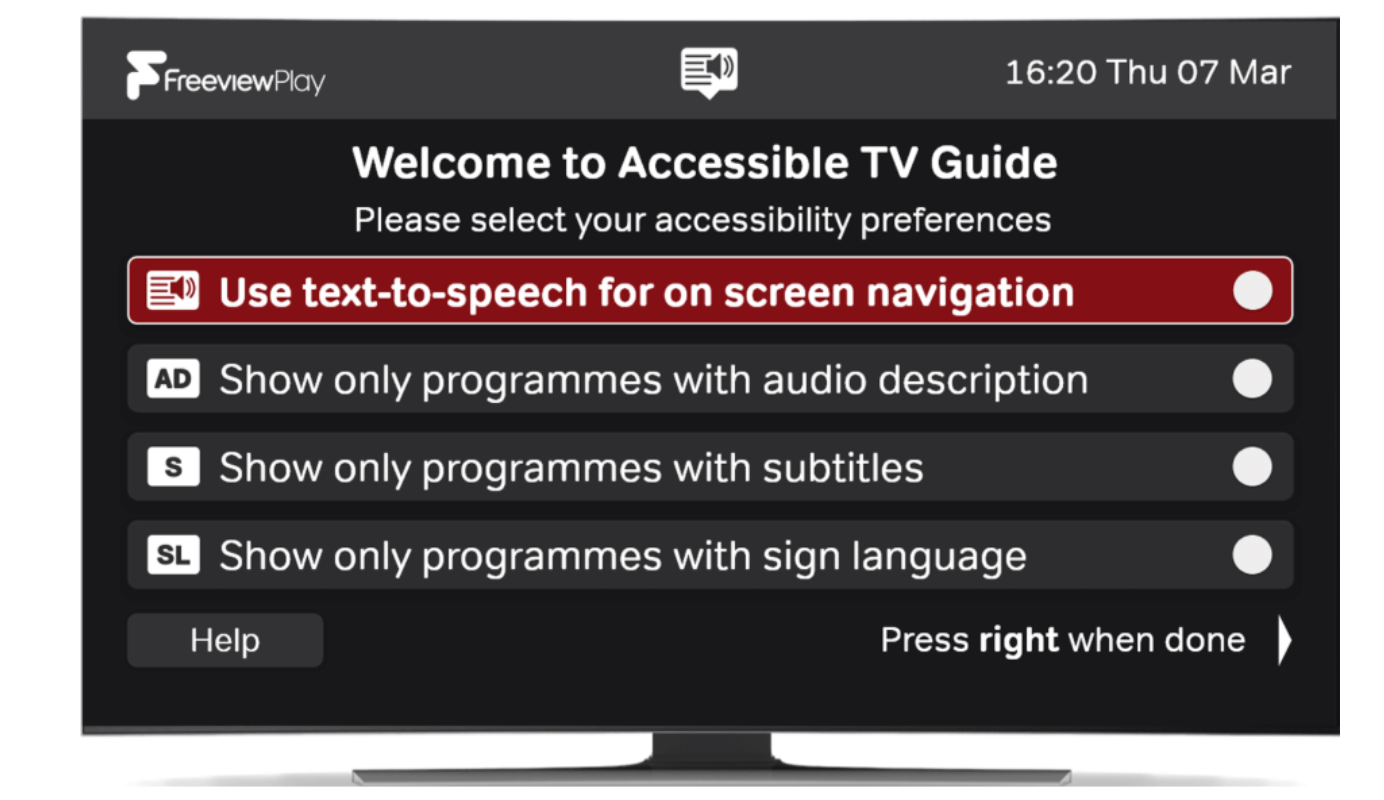
Freely and Freeview Play Accessible TV GUIDE (ATVG)
The ATVG launched in 2020 as an application built using HbbTV technology. It appears to viewers with connected Freely and Freeview Play devices as an additional channel accessed by keying 555 on a remote control. This channel number was chosen due to the raised node that often appears on the number 5 button of a remote control.
The ATVG was designed in collaboration with accessibility groups specifically for those with accessibility needs. It complies with all four priority accessibility requirements set out in Ofcom’s EPG code:
- Magnification,
- Filtering (for easy discovery of programming with appropriate access services),
- High contrast user interface, and
- Talking EPG: text-to-speech (TTS).
Everyone TV worked in close collaboration with accessibility user groups such as RNIB, DAC and AbilityNet throughout the development process to ensure the ATVG is effective in each of the areas.
Sky Glass and Sky Stream
Sky Glass and Sky Stream were developed and launched with the aim of making it simpler and easier for people to get to what they want to watch. In February 2025, Sky launched the second generation of Sky Glass, Sky Glass Gen 2, and in June 2025 launched Sky Glass Air starting at £6 a month.
Sky Glass is a TV set with embedded Sky Operating System (Sky OS). Sky Stream is a streaming puck which connects to any existing TV via a HDMI cable and is also run by Sky OS. Sky OS brings together the most popular TV channels and apps in one place, so you can get to a show or channel in seconds.
We see the benefits of IPTV in providing a better experience for viewers by offering a service with significantly better accessibility, discoverability and personalisation than traditional TV services. Sky Glass and Sky Stream create a seamless viewing experience, offering easy access to Sky content as well as the full range of content from our partners, including the PSBs and global streaming services all in one place.
All this content is aggregated, curated and presented in a simple user interface, creating a better experience which allows viewers to access their favourite show – regardless of provider – more easily than ever.
Core features that enable usability and accessibility for Sky Glass and Stream include the following:
-
There are a number of different ways to watch content on Sky Glass/Sky Stream including live TV; catch-up ingested into Sky OS services; and through the following apps: BBC iPlayer; ITVX; Channel 4; 5; STV; Netflix; Prime Video; Disney+; Paramount+; Apple TV+; discovery+; Hayu; Crunchyroll; U; Xumo Play. Content from these services is aggregated for viewers according to their previous viewing and wider viewing habits, to make it as easy as possible for them to go to their favourite content
-
Sky OS provides the ability to pause, rewind, and watch live TV from the start on linear channels. It also provides the ability to pick up where you left off with ‘continue watching’ functionality
-
Sky OS allows the viewer to easily browse a linear live TV guide, which is modelled from the Sky +/Q linear EPG. To replicate the linear EPG that viewers are used to, PSB channels (BBC, ITV, Channel 4, Channel 5) are in the first five slots of the linear EPG
-
It also allows the viewer to save their favourite shows to a Playlist, bringing together any programmes added from the TV guide, on demand and apps in one place, mirroring the experience for recorded content would be found in a Sky+/Sky Q box. Once a show is added to the Playlist, every episode, past, present, and future will appear. Given this function does not rely on a hard drive in the Sky Glass/Sky Stream, there is no need for viewers to delete anything from their Playlist to make room for new additions
-
Content is fully delivered over broadband, which means there is no need for installation of satellite dishes or aerials. The minimum speed recommended by Sky for Glass/Stream to run is 25mbps for HD, and 30mbps for 4k – well below the average download speed in the UK of 223mbps.[footnote 9]
-
Sky OS has a number of specific accessibility features to ensure all viewers can benefit from the innovation IPTV brings, including:
-
Hands free voice control and voice control via the remote - Sky Stream and Glass are voice control enabled, meaning viewers can give instructions for functions such as navigation to the TV guide, opening a certain app, fast forwarding or pausing content, or to switch HDMI input on Glass. On Stream, this can be done by pressing and holding the Voice button on the remote; on Glass, this can be done in the same way, or by simply saying “Hello Sky” near your TV
-
Audio description – Sky OS makes it easy to check whether a programme has audio description, with programmes marked with an “AD” tag prior to selection. Viewers can also use voice control, to request Sky brings up “audio described programmes” or similar cues
-
Find my remote – Our Sky Glass remotes have a “Find my remote” feature. Near your Sky Glass, say “Hello Sky, find my remote” – at which point your remote will then start to beep for 30 seconds, enabling you to find it
-
Subtitles – On Sky OS, you can turn subtitles on for all channels in any available language on Sky in two steps. It can also be activated in the Accessibility menu, or by voice instruction
-
Voice guidance – Voice Guidance is a screen reader on Sky OS (and Sky Q), providing spoken navigational guidance for people with a sight impairment. It reads out items on the screen as you navigate with the remote control. To activate, viewers can access Sky OS to turn on voice guidance via their voice remote, or go to the accessibility menu
-
Sky data shows customers are enjoying these new, innovative products. 9 out of 10 new Sky TV customers are joining with its streaming products, and Sky Glass Medium (55”) was the best-selling TV in the UK in 2023.
Annex 3: DTG Usability Guidelines
The DTG Accessibility Group maintains a Usability Guideline document named the U-Book the last published version was V4 in July 2021 which added in content on Connected TV and Speech to text features.
The DTG is currently working to produce V5 of this document.
The major headings are:-
- Part A – Usability Guidelines
- A1 Remote Control Implementation Guidelines
- A2 Packaging, Documentation, and Connectivity
- A3 Installation and Tuning
- A4 The User Interface (UI)
- A5 Design of EPGs and on-screen text for legibility
- A6 Media players and interactive applications
- B1 User Interfaces and Remote Control
- B2 Audio Description (AD) Services
- B3 Subtitles & Signing
- B4 Text to Speech
- Part C Appendix - Abbreviations, standards, references, and recommended reading
-
The DTG D-Book has defined and sustained the technical foundation for digital television in the UK. It is the only nationally implemented specification of its kind to be universally adopted across all digital television receivers in a major market, underpinning the success of Freeview, Freesat, YouView, and now hybrid IP-based platforms such as Freely. The D-Book is developed collaboratively by the UK’s Digital TV Group (DTG), bringing together public service broadcasters, commercial channels, consumer electronics manufacturers, IP service providers, multiplex operators, and regulators. It provides not only implementation guidelines but an evolving technical reference that ensures full-chain interoperability – from broadcast playout to the television in the home ↩
-
Older MHEG-based channels still exist for compatibility with older devices. Channel providers decide whether to offer their service via MHEG, HbbTV, or both. Most now offer both, but as the number of HbbTV-only devices increases, more providers are expected to transition fully to HbbTV. ↩
-
We note downsides include losing the ability to be able to record all programming (with the appropriate box) or watch TV anonymously. ↩
-
Even on DTT, in overlap areas where the household could receive services from multiple transmitters the strongest signal would usually be delivered, although the houses could manually re-tune to another target region if desired. ↩
-
Data (Use and Access) Bill factsheet: making lives easier - GOV.UK ↩
-
Ensuring Access for All: The Future of Sign-in for TV Services, DTG report March 2025 ↩
-
- Clause 56 to ‘establish and maintain procedures for the handling of complaints. The Framework Agreement goes on to state that that the procedures must be ‘resolved by the BBC’ in the first instance.