Take a photo of your face for a visa application or permission
How to take and format a digital photo of your face for a visa application or permission.
The quality of your digital photo
Your photo must be:
- clear and in focus
- in colour
- taken in a well-lit room
Your photo must not be altered by computer software or through other means (for example, by adding a filter).
The formatting of your digital photo
Your photo must be:
- at least 600 pixels wide and 750 pixels tall
- at least 50KB and no more than 6MB
- a jpg or jpeg file
- vertically orientated
Your photo must not be mirrored or flipped.
What your digital photo must show
The digital photo must:
- contain no other objects or people
- be taken against a plain light-coloured background
- be in clear contrast to the background
- not have ‘red eye’
- show your head, shoulders and upper body
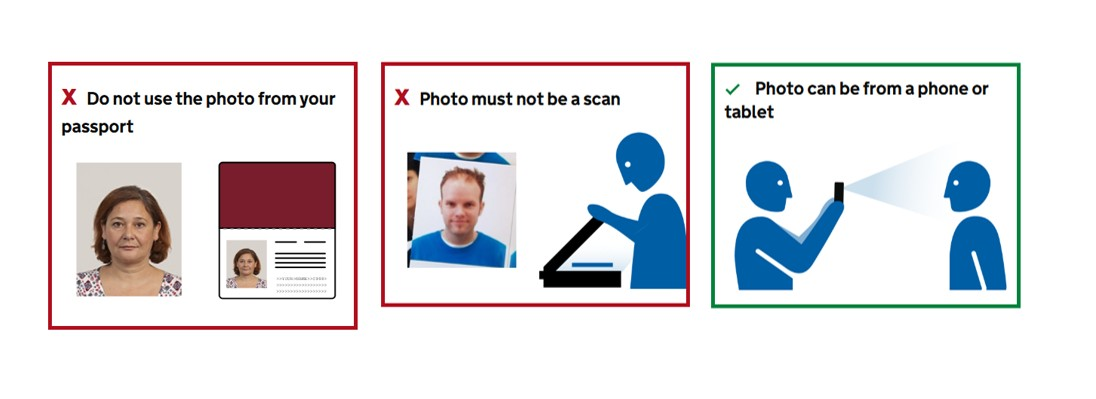
The photo can be from a phone or tablet.
Your photo must not:
- be a scan or photo of another photo of you
- contain other objects or people
- be the same photo of you that is in your passport or identity card
- be of your identity document, it must be of you
In your photo you must:
- ensure your facial features are clearly visible
- be facing towards and looking straight at the camera
- have a plain expression and your mouth closed
- have your eyes open and visible
- not have hair in front of your eyes
- not have shadows on your face or behind you
- not have a head covering, unless it’s for religious or medical reasons
- be dressed appropriately with your shoulders and torso clothed
You should try to arrange for another person to take your photo. This will help reduce the chance of having your photo rejected.
Do not wear glasses in your photo unless you have to. If you have to wear glasses they cannot be sunglasses or tinted glasses, and your eyes cannot be covered by the frames or glare, reflection or shadow. Your eyes must be seen clearly.
Photos of babies and children
Children must be on their own in the picture. Babies must not be holding toys or using dummies.
If you are applying for someone else, such as a child, take a photo of their face.
Children under 6 do not have to be looking directly at the camera or have a plain expression.
Children under one do not have to have their eyes open. You can support their head with your hand, but your hand must not be visible in the photo.
Children under one should lie on a plain light-coloured sheet. Take the photo from above.
Further help
Watch our video on how to take a suitable digital photo.