How to use the ACS accreditation mark
Updated 23 June 2026

© Crown copyright 2026
This publication is licensed under the terms of the Open Government Licence v3.0 except where otherwise stated. To view this licence, visit nationalarchives.gov.uk/doc/open-government-licence/version/3 or write to the Information Policy Team, The National Archives, Kew, London TW9 4DU, or email: psi@nationalarchives.gov.uk.
Where we have identified any third party copyright information you will need to obtain permission from the copyright holders concerned.
This publication is available at https://www.gov.uk/government/publications/maintaining-your-acs-approval/how-to-use-the-acs-accreditation-mark
This guidance explains the conditions and rules of using the ACS accreditation mark.
What the mark is
The ACS accreditation mark consists of the SIA logo with the words ‘Approved Contractor’ underneath.
One of the benefits of being an approved contractor is that you can use the ACS accreditation mark to show that we approve your business. You can add the mark to your:
- website
- stationery
- marketing materials
- tender documents
- vehicles
- equipment
We will send you digital versions of the mark.
Your permission to use the mark
We own the ACS accreditation mark and the SIA logo. We give you permission to use the mark, but we can withdraw this at any time.
You can only use the mark for:
- the business we approved
- the sectors we approved you for (check your entry in our register of approved contractors)
You must not use the SIA logo on its own.
Conditions of using the mark
You can use the mark if you:
- display the approval statement on your website
- follow our resizing rules
- keep the exclusion zone clear
- use the correct colours
- link to your entry in our register of approved contractors
- follow our rules about using the mark online
Display the approval statement
If you use the mark on your website, you must include this statement:
“We are currently approved by the SIA for: [approved sectors].”
Place this where people can see it easily, for example on your home page.
If your approval changes, update your statement. For example, if we remove a sector, take it out of your statement.
You can also add this to your approval statement:
“The ACS Standard looks at all parts of a security provider’s business. It takes a holistic view of how well the organisation is run. Approved contractors must show an independent assessor each year that they meet the required standards.”
Follow our resizing rules
You can resize the mark, but:
- it must be at least 15 mm tall
- keep the original height-to-width ratio
- if you show it with other accreditation marks, it must be at least as tall as the others
Keep the exclusion zone clear
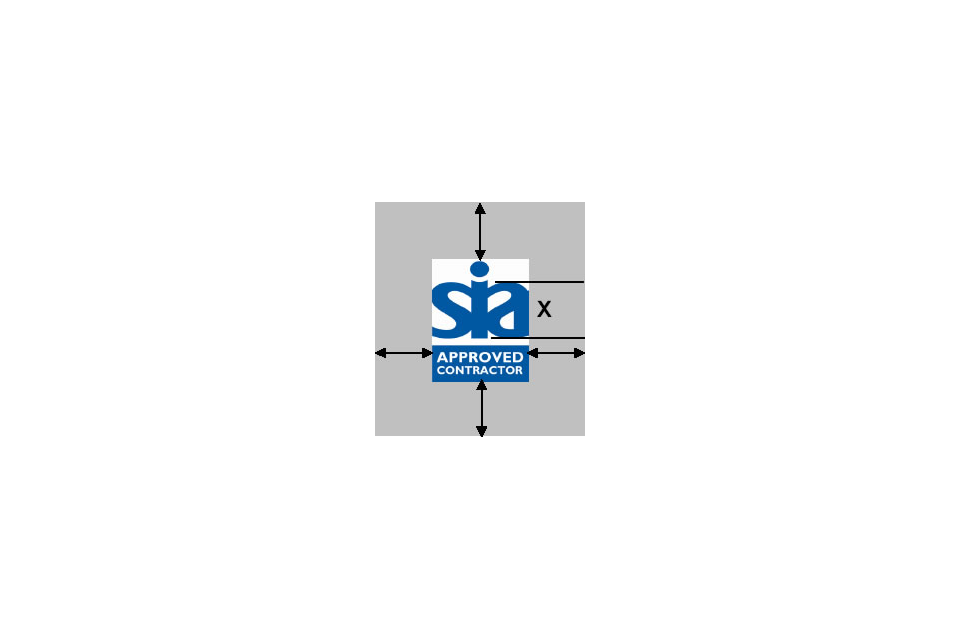
Keep a clear space around the mark, the same height as the letter ‘a’ in ‘SIA’ on all sides. Do not place any text or images inside this space.
Use the correct colours
Use the mark in Pantone 7462 or black. If the mark is on a dark background, reverse it out so it stays clear.
For CMYK, use:
- Photoshop: C97 M60 Y20 K5
- Quark: C100 M50 Y0 K10
For digital use, the hex code for Pantone 7462 is: #0d5091.
Link to your entry in our register
If you use the mark on your website, link it to your company’s entry in our register of approved contractors.
Follow our rules about using the mark online
When you use the mark on a website or digital platform:
- use the approved colours
- make it at least 150 pixels wide
- leave at least 12 pixels of clear space around it
- keep it still — do not rotate, flash, or animate it
What you must not do with the mark
You must not use the mark in a way that:
- misleads people
- overstates your approval
- suggests we endorse your website or its content
- damages our reputation
Doing this could put your approval at risk.