Patent factsheet: Search report
How to understand a search report. You get a search report when you pay for a search as part of the UK patent application process.
After you have made a UK patent application and filed patents form 9A you will receive a search report. An example of what a search report looks like is shown below. This fact sheet has been produced to help you understand the report.
What is the search report?
A patent examiner performs a search of your invention to determine whether it is new and inventive. The search is usually based on the invention as set out in your claims, but may be based on the disclosure of the invention as a whole if the claims are not clear or do not adequately represent the invention disclosed. The results of the search are communicated to you as a Search Report. Any documents listed in the right hand column of the report will be considered at the substantive examination stage if you request examination of your application by filing patents form 10, with fee.
What documents are searched by the examiner?
The search examiner considers documents published anywhere in the world. Any form of published disclosure can be cited against your application, for example, patent specifications, internet articles and technical journals. Where possible English language documents will be provided, however, in some circumstances it may only be possible to provide foreign language documents.
How is the search carried out?
All published patent specifications are classified according to the subject matter of the invention. To carry out a search, the examiner extracts the key technical features of your claimed invention and then searches through classified material relating to your invention looking for evidence that the technical features of your invention might be known or obvious. The examiner will typically perform the search by referring to online computer databases. The databases contain records of published patent specifications from around the world and can be searched using classification terms or keywords. The examiner may also carry out a search of the Internet, product catalogues and technical journals.
What do the document categories X, Y & A mean?
The relevance of each document listed in the Search Report is indicated in the ‘Category’ column. A document identified as category ‘X’ will, in general, have the main technical features of your invention (as set out in those claims identified in the middle column).
Sometimes an invention can be considered non-inventive by combining the technical information provided by a number of documents. Such documents are identified in the left hand column as category ‘Y’.
A document identified as category ‘A’ indicates what has been done previously in the technical area of your invention. An ‘A’ category document does not disclose your claimed invention.
Have all of the claims been searched?
Normally all of the claims are searched. However, if the claims define two or more inventions, the search will be limited to the first claimed invention. The search may also be restricted if the claims are not clear or because your claims are anticipated by a large number of documents. An explanation of why any claims have not been searched will be given in the covering letter to the Search Report.
What do I do next?
Study the documents supplied with the Search Report carefully. You must then decide, in the light of these documents, whether you wish to proceed with your application. If what you have invented is sufficiently different from what has been shown in these documents, you may decide to request substantive examination of your application (if you have not done so already). If it is not, then you may decide to go no further with the application. However, unless you make a clear request to withdraw the application before the preparations for publication are complete, your application will be published with a copy of the Search Report. This is called ‘A publication’ and takes place approximately 18 months from your filing date, or your priority date if you have one (see the Publication factsheet).
Example search report
A search report includes the following information (the numbers in brackets refer to the image below of an example search report):
- which of your claims have been searched (1)
- the section of the Patents Act that relates to the search (2)
- where the examiner has searched (3)
- the publication number of any cited patent (‘cited’ means included in the search report). This number will include a country code, for example ‘US’ for the United States of America (4)
- the name of the applicant or inventor of each cited patent (5)
- the section(s) of the cited document which are particularly relevant to the listed claims (6)
- non-patent citations, for example documents found through internet searches (7)
- the category of each cited document (8)
- the claims which are shown to be not new or not inventive by each cited document (9)
- an explanation of what each document category means (10)
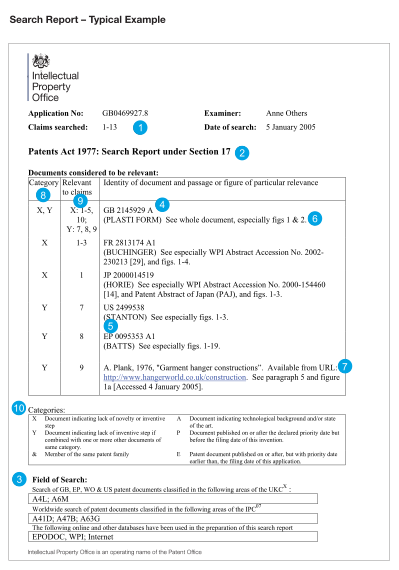
An example search report, with a list of 6 category X and Y documents
Getting help
You can contact the Intellectual Property Office on 0300 300 2000 (local call rate) or visit our website. We’re keen to help our customers as much as possible, but regret that we cannot assist with the commercial exploitation of your invention.
This guide is not intended to be comprehensive and necessarily omits details which may be relevant in particular circumstances.