Guidance on producing ODS format data tables in Stat-Xplore
Updated 1 April 2026

© Crown copyright 2026
This publication is licensed under the terms of the Open Government Licence v3.0 except where otherwise stated. To view this licence, visit nationalarchives.gov.uk/doc/open-government-licence/version/3 or write to the Information Policy Team, The National Archives, Kew, London TW9 4DU, or email: psi@nationalarchives.gov.uk.
Where we have identified any third party copyright information you will need to obtain permission from the copyright holders concerned.
This publication is available at https://www.gov.uk/government/statistics/benefit-cap-number-of-households-capped-to-november-2025/guidance-on-producing-ods-format-data-tables-in-stat-xplore
Up to the March 2026 release, data for the following breakdowns were available on GOV.UK alongside the statistical report in ODS format data tables:
-
Table 4: Point-in-time Caseload at reference month by Region Local Authority and amount capped per monthly assessment period
-
Table 5: Cumulative Caseload at reference month by Region, Local Authority and amount capped per monthly assessment period
-
Table 6: Point-in-time Caseload at reference month by Family Type and Age of Youngest Child
-
Table 7: Cumulative Caseload at reference month by Region and Local Authority at point in time when the household was first capped
As of March 2026, data to produce these tables was added to Stat-Xplore to bring all the Benefit Cap data available together in a single place. The new data added to Stat-Xplore is “Assessment Period amount of benefit capped” on Benefit Cap UC Cumulative Caseload and UC Point in Time databases and the “Age of Youngest Child” on the Benefit Cap UC Point in Time database.
As the data are now available on Stat-Xplore, the ODS format data tables will no longer be produced. This guidance document has been produced to assist users to obtain the information that was in the ODS format data tables from Stat-Xplore.
Table 4: Point-in-time Caseload at reference month by Region Local Authority and amount capped per monthly assessment period
To produce table 4:
1. Go to Stat-Xplore
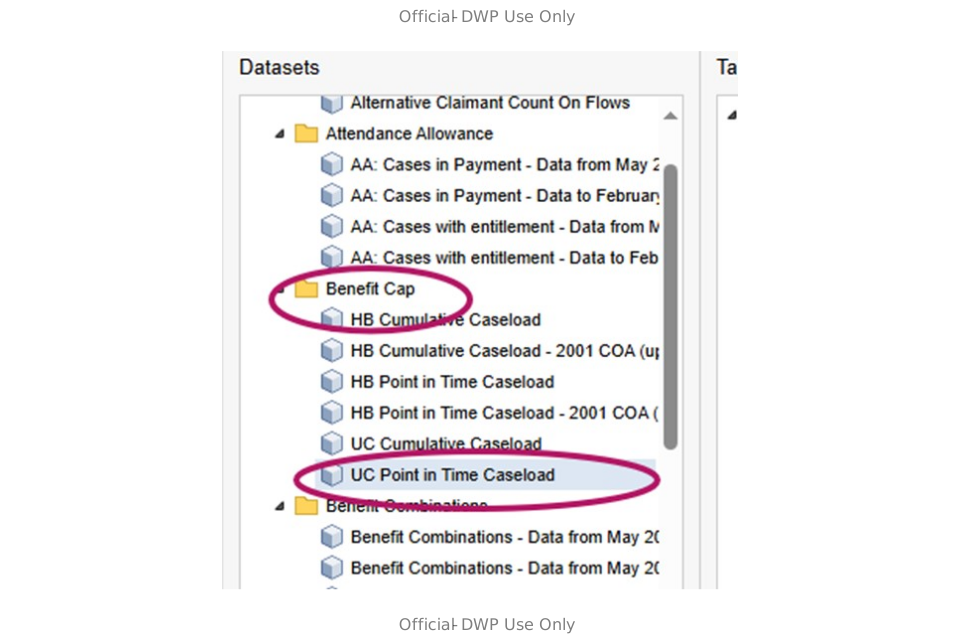
2. Under Benefit Cap menu option, double click on UC Point in Time Caseload
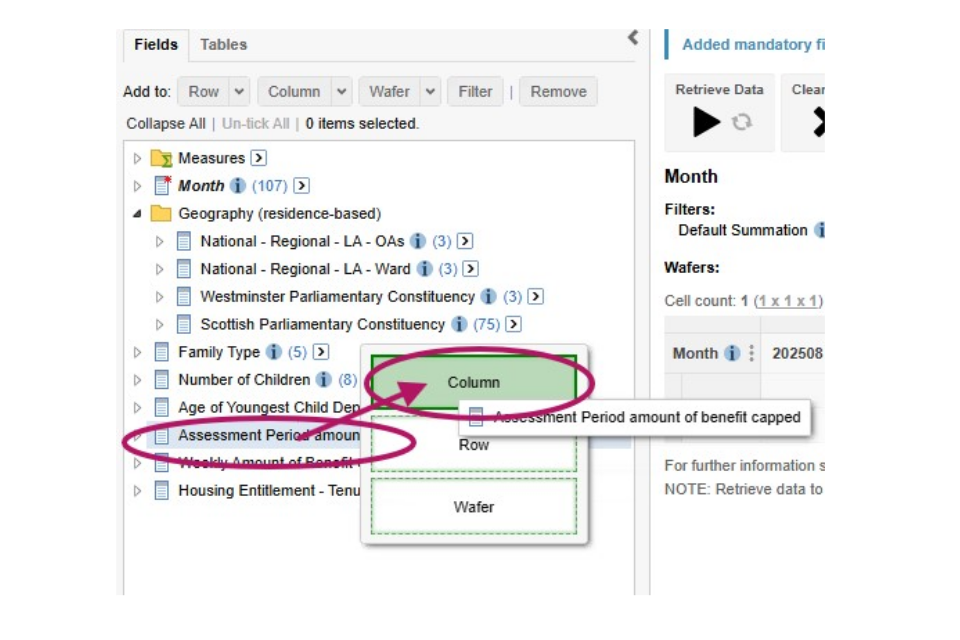
3. Click on Assessment Period amount of benefit capped and start dragging. A pop up menu should appear and drag into Column.
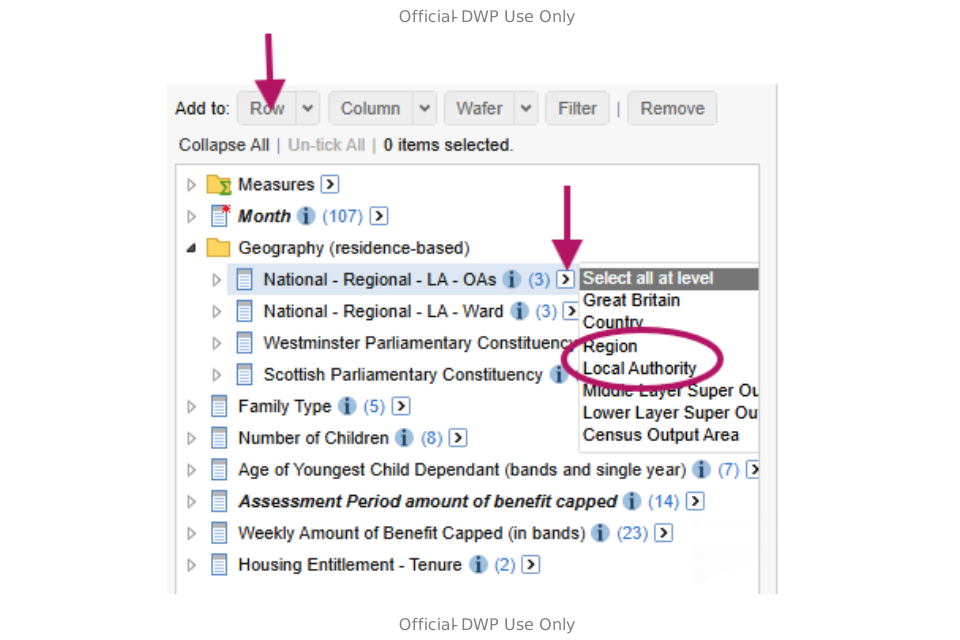
4. Under Geography (residence based) click on the small arrow in a white box after National – Regional – LA – OAs. A pop up menu should appear, select either Region or local authorities depending on your requirement.
5. In the Add to: select Row. Your Region or LAs should appear in the table.
6. Click on Retrieve Data and the table should populate.
7. You can use the Download Table option if you want a copy of the table.
Table 5: Cumulative Caseload at reference month by Region, Local Authority and amount capped per monthly assessment period
To produce table 5:
1. Go to Stat-Xplore
2. Under Benefit Cap menu option, double click on UC Cumulative Caseload
3. Follow the guidance from Step 3 for producing Table 4.
Table 6 – Point-in-time Caseload at reference month by Family Type and Age of Youngest Child
To produce table 6:
1. Go to Stat-Xplore
2. Under Benefit Cap menu option, double click on UC Point in Time Caseload
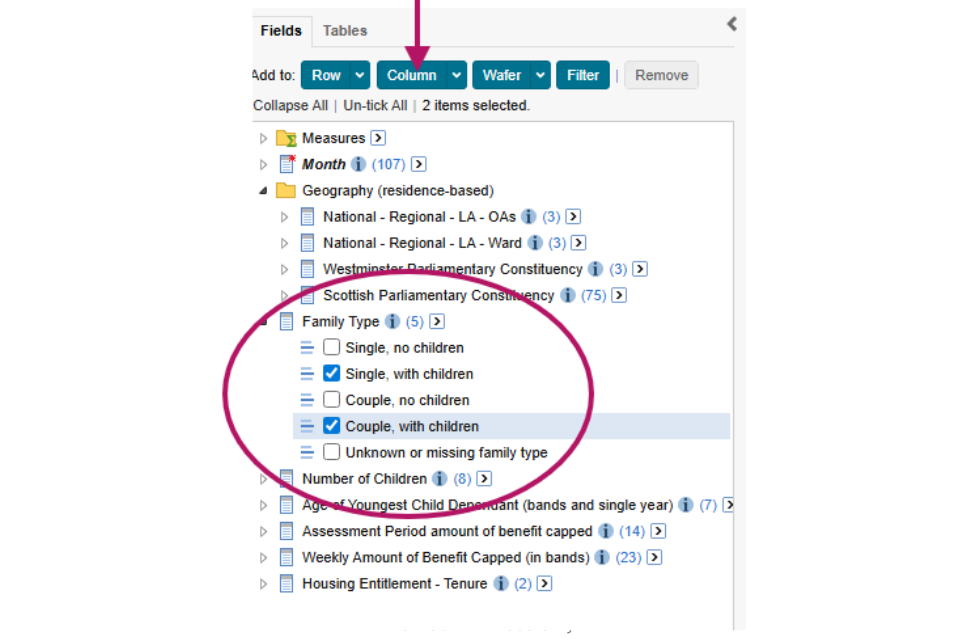
3. Open the Family Type option and then tick the Single, with children and Couple, with Children options.
4. Click on Column and the family types will appear in the table
5. Click on the small arrow at the end of Age of Youngest Child Dependant (bands and single year). A pop up menu will appear and select Age of Youngest Child Dependant (in years).
6. In the Add to: click on Row
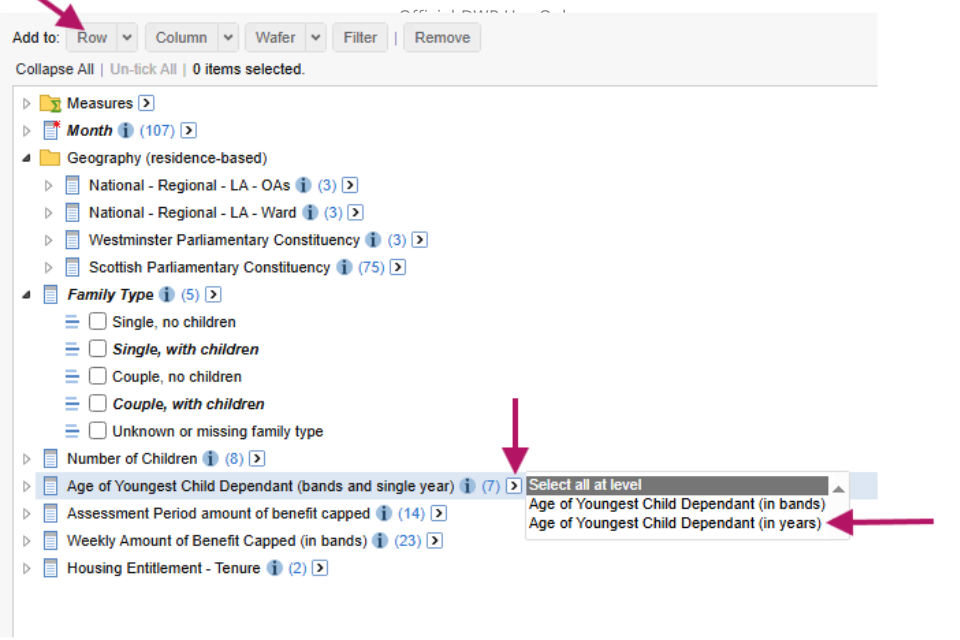
7. Click on Retrieve Data and the table will be populated
8. To download the data select Download Table
Table 7: Cumulative Caseload at reference month by Region and Local Authority at point in time when the household was first capped
This table cannot be produced directly on Stat-Xplore. It requires you to download information from separate parts of Stat-Xplore and put them together.
HB Cumulative total
1. Go to Stat-Xplore
2. Under Benefit Cap menu option, double click on HB Cumulative Caseload
3. Under the Geography (residence-based) menu item click on the small arrow at the end of National – Regional – LA – Ward.
4. Select Local Authority
5. In the Add to: option click on Row
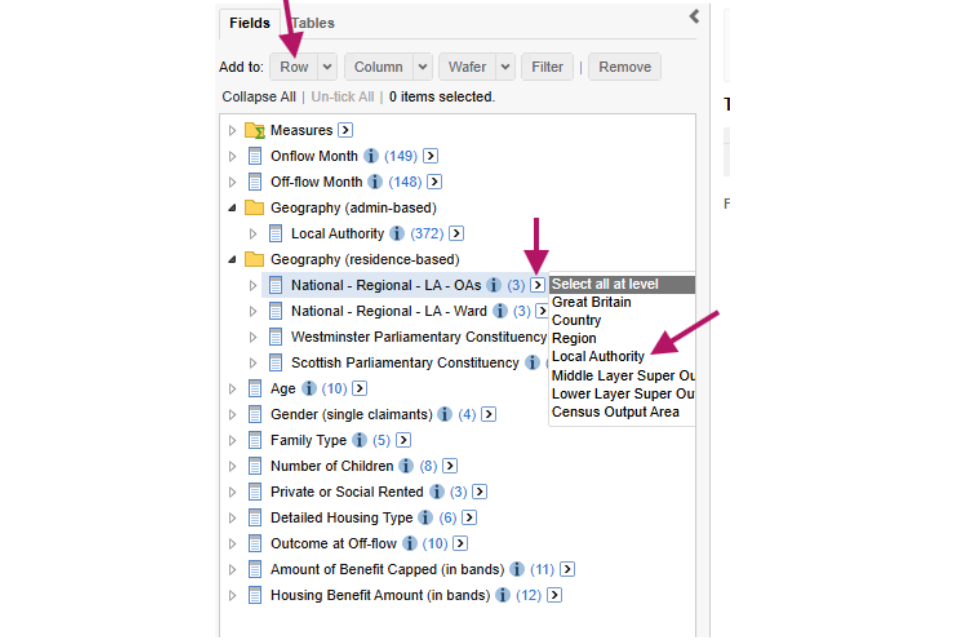
6. Click on Retrieve Data and download this table. These are the figures HB Cumulative Total
HB to UC Cumulative Total
7. Now open the Outcome at Off-flow menu item.
8. Tick the Household no longer claiming Housing Benefit but now claiming Universal Credit.
9. Click on Add to: Filter
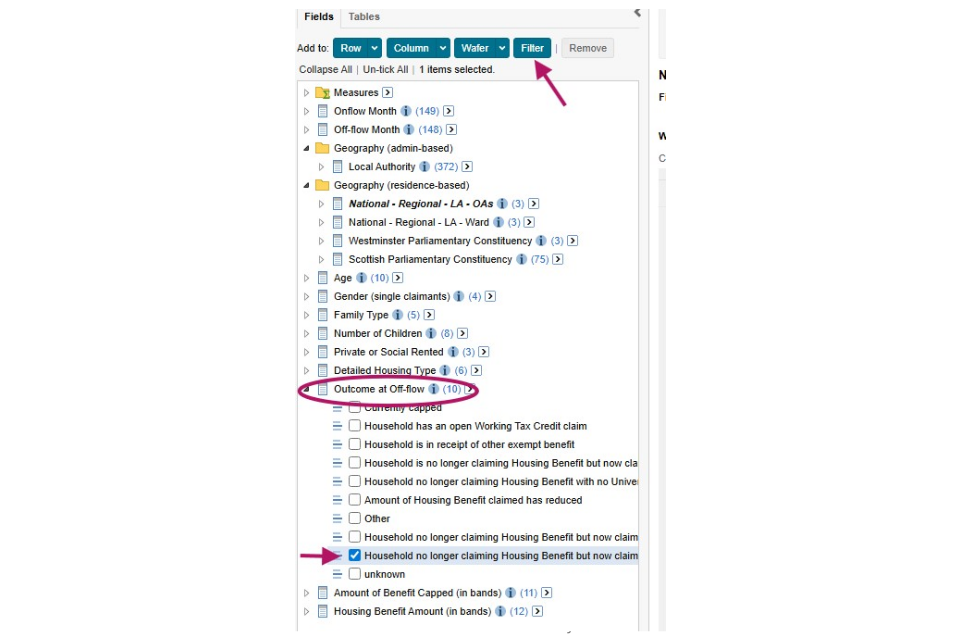
10. Click on Retrieve Data and Download this data.
11. This gives you figures for households that moved from HB to UC while still being capped. These will need to be subtracted from the UC Cumulative caseload figures later.
UC Cumulative total
12. Go back to the Stat-Xplore main menu by clicking on Home
13. Open the UC Cumulative Caseload
14. Follow the same procedure as for the HB Cumulative Caseload to select the Local Authority and add to the rows in the table.
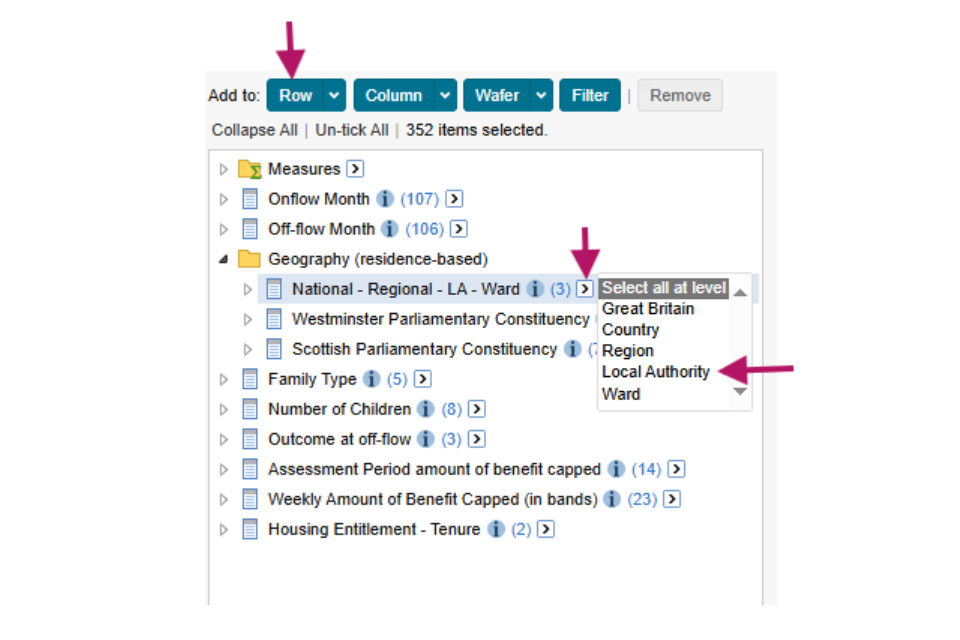
15. This gives the UC Cumulative figures. Download this table.
16. For the total households, Add the figures for the HB (the first figures downloaded) and UC cumulative figures (the third figures downloaded) together and subtract the households that moved from HB to UC (the second figures downloaded) from these figures and this gives the Total Cumulative figure.
17. To put together the final table:
UC = UC Cumulative data downloaded
HB = HB Cumulative data downloaded
Total = UC Cumulative + HB Cumulative – Households that have moved from HB to UC
Contacts
For any statistical enquiries on this guidance or Benefit Cap statistics contact cbm.statistics@dwp.gov.uk
For general Stat-Xplore enquiries contact stat.xplore@dwp.gov.uk
For media enquiries contact the DWP press office