An Evaluation of DWP’s Microsoft 365 Copilot Trial
Published 29 January 2026

© Crown copyright 2026
This publication is licensed under the terms of the Open Government Licence v3.0 except where otherwise stated. To view this licence, visit nationalarchives.gov.uk/doc/open-government-licence/version/3 or write to the Information Policy Team, The National Archives, Kew, London TW9 4DU, or email: psi@nationalarchives.gov.uk.
Where we have identified any third party copyright information you will need to obtain permission from the copyright holders concerned.
This publication is available at https://www.gov.uk/government/publications/an-evaluation-of-dwps-microsoft-copilot-365-trial/an-evaluation-of-dwps-microsoft-365-copilot-trial
Executive summary
Background
This report presents the findings from the evaluation of the Department for Work and Pensions’ (DWP) trial of the licenced version of Microsoft 365 Copilot – a generative AI tool integrated into Microsoft 365 applications. The trial ran from October 2024 to March 2025, involved 3,549 members of staff, and aimed to assess Copilot’s effectiveness in improving task efficiency, job satisfaction, and quality of work output.
Methodology
The evaluation used a mixed-methods framework, combining quantitative surveys, econometric analysis, and qualitative interviews.
Quantitative research
Two large-scale surveys were conducted: one targeting Copilot users (1,716 responses) and the other a comparison group of non-Copilot users (2,535 responses). These surveys collected data on demographics, job roles, AI experience, and self-reported outcomes related to task efficiency, job satisfaction, and perceived work quality.
The econometric analysis compared Copilot users and non-users using regression methods, controlling for key demographic, occupational, and AI attitudinal factors to estimate Copilot’s impact on task efficiency, job satisfaction, and quality of work output.
Qualitative research
Nineteen in-depth interviews were conducted with Copilot users selected through quota sampling. These interviews examined user experiences, training pathways, usage patterns, and any perceived benefits and challenges. Framework analysis was then employed to identify themes that align with the evaluation’s objectives.
Evaluation limitations
This evaluation is subject to some limitations, including the non-random allocation of Copilot licences, self-reported measures, and the absence of a pre-trial baseline. To mitigate these risks, regression analysis was applied, adjusting for demographic characteristics, job roles, and AI-keenness factors. While these controls help reduce some bias, it cannot be assumed that all bias arising from voluntary licence uptake and unobserved differences has been fully addressed.
Key findings
-
Initial reactions to Copilot were largely positive, with many users expressing excitement and curiosity. However, some voiced concerns about job security and the potential dependency on AI.
-
Adoption was often encouraged by managers and peers. Peer demonstrations and informal sharing of experiences played a key role in fostering interest and uptake.
-
Copilot was consistently used, with most users engaging with it either daily or weekly. It was primarily used for summarising documents and meetings, drafting emails, and searching for internal information.
-
Training and onboarding varied across users. While training was provided, most relied on self-directed learning through trial and error, online resources, and peer support. There was a desire for more targeted and role-specific training, as well as quick-reference materials to encourage effective use of the tool.
-
Time savings were recorded. 90% of users indicated that Copilot helped them save time. The Seemingly Unrelated Regression (SUR) analysis estimated an average saving of 19 minutes per day. The most significant reductions were observed in tasks such as searching for information (26 minutes) and email writing (25 minutes).
- Time saved was often reinvested in tasks perceived by users as more valuable. Users reported shifting their focus from routine tasks to other tasks, such as project delivery, strategic planning, or supporting senior leaders.
-
Job satisfaction improved. 65% of users reported feeling more fulfilled at work. Compared to non-users, SUR analysis indicated a medium increase in job satisfaction (0.56 points on a 7-point scale, ranging from completely dissatisfied to completely satisfied).
- Many users reported that Copilot reduced cognitive load and helped them focus on more meaningful aspects of their roles. However, some users viewed it as a helpful tool rather than a transformative one.
-
Quality of work improved. 73% of users reported improved outputs. Compared to the comparison group, SUR analysis indicated a medium increase in perceived quality of work (0.49 points on a 7-point scale, ranging from completely dissatisfied to completely satisfied).
- Many users felt Copilot improved clarity and tone in written outputs but stressed the need for human editing and judgement. It was seen as helpful in producing a useful starting point, rather than a finished product.
Conclusion
This trial of Microsoft Copilot within DWP demonstrated consistent use of Copilot, with users integrating the tool into a broad range of tasks including summarisation, drafting, and information retrieval. While onboarding and training approaches varied, most users found Copilot intuitive and easy to use, often relying on self-directed learning and peer support. The analysis indicated statistically significant improvements in task efficiency, job satisfaction, and perceived work quality, with these results providing evidence that users saved an average of 19 minutes per day across 8 routine tasks and reported greater job fulfilment and clarity in their work.
Authors
Francesco Arzilli, Economist at the Department for Work and Pensions.
Callum Seán Lynch, Social Researcher at the Department for Work and Pensions.
Lucy Page, Economist at the Department for Work and Pensions.
Acknowledgements
We would like to thank the Evaluation Task Force (Cabinet Office/HM Treasury) for their insight and guidance on this report. We’re also grateful to attendees of the Work, Pensions and Labour Economics Study Group and the Analysis in Government conferences for their helpful feedback.
Special thanks to Professor Oliver Hauser, University of Exeter, for his support and valuable feedback throughout this work.
Thanks as well to our colleagues at DWP who contributed to this work, including: Vanna Aldin, Nakkita Charag, Mohammad Ansari, Ben Whisker, Rohan Khanna, Edward Martyn, and James Oswald.
Glossary
| Term | Meaning |
|---|---|
| Artificial Intelligence (AI) | The real-world capability of computer systems to perform tasks, solve problems, communicate, interact, and make logical decisions in ways that resemble human intelligence. AI encompasses a range of technologies, including, but not limited to, machine learning, generative AI, deep learning, and natural language processing. |
| Civil Service Grades | A classification system used in the UK Civil Service to denote job roles and levels of seniority, responsibility, and pay. |
| Comparison Group | A group of individuals in a study who do not receive the intervention being evaluated (for example, staff without access to Microsoft Copilot). Their outcomes are compared to those of the treatment group to assess the effect of the intervention. |
| Confounding Variable | A variable that is associated with both the intervention and the outcome and can distort (“confound”) the estimated effect if not controlled. |
| Counterfactual Impact Analysis | A method of evaluation that estimates what would have happened to participants if they had not received the intervention, allowing for a clearer assessment of the intervention’s impact. |
| Covariate | A variable included in a statistical model because it may help explain the outcome or reduce bias (for example, age, grade, job category). Covariates are adjusted for to isolate the estimated effect of the intervention. |
| Director General (DG) Group | An organisational unit within the Department for Work and Pensions (DWP), typically led by a Director General. DG Groups are used to structure the department and allocate resources. |
| Licence Group | A category of DWP staff who were allocated a Microsoft Copilot licences, aligned to specific business areas or functions. |
| Likert Scale | A survey scale used to measure attitudes or feelings, typically ranging from strong disagreement to strong agreement (for example, 1 = completely dissatisfied, 7 = completely satisfied). |
| Neurodiverse / Neurodivergent | Used to describe individuals whose cognitive functioning differs from what is considered typical, often including conditions such as ADHD, dyslexia, and autism. |
| Non-Probability Sampling | A sampling technique where not all members of the population have a known or equal chance of being selected, often used in qualitative research. |
| Ordinal Scale | A measurement scale that shows the order or rank of items (for example, 1st, 2nd, 3rd) but not the exact difference between them. |
| Ordinary Least Squares (OLS) | A statistical method for estimating the relationships between variables in a linear regression model |
| Outcome Variable | A variable measured to assess the effect of an intervention (for example, task efficiency, job satisfaction, or quality of work output). |
| Quota Sampling | A non-probability sampling method where researchers ensure representation from specific predefined groups (such as by grade or business area) to capture a range of perspectives. |
| Regression | A statistical method for analysing the relationship between a dependent variable (outcome) and one or more independent variables (predictors). |
| Seemingly Unrelated Regression (SUR) | A statistical technique for jointly estimating multiple regression equations that may have correlated error terms, allowing for more efficient and accurate analysis when outcomes are related. |
| Statistically Significant | A result in statistical analysis that is unlikely to have occurred by chance, according to a pre-defined threshold (often p < 0.05), indicating a real effect. |
| Stratified Random Sampling | A sampling method that divides the population into subgroups (strata) based on certain characteristics, and then randomly selects samples from each stratum to ensure representation. |
| Treatment Group | The group of individuals in a study who receive the intervention being evaluated (for example, staff given access to Microsoft Copilot). Their outcomes are compared to those of the comparison group to assess the effect of the intervention. |
Chapter 1: Introduction
This report presents findings from an evaluation of the Microsoft 365 Copilot trial in the Department for Work and Pensions (DWP) between October 2024 and March 2025.
Background
Microsoft 365 Copilot (hereafter referred to as Copilot) is a Generative Artificial Intelligence (AI) tool providing users with a conversational chat interface capable of searching for specific information and generating text and summaries. There are two versions of Microsoft Copilot currently available to DWP staff:
-
Licenced version: Requiring a paid subscription, this version is integrated into Microsoft 365 applications and provides enhanced features, including access to organisational data, advanced security, and compliance capabilities. The DWP trial and this evaluation focused exclusively on the licenced version.
-
Free version: This version offers core Copilot functionality, such as conversational search and text generation, but lacks integration with DWP data and offers fewer advanced features. This version was made available to all DWP staff in April 2025.
DWP’s trial of the licenced version of Copilot ran from October 2024 to March 2025. During this period, 3,549 licences were allocated to DWP staff through a mix of volunteers and peer nominations. These were divided into 12 licence groups aligned with specific business areas (for example Digital, Policy, Finance) to ensure broad coverage of the department’s functions. Importantly, the trial focused on central office (corporate) staff; frontline operational colleagues (such as those in Jobcentres) did not receive any access to Microsoft Copilot during this trial.
DWP has established a policy framework to guide the responsible use of AI tools, including Microsoft Copilot. This framework ensures that all use of AI aligns with departmental values, standards, and existing digital policies, such as security, data protection, and acceptable use. DWP colleagues are required to comply with these principles and follow relevant guidance when using AI tools in their work.
At the time of the evaluation, training and guidance were available to trial participants. The offer included online resources, demonstration sessions and support materials introducing Copilot’s features and how to use them effectively. This provision was intended to enable staff to use Copilot confidently in their roles and to make best use of its capabilities.
It is important to note that this evaluation only explored the use and estimated impact of the licenced version of Microsoft Copilot. The free version was rolled out to all DWP staff after the evaluation fieldwork and is therefore not covered by the evidence presented here.
Existing UK Government Copilot evaluation literature
Some UK government departments have published evaluations of Microsoft Copilot, providing a valuable evidence base for its adoption and impact in the public sector. Contributions include evaluations from the Department for Business and Trade (DBT) and the Government Digital Service (GDS):
-
Department for Business and Trade (DBT): The DBT conducted a three-month pilot of Microsoft 365 Copilot, reporting high user satisfaction and measurable time savings for text-based tasks. The evaluation found particular benefits for neurodiverse colleagues and those in roles with significant written communication, while also highlighting the importance of robust governance and human oversight. It is worth noting that the DBT evaluation was based on user feedback and self-reported outcomes, without the use of a formal comparison or control group.
-
Government Digital Service (GDS): GDS led a cross-government experiment involving 20,000 civil servants across 12 departments (including DWP). This large-scale study found that Copilot users saved an average of 26 minutes per day, with over 70% reporting reduced time spent on routine tasks and increased focus on strategic work. The GDS report also emphasised strong user satisfaction, positive impacts on accessibility and inclusion, and the need for careful management of security and data sensitivity. Like the DBT study, the GDS evaluation relied on self-reported outcomes and did not include a formal comparison group.
In contrast to the government research published so far, this evaluation introduces a methodological advancement by employing a comparison between users and a large group of non-users. This approach enables a more rigorous assessment of Copilot’s potential impact.
Evaluation aims
The evaluation aimed to assess the effectiveness of Copilot and contribute to DWP’s broader evidence base regarding AI adoption and usage. Specifically, this evaluation intended to:
-
examine staff experiences and perceptions regarding Copilot’s performance and reliability
-
investigate the perceived usefulness of Copilot for different user groups and contexts of use
-
estimate Copilot’s impact on task efficiency, job satisfaction, and work quality
Methodology
The evaluation employed a mixed-methods approach, integrating both quantitative and qualitative research.
Quantitative research
The quantitative research was designed to gather feedback on the user experience and impact of Microsoft Copilot across DWP.
To support this aim, two surveys were conducted. The first used staff with active Copilot licences (treatment group) and was designed to capture direct user experience. The second targeted a comparison group drawn from the wider DWP workforce, intended to serve as a reference point for understanding broader attitudes and behaviours among staff who had not used Copilot.
The sampling strategies were designed to optimise comparability between the treatment and comparison groups. The treatment group survey invited all DWP staff with an active Copilot licence, using a census approach to ensure full representation of the user base. Fieldwork for this survey was conducted between 14 and 28 February 2025. The comparison group survey, which targeted staff without a Copilot licence, ran from 4 to 14 March 2025. It used a stratified random sampling method to select participants whose licence group and grade distribution closely matched those of the treatment group. A summary of the sampling and response outcomes is provided in Table 1.2.
Table 1.2: Summary of survey sampling and response outcomes
| Survey | Population | Invitations | Response Rate (n, %) |
|---|---|---|---|
| Treatment group | All DWP staff with Copilot licences | 3,549 | 1,716 (48%)[footnote 1] |
| Comparison group | A random stratified sample of DWP staff without Copilot licences | 9,300 | 2,535 (27%) |
To estimate the impact of Copilot, data from both the treatment and comparison groups were analysed and compared, focusing on three primary outcome measures: task efficiency, job satisfaction, and the quality of work output. Regression methods, which allowed the adjustment for a range of characteristics measured in the surveys, were implemented with the aim of capturing the net impact of using Copilot.
Qualitative research
The qualitative strand of the evaluation allowed participants to articulate and contextualise their views and experiences with Microsoft Copilot, providing unique and complementary insights to the quantitative research.
This research explored the use, perceived benefits and challenges associated with Microsoft Copilot within DWP. The specific research aims were:
-
To explore the level of understanding and familiarity that staff have with the functionality and features of Microsoft Copilot.
-
To investigate the methods through which staff acquire their knowledge about using Copilot, including the effectiveness of the training and support provided.
-
To assess the perceived usefulness of Copilot’s features, focusing on different types of users and on how well it integrates with current workflows and systems.
-
To explore staff perceptions of Copilot’s performance, reliability, and its impact on task efficiency, job satisfaction and quality of work output.
A total of 19 qualitative in-depth interviews were virtually conducted with DWP staff between the 5th and 14th March 2025. Interviews lasted approximately 60 minutes. This was deemed sufficient to achieve data saturation, as no novel themes or insights emerged during the final interviews, indicating that the data collected adequately captured the range of perspectives relevant to the research objectives.
The sample was obtained using quota sampling, a non-probability technique designed to ensure representation from specific predefined groups. A total of 19 participants were selected based on their Copilot licence group, which served as a stratum to guarantee a balanced distribution of experiences. By setting quotas for each licence group, the sampling process ensured a diverse range of grades and licence groups were included.
A standardised topic guide was developed for use in these interviews. The themes covered included:
-
Understanding of Copilot.
-
Knowledge acquisition for Copilot.
-
Use of Copilot.
-
Potential benefits and challenges of using Copilot.
-
Accessibility of Copilot.
-
Future expansion of Copilot.
All interviews were auto-transcribed and note-taken to ensure accuracy and completeness of the data. The research team used framework analysis as a method for organising and managing data through a process of summation and synthesis, resulting in a series of themed matrices tied to the topic guide (and aims of the research).
This report uses quotations to evidence findings. Where quotation marks have been included, these are verbatim, with any omitted or missed parts identified with […].
Overview of limitations
While this evaluation draws on multiple strands of research, its conclusions should be considered in light of several constraints, which are highlighted here to guide interpretation of the findings. These limitations are not unique to this study; they are typical of post-implementation evaluations that seek to assess impact after an intervention has been deployed.
First, the study was not a randomised controlled trial. Copilot licences were distributed on a first-come, first-served basis (often through managerial discretion or peer nomination), resulting in self-selection of participants rather than random assignment. This non-random allocation raises the possibility of selection bias, as individuals who volunteered or were chosen for Copilot may differ systematically from those who did not (for example, being more tech-savvy or motivated).
Second, there is a lack of baseline data. No pre-intervention measures were collected before Copilot was introduced. Without baseline (pre-trial) observations, it is difficult to confidently assess changes over time, and any comparisons rely on participants’ retrospective perceptions, introducing potential post-treatment bias.
Third, the evaluation relied on self‑reported data in the absence of objective metrics. All outcomes (such as time saved or job satisfaction) were based on what participants reported, which meant the results may have been influenced by survey response biases. In particular, non‑response bias was a concern if staff with certain characteristics (perhaps those with strong opinions or notable experiences) were more likely to complete the survey than others. Additionally, acquiescence bias – which is the tendency for respondents to agree with statements or give positive answers regardless of their true feelings – may have led some participants to provide overly favourable responses.
A more detailed discussion of these limitations, along with other methodological considerations and mitigation strategies, is provided in Chapter 5.
Chapter 2: The Implementation and use of Microsoft Copilot
This chapter brings together insights on staff engagement with Microsoft Copilot, based on 19 in-depth interviews and survey responses from the treatment group. It explores how participants initially understood Copilot’s purpose, the training they received, and their views on future guidance. It also examines patterns of use, user experience, and reflections on usability, accuracy, and accessibility.
First Impressions and Understanding of Copilot
Initial Reaction to Copilot
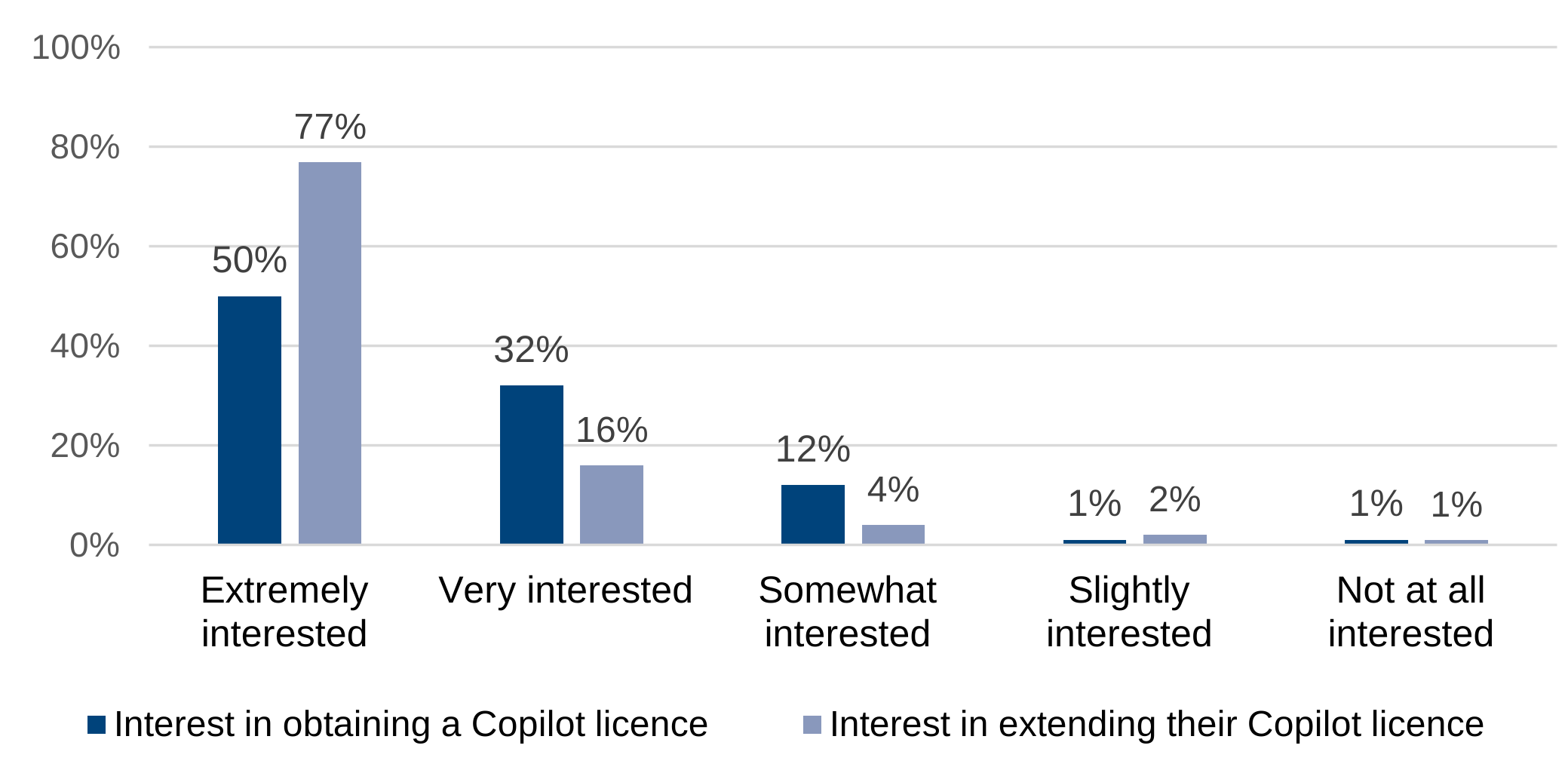
Overall, there was a general sense of excitement and anticipation about the possibilities AI could bring to the department, with many users viewing Copilot as a beneficial addition. As shown in Figure 2.1, half of users (50%) reported being Extremely Interested in acquiring a licence upon first learning about Copilot’s availability in DWP. When the same users were asked whether they would like their licence extended, interest notably increased, with 77% stating they were Extremely Interested in continuing access.
These findings are supported by qualitative evidence, with many users expressing enthusiasm about acquiring a Copilot licence. This interest was often driven by curiosity about Copilot’s capabilities and the potential benefits of integrating AI into their work. However, despite the generally positive reception, some users expressed concerns about the introduction of Copilot, particularly relating to job security and the potential for increased dependency on AI.
Another concern was whether it could perform a number of functions that humans do, eventually replacing humans and causing job losses.
(User 17)
Figure 2.1: Interest in obtaining vs extending Microsoft Copilot licences
User interest in Copilot increased after initial adoption, with stronger interest
Base: 1,713 survey respondents
Survey questions: (i) When you first heard about the use of Microsoft Copilot within DWP, how interested were you in obtaining a Microsoft Copilot licence? ii) How interested are you in your Microsoft Copilot licence being extended beyond end of March?
Understanding of the purpose and aims of Microsoft Copilot
Users generally had a positive understanding of Copilot, viewing it as a tool designed to support a range of administrative and secretarial tasks. Its principal value was seen as enhancing efficiency and productivity by undertaking routine work, thereby enabling staff to concentrate on higher-priority activities. Many users appreciated Copilot’s capacity to streamline tasks such as drafting emails, generating ideas, and summarising content.
It’s just there to assist. Same as a calculator. Like I could multiply things, but the calculator is there and it’s simply quicker… it doesn’t mean that you don’t know how to do it
(User 7)
In addition to its role as an assistant, some users viewed Copilot as a ‘critical friend’ that provided constructive feedback and enhanced their work. They valued its ability to suggest improvements, help articulate ideas more clearly, and offer alternative ways to express their thoughts. This supportive function gave users greater confidence in their tasks, as Copilot acted as a safety net and offered reassurance about their approach.
Pathways into use
Influence of colleagues and managers on Copilot adoption
The adoption and effective use of Copilot within teams was often influenced by both peer encouragement and managerial support.
Managers were seen by several users as the driving factor in them applying for a Copilot licence. Many users felt that their Line Managers saw the potential benefits of Copilot and would actively encourage the adoption and use of this AI tool. For some, this encouragement was reciprocal, with colleagues discussing the value of Copilot to senior management
In addition to leadership support, peer-to-peer encouragement played a significant role in fostering Copilot adoption. Early adopters often became internal champions, informally discussing Copilot’s features with colleagues and performing live demonstrations. Many users described how seeing the tool in action motivated their co-workers to seek access. These exchanges created a ripple effect: once a few team members experienced Copilot’s benefits, others were keen to try it for themselves.
Two others applied for a licence as well. When I showed them what it could do, they wanted to play with it.
(User 2)
Learning to use Copilot
Although training sessions and materials were made available throughout the trial within DWP, many users still opted to explore Copilot independently or supplement formal resources with peer learning and external content.
Figure 2.2 illustrates the various methods users employed to learn about Copilot during the trial. While 89% of participants engaged in self-directed exploration, a significant proportion also utilised DWP-provided resources (77%), learned from peers (61%), and consulted external internet sources (56%). This distribution underscores the diverse and proactive approaches users took to build their understanding, despite the availability of formal training materials within DWP.
Qualitative interviews provide further insight into these behaviours, revealing inconsistent awareness of, or engagement with, the initial onboarding sessions offered by DWP. While a few users recalled receiving training for Copilot, most did not remember attending any formal sessions. Among those who did, opinions varied: some found the training useful for providing an overview and examples of application, while one user felt it was too generic and difficult to translate into real-life scenarios.
I did attend one informal training session that was organised for everybody who signed up and got a licence […] The training session was helpful, because it demonstrated some of the things that people were already using it for.
(User 14)
Figure 2.2: Learning methods used by DWP staff to use Microsoft Copilot
The majority of users opted to learn how to use Copilot through self-exploration

Base: 1,713 survey respondents
Survey question: What methods have you used to learn about Microsoft Copilot (Select all that apply).
Many users taught themselves how to use Copilot without formal training, relying on their existing knowledge of similar tools, such as ChatGPT, and learning through experimentation. A common approach was trial and error. Alongside this, users actively engaged with online resources to build their understanding or resolve queries, finding internal channels such as the Copilot Teams Channel and SharePoint site particularly useful. Some also turned to external sources like YouTube for additional guidance.
[…] as soon as we got the licence, you immediately get access to that Microsoft Copilot Teams channel anyway, where there is loads of information
(User 13)
Perceptions of future training requirements
In terms of future training, although onboarding sessions were made available by DWP, several users reported that they had not received a training session on Copilot when they first started using it. They felt that an initial onboarding session covering the basics, potential applications, and benefits of Copilot would have made their experience smoother and more efficient. Furthermore, some users suggested that such sessions would be particularly valuable for those new to AI, providing a foundational understanding and the confidence to leverage the tool effectively.
I wish I had a session on copilot at the beginning [..] That would have made my life a bit more easier right at the beginning.
(User 8)
There was also desire for training sessions to be tailored specifically for DWP roles and job functions. Some users felt that those in similar roles could benefit from targeted sessions that share best practices and demonstrate how Copilot can be used effectively in their area of work. In addition, several users wished for a ‘cheat sheet’ that provided helpful tips and tricks for using Copilot, including a list of prompts tailored to DWP.
Maybe if people who did similar roles had sessions specifically for them. […] Could there be targeted sessions where you could really share best practice about what works well for each type of work?
(User 10)
Finally, many users expressed a preference for shorter, focused training sessions that cover one specific feature or function at a time. This approach was seen as more manageable and effective compared to longer sessions that cover multiple topics.
DWP patterns of use and user experience
Frequency of use
The frequency of Copilot use across the DWP was notably high. As evidenced in the treatment survey (Figure 2.3), most users (65%) reported daily usage, while an additional 30% indicated weekly usage. These findings align with those derived from qualitative research, which also found that users typically engage with Copilot on a daily basis, with variations contingent upon their workload and specific tasks.
Figure 2.3: Self-reported frequency of use for the treatment group
Nearly two-thirds of the treatment group used Microsoft Copilot daily at work.

Base: 1,713 survey respondents
Survey question: On average, how frequently do you use Microsoft Copilot.
Typical use cases of Copilot
There were various ways in which users found Copilot helpful, with creating meeting notes, searching for information, and summarising documents being the most common among users. Copilot was also used by some to draft messages and to support data analysis.
Many users found Copilot particularly helpful for summarising large volumes of information, including lengthy reports, email threads, and formal meeting discussions. This functionality was especially valued by those needing to catch up on communications after periods of absence or when faced with information overload. Users involved in secretariat or administrative roles highlighted Copilot’s ability to generate accurate and timely meeting minutes, which streamlined their workflow and allowed them to participate more actively without the burden of manual notetaking.
I barely have to update the notes. They pretty much come out fully accurate. It means you can participate fully in the meeting without having to worry too much. I’ll still take a few notes, but I know it will do its job.
(User 10)
Several users also relied on Copilot to draft and refine emails, Teams messages, and other forms of communication. They appreciated its ability to change the tone of their messages to be more professional and friendly, which was seen as useful when dealing with sensitive or complex queries.
I pull out the key information that I need and get Copilot to create the Comms. It has got better English than me for a start, so it reads better, so you know it just looks professional.
(User 19)
In addition to drafting or summarising content, many also used Copilot to search for information within DWP and externally. They found Copilot helpful in locating documents saved in SharePoint libraries or personal OneDrive accounts, as well as searching for emails or defining acronyms. However, there was sometimes a cautious approach to using Copilot to search for information outside the department due to concerns about the credibility of internet sources.
It is great to get you started on research, but because it is computer-generated research, it cannot be used as an official source. It might take a view from an internet source that might not be reputable. That is the danger.
(User 4)
Using Copilot to support with data analysis was seldom reported by those interviewed. However, a small number of users who worked in the Data Analyst profession found it beneficial for creating or refining code more quickly.
I’ve just asked Copilot to write code for me which has been really useful for me and saved me a lot of time.
(User 9)
Factors affecting usage
While Copilot was widely used by most users, many noted that factors such as trust, time management, information sensitivity, the nature of their work, and habit formation could affect and occasionally hinder their usage.
Most users reported that their job role and the nature of their work tasks (for example, secretariat, reporting, data analysis) influenced how frequently they used Copilot. Tasks perceived as more suited to Copilot’s capabilities were prioritised, while others were completed using established approaches. For example, participants often refrained from using Copilot for tasks where they had substantial prior experience or knowledge, opting instead to rely on their own expertise. Users also noted functional limitations, especially in Excel and, to a lesser extent, PowerPoint. Copilot was seen to struggle with data-heavy tasks, including interpreting complex datasets, generating charts, and managing intricate formatting, which reduced its effectiveness for analytical work.
A large chunk of my active working time would probably be using Excel […] I don’t think Copilot is currently at a place where it’s sort of a real add on to Excel.
(User 7)
For some, trust in Copilot also influenced how frequently they used it. Several users voiced reservations about fully relying on Copilot for critical tasks. They preferred using Copilot as a support tool rather than relying on it entirely. This cautious approach was driven by concerns on the accuracy and reliability of Copilot’s outputs. As such, users emphasised the need to verify and proofread its outputs, especially for tasks requiring citation or official documentation.
Alongside trust, information sensitivity was another barrier. Several participants were cautious about inputting internal or confidential DWP data into Copilot, following organisational guidance on data protection and confidentiality.
I’m always reticent to giving it my full trust, with anything that needs citations, and anything that requires ownership by me in front of stakeholders.
(User 5)
Practical challenges also influenced usage patterns. Time pressures within a demanding work environment were frequently cited as a reason for limited engagement, even among those who recognised Copilot’s potential benefits. Some participants also described difficulties in developing a consistent habit of use, noting that they often forgot to integrate Copilot into their workflow and needed to consciously remind themselves to do so.
Most of my day is frantic in doing work so I don’t always have time to play with it but I’d be gutted if I lost Copilot.
(User 5)
Usability, accuracy, and accessibility of Copilot
Usability of Copilot
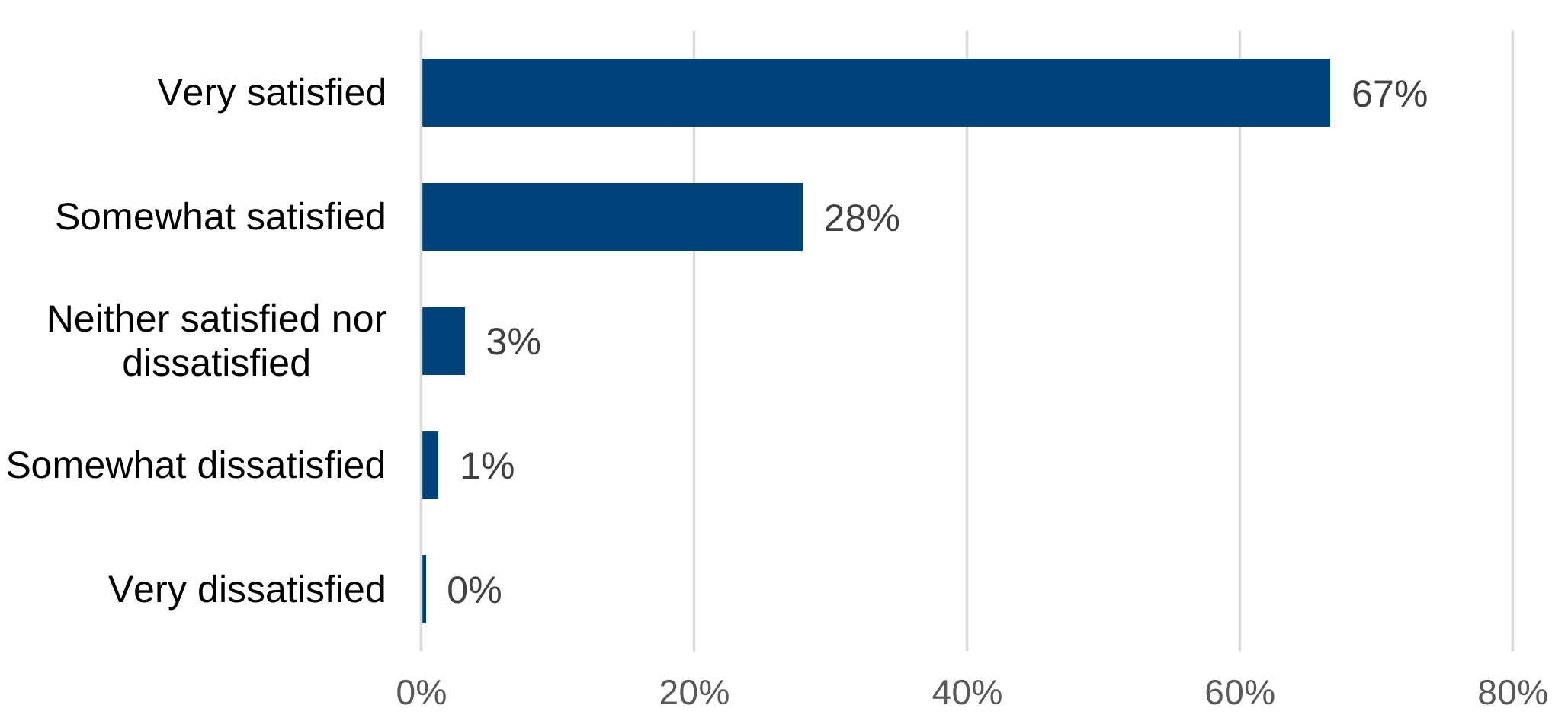
Overall, the majority of users (95%) were either Very Satisfied or Somewhat Satisfied with the overall performance of Copilot. See Figure 2.4.
Figure 2.4: Level of satisfaction in Copilot’s overall performance
The majority of Copilot users were satisfied with the performance of Microsoft Copilot.
Base: 1,713 survey respondents.
Survey question: How satisfied are you with the overall performance of Microsoft Copilot.
Many users described Copilot as easy to use, intuitive, and well-integrated into their existing digital workflows. Many appreciated that it was embedded across familiar Microsoft applications such as Teams and Word, which made it feel like a natural extension of tools they already used. For those confident with Microsoft products, the transition to using Copilot felt seamless. The interface, layout, and prompts were seen as accessible, and some commented that no formal training was required to get started.
However, while the interface was broadly praised, some users also acknowledged that Copilot’s effectiveness depended heavily on the quality of the prompts provided. Several users noted that vague or overly broad prompts could lead to irrelevant or incomplete results. As such, many described a learning curve in understanding how best to phrase prompts clearly and specifically. Over time, users developed strategies to refine their prompts, often through trial and error, and became more adept at getting the outputs they needed.
It’s literally like talking to a calculator. So if you don’t put the right inputs in, you’re not going to get the right output.
(User 5)
Additionally, despite the overall ease of use, a few users pointed out inconsistencies in how Copilot was accessed across different platforms. While it was praised for being “everywhere,” this ubiquity sometimes led to confusion about where to find specific features or how to access recent tasks. Some users preferred using it in Microsoft 365 over Teams due to layout and visibility differences, and others noted that certain functions were harder to locate in Outlook.
Sometimes I just want it in that one place […] I tend to default back to going to Microsoft 365, where it is just there on the main page.
(User 15)
Finally, some users expressed frustration with search and retrieval functions, particularly when trying to locate specific emails or documents. Copilot sometimes returned irrelevant results based on keyword matches rather than the full content of the prompt, which led to inefficiencies.
I’ll ask it things and it just starts talking about something else […] it just gives me random things because one word that I’ve mentioned is in that document but it’s not relevant.
(User 9)
Quality of Copilot response
Most users reported a strong level of confidence in Copilot’s accuracy, with 85% rating the accuracy of Copilot’s meeting notes as either Very Good or Good (Figure 2.5). This suggests that, for most users, Copilot is perceived as a reliable tool for summarising familiar content, such as Teams meetings.
Figure 2.5: Self-reported accuracy of meeting notes produced by Microsoft Copilot
Copilot was viewed by most to be accurate in summarising Teams meeting.

Base: 1,713 survey respondents.
Survey question: How would you rate the accuracy of Copilot in summarising Teams.
The qualitative insights are consistent with this trend. Users generally felt confident in Copilot’s ability to produce accurate outputs, particularly when it drew from internal or familiar content. This confidence was often grounded in users’ own knowledge of the material, allowing them to verify that Copilot’s summaries or drafts aligned with their expectations.
However, this trust was often conditional. Users were cautious when Copilot sourced information from the web or when the task involved more complex or unfamiliar content. In these cases, the reliability of the output was seen as variable, and users were more likely to scrutinise the results.
Still has the human element anyway so I always know to cross check things anyway and never use it for the final document.
(User 5)
This cautious trust was reflected in a widespread practice of human oversight. Even when Copilot performed well, users consistently reviewed and edited its outputs before using them. This was not necessarily a sign of distrust, but rather a professional standard; most users felt responsible for the final product and saw Copilot as a support tool rather than a substitute for their own judgement.
This professional oversight was partly driven by awareness that Copilot was not infallible. Minor errors, such as irrelevant content, incorrect emphasis, or overly generalised summaries, were noted, but typically seen as manageable. These imperfections rarely led users to abandon the tool; instead, they adjusted the output or refined their prompts.
Sometimes it is a bit weird, and it will come back to things that are not even relevant […] I just adjust it.
(User 15)
Prompt quality emerged as a critical factor in determining Copilot’s accuracy. Several users noted that vague or poorly structured prompts could lead to hallucinations or irrelevant results. Conversely, clear and specific instructions tended to yield more accurate and useful outputs.
Accessibility of Microsoft Copilot
Some users shared accessibility related experiences with Copilot, particularly in relation to neurodivergence, speech and language communication needs (SLCN), and colour blindness.
Copilot was described as a practical support tool for managing cognitive and communication challenges. It helped users with attention deficit hyperactivity disorder (ADHD) maintain focus in noisy environments, supported those with SLCN in finding the right words, and reduced stress for individuals who struggle with written communication. The tool’s ability to generate alternative phrases and summarise information was particularly valued.
It’s definitely beneficial for me because I’ve got ADHD so my brain can quite easily leave the room when there’s too many people talking and it makes it easier for me to focus.
(User 11)
Other users echoed the sentiment that Copilot was generally accessible, even if they themselves did not have a disability or health condition. However, concerns were raised about the accessibility of Copilot’s outputs when shared with colleagues who might have different needs. There was some uncertainty about whether the documents or slides generated by Copilot would comply with accessibility standards.
The feedback that I have got from the people in my team who are neurodiverse, who have used it, has always been positive.
(User 13)
Conclusion
The implementation and use of Microsoft Copilot within the DWP has demonstrated a broadly positive trajectory, with evidence of good engagement and perceived value among users.
Initial reactions to Copilot were largely enthusiastic, with many users expressing curiosity and optimism about its potential to enhance productivity. However, some users voiced concerns about job security and the potential dependency on AI.
Adoption pathways were often influenced by managerial encouragement and peer advocacy. Managers played a key role in promoting uptake, while peer demonstrations and informal sharing of experiences fostered wider interest. Although training was available, experiences were mixed: while some users benefited from formal sessions, many relied on self-directed learning through trial and error, online resources, and peer support. There was a clear appetite for more targeted, role-specific, and time-efficient training formats.
Patterns of use revealed that Copilot was integrated into a wide range of tasks, with daily or weekly usage reported by the majority. Common applications included summarising documents and meetings, drafting communications, and searching for information.
Usability was widely praised, with users finding Copilot intuitive and well-integrated into existing Microsoft tools. However, prompt quality was critical to output accuracy, and some users experienced challenges with search functions and platform consistency. Accessibility feedback highlighted Copilot’s value for users with neurodivergent conditions and communication needs, though concerns remained about the accessibility of outputs for others.
In conclusion, Microsoft Copilot has been positively received and integrated into users’ workflows, especially for summarisation, drafting, and information retrieval. Future efforts should focus on expanding access, providing tailored training, and addressing concerns around accessibility and data governance to maximise Copilot’s impact.
Chapter 3: user perceptions of the effect of Microsoft Copilot
This chapter explores how users perceive Microsoft Copilot’s effect on their work, drawing from 19 in-depth interviews and survey responses from licence holders. The analysis focused on three outcomes: how Copilot helped users save time and reallocate effort, improved clarity and professionalism of work outputs, and influenced fulfilment at work. As these findings are based on a self-selected group of users, they may not reflect the wider workforce.
User perceptions of effect on time saved and task efficiency
Time saved
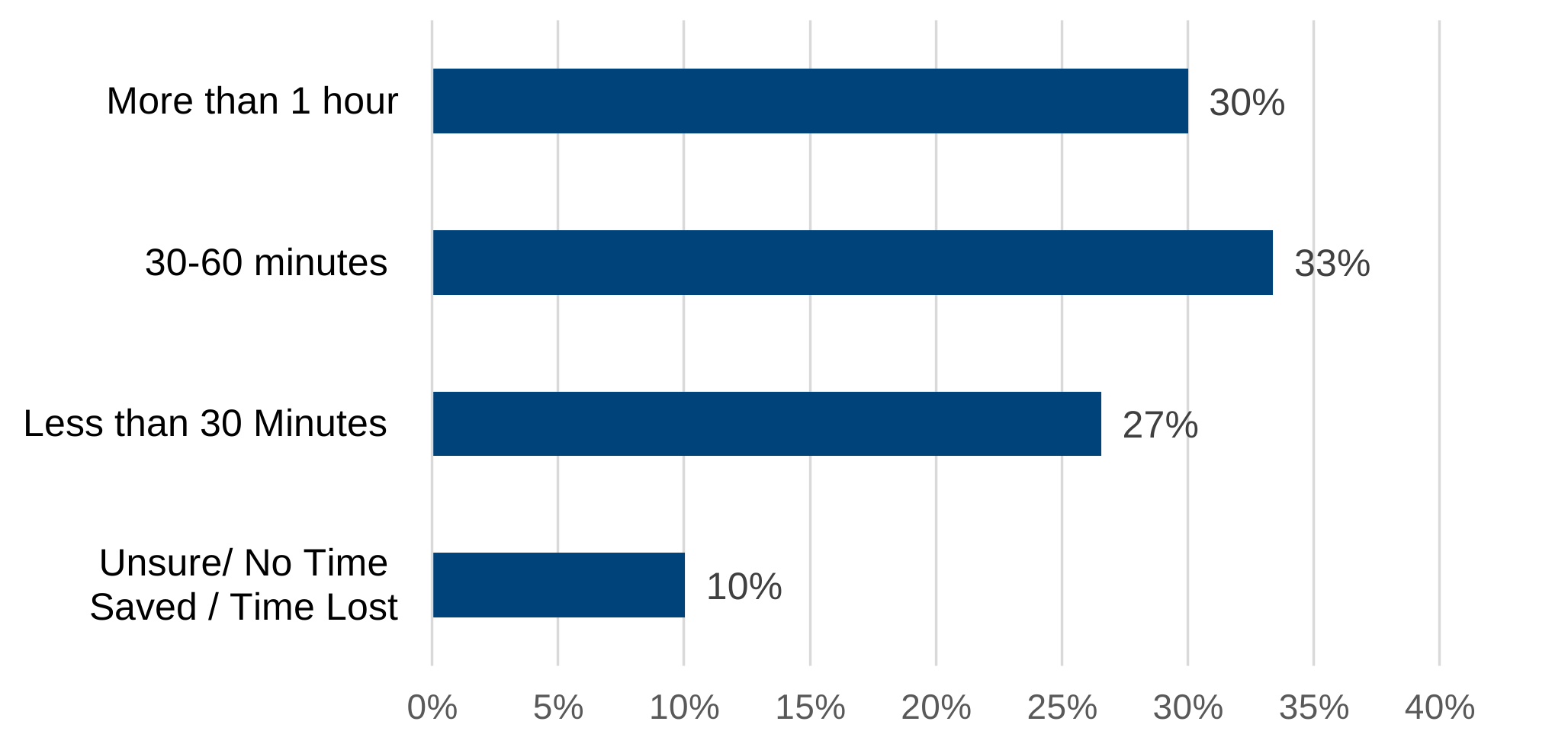
Many users described Copilot as a significant time saver, with approximately 90% reporting that Copilot helped them save time. Among these users, 30% indicated that they saved more than one hour per day, 33% reported saving between 30 to 60 minutes, and 27% experienced savings of less than 30 minutes per day (Figure 3.1).
Figure 3.1: Perceived daily time savings from Copilot use
A third of users saved 30 to 60 minutes per day, with comparable proportions reporting over an hour or under 30 minutes.
Base: 1,713 survey respondents.
Survey question: On average, in the past week, how much time has Copilot saved you per day on the tasks for which it is used?
This range of time savings was reflected in how users described Copilot’s role in their day-to-day work. Many users valued Copilot for accelerating routine processes such as drafting documents, summarising meetings, and retrieving information. While the nature of their work remained unchanged, many noted that Copilot enabled them to meet tight deadlines, respond more quickly to senior leaders, and manage competing priorities with greater ease.
For a few users, the time savings were cumulative rather than drastic. While each individual task might only be slightly faster, the overall effect across a week or month was seen as substantial.
In the short term, it may not seem like it has cut down that much time, but […] over a sustained period, it has definitely cut down my time.
(User 4)
Use of time saved
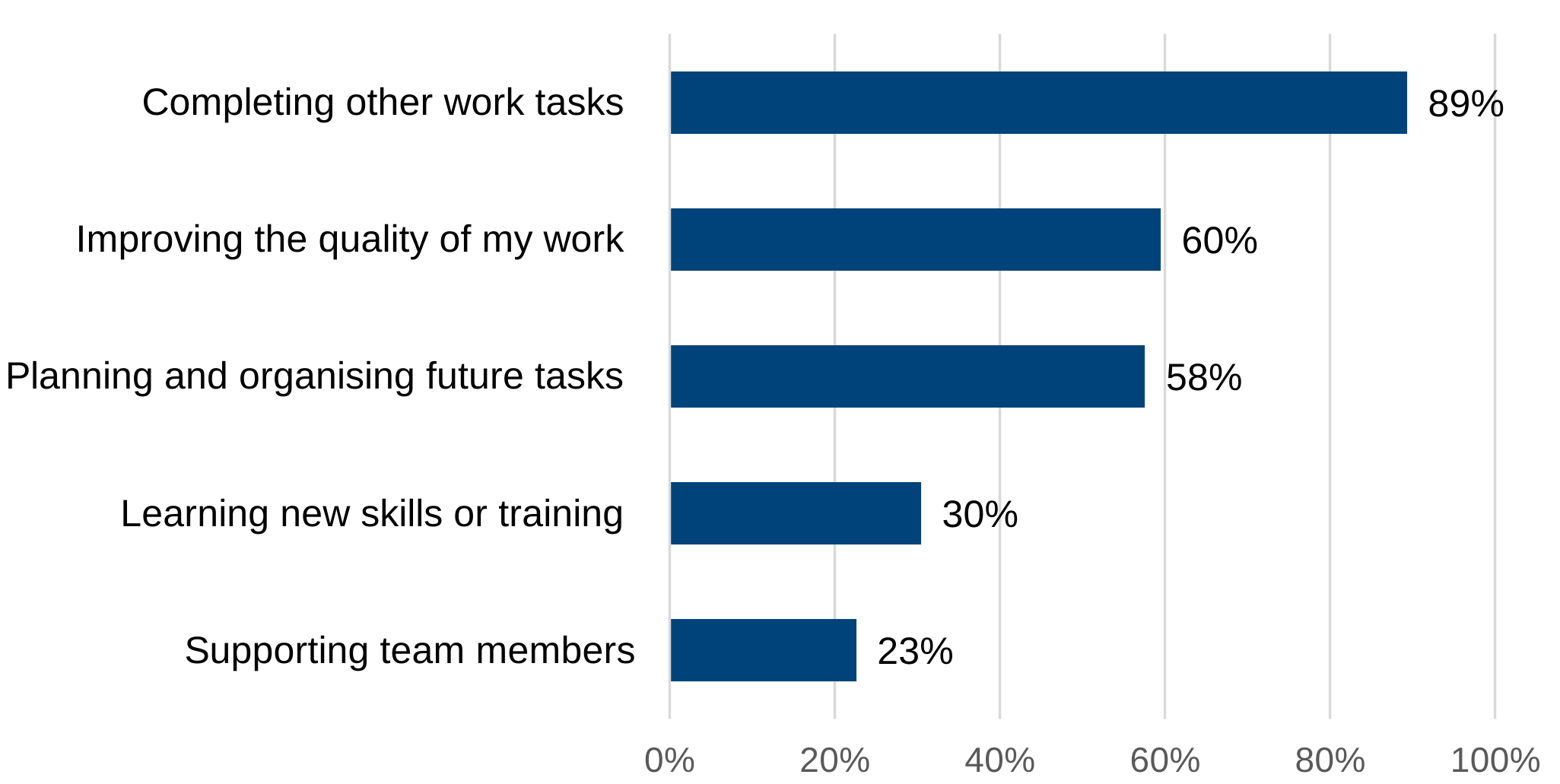
The majority of users (89%) reported reallocating the time saved to completing other work tasks. Additionally, around 60% of users reported using their time saved to improve the quality of their work, or to organise and plan future tasks (see Figure 3.2).
Figure 3.2: Top uses of time saved via Microsoft Copilot
Most users reallocated time saved with Copilot to other tasks, with many also using it to improve work quality and plan ahead.
Base: 1,541 survey respondents.
Survey questions: In the past week, how have you typically used the time saved at work through using Copilot (select all that apply).
Many users described how Copilot enabled them to shift their time and attention from routine or administrative tasks to more meaningful, strategic, or personally fulfilling work. Rather than reducing their overall workload, Copilot allowed them to complete administrative tasks more quickly, freeing up capacity to focus on other tasks, such as project delivery, strategic planning, or supporting senior leaders. This reinvestment of time was often framed not as a reduction in effort, but as a redirection towards activities that users perceived as higher value.
It allows me to focus less on the mundane stuff. I can spend time doing my actual job. All the actual stuff, all the strategy stuff, all the [business as usual] stuff.
(User 19)
For some, this meant being able to take on more responsibilities, lead additional initiatives, or support colleagues more effectively. Others described using the time to improve the quality of their outputs, reflect more deeply on their work, or simply take breaks they previously had to forgo.
My role is quite a lot of projects […] They are not necessarily urgent tasks, but they are important tasks, which I would not have time to do if I didn’t have Copilot.
(User 10)
Reduction in effort
In addition to saving time, many users described how Copilot helped reduce the mental effort required for routine or cognitively demanding tasks. This included summarising complex information, taking notes during meetings, and structuring written content. Users felt they could focus more clearly, especially in high-pressure or multitasking environments. For some, this reduction in cognitive load improved their ability to sustain attention throughout the day
Copilot was also recognised for its ability to enhance not only individual workflows but also overall team performance, especially in environments where collaboration and shared responsibilities were crucial. Some participants described how they could now delegate or disseminate information more effectively, while others highlighted how the tool reduced their reliance on colleagues for support.
I think it’s been good to not have to ask other colleagues for their assistance. So it’s probably saved me time, but also saved them time in a way.
(User 9)
However, not all experiences were uniformly positive. For instance, a few users raised concerns about double-handling and verification overhead. While Copilot was widely appreciated for reducing effort and accelerating tasks, some users still felt the need to manually verify outputs to ensure accuracy and relevance. In some cases, this additional step negated the time savings and led users to question whether manual methods might have been more efficient.
I had to go back and look and make sure that they were relevant […] I just felt if I had done it manually from the beginning, it would have been better.
(User 4)
User perceptions of effect on job satisfaction
Job satisfaction and wellbeing
There was a noticeable positive sentiment towards Copilot, with around two-thirds of respondents (65%) stating they either strongly agree or agree that Copilot made them feel more fulfilled at work. However, 27% remained neutral, which may reflect a more cautious stance on attributing fulfilment directly to the tool (see Figure 3.3).
Figure 3.3: Perceived change in work fulfilment from Copilot use
The majority of users either agreed or strongly agreed that Copilot made them feel more fulfilled at work.
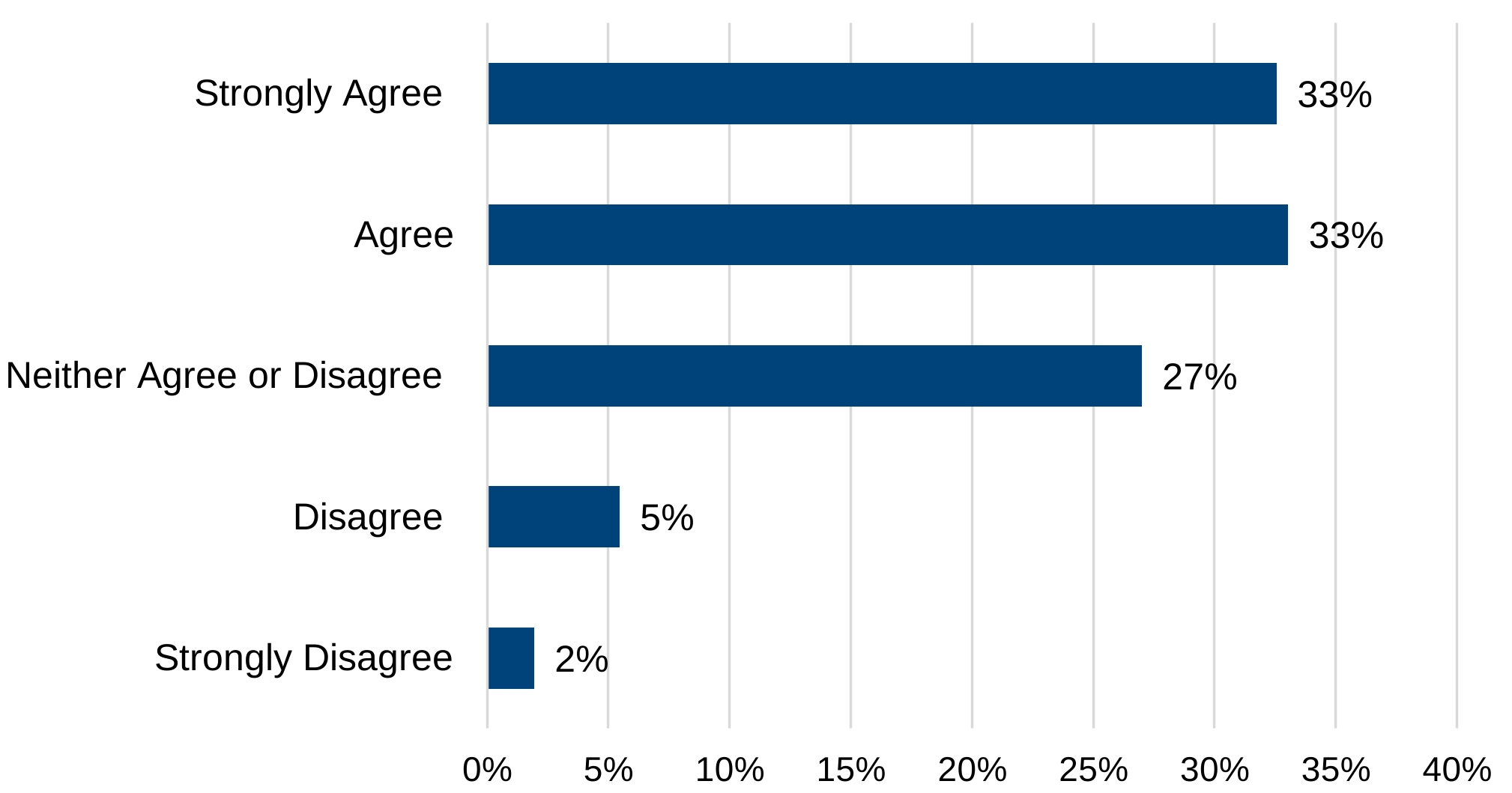
Base: 1,713 survey respondents.
Survey questions: To what extent do you agree with the following statements about Microsoft 365 Copilot? “As a result of having Copilot, I feel more fulfilled at work”.
Beyond fulfilment, users also reflected on how Copilot affects their day-to-day work. Some users described how Copilot enhanced their ability to focus on meaningful work by reducing routine or time-consuming tasks. The tool was perceived as a practical assistant that helped users manage their workload more effectively, especially when dealing with repetitive tasks.
It maybe allows more time to sort of focus on the interesting part of the work, like when I’m coding.
(User 9)
This improved efficiency also contributed to better work-life balance. By helping them complete tasks more quickly, the tool allowed to avoid carrying stress into their personal time. Copilot was often described as a comfort blanket or a quiet assistant that was always available, contributing to a sense of control and accomplishment
Just the fact that you can get stuff done quicker […] In that respect, it has had a massive impact on work life balance.
(User 19)
However, not all users felt a shift in their overall job satisfaction. Some felt that while the tool was helpful in a practical sense, it had not changed how they felt about their fulfilment at work overall. For these users, Copilot was seen as a useful addition to their toolkit, but not something that fundamentally altered their wellbeing or job satisfaction.
I’m not sure it’s improved my well-being, but I do enjoy using, like, AI and I think I’m quite of the mindset that we need to make the most of this.
(User 9)
User perceptions of effect on quality of work
Quality of work
The majority of users felt that Copilot had enhanced the quality of their work, with 73% indicating that they either strongly agree or agree with this sentiment (Figure 3.4).
Figure 3.4: Perceived change in quality of work from Copilot use
The majority of users either agreed or strongly agreed that Copilot has improved their work quality.

Base: 1,713 survey respondents.
Survey question: To what extent do you agree with the following statements about Microsoft 365 Copilot “As a result of having Copilot, the overall quality of my work has improved”.
However, while most users felt that Copilot improved the quality of their work, a few expressed more neutral views. These users acknowledged the tool’s value in saving time and reducing effort but did not feel it had significantly changed the quality of their outputs.
I don’t think it’s really improved the quality of my work, I would say […] The overall quality, I think remains the same.
(User 9)
Enhancing written communication
Users consistently described how Copilot enhanced the clarity, tone, and structure of their written communication. Whether drafting emails, preparing presentations, or summarising complex information, Copilot was perceived to help users’ express ideas more clearly and professionally. In several cases, users acknowledged that while they edited the outputs, Copilot provided a strong foundation that elevated the overall quality of their communication.
My responses are more professional, articulate. Get the message across. Very clear, very concise.
(User 8)
This improvement in communication often translated into greater recognition and credibility in the workplace. Users reported receiving positive feedback from peers and senior leaders, sometimes for work that had previously been criticised. In some cases, this recognition led to increased responsibility or visibility within their teams. Importantly, users did not attribute their success solely to the tool; rather, they viewed Copilot as a support that enabled them to deliver at a higher standard.
People have commented, ‘This is a really good Comms.’ […] I’ve not changed. I’m just using a new tool that helps me.
(User 19)
Human Judgement and Oversight
Many users stressed the importance of reviewing and refining Copilot’s outputs. While generally seen as helpful, Copilot occasionally generated awkward phrasing, repetitive content, or misinterpretations. As a result, many users consistently emphasised that Copilot should complement, not replace, human judgement. Copilot was widely regarded as a collaborative assistant that required continued human oversight. It was seen as useful for producing initial drafts or suggestions that users could then adapt to reflect their personal style, context, and professional standards
Occasionally it’ll spit out a little bit of a nonsense sentence, so you’ve got to double check that.
(User 12)
Conclusion
Microsoft Copilot was widely perceived by users as a valuable tool that enhances efficiency, improves the quality of work, and contributes to a more fulfilling work experience. Most users reported notable time savings, particularly in routine tasks such as drafting, summarising, and retrieving information. While the amount of time saved varied, even small efficiencies were seen to accumulate meaningfully over time. Rather than reducing overall workload, users typically reallocated saved time to other activities.
In addition to saving time, Copilot was credited with reducing cognitive effort, especially for repetitive or mentally demanding tasks. This allowed users to maintain focus and manage competing priorities more effectively. Some also noted improved team efficiency, as Copilot reduced their reliance on colleagues for support. However, a few users highlighted the need to verify outputs, which occasionally diminished the perceived benefits.
The tool was also associated with improvements in the clarity, tone, and structure of written communication. Many users felt that Copilot helped them produce more professional and articulate outputs, often leading to positive feedback from peers and senior leaders. While some users edited the content to align with their personal style and context, they valued Copilot’s ability to provide a strong starting point. A few, however, felt that the tool had not significantly changed the quality of their work.
In terms of job satisfaction, many users reported a positive impact. Copilot enabled them to focus on more meaningful aspects of their roles and supported better work-life balance by helping them complete tasks more efficiently. The tool was often described as a supportive presence, offering reassurance and a sense of control. Nonetheless, some users remained neutral, viewing Copilot as a helpful but not transformative addition to their work.
Overall, users viewed Copilot as a supportive and effective assistant that complements their existing skills. Its benefits were most evident in enhancing efficiency, improving communication, and enabling a shift towards more fulfilling work. However, the extent of its impact varied depending on individual roles, tasks, and the continued need for human oversight.
Chapter 4: The impact of Microsoft Copilot
This chapter summarises findings from the impact evaluation of Microsoft 365 Copilot, focusing on task efficiency, job satisfaction, and work quality. Using a quasi-experimental design, the analysis compares outcomes between staff with Copilot licences and those without, drawing on survey data and qualitative insights from 19 interviews.
Analytical framework and methodology
Analytical plan, data source and variables
Before data collection began, a pre-specified analysis plan was developed and finalised. This plan was informed by a theory of change (see Appendix 1) that outlined how Copilot was expected to influence work processes and outcomes. Based on this framework, the evaluation defined the main outcome measures, the statistical models to be applied, and eleven key tests, each linked to a specific outcome central to the evaluation objectives. To minimise the risk of Type I error (false positives) arising from multiple testing, a Bonferroni correction was applied across these eleven tests, ensuring the overall family-wise error rate remained at the pre-defined significance level. All analyses were conducted in accordance with this plan.
The pre-specified tests focused on the main effects of the intervention on task efficiency, job satisfaction, and quality of work output, as well as changes in time spent on routine tasks such as email writing, information search, and meeting summarisation.
Data for the impact evaluation came from two large-scale surveys conducted in February and March 2025. The treatment group survey included all staff with a Copilot licence, while the comparison group survey used stratified random sampling to select non-users with similar grade and business area profiles. Three outcome variables were constructed:
-
task efficiency: Measured as the average time saved per day across eight routine tasks, converted from ordinal categories into continuous minutes
-
job satisfaction: Measured using a 7-point Likert scale reflecting overall satisfaction over the past three months.
-
quality of work output: Measured on a 7-point Likert scale, assessing satisfaction with the quality of work produced over the past three months
Table 4.1: Summary of outcome variables and measurement scales
| Outcome Variable | Description | Measurement Scale |
|---|---|---|
| Task efficiency | A calculated average of the time spent per day across 8 routine tasks. These tasks were: Checking own writing for grammar, tone, or spelling; Data analysis or coding; Producing or editing written materials; Writing an email; Scheduling meetings; Searching for existing information or research; Summarising information or research; Transcribing or summarising meetings | Minutes expressed as the lower bound of each time category from a 6-point ordinal scale (for example 15 to 30 minutes was recorded as 15 minutes). |
| Job satisfaction | Overall satisfaction with one’s job over the past three months | A 7-point Likert scale, ranging from 1 (completely dissatisfied) to 7 (completely satisfied). |
| Quality of work output | Overall satisfaction with the quality of one’s work output over the past three months. | A 7-point Likert scale, ranging from 1 (completely dissatisfied) to 7 (completely satisfied). |
The independent variable of interest was a binary treatment indicator: respondents who held a Copilot licence during the trial period were coded as 1 (treatment group), and those who did not were coded as 0 (comparison group).
Econometric model
To estimate the net impact of Copilot use, the evaluation employed Seemingly Unrelated Regression (SUR). This technique is suited to analysis with multiple, potentially correlated outcome variables. The three outcomes – task efficiency, job satisfaction, and quality of work output – are assumed to be interdependent. For example, improvements in task efficiency may influence job satisfaction, and both may affect perceived work quality.
SUR allows for the simultaneous estimation of multiple regression equations, each with its own dependent variable, while permitting correlation in the error terms across equations. This means the model recognises that the unexplained variation (or “error”) in one outcome (for example, job satisfaction) might be related to the unexplained variation in another (for example, quality of work output). By allowing these error terms to be correlated, the model improves the efficiency of the estimates and provides a more holistic view of the intervention’s impact.
The SUR model is specified as follows:

Where Yᵢ is the outcome variable for individual i, Treatmentᵢ is a binary indicator for Copilot licence status, Xᵢ is a vector of control variables, and εᵢ,₁ is the error term, which may be correlated across equations.
In addition to SUR, Ordinary Least Squares (OLS) regressions were used to provide robustness checks for the main results.
Model specifications
To assess the robustness of the estimated treatment effects, nine model specifications were estimated for each outcome variable. These specifications incrementally introduce control variables in a stepwise fashion, allowing for a systematic examination of how the treatment effect evolves as additional covariates are included. Preliminary analysis identified variation in control variables between the treatment and comparison groups, and these insights informed the specification of controls in the subsequent econometric modelling (see Appendix 2).This approach helps to evaluate the sensitivity of the results to different model assumptions and to identify the extent to which observed effects may be driven by underlying differences between groups.
Table 4.2: Overview of model specifications
| Model Specification | Control Variables Included |
|---|---|
| 1 | None (unadjusted model) |
| 2 | Director General (DG) group |
| 3 | DG group, grade |
| 4 | DG group, grade, gender |
| 5 | DG group, grade, gender, age |
| 6 | DG group, grade, gender, age, job category |
| 7 | DG group, grade, gender, age, job category, health condition |
| 8 | All the above + interest in AI |
| 9 | All the above + current experience with AI tools |
By progressively including additional variables, the analysis provides a transparent view of how the inclusion of demographic, occupational, and AI-keenness factors influence the estimated impact of Copilot usage. This structure also supports robustness checks and helps isolate the contribution of each set of covariates to the overall model fit and explanatory power.
Although this report presents results from all model specifications, the following discussion and interpretation of findings are based on model specification 9, as pre-specified in the evaluation design. This model includes the broadest set of confounding variables, incorporating measurable demographic, occupational, and AI-keenness factors that could plausibly influence the outcomes. By including these covariates, model specification 9 provides the most robust and reliable estimates of Copilot’s impact. As such, references to the econometric analysis throughout the remainder of the report are drawn from model specification 9, as it best accounts for the compounding effects of relevant factors on the results.
Findings
Task efficiency
The analysis estimated that users in the treatment group saved an average of 19 minutes per day across eight routine tasks when controlling for all demographic, occupational, and AI-keenness variables. This effect was statistically significant across all specifications.
Table 4.3 shows that when we include measures of AI-related interest and experience in the analysis, the estimated impact of Copilot becomes larger. If we do not account for these characteristics, the estimated effect of Copilot looks smaller because AI-keen users may spend more time on tasks in the absence of Microsoft Copilot.
It is important to note that Copilot users were not randomly selected, which introduces the possibility of self-selection bias. People who were already more interested in, or experienced with, AI may have been more likely to take up Copilot. These individuals might also be more inclined to spend extra time on certain tasks, regardless of whether they used Copilot (for example, someone who enjoys experimenting with new technology may already spend longer searching for information or refining emails).
By controlling for AI-keenness factors, the analysis helps to address these confounding factors and makes the treatment and comparison groups more similar. This adjustment leads to a higher Copilot coefficient, providing a more accurate estimate of the tool’s true impact.
Table 4.3: Estimated impact of Copilot on task efficiency (SUR)
| Control Variables Included | Treatment Coefficient (Lower Bound, Minutes) | 95% Confidence Interval (minutes) |
|---|---|---|
| None | 10 | [7, 12] |
| DG | 10 | [7, 12] |
| DG + Grade | 11 | [8, 13] |
| DG group, grade, gender | 11 | [8, 13] |
| DG group, grade, gender, age | 11 | [9, 14] |
| DG group, grade, gender, age, job category | 12 | [9, 14] |
| DG group, grade, gender, age, job category, health condition | 11 | [9, 14] |
| All the above + interest in AI | 19 | [17, 22] |
| All the above + current experience with AI tools | 19 | [17, 22] |
All reported specifications are statistically significant at the 1% level. Figures have been rounded to the nearest minute.
Additionally, the task-level breakdown (Table 4.4) estimated that the greatest time savings were recorded in searching for existing information or research (26 minutes), writing emails (25 minutes), and summarising information or research (24 minutes).
These tasks are common across roles in DWP, suggesting that Copilot’s efficiency benefits are broadly applicable. Qualitative evidence reinforces this finding, with users frequently describing Copilot as a “time-saver” that helped them meet tight deadlines, manage competing priorities, and shift focus to activities users viewed as more meaningful.
Table 4.4: Estimated Impact of Copilot for different tasks (SUR; Model Specification 9)
| Task | Treatment Coefficient (Minutes) | 95% Confidence Interval (Minutes) |
|---|---|---|
| Checking own writing for grammar, tone, or spelling | 17 | [13, 21] |
| Data analysis or coding | 15 | [12, 19] |
| Producing or editing written materials | 20 | [15, 24] |
| Writing an email | 25 | [20, 30] |
| Scheduling meetings | 19 | [16, 23] |
| Searching for existing information or research | 26 | [21, 30] |
| Summarising information or research | 24 | [20, 28] |
| Transcribing or summarising meetings | 9 | [5, 13] |
All reported treatment coefficients are statistically significant at the 1% level. Figures have been rounded to the nearest minute.
Taken together, these findings suggest that Copilot enables meaningful time savings, allowing staff to reallocate effort toward other tasks. Qualitative evidence further indicates that time saved was often redirected to project delivery, planning, and mentoring. Over time, these daily efficiencies may accumulate, providing staff with greater capacity for strategic thinking and stakeholder engagement, and potentially leading to improved organisational outcomes.
Job satisfaction
The econometric analysis estimated a positive and statistically significant impact of Copilot usage on job satisfaction. After controlling for all demographic, occupational, and AI-keenness variables (Table 4.5), the treatment coefficient was 0.56 on a 7-point Likert scale (ranging from ‘completely dissatisfied’ to ‘completely satisfied’), indicative of a medium effect size according to Cohen’s D conventions[footnote 2]. This suggests that Copilot use made a meaningful contribution to users’ sense of fulfilment at work.
Table 4.5: Estimated Impact of Copilot on Job Satisfaction (SUR)
| Control Variables Included | Treatment Coefficient | 95% Confidence Interval |
|---|---|---|
| None | 0.70 | [0.62, 0.77] |
| DG | 0.70 | [0.62, 0.78] |
| DG + Grade | 0.69 | [0.62, 0.77] |
| DG group, grade, gender | 0.69 | [0.62, 0.77] |
| DG group, grade, gender, age | 0.69 | [0.61, 0.77] |
| DG group, grade, gender, age, job category | 0.69 | [0.61, 0.77] |
| DG group, grade, gender, age, job category, health condition | 0.67 | [0.59, 0.75] |
| All the above + interest in AI | 0.58 | [0.49, 0.67] |
| All the above + current experience with AI tools | 0.56 | [0.47, 0.65] |
All reported specifications are statistically significant at the 1% level.
Qualitative research supports this finding. Many users felt Copilot helped reduce repetitive or cognitively demanding tasks, enabling them to redirect their attention to more meaningful and engaging aspects of their roles. This shift was frequently associated with a sense of increased autonomy and control -users referred to Copilot as a “comfort blanket” that helped them navigate their day with greater confidence and reduced stress.
Quality of work output
The econometric analysis estimated a positive and statistically significant impact of Copilot usage on perceived quality of work output, with a treatment coefficient of 0.49 on a 7-point Likert scale (ranging from ‘completely dissatisfied’ to ‘completely satisfied’). This effect, like that for job satisfaction, corresponds to a medium effect size under Cohen’s D conventions and remained stable across all model specifications. This suggests an improvement in how users viewed their quality of work since adopting the tool.
Table 4.6: Estimated Impact of Copilot on quality of work Output (SUR)
| Control Variables Included | Treatment Coefficient | 95% Confidence Interval |
|---|---|---|
| None | 0.48 | [0.42, 0.53] |
| DG | 0.48 | [0.42, 0.53] |
| DG + Grade | 0.48 | [0.42, 0.53] |
| DG group, grade, gender | 0.48 | [0.42, 0.53] |
| DG group, grade, gender, age | 0.48 | [0.42, 0.54] |
| DG group, grade, gender, age, job category | 0.48 | [0.42, 0.54] |
| DG group, grade, gender, age, job category, health condition | 0.47 | [0.41, 0.53] |
| All the above + interest in AI | 0.49 | [0.42, 0.55] |
| All the above + current experience with AI tools | 0.49 | [0.42, 0.55] |
All reported specifications are statistically significant at the 1% level.
Qualitative evidence provides important context for interpreting this moderate effect size. Across interviews, users consistently described Copilot as a valuable support tool that enhanced the clarity, tone, and structure of written outputs. It was particularly effective in helping users draft emails, summarise meetings, and prepare presentations. Many participants reported increased confidence in their work and noted that Copilot enabled them to produce more professional and articulate communications, often leading to positive feedback from colleagues and managers.
However, users also emphasised that Copilot was not a substitute for human judgement. Rather, it was viewed as a collaborative assistant that generated first drafts or suggestions, which users then edited to align with their personal style, context, and standards. This reliance on human oversight was especially pronounced in tasks involving nuance, sensitive content, or stakeholder-facing outputs.
Conclusion
The econometric analysis of Microsoft Copilot’s impact on task efficiency, job satisfaction, and perceived quality of work output suggests statistically significant and positive effects across all three outcome measures. When controlling for demographic, occupational, and AI-keenness factors, an impact was estimated for task efficiency. Copilot users were estimated to save an average of over 19 minutes per day on routine tasks. Disaggregated analysis further indicated that the most substantial time savings were associated with searching for existing information (26 minutes) and composing emails (25 minutes). These efficiencies suggest that Copilot enabled staff to reallocate time toward activities they perceived as higher priority.
Changes were observed in job satisfaction, with a coefficient of 0.56 on a 7-point Likert scale after controlling for demographic, occupational, and AI-keenness variables. This medium effect size could reflect the cumulative benefits of increased task efficiency, reduced cognitive load, and improved work-life balance. Qualitative evidence supports this interpretation, with users describing Copilot as a “comfort blanket” that helped them manage their workload more effectively and focus on more meaningful aspects of their roles.
Perceived quality of work output also appeared to improve, with a treatment coefficient of 0.49 on a 7-point Likert scale after controlling for demographic, occupational, and AI-keenness variables. Users attributed this enhancement to Copilot’s ability to support the drafting and refinement of written communication, particularly in producing clearer, more structured, and professional outputs. However, qualitative findings indicate that Copilot was viewed as a facilitative tool rather than a replacement for human judgement. Most users continued to exercise editorial oversight, especially for tasks involving nuance or high visibility, which helps explain the moderate magnitude of the effect.
Taken together, the econometric analysis suggests that Copilot has a positive impact across key dimensions of work experience within DWP. These findings hold after accounting for individual characteristics such as grade, gender, age, job category, health condition, and AI-related interest and experience. However, the analysis is subject to limitations, including potential selection bias and omitted variable bias, as discussed in Chapter 5.
Chapter 5: Conclusion
This chapter presents the conclusion of the evaluation, drawing across all strands of the research. Limitations are also discussed.
Limitations of this research
While this evaluation offers valuable insights into the implementation and estimated impact of Microsoft Copilot within the DWP, the robustness and generalisability of its findings are inevitably shaped by a number of methodological constraints. Such limitations are typical of evaluations conducted after an intervention has been implemented. Although these factors do not detract from the overall contribution of this evaluation, they do necessitate a cautious and considered interpretation of the results. The limitations of this research are acknowledged here to ensure transparency and support appropriate use of the evidence.
A primary limitation of the evaluation is the absence of baseline data. The survey instruments were administered after participants had already begun using Copilot, which precluded the collection of pre-intervention measures. This introduces the possibility of post-treatment bias, particularly in questions that require respondents to reflect on their prior attitudes or behaviours. For example, measures of interest in AI before using Copilot may have been influenced by the experience of using the tool itself. This retrospective framing may limit the internal validity of comparisons between treatment and control groups.
Closely related to this is the issue of selection bias. Copilot licences were not allocated randomly but through a first-come, first-served process, often influenced by managerial discretion or peer nomination. This means the treatment group may differ systematically from the comparison group in ways that are not fully observable and controlled for. For instance, staff who were more enthusiastic about artificial intelligence or who identified as early adopters were more likely to receive a licence. These individuals may also be more engaged in their roles or tasked with more complex work, characteristics that could independently influence their reported outcomes. Consequently, this self-selection effect may lead to an overestimation of Copilot’s benefits, as those predisposed to adopt the tool might also be more inclined to report positive experiences.
To mitigate the effects of selection bias, the evaluation employed a stratified sampling strategy for the comparison group and implemented econometric controls for a wide range of observable characteristics. These included demographic variables (age, gender, health condition), occupational attributes (grade, job role, Director General group), and AI-keenness indicators (interest and experience). The use of SUR further strengthened the analytical framework by accounting for correlations in standard errors. However, the potential influence of unobserved confounders, such as workplace culture or individual motivation, cannot be fully ruled out.
Moreover, response rates varied across sub-groups (for example, Director General groups), with some categories of staff more likely to participate in the survey than others. This introduces the possibility of non-response bias, whereby the views of respondents may not accurately reflect those of the broader population. For example, individuals with positive experiences of Copilot may have been more inclined to complete the survey, thereby skewing the results.
The accuracy of self-reported perceptions presented an additional challenge. Measures of job satisfaction, perceived work quality, and time saved are subjective and may be influenced by acquiescence bias. Respondents who were unsure about the applicable time band or who felt positively about the trial may have defaulted to favourable responses. This is particularly relevant for questions on time savings, where enthusiasm about the trial or a desire to retain access to Copilot may have coloured responses. This evaluation triangulated these self-reported measures with econometric estimates, which are generally more conservative, thereby providing a more balanced view of the tool’s impact.
The qualitative interviews provided rich contextual insights; however, as is typical of such methods, their generalisability is limited. Although the sample was relatively small in relation to the overall trial population, data saturation was achieved, indicating that the key themes were well captured. Nonetheless, it remains possible that the sample did not fully reflect the diversity of the wider user base, particularly in relation to characteristics not included in the stratified sampling approach. As such, while the qualitative findings offer depth and nuance, they should be interpreted as illustrative rather than representative.
Finally, the version of Copilot used during this evaluation may differ from any future iterations due to ongoing advancements in generative AI capabilities. As such, the findings may not fully capture the performance or user experience associated with newer versions of the tool. This limitation is particularly salient in the rapidly evolving technological landscape of AI.
Conclusion
This evaluation refers to the assessment of the paid, licenced version of Microsoft 365 Copilot.
The findings suggest that Copilot delivers measurable benefits across the DWP, with consistent evidence of improved task efficiency, work quality, and job satisfaction. These outcomes were supported by a mixed-methods approach, combining econometric analysis, large-scale survey data, and qualitative interviews. In addition, the evaluation also surfaced insights into the conditions under which these benefits were realised, particularly in relation to Copilot’s implementation and use.
Implementation was characterised by strong initial interest and enthusiasm, with uptake often driven by managerial encouragement and peer advocacy. Although some training was made available to all users, onboarding experiences varied considerably. Most users did not recall attending formal training and instead relied on self-directed learning, peer demonstrations, and online resources. Many expressed a clear desire for additional training to maximise Copilot’s benefits, particularly training that was tailored to their roles, offered practical examples, and delivered in short, focused formats. To realise the full value of Copilot, users may require targeted guidance, prompt libraries, and opportunities to share best practice within their teams and peers.
Patterns of use revealed that Copilot was widely adopted and integrated into a broad range of tasks. Daily or weekly usage was common, with users employing the tool for summarising documents and meetings, drafting communications, searching for internal information, and, in some cases, coding. The tool was particularly valued for its ability to reduce cognitive load and accelerate routine processes, enabling users to reallocate time towards what they perceived as higher priority activities. However, usage was shaped by several factors, including job role, task type, trust in the tool, and concerns about data sensitivity.
Usability was widely praised, with Copilot described as intuitive and well-integrated into existing Microsoft applications. Yet prompt quality emerged as a key determinant of output relevance and accuracy. Most users developed strategies to refine their prompts over time, often through trial and error. Accessibility feedback was also positive, particularly from neurodivergent users, though concerns remained about whether Copilot-generated outputs met accessibility standards for others.
The econometric analysis estimated that Copilot had a statistically significant and positive impact across all three outcome measures. Users saved an average of 19 minutes per day, with the largest gains in email drafting and information retrieval. Job satisfaction improved by 0.56 points on a 7-point scale, and perceived work quality by 0.49 points. These estimated effects were consistent across model specifications and broadly aligned with qualitative accounts. However, the estimated impact was not uniform; some users viewed Copilot as a helpful but non-transformative tool, and the need for human oversight remained a consistent theme.
Taken together, this evaluation suggests that Copilot can deliver measurable and meaningful benefits across the DWP. These benefits were most pronounced in tasks involving information retrieval and written communication, where Copilot enabled users to reallocate cognitive resources and time toward other activities. However, the realisation of these benefits was contingent upon several implementation factors, including the availability of licences, the quality of onboarding, and the alignment of Copilot’s capabilities with specific job functions. This evaluation also highlights the importance of human oversight, with users consistently exercising editorial judgement to ensure the accuracy and appropriateness of outputs. As such, Copilot should be seen not as a replacement for human expertise, but as a complementary tool that can augment professional practice. Future deployment strategies must therefore prioritise targeted training, inclusive licence allocation, and ongoing evaluation to ensure that generative AI technologies are embedded in ways that are equitable, effective, and responsive to the diverse needs of the DWP workforce.
Appendices
Apprendix 1: Theory of Change
The Theory of Change (ToC) exercise, conducted in summer 2024, concluded that implementing Microsoft Copilot within the DWP has the potential to deliver efficiency gains by reducing time spent on routine tasks and enabling staff to focus on more complex work.
The ToC indicates that Copilot could improve productivity by streamlining activities such as generating meeting notes, summaries, emails, reports, and coding outputs. It may also support staff well-being by reducing cognitive load and stress, while strengthening collaboration and organisational effectiveness within teams. In addition, the ToC suggests that Copilot may enable faster project completion -particularly for less experienced staff - reduce the need for human intervention in repetitive processes, and enhance meeting inclusivity for part‑time staff and colleagues with additional needs.
At the same time, the ToC highlights several challenges and uncertainties. These include the initial learning curve and time required to develop effective use, the risk of over‑reliance on Copilot, and potential implications for evolving roles and responsibilities. There are also risks associated with inappropriate decision‑making if outputs are not subject to sufficient human oversight. External factors, such as policy changes and broader perceptions of AI, may further influence adoption and impact.
Overall, the ToC underscores the importance of addressing these challenges and maintaining ongoing evaluation to ensure that Copilot achieves its intended outcomes.
Appendix 2: Comparability of the treatment and comparison groups
To assess the comparability of the treatment group (staff with Copilot licences) and comparison group (staff without licences) were comparable, Pearson’s Chi-square tests of independence were conducted on a range of demographic, occupational, and AI-keenness variables. This was used to determine whether observed differences between groups were statistically significant, while Cramer’s V coefficient is used to measure the strength of any associations (ranging from 0 for no association up to 1 for a very strong association).
Table A2.1: Chi-Squared results for differences between treatment and comparison groups
| Control Variable | χ² (df) | p-value | Cramér’s V |
|---|---|---|---|
| Civil Service Grade | 47.46 (7) | <0.0001* | 0.107 |
| Directorate | 60.88 (8) | <0.0001* | 0.121 |
| Job Role | 106.41 (20) | <0.0001* | 0.160 |
| Gender | 7.20 (5) | 0.206 | 0.042 |
| Age Band | 82.87 (7) | <0.0001* | 0.142 |
| Prior AI Experience | 474.10 (4) | <0.0001* | 0.338 |
| Initial Interest in Copilot | 959.27 (5) | <0.0001* | 0.481 |
| Health Condition | 19.39 (1) | <0.0001* | 0.068 |
Note: * indicates p < 0.05 (statistically significant difference between groups). All marked differences above are significant at p < 0.0001.
Most demographic and occupational variables differed significantly between the treatment and comparison groups; however, these associations were generally modest. For example, differences in Civil Service grade and directorate were statistically significant (p < 0.0001 for both), but effect sizes were small (Cramér’s V = 0.107 and 0.121, respectively), suggesting these imbalances are weak and unlikely to have a meaningful practical impact.
In contrast, attitudinal factors related to AI keenness exhibited much larger differences between the groups. Both Prior AI Experience and Initial Interest in Copilot were significantly higher among the treatment group (p < 0.0001), with Cramér’s V coefficients of 0.338 and 0.481 respectively – indicating moderate-to-strong associations. In other words, staff who volunteered for the Copilot trial were considerably more likely to have prior experience with AI and greater initial enthusiasm for Copilot than those in the comparison group. These differences are not only statistically significant but also practically meaningful: they reflect the expected self-selection bias (that is, keen, tech-interested individuals were more inclined to opt into the trial).
In summary, aside from the notable differences in AI-related experience and interest, the treatment and comparison groups were fairly well-matched on the other measured characteristics. We have controlled for all the above variables in our regression analyses of Copilot’s impact. By doing so, we mitigate the risk that any remaining group differences (even those associated with low Cramér’s V coefficients) could bias the results. In effect, our adjustments ensure that even variables showing only weak group differences (such as grade, directorate, or health condition) do not inadvertently influence the outcome measures, allowing for a more reliable estimation of Copilot’s true impact.
-
Three individuals in the treatment group were excluded from the analysis because they reported not having access to Microsoft Copilot on their work laptops. ↩
-
Cohen’s D effect size conventions are commonly interpreted as: Small = 0.2, Medium = 0.5, Large = 0.8. (Source: Cohen, J. (1988). Statistical Power Analysis for the Behavioural Sciences (2nd ed.). Hillsdale, NJ: Lawrence Erlbaum Associates.) ↩