AI insights: Using AI to manage shared drives (HTML)
Updated 3 August 2026

© Crown copyright 2026
This publication is licensed under the terms of the Open Government Licence v3.0 except where otherwise stated. To view this licence, visit nationalarchives.gov.uk/doc/open-government-licence/version/3 or write to the Information Policy Team, The National Archives, Kew, London TW9 4DU, or email: psi@nationalarchives.gov.uk.
Where we have identified any third party copyright information you will need to obtain permission from the copyright holders concerned.
This publication is available at https://www.gov.uk/government/publications/ai-insights/ai-insights-using-ai-to-manage-shared-drives-html
1. Ungoverned content: a barrier to AI readiness
1.1 The scale of the challenge
Well-managed, accessible content enables more effective use of generative AI tools, improves reuse of information and supports productivity gains across teams.
Legacy shared drives represent one of the largest unmanaged data estates across government. They can contain vast volumes of aging unstructured content - some containing hundreds of millions of documents.
This not only creates legal, security and cost risks, but also prevents departments from effectively reusing valuable information - constraining AI adoption, insight generation and organisational productivity. Much of this data should already have been destroyed - the continued retention of such content brings unnecessary cost and risks.
Some of the data will have business value and should be made available to teams for re-use. A small proportion (2 to 5%) of shared drive content will have historical value and must by law be transferred to the National Archives after twenty years. Departments will be unable to meet this requirement unless they develop the capability to identify and process such content.
Good information governance is foundational to AI readiness. At this scale of departmental shared drives, manual approaches are not viable. AI and data science-enabled approaches will be required to manage content effectively. These approaches now make it possible to review content at scale. Without these capabilities, departments cannot realistically meet their legal, operational and AI transformation requirements.
1.2 The role of senior leaders in effecting change
This work is a core component of improving data maturity and enabling safe, effective use of AI tools across the department. To address the risks and unlock value from shared drives, senior leaders should act now to:
1. Set a clear mandate for Knowledge and Information Management (KIM) and data teams to review and dispose of legacy content
2. Adopt a proportionate resourcing model, combining KIM expertise with data and AI capability
3. Select a tooling approach aligned to scale and complexity
4. Define a risk appetite - balancing deletion, retention and preservation decisions
2. About this guide
2.1 Who this guide is for
This guide helps you to integrate AI and data science techniques into your approach to managing content that was created on network shared drives. It builds on approaches set out in the AI Insights Guide: Using AI to manage the digital heap.
The guide sets out a 7-step approach to reviewing your shared drives. The approach enables you to identify and process content of historical importance whilst removing content that no longer has business value and setting retention periods on all other content.
The guide is aimed at government Knowledge and Information Management (KIM) professionals as they are responsible for setting and implementing retention policies across all data repositories, including shared drives. Tackling shared drives will require collaboration between KIM professionals and their digital and data colleagues, including data scientists and IT professionals.
The application of AI for life cycle management is a rapidly developing field. In the coming years you can expect that tools, methods, approaches and processes will improve. Your department’s skills and experience in deploying these tools will also improve.
2.2 Why action is needed on shared drives
Government organisations must apply effective life cycle management to all content. The Public Records Act requires that records selected for permanent preservation be transferred to The National Archives (or equivalent) within 20 years. This includes content created on shared drives.
The guide aims to help your department comply with your obligations under the Public Records Act and the Code of Practice on the Management of Records for records created in network shared drives. It will help you to:
-
remove content that no longer holds business value
-
identify and protect content with remaining business value
-
identify and process content of historic value
Priorities may differ by department depending on the age of the shared drive content and how long it has been inactive. For example, you might prioritise preserving or expanding teams’ access to shared drive content and enabling them to use AI tools to exploit it. Alternatively, you might prioritise sending content of historic value to The National Archives promptly and disposing of content with no continuing business value. This guide supports both priorities.
Tackling shared drives, and the digital heap more generally, will contribute to your department’s broader AI readiness and data maturity
2.3 The nature of legacy shared drives
Network shared drives (or ‘fileshares’) were the standard document storage environment in many government organisations, before cloud suites like Microsoft 365 and Google Workspace became common.
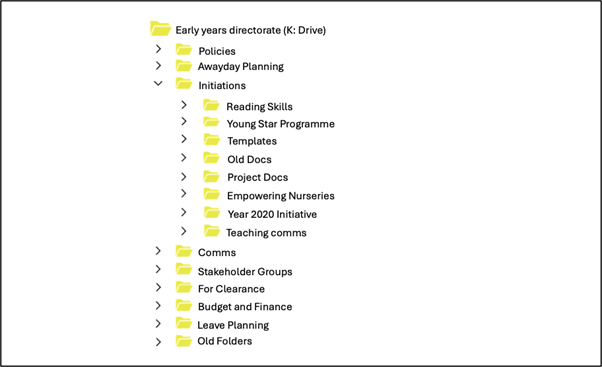
Typically, a team was given a top-level (or root) folder, under which multiple levels of subfolders could be added. Team members saved files directly into these folders. For the purposes of this guidance, a ‘drive’ is the top‑level (root) folder allocated to a team.
The image below is purely illustrative and does not represent an actual drive
Shared drives were a relatively unsophisticated environment. Networked shared drives generally lacked functionality to:
-
apply retention rules
-
retain contextual information about the teams that used each shared drive
As a consequence, content in shared drives has tended to accumulate without any routine processes to delete content that is no longer required. Your department may have retained nearly all the content that accumulated on their shared drives, potentially dating back to the late 1990s or early 2000s. You may lack context on the teams that used those drives, and what they used them for.
Your shared drives may have remained on on-premise servers, or they may have been moved to a cloud platform such as Amazon Web Services (AWS) or Microsoft Azure, or they may have been migrated into an online system such as Microsoft 365.
A shared drive is likely to contain a wide range of content. There will be significant amounts of content that is not needed any more, for example:
-
documentation of past internal administrative and support processes
-
trivial documentation and duplicates
-
uncommunicated drafts
However, some content will have continuing business value –such as evidence of important policy initiatives, case work and ministerial or royal visits – that is not documented in any other surviving repositories.
3. Make the case for acting on shared drives
3.1 Set out the business case
There is a compelling business case for acting on shared drives:
-
identifying content with business value for organisational re-use can enhance policy development and improve decision-making
-
removing unnecessary data reduces storage costs and reduces information and cyber security risk
-
the storage of personal data that no longer serves a business purpose may breach data protection principles
-
managing content effectively supports timely responses to inquiries and Freedom of Information requests and meets the Public Records Act requirement to transfer records to The National Archives within 20 years
You may need to seek a formal mandate from your organisation to review shared drives. If so, you should set out:
-
the reasons why you are conducting the review
-
the costs and risks associated with not acting
-
the benefits sought from the review (framed in terms of cost savings, reduction of risks, improved exploitability of retained content or improved compliance with legislation)
-
the approval process by which you will seek organisational agreement to proposed disposition actions
-
the timeframe in which the review will be carried out
-
the support needed from the rest of the organisation
Your business case may be more successful if you can evidence:
-
the volume of content held on shared drives and its storage costs
-
examples of high-risk content (including personal data) being retained beyond business need
-
instances where large volumes of content caused delays in responding to inquiries or information requests
-
examples of content likely to have business use for your organisation
-
examples of content that should be transferred to the National Archives
You may also wish to describe how providing business areas with access to relevant content in shared drives could improve their effectiveness.
3.2 Establish a benchmark cost of storing the drives
Benchmarking shared drive storage costs will help you to:
-
alert your organisation to the costs of retaining excess content
-
provide a baseline to assess the cost or financial impact of your proposed actions
The annual costs of retaining the shared drives will depend on:
-
the location of the shared drives
-
the size of the shared drives (in terabytes)
-
the pricing terms of your department’s contract with its cloud (or server) hosting provider
You may be able to realise cost savings by preventing your organisation from exceeding its current contractual storage limits. Consider a scenario where:
-
shared drives have been migrated to SharePoint
-
Microsoft 365 charges are partially determined by a SharePoint storage allocation
-
current estimates project that the department will exceed this allocation within the next 2 to 3 years
In this situation, conducting a review to reduce shared drive content can help the department remain on its current, lower cost storage allocation for a longer period – and so avoid the move to a higher storage tier and associated increased costs.
4. Prepare your review
4.1 Establish your data protection and AI governance arrangements
Before starting, ensure you have:
-
Addressed data protection requirements (including a Data Protection Impact Assessment where required)
-
Put appropriate security controls in place
-
Defined any impact on legal proceedings, public inquiries and FOI
-
Defined an approach for algorithmic transparency (ATRS)
4.1.1 Assess the data protection impact of your review
Your shared drive content may contain personal data. You will need to ensure that data protection principles, and the rights of data subjects, are respected at all stages of the review.
You should involve data protection colleagues at an early stage of planning the review. You should consider carrying out a formal data protection impact assessment of the review before you start.
Applying life cycle management to content held on shared drives helps support the data protection obligation to minimise personal data and not to retain personal data longer than is necessary. However, you will also need to ensure that:
-
appropriate access permissions are applied to content at all stages of the process
-
appropriate security protections are in place for content at all stages of the process.
-
any duplicate set of the drives (for example, duplicate sets taken for the purpose of analysis) are accorded the same level of protection as the original set of drives
4.1.2 Establish your AI governance arrangements
When using AI tools during your review, you should ensure that these tools are used in accordance with the principles set out in the AI Playbook for the UK government. You should also consult the Guidance on AI and data protection issued by the Information Commissioner’s Office.
Be prepared to use the algorithmic transparency recording standard to publish information about how and why you have used algorithmic tools to make decisions on content held in legacy shared drives.
You must ensure that data is kept secure at all stages of your review. You should consult the guidance available on security.gov.uk, including Guidelines for secure AI system development.
4.1.3 Identify any specific risks or sensitivities
As well as personal sensitivities there are likely to be other sensitivities within your shared drives. Assess if any content held on shared drive areas will require special protection during the review, for example:
-
if a shared drive was designed to hold content at one of the higher levels of the government security classification
-
for the drive of a team that carried out particularly sensitive work
-
for the drive of a human resources department
4.2 Get access to your department’s shared drives
To apply AI and data science techniques to content held in shared drives, you need:
-
access to the entirety of the shared drive content that falls within scope of the review
-
the capability to run analytics tooling over the content
To ensure proper use of these access rights, you should consider implementing controls that demonstrate how their use is being governed. You can do this in various ways, including:
-
ensuring audit logs capture drive searches and material downloads
-
ring-fencing highly sensitive shared drive areas (for example, HR folders)
4.3 Ensure your content is in an appropriate storage environment
Network shared drives were typically created on on-premise servers before the advent of cloud computing. On-premise servers may lack modern security controls, increasing susceptibility to cyber threats like ransomware, malware and exploitation of outdated protocols.
Most organisations have since moved their drives to a cloud environment to capitalise on the benefits of cloud computing, including greater levels of security and cost efficiency.
Shared drives can be housed in 2 main types of cloud environment:
-
software-as-a service offerings – for example Microsoft 365 or Google Workspace
-
infrastructure-as-a-service offerings – for example AWS or Microsoft Azure
If shared drive content is in an unsuitable environment, consider migrating it to your preferred environment. Annex 1 explains how to choose between these environments and Annex 2 explains how to migrate content into your chosen environment.
4.4 Identify your functionality requirements
To review content in your shared drives you will need functionality that enables you to:
-
profile your shared drives
-
analyse content
-
add extra metadata to content
-
enhance the structure of content
-
apply retention rules to content
-
maintain an audit trail of actions on content
The exact functions needed will depend on the objectives of your approach.
Refer to Annex 3 for guidance on the types of functionality that are useful when reviewing shared drives.
4.5 Choose a strategy for meeting your tooling needs
There are 3 broad strategies for meeting your tooling needs. You could:
-
set up a data science environment to use open-source tooling
-
develop bespoke tools
-
use commercial off-the-shelf software
When deciding which of these options is best for your purpose, consider:
-
the scale of the review you will undertake of the shared drives
-
the data science skills at your disposal
For more complex objectives (for example, if you need to reorganise content, or sensitivity review content) you may need the flexibility and power of a data science environment, or to develop bespoke tools.
Data science environments can only be used by people with specialist data science skills, including coding skills.
The development of bespoke tools typically involves:
-
taking some of the tools a data scientist would use in a data science environment
-
packaging them up with a user interface so that KIM professionals could use them even if they do not have programming and data science skills and experience
For less complex objectives (for example, to migrate content) you may be able to use commercial off-the shelf (COTS) software. You can use this software through a user interface without requiring coding skills. COTS options tend to be less flexible than either data science environments or bespoke tools, but the use of them tends to reduce the information assurance and information security burden.
For more information on these different tooling strategies, refer to Annex 4.
4.6 Make shared drives read-only
Before starting a review, you should set the shared drives to read‑only, with the only exceptions being for specific, unavoidable business needs not met by other systems.
Making the shared drives read-only prevents new content being added during the review, which might require the process to be repeated.
The method for making shared drive content read-only depends on whether the content is stored in:
-
on-premise servers
-
on cloud infrastructure (such as AWS or MS Azure)
-
a cloud suite such as Microsoft 365
Take a back-up copy of the drives. This means that you have 2 copies of the drives:
-
one for analysis and processing –- you may need to move it into an environment that is suitable for the tools you wish to use
-
one for back up, to ensure roll-back is available if any errors are made with the content – you can then delete the back-up copy once you have satisfactorily completed the review (barring any legal holds)
4.7 Define the approval process for your disposition actions
You will need a clear process for your department to check and approve your review decisions before they are actioned.
The process should:
-
give your organisation confidence that decisions are verified before they are actioned
-
reduce the risk of inadvertently deleting valuable content
-
create an audit trail that explains, defends and accounts for your disposition actions
The approval process should be proportionate. Design an approval process that you can run within a reasonable time frame and at a reasonable cost in terms of staff time.
The process would ideally include checks with:
-
your department’s legal, access to information, and inquiry liaison teams to confirm that the proposed deletions do not impact any information that is under a legal hold, or relevant to an ongoing inquiry, investigation or access to information case
-
business areas to confirm that the proposed deletions do not contain information needed for operational or accountability purposes, or for the defence of departmental, national or citizen rights or entitlements
5. Review your shared drives
This section sets out a 7-step approach for conducting a review of your department’s shared drive. The 7 steps will enable you to identify and process content of historic value, and to remove content that is no longer of business value.
Step 1: understand the organisational context
-
identify the operational context of your department during the period that the shared drive was in use – including the organisational structure, the mission of the department; and the most important initiatives and events it was involved in
-
define your selection priorities – determine which activities, events, policies, programmes and functions merit permanent preservation of their records
-
identify the teams, units or functions who created records linked to your selection priorities
To help you do this, you could use:
-
annual reports
-
historic organisational charts
-
content about the programmes, projects and policies published on the department’s website at the time – your department’s websites will have been captured into the UK Government Web Archive
-
record selection policies (or operational selection policies) in which your department identifies the records needing permanent preservation
-
documentation (including catalogue entries) for records previously sent to The National Archives
The information that you gather on past departmental structure, policies, programmes and records selection priorities could be a useful source from which to generate search strings or prompts to large language models (LLMs). These searches or prompts may help you locate content responsive to your selection priorities (in step 3). The AI.gov.uk knowledge hub has advice on Experimenting with prompts.
Step 2: profile each drive
For the purposes of this guidance, a drive is the top-level (root) folder allocated to a team. Effective profiling may allow you to make decisions at top-level folders (drives) rather than on sub-folders or on individual items, which will save substantial time and resource, because:
-
you have less decisions to make, to check and to defend
-
you can use your professional knowledge of which areas of your department create records that have historic value
-
you have less need to engage with the folder structure within a drive – folder structures within drives tend to lack a coherent logic
-
you can scale up your decision making – your shared drives may contain millions of items, making item-level decision-making impossible
For each drive, it would be useful to identify:
-
the name of the team that used the drive
-
the role of the team that used the drive
-
the date range within which the drive was actively used and added to
-
a current business owner/Information Asset Owner (IAO) for the drive – this will normally be the directorate or team that carries out similar activities
- there may be some drives for which no business owner can be identified – for example, if your department no longer has those functions
You should pilot the approach on a small number of drives (for example, 1–2 drives) to build confidence, test tooling, and understand the scale of effort before scaling to a full programme.
Several UK government departments have used file storage analysis tools to help them profile their shared drives. Such tools can provide statistical information about a drive (for example, its size, the number of items, the file formats that are present, the locations of duplicates, the locations of large files). They typically provide a dashboard to enable you to drill into a shared drive and navigate through folder structures.
Use Ai when you need to analyse and summarise drives. For example, you could prompt a generative AI tool to describe the main topics, programmes and projects documented in a drive.
Step 3: identify any drives likely to have historical value
Content of historical value will not be evenly distributed across your shared drives but will be ‘clumped’ together in particular drives. The purpose of this step is to identify the drives in which those ‘clumps’ are likely to be located.
Some areas of your organisation are more likely to create records of historical value than others. This may be because they have a strategic coordination role within the department, or they lead on an important policy area, or they lead the response to an important issue or crisis. Other areas of the organisation may play more of a support role, or are executing existing policy rather than developing new policy. These areas are much less likely to create records of historical value.
In this step, for each drive evaluate whether the team’s societal or departmental impact justifies permanent preservation of their documentation.
Content of historical value is likely to be found in the drives used by teams that had important roles in:
-
the strategic coordination of your department’s activities (for example, private offices of ministers and permanent secretaries)
-
developing and delivering the mission-critical activities of your department
-
developing legislation
-
leading programmes of national significance
-
participating in (or responding to) events of national significance
Identifying a drive as having historic value does not commit you to keeping every item within it – you can later appraise it and remove content that is not worthy of permanent preservation (refer to step 6).
Use AI when you need to rank drives based on how well they meet each of your selection priorities. For this you would need to formulate selection priorities so they could be used to either prompt an LLM or train a classifier. When combined with the information gathered in step 2, this might enable you to display a list of drives in order of relevance to selection priorities, with a summary of the contents of each drive and the statistical details of each drive.
Step 4: schedule disposition of all other drives
For each drive deemed unworthy of permanent preservation:
- assign a retention period to it and hence calculate a disposal date
Determine a retention period based on the team’s or directorate’s role. Where possible use a simple division into long, medium and short retention bands. Add more bands if your department has specific retention requirements.
AI can support you by generating summaries of the content of the drive. Use these summaries to validate, check or challenge your retention decision.
Tooling can support you by assigning a retention rule to each drive. For a drive moved into SharePoint within Microsoft 365, retention policies can be applied to a whole SharePoint site, or a default retention label can be applied to every document in the library in which the drive is stored.
Step 5: establish an order of priority for drives of historical value
Drives identified for permanent preservation require resource-intensive pre-transfer processing before being sent to The National Archives. You should establish a processing pipeline to determine the most appropriate order for this:
-
identify drives which are approaching, or have exceeded, the 20-year mark and prioritise drives that contain the oldest content
-
assess the likely level of sensitivity more sensitive content will take longer to process
Tackle drives with a lower level of sensitivity first. This enables you to eliminate backlogs whilst building experience in sensitivity review with lower-risk content.
Use AI when you need to:
-
restore date ranges on drives where creation dates or last modified dates were corrupted (for example, in migrations)
-
show how content held in different drives is related, allowing similar drives to be batched together for processing
Tooling can help you by:
-
identifying the date range of each drive
-
enabling you to assign a processing priority to each drive deemed to be of historic value (for example, some file storage analysis tools store scans of a drive in a database to which metadata fields can be added)
-
generating reports that list drives of historic value in priority order (provided you have assigned a processing priority to each drive)
Step 6: process drives of historic value in priority order
Before you transfer a drive of historical value to the National Archives, you need to:
-
appraise it (not all content within it will be worthy of permanent preservation)
-
sensitivity review it (some content worthy of permanent preservation will contain sensitive information that should not be made publicly available)
Refer to the National Archives website for guidance on these digital transfer steps. This includes guiding principles on conducting a sensitivity review.
Process drives in the priority order that you identified in step 3. For each drive of historic value:
- break the drive into segments – divide the drive into segments (typically areas of the folder structure)
- each segment should be small enough that one reviewer (with the aid of data science tooling) could sensitivity review it
- use tooling to distinguish each segment (perhaps by means of a label applied to the highest level folder within the segment) and to calculate how much content is in each segment
- appraise each segment – if the segment has historic value, you may wish to run checks for duplication and for content that is obviously trivial or irrelevant
- once those checks are complete, place the segment in a pipeline for sensitivity review and transfer
- if the segment does not have historic value then either delete it or schedule it for disposition at a future date
-
sensitivity review each segment – within each segment that is selected for permanent preservation, use sensitivity reviewers to identify any content covered by an exemption from public access listed in the Freedom of Information Act
-
transfer the processed drive to the National Archives – transfer the drive to the National Archives with sensitivities redacted or removed
- under the 20-year rule in the Public Records Act, you will transfer selected, sensitivity-reviewed digital records 20 years after they are created (the National Archives is also happy to take early transfer of material)
Drives may contain files that are in an unsupported format. The National Archives offers:
-
a free software tool, Droid, that can generate a report of the formats of files on your shared drives
-
a list of software formats that the National Archives can sustain over the long term – the National Archives can accept these formats from public bodies; preserve the information they contain and provide access to them.
- If you select digital records for transfer that are in a format that does not appear on this list, the National Archives may still be able to accept them, but it might require further research – in this scenario, contact them
You should pilot the approach on a small number of drives (for example, 1–2 drives) to build confidence, test tooling, and understand the scale of effort before scaling across all those drives deemed to contain content likely to have historic value.
Use AI when you need to:
-
generate clusters of closely related folders within a drive, helping to divide content coherently, even when the drive’s structure is disorganised.
-
highlight passages in documents that may fall under Freedom of Information Act exemptions (you may need to build a lexicon, rule set or prompt library to support this)
-
identify names of people, countries, places and projects within a set of documentation (and providing a means of navigating from those entities to their occurrences in the documentation) – this is commonly called ‘entity extraction’
Tooling can help you by:
-
recording stages in a sensitivity review process (for example, assigning a set of folders, or a folder or item, to a sensitivity reviewer for review) and recording review decisions
-
redacting passages within documents that are identified as sensitive
Step 7: dispose of redundant drives
You will need to dispose of drives that are no longer needed. You should:
-
create a report listing all the drives due for disposal – the report should list all the drives for which the retention period (set in step 4) has expired, and therefore for which the disposal date is in the past
-
give business or asset owners a chance to comment on proposed disposals – alert them to the disposal plans and set a time window for objections
- consider providing an AI generated summary of the drives to help inform their assessment
-
check for legal holds – consult Legal, Inquiries, FOI and Data Protection teams to confirm if the drives proposed for disposal are affected by litigation, inquiries or access to information requests
-
dispose of drives identified for disposal if no objections or holds have been identified – the process for disposing of digital content should be set by your Departmental Records Officer
The following measures will help you explain and defend your disposition decisions:
-
retain a report listing the records destroyed, and documentation of the authorisation of the disposition actions
-
retain an AI generated summary of the drives that you dispose of
-
document how AI was used in the disposition process (for example, in a report made under the algorithmic transparency and reporting standard)
Tooling can support you by enabling you to conduct, control and record a consultation with business owners on the fate of particular drives.
Annex 1: where to store your shared drive content
If shared drive content is in an unsuitable environment, consider migrating it to your preferred environment. Use this annex to help you decide where to store your shared drive content.
When to store content in a software-as-a-service environment
Software-as-a-service offerings, such as Microsoft 365 or Google Workspace, serve as the main day-to-day working environments for end users. These environments will enable you to apply retention rules to content through functionality available to administrators.
Consider storing the content of the shared drives in your main software-as-a-service environment if:
-
it was added to relatively recently and is relevant to the work of teams or directorates
-
you want to give end users, teams or directorates access to the content within their daily working environment
-
you have good knowledge about each drive (including who it belongs to and who should be able to it access it)
-
only a small percentage of content is approaching 20 years old – therefore, a large-scale appraisal exercise to identify historically valuable content for transfer to the National Archives is not immediately necessary
-
moving content into an environment like Microsoft 365 does not have an adverse impact on the per-user cost your department pays for the service
-
your team does not have access to data science skills and tools, and so would benefit from being able to process content with the suite’s records retention, search and analytics functionality
Assess whether you need to tighten access permissions on shared drive content before moving it into an environment such as Microsoft 365 or Google Workspace. These environments are very different from those in which shared drive content was originally stored. End users typically have access to much more powerful search and generative AI tools, enabling more content to be discovered, even if the end user is not consciously looking for it.
When to store content in an infrastructure-as-a-service environment
Infrastructure-as-a-service environments, such as AWS or Microsoft Azure, allow data science tools to be used during review. These environments will be useful if your team has strong data science capabilities, and if you need to carry out significant processing on the drive. For example, you might wish to reorganise content, appraise content or conduct a sensitivity review on content selected for permanent preservation.
Consider storing the shared drives in an infrastructure-as-a-service environment if:
-
a relatively long time has elapsed since content on the shared drive was added to
-
your end users, teams or directorates would get no significant benefit from being able to access their shared drive content in their day-to-day working environment
-
you have relatively weak knowledge of what content is on the shared drives, who it belongs to and who should be able to access it
-
some of the content is close to 20 years old and the main priority is to process it by identifying content of historical value (and then sensitivity reviewing that content and transferring it to the National Archives)
-
your KIM team has access to data science skills
-
your KIM team intends to use a data science environment or bespoke data science tools to process content
Annex 2: how to migrate content into your chosen environment
If shared drive content is in an unsuitable environment, consider migrating it to your preferred environment.
Recognise the opportunities of shared drive migrations
Migration projects offer opportunities as well as risks. They offer the opportunity to:
-
review content and remove redundant or trivial content (ROT)
-
set retention rules on content
-
ensure teams continue to have access to shared drive content that is relevant to their work , so that they can exploit it with their generative AI tools
Consider designing your migration project to take advantage of these opportunities. If you simply ‘lift and shift’ your entire shared drive into a location in a cloud environment, you are likely to transfer all the costs and risks of that content to the new environment.
Mitigate the risks of shared drive migrations.
Any move of records poses risks that need to be mitigated. Your migration process needs to have measures in place to ensure that:
-
any systems or processes that were dependent on the shared drives do not get broken by the move
-
the dates of items do not get reset (and hence corrupted) when the items move
-
the structure of shared drives and the access permissions on those drives are preserved during and after the move
-
duplicate sets of content created as back-ups during the move are not retained once the move is satisfactorily completed
Steps in the migration process
Consider taking the following steps when managing a migration project.
Plan the migration
-
Step 1: profile the content that is to be moved. Benchmark the ‘as is’ state of the shared drives. Identify the volume of the drives, the date range of the content, the extent to which the drives are still being added to (or the date they were last added to). Identify any file types that are no longer supported. Scan the drives for any files containing potential threats (for example, from macros, scripts or code).
-
Step 2: identify any areas of business-critical content and any areas of content which may contain content of historical value. Interviews with stakeholders might help with this.
-
Step 3: make an overall plan for the move. Set out what shared drive content you want to move, to what target repository, for what reason, with what governance controls.
-
Step 4: identify (and plan for) operational dependencies. Establish whether any of your organisational IT applications are dependent on the shared drives (for example, because they use content stored on shared drives as an input, or because they place outputs of processes into a shared drive). Make a plan to ensure that all dependencies that are business critical continue to work before, during and after the migration.
-
Step 5: define the target state of the content. Identify the state that the content needs to be in to support its integration into the new repository. This includes any additions, enhancements or adaptations to content metadata, structure and access permissions.
Prepare the migration
- Step 6: make the content in the original repository read-only. Do this is to prevent colleagues making changes or additions that would be lost when the original content is deleted later in this process.
Step 7: make a back-up of the drives. This means that you have 2 copies of the drives: one to be processed and migrated to the target destination, the other for back up so that roll-back is available if any errors are made with the migration. Once the migration has been satisfactorily completed the back-up copy can be deleted (barring any legal holds).
- Step 8: ensure that data metadata will not be reset by the move. Repositories typically set a creation date and last modified date on items stored within them. When you move content from one repository to another, there is a danger that the new repository will reset those dates. Ensure that the original creation and modified dates of the content are preserved during and after the move of content to the new repository
Execute the migration
-
Step 9: process the content. Make any necessary changes to shared drive content to get it into the target state (the state in which you can move it in a way that meets your goals for the migration). This processing might include addition of default retention rules, removal of time served and trivial content, removal of unwanted file types, and addition of access permissions.
-
Step 10: move the target set into the destination repository. You may need a phased approach so that each move can be checked and validated before content is made available to end users.
-
Step 11: validate the migration. At the end of all the moves, validate that content has been moved successfully, and any processing has been carried out successfully.
-
Step 12: delete the back-up. Once the migration has been validated, the back-up copy should be destroyed (barring any legal holds).
Annex 3: useful functionality
This annex describes the types of functionality that are useful when reviewing a set of shared drives.
Functionality to enable you to profile your shared drives
You may need to gain an understanding of:
-
the total volume of your shared drives
-
the different file types contained in the drives
-
the number of different drives
-
the date range of each drive
-
the latest date that content was modified within each drive
This information is useful at the planning stage of a migration, cleansing, review or appraisal project.
Your tooling would therefore need the capability to output reports with this information. You might also benefit from the tool having dashboarding and data visualisation capabilities to enable you to drill down to get more detail on each of these areas.
Profiling the file types within your drives is useful because it enables you to identify any file types that are no longer supported or no longer accessible (for example, because of software obsolescence). It also enables you to identify file types for which there is a high likelihood that the content is trivial.
Functionality to enable you to analyse content
Appraisal and sensitivity reviews are likely to require search, analytics or AI tools to analyse content on the shared drive. This will enable you to gain a better understanding of the features of particular drives, file types, topics and so on within the repository.
For example, you may need the functionality to:
-
locate content responsive to particular appraisal priorities
-
define vocabularies (or rules) that indicate content relevant to appraisal priorities
-
define vocabularies (or rules) that indicate trivial content
-
define vocabularies (or rules) that indicate content potentially covered by Freedom of Information Act access exemptions
-
search content using defined vocabularies or rule sets
-
create dashboards to visualise and drill down into search responses
-
generate an AI summary of drive content or defined folder sub-sections.
Functionality to enable you to add extra metadata to content
Profiling your shared drives will lead to a better understanding of the drives, their content and the appropriate retention rules or immediate disposition actions.
To gain greater control over content, you may require functionality that enables you to enhance metadata. For example, you may need to assign the following metadata to root folders, sub-folders or items:
-
original organisational unit name
-
current organisational unit name
-
related topic or function
-
value assessment (for example, ROT, ongoing value, potential historic value)
-
a retention rule (for example, short term, medium term or long term)
-
a disposition action (for example, delete or retain)
-
a sensitivity (for example, an FOI exemption that they are responsive to)
-
a stage in a process (for example, reviewed or not reviewed)
Functionality to enable you to apply retention rules
One purpose of reviewing your shared drive is to distinguish content of ongoing business value from content that no longer has value. Once you have identified content that is of ongoing value, you may benefit from putting a retention regime in place that enables that content to be managed through the rest of its life cycle.
This includes functionality to:
-
set rules on content – including the ability to set rules on root folders, sub-folders or items – this involves setting both a time period and the trigger date from which that time period starts
-
run reports – for example, on content due for disposition
-
kick off disposition reviews – workflows that assign content to designated business owners or KIM professionals for review (and that track the progress of the review)
Functionality to maintain an audit trail of actions on content
It is important to keep a record of any actions you have taken to dispose of drives, sub-folders or items. You may therefore need functionality within your tooling that records:
-
the scope and extent of the content that was disposed of
-
the reasons for the disposition
-
the authorisation of the disposition
-
the date on which content was disposed
Annex 4: comparison of different tooling strategies
This annex helps you choose how to meet your tooling needs. It sets out the pros and cons of:
-
data science environments
-
bespoke tools
-
commercial off-the-shelf software
When to use a data science environment
Consider deploying a data science environment if you:
-
need to make radical interventions on shared drive content
-
have strong data science skills available in your team
A data science environment is an environment in which you write code to deploy tools or models of your choice to process content. This type of environment is likely to be more flexible and powerful than off-the-shelf software. However, it will need more expertise to deploy, operate and govern. For this to be a viable option, you will need a trained data scientist, data engineer or data analyst working in or with your team.
A data science environment may contain:
-
a tool (such as Apache Tika) that can open the individual items within the shared drives and extract both the contents and the metadata – note that Apache Tika requires a Java runtime environment
-
a package (such as MS Excel) to create and read spreadsheets
-
a visualisation tool (such Power BI) to enable you to interact with content via dashboards
-
the ability to load programming languages (for example, Python)
-
a notebook tool (for example, Jupyter) and an integrated development environment (for example, VSCode) within which to write code
-
the ability to download and install additional open-source python libraries
-
a budget for cloud resources
-
the ability to provision and store files in blob storage
-
the ability to provision a cloud-based semantic search service (for example, Azure AI Search service)
This enables a data scientist to deploy the full range of open-source tools and models. For example, such an environment could deploy:
-
algorithms (such as SimHash) that can identify near matches or duplicates
-
language models (such as BERtopic) that can vectorise documents, and that use those vectors to cluster items (or containers of items)
When to build bespoke tools
Consider developing bespoke tools if you:
-
need to make radical interventions on shared drive content
-
want KIM professionals to be able to use data science tools without the need for specific data science skills, and without the need to write code
The creation of bespoke tools is likely to involve you:
-
creating a package of existing data science tools and services – these tools might be open source (for example, Python libraries) or proprietary (for example, the search tools made available by large-scale cloud providers, or the AI agents made available by the providers of LLMs)
-
leveraging and extending capabilities in your existing software environments – for example, you might leverage repositories, functionality and services available in your Microsoft 365 or Google Workspace cloud environment
-
building a user interface – this enables your KIM team to use the tools without having to write code
Bespoke tools have more flexibility than off-the-shelf software and can be incrementally developed following your department’s own roadmap. In comparison with a standard data science environment, bespoke tools are more resource intensive to develop but require fewer data science skills to use.
When to use off-the-shelf software
If the tasks you need to accomplish do not require the wholesale reorganisation of your shared drives, or if your team does not contain data scientists, consider using functionality in commercial off-the-shelf software packages.
This functionality may be present in tools that your organisation has purchased licences for and that have the capability to analyse, visualise, annotate, enhance or process content across a large repository. For example, relevant functionality may be present in:
-
eDiscovery tools used to find content to support responses to inquiries or litigation
-
migration tools used to control the move of content from one repository or environment to another
-
your main software-as-a-service environment (such as Microsoft 365 or Google Workspace) – these environments may provide (depending on your licensing) search capabilities, eDiscovery capabilities, and functionality to train machine learning models, prompt LLMs, deploy AI agents and apply retention rules
-
file storage analysis tools that provide detailed analytics information on the contents of a repository
| Data science environment | Bespoke tools | Commercial off‑the‑shelf software | |
|---|---|---|---|
| Core capability | Fully customisable environment to build and run models and tools | Tailored tools built from existing components, wrapped in a user interface | Pre-built functionality within licensed software platforms. Supports standard analysis, management or processing |
| Ease of use | Low (requires coding skills) | Moderate–high (UI-based) | High |
| Typical strengths | • Access to full range of models and algorithms • Rapid experimentation |
• Tailored to organisational needs • Useable by non-technical users |
• Quick to deploy • Lower maintenance, information assurance and governance burden |
| Typical limitations | • Requires specialist skills • High governance burden |
• Resource-intensive to develop, maintain and assure | • Limited flexibility • May not meet complex or novel requirements |